Indie game storeFree gamesFun gamesHorror games
Game developmentAssetsComics
SalesBundles
Jobs
TagsGame Engines

zazz and fancy puppets

A topic by spacerace127 created May 18, 2025 Views: 361 Replies: 2
Viewing posts 1 to 2
(+2)

Hello! First community post here, hope everyone is having a nice day.

I'm currently working on a game for the decker vn jam, and have been using the fancy puppet feature of puppeteer. I more or less have it set up in a way that works for me, such as having face emotes, hand emotes, even different head poses that will change which image it uses for a face emote, etc. etc.

I was thinking of using zazz's flipbook function to add some extra animation to the sprites, but I can't figure out how to get it working. I can get zazz working outside of the fancy puppet prototype, but inside it has trouble and doesn't do anything. I'm calling the zazz function in the puppet contraption's view[] function, and view[] is being called constantly through the get_animate[] -> animate[] thing that the pt example deck had going on. I'm guessing this might be a limitation with contraptions (similar to how it looks like you can't call dialogizer in contraptions either), tho of course I could be missing something.

If using zazz is not possible with fancy puppets, I was wondering then if anyone had tips on doing manual animation without using sleep[] (since i want these animations to play during dialog as well). One way I'm thinking is by incrementing frames of an animation after a certain amount of sys.frames tick by.
Developer(+2)

Zazz is a module. You can't reference modules from inside contraptions, since they're both supposed to be reusable units that can be imported separately into other decks.

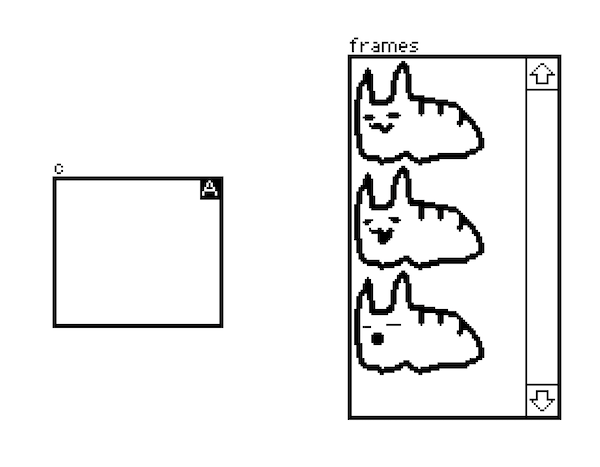
Fortunately, zazz.flipbook[] is pretty simple; we can make a loose equivalent by creating a rich text field, pasting our frames of animation into it, and then writing a script which pulls the images out of that field and picks one to display each frame. Say our canvas and frames field look like this:


If we marked the canvas as "animated" and gave it a script like the following:

on view do
 f:frames.images
 i:f[(count f) % sys.frame/4]
 c.clear[].paste[i .5*c.size-i.size]
end

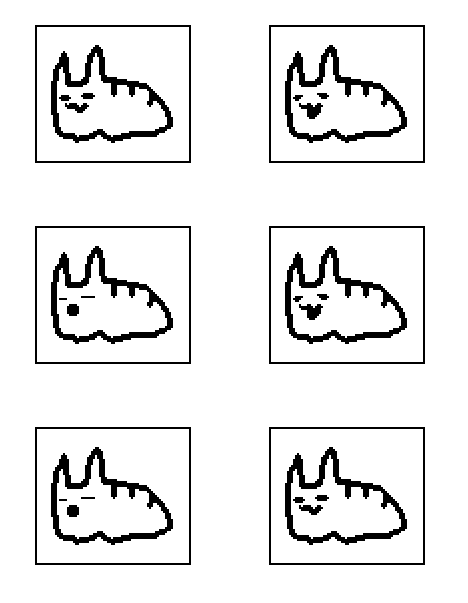
It would look something like this:


The first line grabs the images from the rich-text field as a list.

The second line uses sys.frame (which counts up at 60hz), divides it by 4 to produce a 15fps animation, takes that modulo the length of the list (%) and indexes into the list, so that the frames will repeat.

The third line clears the canvas and centers the image we selected within the canvas.

Many variations on this basic strategy are possible. We might, for example, introduce a layer of indirection with a separate frame index list to create more complex animations from a small number of frames:

on view do
 f:frames.images
 x:0,0,0,0,0,1,2,1
 i:f[x[(count x) % sys.frame/5]]
 c.clear[].paste[i .5*c.size-i.size]
end


Here's that whole example as a card you can paste into your deck and play with:

%%CRD0{"c":{"name":"frame_animation","widgets":{"frames":{"type":"field","size":[98,169],"pos":[302,98],"scrollbar":1,"value":{"text":["","i","i","i"],"font":["","","",""],"arg":["","%%IMG0AD0AMQAAAwAAAAAAAAAHgAAAAAAAAA/AAAAAAAIAD8AAAAAABwAdwAAAAAAHAD3AAAAAAA+AOOAAAAAAD4A44AAAAAAPgDjgAAAAAB+AcOAAAAAAP4Bw4AAAAAA7gHDgAAAAAHOAcOAAAAAAc4Bw4AAAAABxwHDgAAAAAHHAcHAAAAAAccDgf4AAAABxweB//AAAAOH/4D//8AAA4f/AA///AADg/wADg/+AAOAAAAOBz8AA4AAAA4HA4ADgAAADgcBwAOAA+AOBwHgA54H8AQCAfADvwPgAAAB+AOeAAAAAAH8A4AAAAAAA54DheMAAAADjgOH94AAAAEHA4P/AAAAAAeDgD4AAAAAA4OAHAAAAAABw8AAAAAAAAHBwAAAAAAAAcHAAAAAAAAA4cAAAAAAAADhwAAAAAAAAOHAAAAAAAAA4cAAAAAAAAHg4AAAAAAAD8DgAAcAAAA/APAAH4AH//4Af8B/wH//8AA/7/n3///gAA//8P/8AAAAAH+AP8AAAAAAMAAMAAAAA","%%IMG0AD0AMQAAAwAAAAAAAAAHgAAAAAAAAA/AAAAAAAIAD8AAAAAABwAdwAAAAAAHAD3AAAAAAA+AOOAAAAAAD4A44AAAAAAPgDjgAAAAAB+AcOAAAAAAP4Bw4AAAAAA7gHDgAAAAAHOAcOAAAAAAc4Bw4AAAAABxwHDgAAAAAHHAcHAAAAAAccDgf4AAAABxweB//AAAAOH/4D//8AAA4f/AA///AADg/wADg/+AAOAAAAOBz8AA4AAAA4HA4ADgAAADgcBwAOAA+AOBwHgA54B8AQCAfADvADgAAAB+AOYAAAAAAH8A4AAAAAAA54DhGMAAAADjgOH94AAAAEHA4P/AAAAAAeDgH8AAAAAA4OAfwAAAAABw8B+AAAAAAHBwHwAAAAAAcHAOAAAAAAA4cAAAAAAAADhwAAAAAAAAOHAAAAAAAAA4cAAAAAAAAHg4AAAAAAAD8DgAAcAAAA/APAAH4AH//4Af8B/wH//8AA/7/n3///gAA//8P/8AAAAAH+AP8AAAAAAMAAMAAAAA","%%IMG0AD0AMQAAAwAAAAAAAAAHgAAAAAAAAA/AAAAAAAIAD8AAAAAABwAdwAAAAAAHAD3AAAAAAA+AOOAAAAAAD4A44AAAAAAPgDjgAAAAAB+AcOAAAAAAP4Bw4AAAAAA7gHDgAAAAAHOAcOAAAAAAc4Bw4AAAAABxwHDgAAAAAHHAcHAAAAAAccDgf4AAAABxweB//AAAAOH/4D//8AAA4f/AA///AADg/wADg/+AAOAAAAOBz8AA4AAAA4HA4ADgAAADgcBwAOAAAAOBwHgA4AH8AQCAfADvAAAAAAB+AOAAAAAAAH8A4AAAAAAA54DgeAAAAADjgOD8AAAAAEHA4PwAAAAAAeDg/AAAAAAA4OD8AAAAAABw8HgAAAAAAHBwAAAAAAAAcHAAAAAAAAA4cAAAAAAAADhwAAAAAAAAOHAAAAAAAAA4cAAAAAAAAHg4AAAAAAAD8DgAAcAAAA/APAAH4AH//4Af8B/wH//8AA/7/n3///gAA//8P/8AAAAAH+AP8AAAAAAMAAMAAAAA"]}},"c":{"type":"canvas","size":[78,69],"pos":[164,155],"animated":1,"script":"on view do\n f:frames.images\n x:0,0,0,0,0,1,2,1\n i:f[x[(count x) % sys.frame/5]]\n c.clear[].paste[i .5*c.size-i.size]\nend","scale":1}}},"d":{}}

Within a fancy puppet we can't rely on "animated" sub-widgets to pump animation events, so instead we'd put similar code inside a function called by the function returned by get_animate[], like in the example from the puppeteer docs:

on view do
 f:frames.images
 x:0,0,0,0,0,1,2,1
 i:f[x[(count x) % sys.frame/5]]
 c.clear[].paste[i .5*c.size-i.size]
end
on get_animate do
 on animate do view[] end
end

Does that make sense?

(+1)

Thank you for the swift response! Yeah, makes sense you can't use modules inside contraptions then. Gave this a try and it worked!! My fancy puppet is slowly becoming a monstrosity of field and grid widgets, but hey, its my monstrosity.