Indie game storeFree gamesFun gamesHorror games
Game developmentAssetsComics
SalesBundles
Jobs
TagsGame Engines

RahiTuber

A lightweight yet highly customisable pngtuber app · By rahisaurus

Bug Reports Sticky Locked

A topic by rahisaurus created Jul 31, 2024 Views: 5,897 Replies: 179
This topic was locked by rahisaurus Aug 03, 2025

Locked for archival purposes - please make all future bug reports on GitHub

https://github.com/ThomasR95/rahituber/issues


Viewing posts 21 to 40 of 45 · Next page · Previous page · First page · Last page

In previous versions transform rotation was inherited by child parts, but in the latest version (13.1) it doesn't work anymore. I don't know if it was intended, but it made adjusting rotation motions better (I used it to make an appendage rotate 6 degrees and offset it's rotation to -3 to make it centered).

While in the same topic, would it be possible to have an option to stop mouse tracking when the part is hidden? (I'd love to use empty layers to turn on-off mouse tracking of certain parts using states hehe).

Thanks ❤
Developer

Thanks for letting me know, I'm not aware i changed anything to do with rotation inheritance in the latest update... I'm pretty sure I've tested multiple setups with inherited rotation too. Sorry to hear it's not working for your setup! Which was the previous version you used? 

Thanks for the idea about mouse tracking as well. 

I'll try to get a fix out asap!

(2 edits)

It worked in 12.0, but while making sure of it I've realized it only did if the rotated part was a non-inheriting parent (any child part would rotate independent of their own child parts)

Rotating a non-inheriting parent part in v12.0


Rotating a inheriting parent part in v12.0
Developer(+1)

Hi, please check update 13.2, it should be doing what you want now!

As far as I can tell both the rotation and the mouse tracking thing are working perfectly, you're the best ^^

Hello! Been playing with this and it's been a fantastic transition from learning/using a previous application, and the features on this one has been awesome.

So about the "Control States via HTTP", I noticed that when two windows are open, the web requests only apply on the first window that was opened.

Currently the method I trigger this is by Stream Deck via the "Web Requests" plugin, and this the configuration to make it work.

So it works, just when I open a second window, it continues to only work for the first window. I run two windows of two characters, so that's why I noticed this, haha. Couldn't find a way to DM to share directly.

Thank you again!

Developer (1 edit)

Hi, thanks for pointing this out. That is currently a limitation, but I'm not exactly sure _why_ ... I'm rather new to this kind of low-level network programming. Both instances of RahiTuber should have a listener open on the same port, so the problem is either: 

  • I'm unknowingly doing something illegal and the second listener never gets opened, or 
  • The first listener somehow consumes the request and the second listener never sees it

Will get back to you when i find out more!

(1 edit)

Sounds good, thank you! I don't know much about it, but what if each window could have it's own assignable port? If I set the first window to 8000 and the second window to 8001, would both listeners work?

I don't know if streaming applications can send two web requests with one action, but with Stream Deck, a button can be a multiaction and I could have two web requests tied to a button.

EDIT: So Streamer.bot works with the "Fetch URL" sub action, in case anybody is wondering about that.  And multiple sub-actions can be added, so if my above idea is a possibility, it could work.

Developer (1 edit)

Hi, thanks, I came to the same conclusion. For what it's worth, MixItUp can also do multiple requests in the same command.

I've added the capability to change the port, just checking if there's anything else I can quickly do to make this update more worth it before I upload ^^

Awesome, looking forward to it when it drops. I've been having fun setting it up. Twitch commands seem like a fun thing to let viewers change the outfit haha. I gotta actually stream more first tho. :P

Developer

Awesome setup idea!

Here's the update! https://rahisaurus.itch.io/rahituber/devlog/888986/update-2025-02-16-v133

Thank you! It's working and I have commands set up through Streamerbot and it's awesome.

https://i.imgur.com/8jC6vPJ.mp4

The only quirk is I think it's part of the global settings, so it doesn't save to the layer set. Not sure if I'm doing that wrong. But it's such a minor thing to adjust on my end when booting up the second window. 

Thank you again. :D

Developer (2 edits)

Yeah, I thought it made the most sense to be a global setting. 

If you want to keep your config and the most recently loaded layer set for both windows, you can copy the RahiTuber directory (so, running your second setup on a copied RahiTuber.exe in a new location) and then it'll have it's own config file .

(3 edits)

Yesterday I managed to do my initial idea of toggling between two mouse tracking states, but I've found some caveats in the way:

  1. My layers with mouse tracking inherit motion mostly in this way (-> = inherits from): Part -> Subtle Motion (no sprite) -> Exaggerated Motion (no sprite). Most of the exaggerated motions inherit from other parts in a branched way, it's a bit complicated :P. Alternating between the two motions work as expected, but today I tried hiding both layer groups to make a new "no tracking" state and it freezes the position of some parts, instead of returning them to the original position (some do return, but only if i go from subtle to no motion, and I don't know why only some of them do).
  2. While testing the states I noticed my HTTP requests were being irresponsive some times and I managed to fix it by using 127.0.0.1 instead of localhost. It may be a good idea to change the URL the program suggests (in the hint popup and the copy state option) or to include this info somewhere.
  3. If a state is deactivated from the state list (by unchecking it) and it's called using a HTTP request, it will halt all HTTP requests until that state is activated again.

I think that's all I've noticed, I'll let you know if I find any other weird things.

EDIT: Regarding #1, if I discard the "exaggerated motion" layers, then all positions reset properly, I think it may have something to do with stacking empty layers with mouse tracking. I'll try to use a 1x1 transparent image to see how that works later.

Developer(+1)

Ah, thanks for letting me know!

(1 edit)

Sadly the transparent sprite didn't work so I guess it must be a stacked mouse tracking issue, and I found a huge bug in the new Contrast theme: it's missing the "load"/"save" buttons in the dialogue boxes! 😅

UPDATE: I came up with a workaround for the mouse tracking: I made an intermediary, always on simple layer that sits between the two motions (Subtle -> Intermediary -> Exaggerated) and now things work as expected. So it's definitely a problem with consecutive mouse tracking inheriting.

I hope this helps.

Developer (2 edits)

Hi, I've already found and fixed the contrast theme issue 😂 That's what I get for having windows with absolute pixel sizes instead of being based on the font size...

I also fixed the HTTP state blocking issue.

I've just tried replicating your setup with two empty layers that both have mouse tracking enabled, the inheritance goes like this:

someMoreMotion > someMotion > heart

https://imgur.com/dvpg4AM

I couldn't find any issues with this setup. Did I miss something?

Do all your layers have "hide with parent" turned off?

I did just notice that they don't stop tracking if they are visible themselves, but in a folder that gets hidden. Fixed that.

(3 edits)

I'm going to try to recreate the broken state and send the model to you. I did notice something weird with the folders, so I hide the contents too to be sure. (Sorry for a deleted reply earlier, I thought it fixed by itself while recreating it and it turned out I just deleted a folder and not it's contents 😓)

I've just tried replicating your setup with two empty layers that both have mouse tracking enabled, the inheritance goes like this:
someMoreMotion > someMotion > heart 
I couldn't find any issues with this setup.
Did I miss something?
Do all your layers have "hide with parent" turned off?

Yes, "hide with parent" is turned off and I believe that order is correct, but in my case someMoreMotion would probably inherit from another sprite that inherits from aDifferentMotion, etc... So maybe I'm stressing the software too much 😅

Developer(+1)

well, I like to be sure that people can create what they want, whether it's stressful or not 😁

Developer

Hi, by the way - I think I found the reason for this, and hopefully fixed it in the v13.4 update. Let me know if it worked!

Thanks! I'll try the new version during the weekend and I'll let you know how it goes! ^^

It works!! Also, the Inheritance Graph is great! Thank you!
I've fixed my rotations too, I didn't know they were broken. I did set them up negative by feeling 😅

I've started checking the new changes and I think I've found a bug or two, I'll make a new post to keep this organized 😛

Good evening, I'm currently drawing a character to use in this program. I have all the parts of the character separated into layers to have better control and be able to customize it better. But now I'm noticing in these latest versions that if the character breathes (increases and reduces the scale) to create the "breathing" effect. But having the character separated by layers, there comes a point where the "breathing" frequency starts to vary slightly until it reaches the maximum point where all the parts of the character start to move individually until the frequencies synchronize and then the problem happens again. Could you put the breathing effect in the folders as well? This way I can remove the breathing effect from all the layers and only activate that effect in the folder that contains all my layers and in this way all the layers placed inside a group of folders would have the same breathing frequency. Apart from those details, excellent work with this software, I love it. Congratulations.

Developer

hi there, 

This is what Motion Inherit does. The idea is that you can set up your main layer (usually the body or torso or something) with the breathing effect, and then tell every other layer to inherit that motion.

Hope that helps!

ooooooooooooooooooooooooooooooooh

thanks :D

Ok, so I've checked the settings and created a new project and started from scratch. And I was able to find the source of my problem. When all the layers share the same pivot axis position, the breathing happens synchronously, but if one of the layers has a different pivot axis, then the breathing starts to get out of sync. For example, all my sprites are framed in the same position, only one is the body, another is the head and the rest are the eyes. But I configured each layer to rotate slightly to give the effect that the head jumps and rotates a little when it talks, to achieve this you have to set the different pivot axis for each layer and this causes the breathing to get out of sync. That's why I told you that the breathing effect would be well implemented in the group layer as well.

Developer (1 edit)

Thanks, but my original point still stands: Motion Inherit is currently the only intended way to guarantee synchronization and any other method is coincidental.

If you want the head to follow the body and also have its own motion, you can tick the "enable individual motion" in the Motion Inherit settings. Then it will add that motion on top of whatever motion it's inherited from the parent layer.

(3 edits)

13.4 Bug Report incoming!

  1. Motion Inherit Stretch:
    1. I'm not sure this one is a bug. For clarity I'm going to call a horizontal stretch Squish and a vertical one Stretch.
      I've noticed it works like this: Left to Right and Down to Up cause a Stretch and the oposite movements cause a Squish effect (and the other way around when setting negative strength values).
      In a way, I find that effect weird for horizontal movements. I kind of expected it to do the same deformation when moving either left or right. But I also like the effect it has when moving vertically, I guess it resembles gravity in some way.
      Whether it's a bug or intentional, I'd like to be able to make one axis "symmetrical" (as in doing the same effect when moving left or right/up or down) if possible.
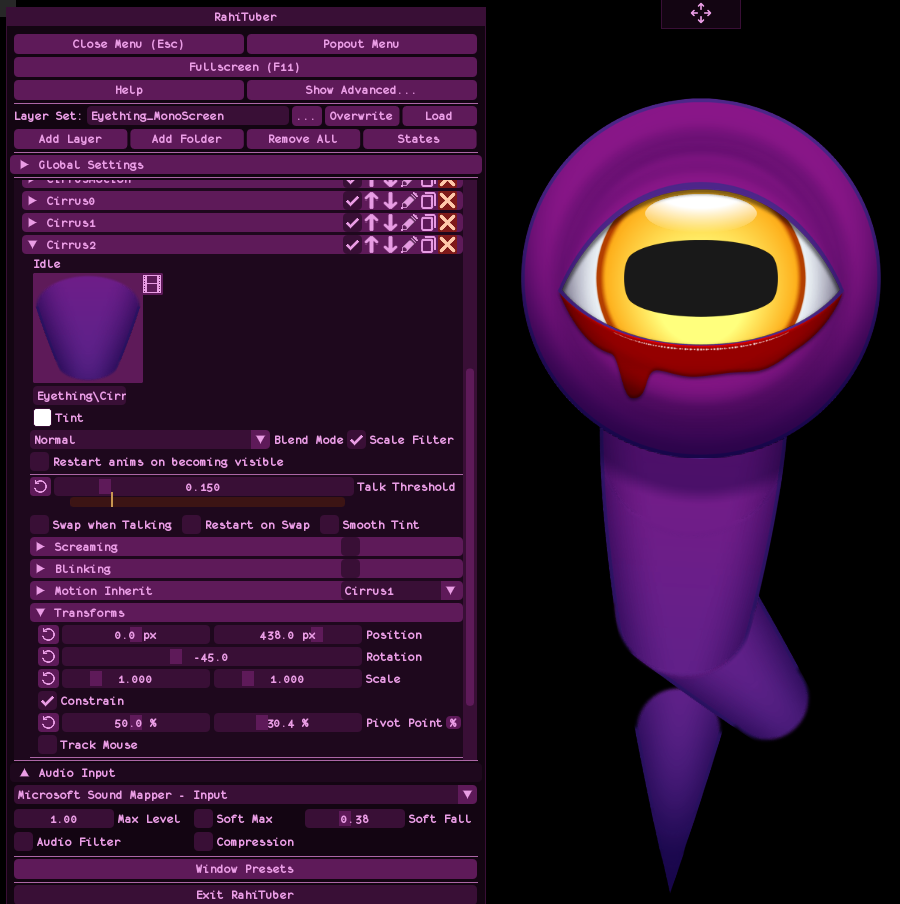
    2. When using this feature, child layers get slightly misaligned temporarily when the deformation is being applied. I've got the feeling it has something to do with how the Stretch effect stores the coordinates, like it needs more resolution, maybe (I exaggerated the settings and applied inherited rotation to be able to take this screenshot showing the misalignment. It's way more subtle/barely noticeable with normal settings).

      This doesn't happen with Stretch off.
  2. VSync/FPS Limit:
    When trying the new FPS limit I've found some performance issues with Vertical Sync.
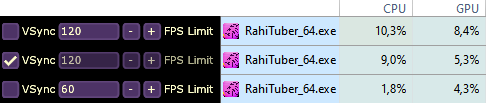
    I use two screens, a main 120hz monitor and a second 60hz one (I run RahiTuber on this one). If I turn on VSync, the FPS get limited to 60 as expected and the GPU goes down, but the CPU usage stays the same. It only goes down to normal levels if I turn it off and manually limit the frames per second to 60.


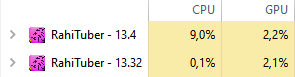
    I did an experiment with no layers (to be sure of the bare performance) and VSync turned on in both 13.32 and 13.4 and... Yeah, something about it is eating the CPU now:

I'll update you if I notice anything else, for now I'll be squishing parts, I'm loving this feature hehe

Developer (2 edits)

Thanks for this info and the detailed reports! 

Hopefully these won't be causing people too many issues until i fix them. The vsync one is strange because i literally didn't change the vsync code 🤔

The horizontal squishing is intentional, and it's based on where the pivot is in relation to the sprite center. If there's more "weight" on one side, thats the side that will lag behind.

However, currently with a centered pivot point, it does just pick the left side. I could definitely add something that when the X pivot is at 50%, horizontal stretch is symmetrical.

To be honest the misalignment isn't noticeable in a normal use case, but while playing with more exaggerated values I started seeing it and I cranked it all up to see what it was 😂

The one that was annoying was the VSync because it worked perfectly before and at first I didn't understand why the CPU usage was so high all of the sudden. Oh also, in 13.32 and before, VSync On used to limit the frames to 60 in both my monitors and now it goes to 120 in my main, but I don't know if that's related and helps tracking the issue.

Oh that makes sense, I felt it was intentional. It would be great!

Developer

Vsync has no guarantee of frame rate, only that it aligns with your monitors refresh rate - so if it can fit two frames in before your monitor refreshes, I think it does that. 

The difference between this and the previous version is that previously, when vsync was enabled, I was also limiting the FPS to 60. I removed that in case people have high-refresh-rate monitors and want to see it at 120fps.

I'm using SFML for the rendering side of things, so i might need to take a deep dive into their implementation to find out why this has suddenly gone wrong...

Oh, so that's why it didn't go up to 120 before!

I've been investigating and it seems like it's a driver problem (NVIDIA in my case) and not a SFML one. Turning off "Threaded Optimization" in NVIDIA Control Panel solved it. I guess that's a partial win 😅

Going off on a slight tangent, I've noticed the FPS determine the physics movements and I came across this article that might be helpful to make them consistent 

I hope all of this helps!

Developer

thanks very much!

Hey, great catch ! Thanks for sharing. I was opening the Demo model on two versions of rahituber, with stock settings, and seeing 10x CPU use on the newer version seemed crazy ! Threaded Optimization on Nvidia CPL reduced the difference to expected numbers. Perhaps that info would fit nicely in the "known issues" post @rahisaurus ?

Developer

Thanks, I'll add that ^^

Developer(+1)

I think I finally found the cause of this error and fixed it! https://rahisaurus.itch.io/rahituber/devlog/950908/update-2025-05-23-v1392

(3 edits)

Awesome! I think Stretch has this bug too (I peeked at the code and I saw that lines 4117 and 4118 in LayerManager.cpp still use floating point precision for stretch, but I don't know if that's it), but with that turned off it looks like it's indeed fixed! Woohoo!

Developer(+1)

The switch to double precision didn't actually do anything, but thanks for letting me know that stretch still has the issue. I'll look into it!

Oooh, my C++ is pretty basic and when I saw that part of the commit changes I thought that was it haha. I'm glad to help!

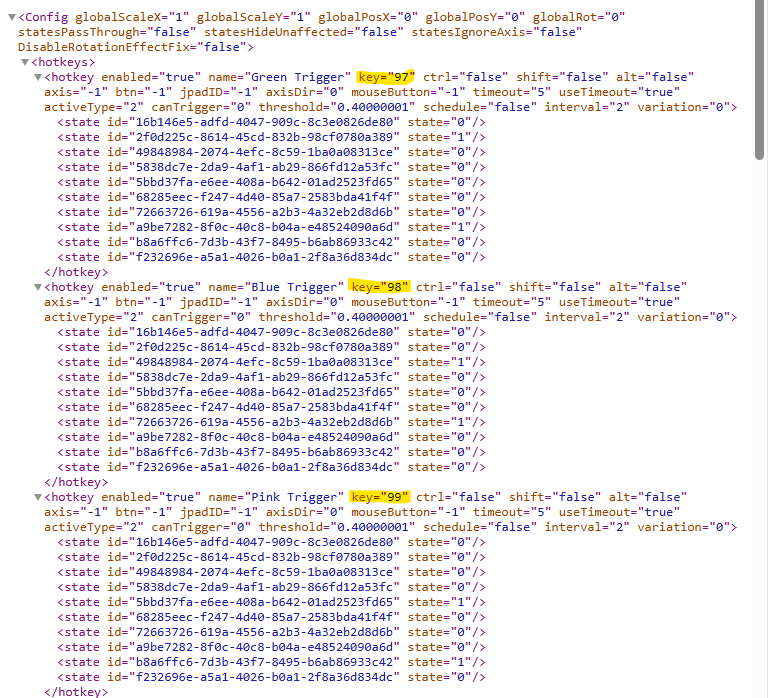
Hi Rahi, in 13.4 I can bind F13, F14, and F15 as hotkeys to states. However, F16 through F20 don't seem to be able to be bound. Looking into the XML, F13 is key 97, F14 is 98, F15 is 99.  Manually setting the state I want in the XML to what I assume would be key ID 100 for F16 did not work. Possible the key IDs only go up to 99? I've found a workaround for my setup, but just thought you should know. Thank you for your hard work!

Developer(+1)

Hi, thanks for your comment. Unfortunately this is less a bug and more a limitation of SFML (which I am using to handle rendering, window management, and mouse/keyboard events).

If enough people request it i can try to implement my own event handling but this will be awkward and probably time consuming. 

Thanks for the response!

Developer(+1)

Following up - i have now found a second method of detecting keyboard keys through SFML and the next update will switch to that, which detects F15-24 and media keys 👍

Awesome! Thank you for circling back 💚

I'm also having issues with resizing the window and the program appearing as in a loading status. 
I've tried resizing the window manually and was unsuccessful. Bringing it forward from other windowed applications, running the application in admin mode but the window appears to be in negative screen space when in window mode and unable to return. If I click F11 the screen remains black./transparent and freezes the second screen (if using any).
I've tried restarting my PC and still have issues - not sure if this bug requires a more detailed fix. 

Developer

Hi, please contact me on discord @rahisaurus and send me screen recordings. If you haven't already, please check if the fixes in the FAQ help.

Resizing the window works by dragging the small squares in the top left and bottom right corners which are visible when the menu is open. If the program is getting stuck while loading, though, they might not be responsive.

I'm not sure if this is a bug or not, but whenever I mute my mic while talking, my avatar will freeze in the talk animation, rather than be idle. Am I missing something?

Developer

That's intriguing. I'll look into that!

Hi ^_^

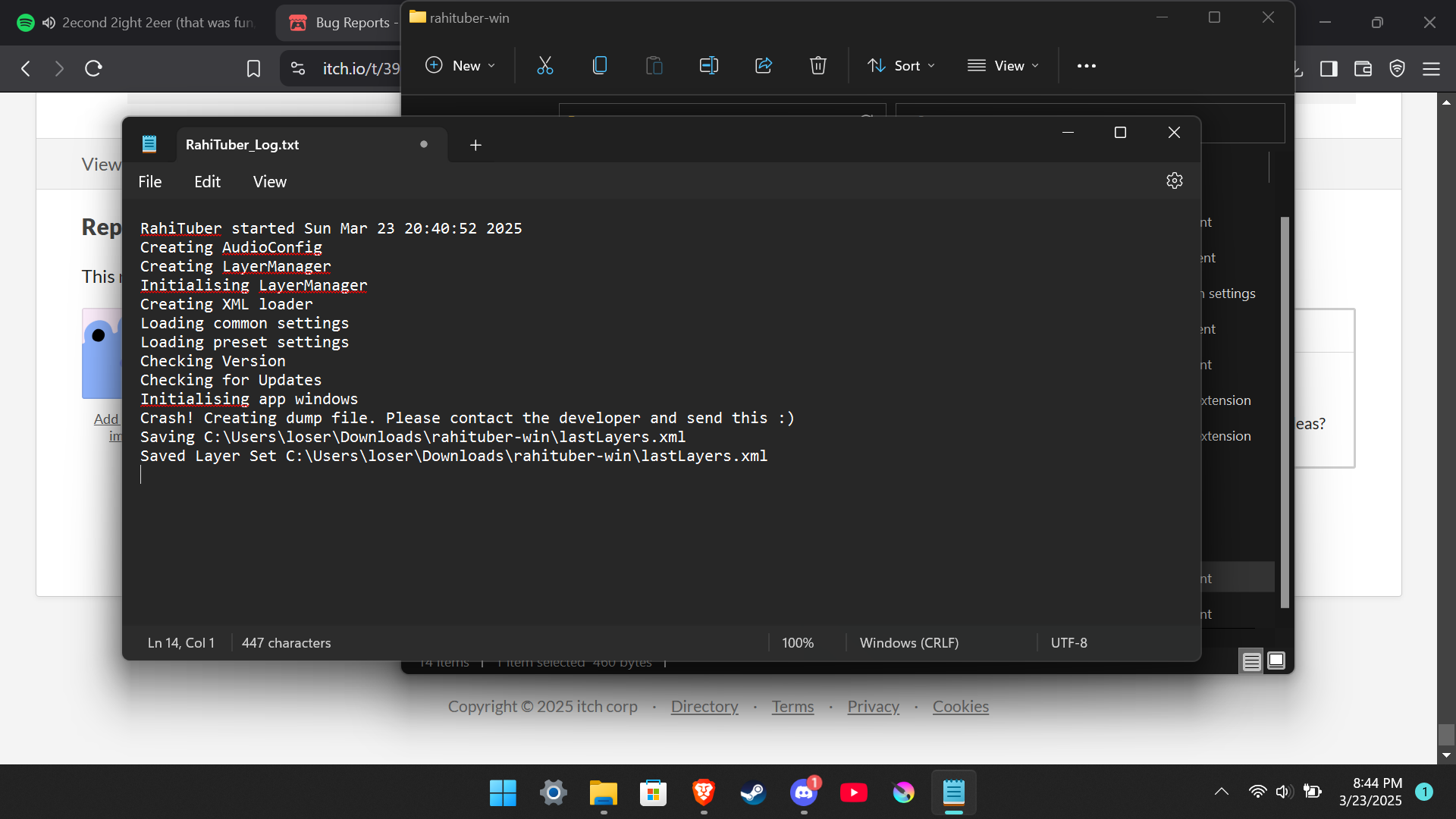
I downloaded Rahituber, and after accepting the Terms, it crashes whenever I open it. I've tried everything in the FAQ, and it just won't open. Do you have any ideas? 

Developer (1 edit)

hi scrybe, so sorry about this. 

I actually noticed this happening on my own pc the other day, and then i restarted my computer and it stopped happening. When i debugged it, it was crashing somewhere in the dxgi part of the graphics driver. For me, the crash was not happening with the default settings though. 

Have you tried restarting your computer?

If restarting didn't work, please dm me on discord @rahisaurus and send me the .dmp file from the program directory.

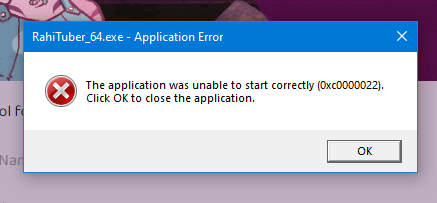
I just tried installing and running- uninstalling after getting an error and reinstalling... but I keep getting the same error. Trying to update it also gives me an error. I'd never downloaded this before, so I'm not sure what's going on. It shows up for both 64 bit and 34

Developer

Ooh. Never seen that one before. Contrary to my note in the install instructions....  Have you tried downloading it manually instead of using the itch app? 

sorry it took me a minute to get back here, haha. Thank you, that fixed it! :D

Developer

Interesting. Perhaps my faith in the itch.io app was misplaced ...

Noticed a quirk in the latest version using the new "Unload Hidden Textured" feature.  If I used a state to toggle on two layers using the same texture (Two animated sprite sheets used for eyes in my case) one would get replaced with a solid color box.

I was able to fix this issue by Saving the layer set, closing RahiTuber, relaunching RahiTuber, and then going to the problem layers and resetting their file paths and sprite sheet settings.  So far it hasn't been back.

Developer (1 edit) (+1)

Interesting, I had seen something similar while testing but thought i fixed it. Thanks for letting me know!
Edit - I just tested and saw the same thing myself, so a fix should be on its way soon :)

Just wanted to let you know the updated seems to have made some of my layers have blinking ticked ON. So unfortunately my clothes and random items were blinking on and off. At first I didn't know why it was happening but I figured it out today.  ^^;;  I will fix my layers and unclick blinking.  ♥ (Just in case someone else has this issue) 

Developer

Thanks for telling me! 

I'd seen it in a test with someone else's older broken layer set, and assumed it was part of the layer set itself. I'll definitely take a look and find out why that happened now.

there seems to be an issue where the talk image automatically unloads after a while of not talking

the file path itself doesn't unload so the image loads in as soon as i talk, but this causes the model to go invisible for a bit, noticeably longer if the filesize is larger, like for spritesheets

Developer

If you've turned on the new "unload textures" setting, that's expected behaviour. 

You can pin the layer so that doesn't happen, or increase the unload timeout. 

If you haven't turned on the "unload textures" option then it is indeed a bug and I'll look into it!

(1 edit)

didn't know this was now an option now, but it seems like it still happens even when the option's unchecked

using demo_basic.xml : https://streamable.com/ld9ld6

Developer

Thanks for showing me, that shouldn't be happening, I'll look into it!

Developer

Hi, please try the latest build, it should be fixed!
https://rahisaurus.itch.io/rahituber/devlog/929591/update-2025-04-21-v13661

the issue still persisted and images wouldn't load whatsoever after unloading, however after i tried a fresh copy of rahituber w/o previous configs/settings/etc., the issue no longer happens. may have just been an issue caused by settings from an older version. thank you for the quick support!

Developer

Glad a fresh install fixed it! Thanks for the update 👍

Hello again! I tried setting up HTTP state triggers via Mix It Up today, and ended up crashing RahiTuber each time I tried to implement them. I think I did it correctly per this post, but I suspect user error somewhere along the line since no-one else has reported it (I think). I slapped the log file in a pastebin here; I could not find  a .dmp file anywhere, unless I'm looking in the wrong place. I did show how I set them up around 1:51:20 in this VOD, so there's always a chance I did something super obviously incorrect and it's easily noted. It is also very possible I missed a troubleshooting step somewhere.

For reference, I did trigger it through a Stream Deck application as well as through Mix It Up itself, and both methods caused a crash. Let me know if I can dig up anything else helpful!

(1 edit) (+1)

I suggest you use 127.0.0.1 instead of localhost as it's being deprecated (maybe it has something to do)

I changed the default port to 8001 too because 8000 seemed to be used by some games or programs I use.

Also, try using the "Copy Request" button inside the states (it was added after that post you followed) just in case there's some kind of typo.

I hope all this helped 😅

(+1)

Thank you so much! It... turns out I think I had installed a version I hadn't meant to (the current, buggy one--OOPS, I could've sworn I rolled it back through the itch app). 😅

That said, I'm tucking all these in my pocket if I encounter issues in the future!

Developer

Which version were you using? v13.641 contains a fix for a crash somebody else saw whenever they used http to trigger states, maybe it's the same one.  The .dmp file should just be in the same folder as RahiTuber.exe. Sometimes it just fails to make one for various reasons. 

AHA, I'm a dummy and evidently did not correctly tell itch to roll back the app version from the latest one. :) Thank you, it's all fixed up now!

Developer

WAIT, so 13.65+ breaks the http states after that fix? But i didn't touch them 🤯

Strangely! 13.65 worked fine, 13.66 broke it, 13.661 is working fine again (updated through the Itch app just to test if that was contributing in my case, and it does not appear to be).

Developer

Very odd. Well, I'm really glad 13.661 fixed it for you!

(1 edit)

Hellooo!

I've noticed something inconsistent with blend modes and layer clipping when setting up some shadows.

It looked like the Multiply blend mode was stronger when the layer was clipped (as in it's darker than if it's not clipped), so I did some testing and it seems like blend modes act weird if the layer texture has partial transparency and it's clipped.

Edit: In this example you can see that the clipped layer it's darker and the only different setting is the clipping.

Developer(+1)

Hi, yeah it's awkward to manage partial transparency. The multiply blend mode in particular is awkward because atm it uses a custom shader specifically to handle partial transparency, but it's not perfect. 

I think i need to rework the layer blending to all use custom shaders that can take into account the backbuffer

(+1)

Don't stress too much, you're already doing an amazing work! I can't believe how far RahiTuber has come in a few months!

As a workaround, I've managed to kind of restore the un-clipped blend for my clipped shadows (using Multiply, I don't know if this approach would word for other blend modes) by reducing the layer's alpha by 75% (that's A:191 for anyone wondering) with the tint option.

Developer(+1)

Btw, this one should now be fixed in the latest update ^^

hello! the controller tracking is awesome but i havent been able to get the right stick tracking to work, only left stick and dpad. 

i see the same behavior on both my ds5 and my switch pro controller, with ds4windows both open or closed, and with rahituber run in normal mode or as administrator.

Developer

ah that's a bummer. I don't have a switch or ds5 controller to test with. I think the control schemes for those are different, and wrappers such as ds4windows are unlikely to work since i had to go so low-level to avoid losing focus. 

The workaround for now is to use an xbox controller. I'm unlikely to get either of those controllers for myself since i don't use the consoles, but if anyone with c++ knowledge and a relevant controller wants to contribute to the GitHub repository, they're more than welcome to!

(1 edit)

Idle motion has poor aliasing, but talk motion work properly
https://imgur.com/a/LL3zLTQ

Developer

in the "compositing" section on your layer, have you switched the Scale Filter setting to "Linear"?

This looks like what happens when you scale down a large sprite with the "Nearest Pixel" scale filter.

Yeah, I tried setting the filter to linear in compositing... that fixed the issue. But now there's another problem: a white line around the sprite due to the alpha mode. Without premultiplied alpha, it gets even thicker. And yes, I tried both scaling down the sprite manually and using a version pre-saved at the target resolution.
https://imgur.com/a/otjfv41

Developer (1 edit)

Is there definitely no soft edge on the sprite itself? Maybe your art program has a setting to premultiply the alpha or not? Make sure your program is saving the transparent pixels as black, i.e. RGBA 0,0,0,0.

Sry for the late reply. I see what you mean, I did soften the edges a bit in Clip Studio, but I’m not sure I want to get rid of that softness. Is there maybe another way around it?

Developer

You can keep the soft edge, but you need to make sure that the colour value for those semi-transparent edge pixels is 100% black.

(1 edit)

I think I am having the same issue as derek_Inc. Looks choppy when making smaller or when in the original scale and with scale filter it has gaps between layers. I dont understand why. I am using krita to draw but also pretty new to that app and have been trying some different settings but I really dont understand enough to look in the right places

Without scale filter when making the image huge there are no problems and I also dont see any type of gaps. I dont know what I can try next to fix this issue

Also I dont know if it means anything but my character looks normal and non choppy in veadotube mini and I used the same way of saving my files as I did with the layers for rahitube

Developer

What do you mean by "gaps between layers"? 

Generally you should draw some overlap between layers, this is kind of just a thing with texture art because a smooth filter will turn a hard pixel edge into a soft one.

Sorry to hear this. Please can you post screenshots showing the issue?

(2 edits)

https://gyazo.com/f0b0b744ca816307d79859324415feb3  This example for the more pixelly version. 

https://gyazo.com/fa6e1d2653e86470a838f548d999a9e7 There are many weird lines where ever the layer ends. Under the necklace and shirt is also still body layer so there is overlap with layers everywhere. I have fully drawn all the layers(except back of the hair apparently), even under clothes there is full body and so on. The shirt is in 2 different layer pieces and the weird lines there are very clear. I am very confused :D

The second one is with scale filter that does help with the pixels but then is those lines. My canvas size is 1400x1400 if that matters.

Developer

I see what you mean. I saw the same issue on my own model a while back while I was working on the blend modes, but then I fixed it within RahiTuber itself. 

This is what confuses me - I'm using Krita for my art too, and i have multiple models which use the linear scale filter, and i don't see this issue arise on my own computer. 

Please can you contact me on discord (@rahisaurus) and send me your layer set so that i can test it myself? 

Hopefully if i can also see the issue then i have something to work from. 

Hi! I sent a friend request since I don't know if there is some other way to message you on discord. My user has a gaming bee picture. It wont let me send you a message atm. 

Hi, after I made my first PNGtuber (which ended up pretty well with no lag) I tried to make a seccond one (which had a lot less of layers) and for some reason the program goes at something like 10 FPS (or even less).
Is there any way to fix this or "restart" to solve this problem?

Developer

Hi, which version of RahiTuber are you running? Version 13.9 has a known performance issue.

I just checked and it says 13.91, opened the model and now it works fine (everything now it's pretty fluid).
Did the program updated in the background and that's why it got fixed or this is something that happends from time to time?

Developer

It definitely doesn't update in the background. If you were getting a lot of lag before, it could just be that whatever other programs you had running were using up your RAM/GPU and not leaving enough space for RahiTuber to run. Running a game without a framerate limit would do that, for example.

Ohh, that has sense, thanks :D

Viewing posts 21 to 40 of 45 · Next page · Previous page · First page · Last page