If you're having trouble or run into any bugs with the code, post a comment here! I will try to get back to you within a few days.

Visually construct character expressions to paste into script 路 By
Hi! Thank you so much for creating this tool! I'm not sure if this is user error on my part (and sorry if so), but when I copied the folder into my game and ran the launcher, it threw this error:
I'm sorry, but errors were detected in your script. Please correct the errors listed below, and try again. File "game/image_tools/image_attributes_tool.rpy", line 803: keyword argument 'align' is incompatible with 'xpos'. ypos sprt.SPACER*3 align (0.0, 0.0) ^ Ren'Py Version: Ren'Py 8.1.3.23091805 Mon Sep 25 11:13:23 2023
If I comment out
ypos sprt.SPACER*3 align (0.0, 0.0)
in image_attributes_tool.rpy (line 803), it runs just fine. I'm pretty new at ren'py (&python) so I'm not really sure what can be done to fix this.
Oh no worries! Thank you for bringing it to my attention. You can change it to
ypos sprt.SPACER*3 anchor (0.0, 0.0)
to make the issue go away - it's a developer warning since align technically also tries to set ypos. It's due to a config value called check_conflicting_properties introduced in the most recent Ren'Py version - you can also disable it with
define config.check_conflicting_properties = False
to avoid these sorts of errors, though I'll also update the code to avoid that issue.
Heeeey, i have a bunch of suggestions, feel free to add them or not.
>A way to hide the group menu and show the sprite in fullscreen. Often I'm using your tool to check if I forgot to draw an arm variant for some clothes, so what I like to do is just take a screenshot of the sprite, draw over it in Photoshop the sleeves it's missing and export the image that I add over it in the layered image lol. But sometimes the arm is cropped out. Also maybe being able to change the background color?
>This one is probably hard to implement, but I like opening your tool when writing dialogues when I'm not sure which expression to use (I have it on a keyshortcut). So when you open the menu, it would be great if it could update the sprite with the attributes of the currently shown tag lol (if it's actually being shown). So when I open up I can see instantly my sprite and the different options without having to manually clean and choose all the attributes.
Have a great day!
Hi there, this is really embarrassing, but I'm a noob and can't figure out how to make images show at all. I tried using the image tags I've defined and called in script.rpy, but that didn't work. The tutorial just says to enter tags, so I'm kind of at a loss. Sorry if I missed something incredibly obvious, that's definitely possible. Thanks for any help you can provide.
Edit: Sorry, forgot to mention that I got it working in the Attributes tool, but for some reason it doesn't work in the Layered Image tool.
The layered image visualizer has a stricter requirement than the attributes tool - namely, that the image needs to be a layered image. So, specifically, you need a declaration like layeredimage eileen standing: and then you could type in eileen standing to the visualizer to adjust it. It is not sufficient to have image eileen standing = "..." or similar. If you aren't sure what layered images are, you can read more about them in the docs: https://www.renpy.org/doc/html/layeredimage.html#layered-images
If you're still having trouble, feel free to post your layered image declaration and the results of typing in that name to the tool and I'll see what I can do to help!
Hi, I keep having a python error that bricks the entire plugin until I delete the game project's cache. It happens if I click the "multiple" button and my filenames have underscore in them (eileen_m_smile.png)
RecursionError: maximum recursion depth exceeded while calling a Python object
It would be good to explain the different folder/file structures you are supporting and the different filenames you expect to work with your scripts. The absolute ideal scenario would be to have an example sprite + layeredimage provided, which I believe would be a fair request for a paid plugin. You could for example use the Agustina sprite.
You could also mention that the sprite's layeredimage and every attribute need to be manually declared in advance ("group outfit auto" doesn't seem to work). I wouldn't have known from the itch description, only by reading this thread and getting errors I learned of this.
Hello! I'll need you to be more specific about the errors you're encountering; the layered image tool is set up to work with basically any layered image declaration as it only checks the LayeredImage object after Ren'Py has already handled all the groups and such. I tested it with the following code:
layeredimage august: always "august_base" group outfit auto group eyes auto: attribute open default group eyebrows auto: attribute normal default group mouth auto: attribute smile default group glasses auto group emotion auto
and had no issues using it in the tool. These filenames have underscores in them also (august_eyebrows_frown.png and so on), so the file naming is not inherently a problem. The intention is that the tool supports as many layered image declarations as possible, which is why there are not limits listed on the itch page.
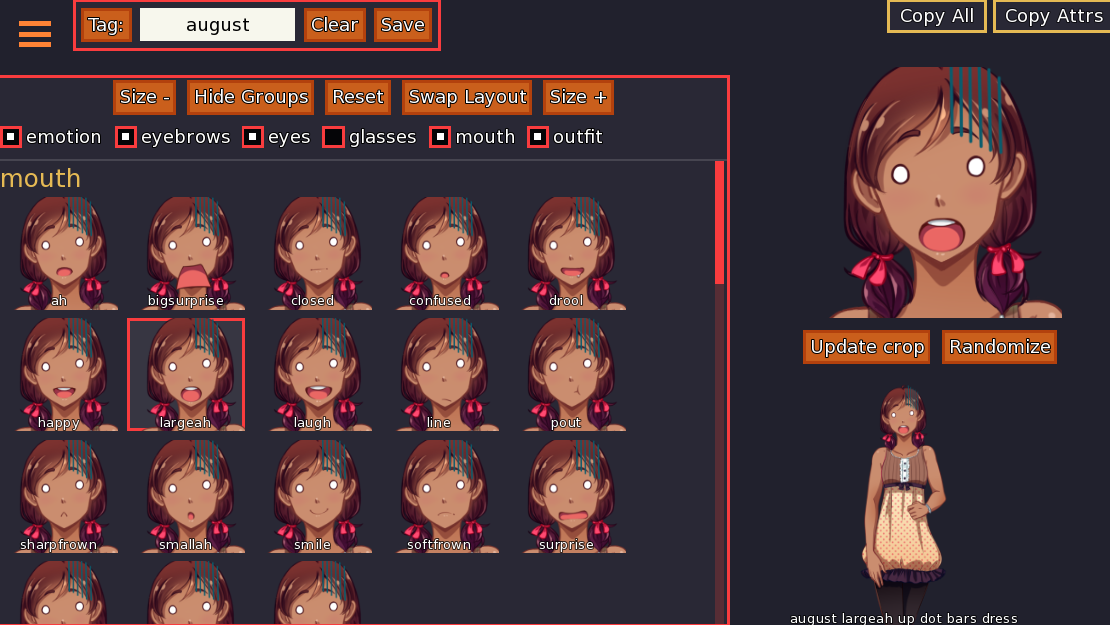
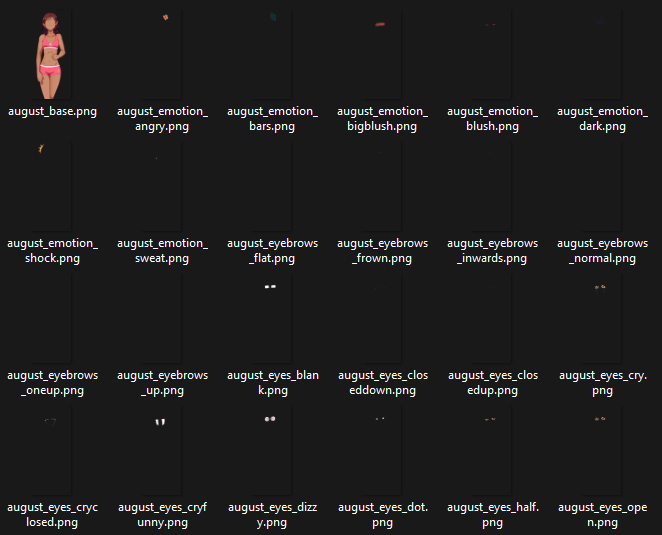
I managed to solve the recursion error. It was a layer that was incorrectly called in code ("august base" instead of the correct "august_base" when the filename was "august_base.png"). The same error also appeared in-game when the sprite was called. Solving this error also made layer groups declared with "auto" appear.
That said, if the error appears once it still bricks your layeredimage tool until the game's persistent data is removed. It would be great if there was some kind of error message but the tool doesn't get bricked, as this kind of slipups is probably a common occurence during the dev process.
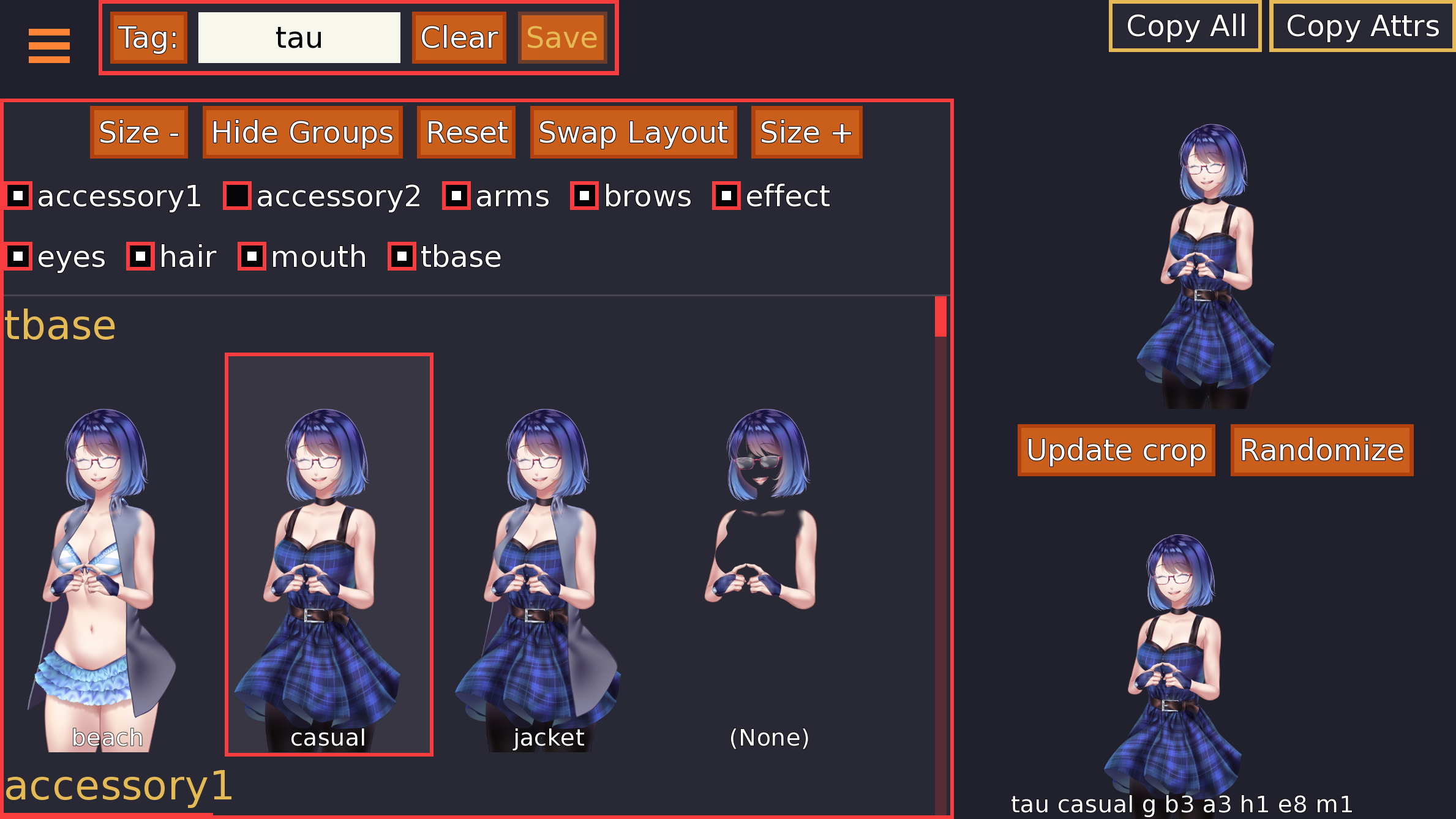
Is it possible that your attributes do not have `default` attributes set up, such that `show tau` with no additional attributes would show nothing at all? That's an issue with the crop tool, as it only uses the provided image tag (e.g. `tau`) for cropping purposes. Your layered images should always have sensible `default` attributes set if they're required (e.g. a default mouth attribute because the character should always have a mouth). It looks to me in the screenshot like if you don't have a `tbase` attribute set, the sprite simply doesn't have a base at all and is made up of the hair/arms/expression parts, which supports this. You can set up attributes with the `default` keyword e.g.
group tbase auto: attribute casual default
Oh my gosh, thank you so much for telling me about this! You see, I had been working with pre-rendered sprites for so long that layered images are still new to me. I knew it was something on my end, but I was able to implement a default attribute set. Thank you very much for your help! You've done a great job with all these tools, and I feel like I've been able to do a lot more creative things in my game thanks to them.
Hello! I'm using the layered image visualizer and I'm having this problem where I can use the addon but if I try to get to certain menus my game crashes and show this:
TypeError: new_renpy_loadable() got an unexpected keyword argument 'directory'
the menus that crash my game are the save menu, load menu and also menus inside the game where the story is not running and you can click characters to talk to them.
removing the files of the addon solves it but I wouldn't want to be constantly putting the addon on and off the folders.
(edit) I also noticed that I have a custom button in the save and load menus , if I remove this, it also stop crashing, what I don't get is why does the addon make any difference on this button not working.
imagebutton:
auto "gui/button/delete_%s_button.png"
action [FileDelete(slot), Hide("delete_overlay_screen")]
xpos -25
ypos -315
(edit2) It seems the problem goes around using an imagebutton with "auto" and %s
Hey there! Looks like this was an oversight on my end, with a fix intended to fix something Ren'Py bungled in v8.4. You can make the following change in the common file, to new_renpy_loadable:
if renpy.version_tuple >= (8, 4, 0) and renpy.version_tuple < (8, 4, 2):
## There's a problem with how renpy.loadable works with empty strings
old_renpy_loadable = renpy.loadable
def new_renpy_loadable(s, **kwargs):
if s == "":
return False
return old_renpy_loadable(s, **kwargs)
renpy.loadable = new_renpy_loadable
Hope that helps!
Hi! This tool seems like it would be extremely helpful! But for some reason, when I put it in my script, I get this error when starting up the game.
I'm sorry, but an uncaught exception occurred.
While running game code:
File "game/Script/technical/screens.rpy", line 503, in execute
screen main_menu():
File "game/Script/technical/screens.rpy", line 503, in execute
screen main_menu():
File "game/Script/technical/screens.rpy", line 518, in execute
use navigation
File "game/Script/technical/screens.rpy", line 305, in execute
screen navigation():
File "game/Script/technical/screens.rpy", line 305, in execute
screen navigation():
File "game/Script/technical/screens.rpy", line 307, in execute
fixed:
File "game/Script/technical/screens.rpy", line 313, in execute
imagebutton auto "gui/mainmenu/start_%s.webp" xpos 1553 ypos 432 focus_mask True action [Start(), Play("sound", "audio/sounds/buttonstart.mp3")] hovered [Play("sound", "audio/sounds/click.mp3")]:
TypeError: new_renpy_loadable() got an unexpected keyword argument 'directory'
-- Full Traceback ------------------------------------------------------------
Traceback (most recent call last):
File "renpy/common/_layout/screen_main_menu.rpym", line 28, in script
python hide:
File "renpy/ast.py", line 1187, in execute
renpy.python.py_exec_bytecode(self.code.bytecode, self.hide, store=self.store)
~~~~~~~~~~~~~~~~~~~~~~~~~~~~~^^^^^^^^^^^^^^^^^^^^^^^^^^^^^^^^^^^^^^^^^^^^^^^^^
File "renpy/python.py", line 1260, in py_exec_bytecode
exec(bytecode, globals, locals)
~~~~^^^^^^^^^^^^^^^^^^^^^^^^^^^
File "renpy/common/_layout/screen_main_menu.rpym", line 28, in <module>
python hide:
File "renpy/common/_layout/screen_main_menu.rpym", line 35, in _execute_python_hide
ui.interact()
~~~~~~~~~~~^^
File "renpy/ui.py", line 304, in interact
rv = renpy.game.interface.interact(roll_forward=roll_forward, **kwargs)
~~~~~~~~~~~~~~~~~~~~~~~~~~~~~^^^^^^^^^^^^^^^^^^^^^^^^^^^^^^^^^^^^^
File "renpy/display/core.py", line 2219, in interact
repeat, rv = self.interact_core(
~~~~~~~~~~~~~~~~~~^
preloads=preloads,
^^^^^^^^^^^^^^^^^^
...<4 lines>...
**kwargs,
^^^^^^^^^
) # type: ignore
^
File "renpy/display/core.py", line 2757, in interact_core
root_widget.visit_all(lambda d: d.per_interact())
~~~~~~~~~~~~~~~~~~~~~^^^^^^^^^^^^^^^^^^^^^^^^^^^^
File "renpy/display/displayable.py", line 432, in visit_all
d.visit_all(callback, seen)
~~~~~~~~~~~^^^^^^^^^^^^^^^^
File "renpy/display/displayable.py", line 432, in visit_all
d.visit_all(callback, seen)
~~~~~~~~~~~^^^^^^^^^^^^^^^^
File "renpy/display/displayable.py", line 432, in visit_all
d.visit_all(callback, seen)
~~~~~~~~~~~^^^^^^^^^^^^^^^^
File "renpy/display/screen.py", line 503, in visit_all
callback(self)
~~~~~~~~^^^^^^
File "renpy/display/core.py", line 2757, in <lambda>
root_widget.visit_all(lambda d: d.per_interact())
~~~~~~~~~~~~~~^^
File "renpy/display/screen.py", line 514, in per_interact
self.update()
~~~~~~~~~~~^^
File "renpy/display/screen.py", line 715, in update
self.screen.function(**self.scope)
~~~~~~~~~~~~~~~~~~~~^^^^^^^^^^^^^^
File "game/Script/technical/screens.rpy", line 503, in execute
screen main_menu():
File "game/Script/technical/screens.rpy", line 503, in execute
screen main_menu():
File "game/Script/technical/screens.rpy", line 518, in execute
use navigation
File "game/Script/technical/screens.rpy", line 305, in execute
screen navigation():
File "game/Script/technical/screens.rpy", line 305, in execute
screen navigation():
File "game/Script/technical/screens.rpy", line 307, in execute
fixed:
File "game/Script/technical/screens.rpy", line 313, in execute
imagebutton auto "gui/mainmenu/start_%s.webp" xpos 1553 ypos 432 focus_mask True action [Start(), Play("sound", "audio/sounds/buttonstart.mp3")] hovered [Play("sound", "audio/sounds/click.mp3")]:
File "renpy/ui.py", line 961, in _imagebutton
idle = choice(idle, idle_image, "idle", required=True)
~~~~~~^^^^^^^^^^^^^^^^^^^^^^^^^^^^^^^^^^^^^^^^^
File "renpy/ui.py", line 949, in choice
rv = renpy.config.imagemap_auto_function(auto, name)
~~~~~~~~~~~~~~~~~~~~~~~~~~~~~~~~~~~^^^^^^^^^^^^
File "renpy/common/00defaults.rpy", line 168, in _imagemap_auto_function
elif renpy.loadable(rv, directory="images"):
~~~~~~~~~~~~~~^^^^^^^^^^^^^^^^^^^^^^^^
TypeError: new_renpy_loadable() got an unexpected keyword argument 'directory'
Windows-11-10.0.26200-SP0 AMD64
Ren'Py 8.4.1.25072401
Painkiller: Arachnophobia 2.0
Fri Dec 26 00:11:16 2025
It seems as if its interacting with my main menu code for some reason? For reference, this only happens when I put in the files for this plugin and the image tools plug in.
If it helps, this is my main menu screen. Not sure what the problem is!
screen navigation(): fixed: style_prefix "navigation" spacing gui.navigation_spacing
imagebutton auto "gui/mainmenu/start_%s.webp" xpos 1553 ypos 432 focus_mask True action [Start(), Play("sound", "audio/sounds/buttonstart.mp3")] hovered [Play("sound", "audio/sounds/click.mp3")]: at enterone imagebutton auto "gui/mainmenu/load_%s.webp" xpos 1586 ypos 496 focus_mask True action [ShowMenu("load"), Play("sound", "audio/sounds/buttonclick.mp3")] hovered [Play("sound", "audio/sounds/click.mp3")]: at entertwo imagebutton auto "gui/mainmenu/chap_%s.webp" xpos 1377 ypos 563 focus_mask True action [ShowMenu("chapterselect"), Play("sound", "audio/sounds/buttonclick.mp3")] hovered [Play("sound", "audio/sounds/click.mp3")]: at enterthree imagebutton auto "gui/mainmenu/pref_%s.webp" xpos 1420 ypos 632 focus_mask True action [ShowMenu("preferences"), Play("sound", "audio/sounds/buttonclick.mp3")] hovered [Play("sound", "audio/sounds/click.mp3")]: at enterfour imagebutton auto "gui/mainmenu/warn_%s.webp" xpos 1486 ypos 691 focus_mask True action [ShowMenu("warnings"), Play("sound", "audio/sounds/buttonclick.mp3")] hovered [Play("sound", "audio/sounds/click.mp3")]: at enterfive imagebutton auto "gui/mainmenu/about_%s.webp" xpos 1550 ypos 764 focus_mask True action [ShowMenu("about"), Play("sound", "audio/sounds/buttonclick.mp3")] hovered [Play("sound", "audio/sounds/click.mp3")]: at entersix imagebutton auto "gui/mainmenu/help_%s.webp" xpos 1583 ypos 830 focus_mask True action [ShowMenu("help"), Play("sound", "audio/sounds/buttonclick.mp3")] hovered [Play("sound", "audio/sounds/click.mp3")]: at enterseven if renpy.variant("pc"): imagebutton auto "gui/mainmenu/quit_%s.webp" xpos 1593 ypos 900 focus_mask True action [Quit(confirm=not main_menu), Play("sound", "audio/sounds/buttonclick.mp3")] hovered [Play("sound", "audio/sounds/click.mp3")]: at entereight
I'm not sure I understand what you're asking - I think perhaps your expectations are incorrect? This tool will handle if_all/if_any/if_not and the newer when equivalent, but I don't eliminate attributes you've chosen from the grid just because adding that attribute means it's no longer a valid combo. As this is a dev tool, it's expected that you're picking attributes that make sense to combine. But, for example, if you had two "hair_front" attributes, one that only shows up if the character is in a work outfit (if_all "work_outfit") and one that shows up if the character is not in a work outfit (if_not "work_outfit"), then the correct hair_front will be shown based on whether the work outfit attribute is present or not. If I've misunderstood and you have a compelling use case + example of what your expectations are, I can add a feature request to my to-do, however!
That does make sense! Perhaps its only doing that because I havent set up all my if_alls, if_any, etc, I only have it tested on the mouths right now (since I'm very new to using layeredimages and am still figuring out how it works) and noticed it wasnt showing in the tool anymore. Thanks and sorry for the silly question! 馃槅
Hey, I'm completely new to this area, apart from doing a few things with Metin2 back then, I have hardly any experience. What do I do now when I get this error message?
'm sorry, but an uncaught exception occurred.
While running game code:
File "game/image_tools/layered_image_visualizer.rpy", line 1450, in script
init 30 python in sprt:
File "game/image_tools/layered_image_visualizer.rpy", line 1451, in <module>
tut2 = Tutorial(
^^^^^^^^
NameError: name 'Tutorial' is not defined
During handling of the above exception, another exception occurred:
Traceback (most recent call last):
File "game/image_tools/layered_image_visualizer.rpy", line 1450, in script
init 30 python in sprt:
File "game/image_tools/layered_image_visualizer.rpy", line 1450, in script
init 30 python in sprt:
File "game/image_tools/layered_image_visualizer.rpy", line 1534, in prepare_screen
screen sprt_tutorial2():
File "game/image_tools/layered_image_visualizer.rpy", line 1534, in prepare
screen sprt_tutorial2():
renpy.display.screen.ScreenNotFound: Screen 'sprt_tutorial_text' is not known. Did you mean: 'sprt_tutorial2'?
-- Full Traceback ------------------------------------------------------------
Traceback (most recent call last):
File "game/image_tools/layered_image_visualizer.rpy", line 1450, in script
init 30 python in sprt:
File "renpy/ast.py", line 1187, in execute
renpy.python.py_exec_bytecode(self.code.bytecode, self.hide, store=self.store)
~~~~~~~~~~~~~~~~~~~~~~~~~~~~~^^^^^^^^^^^^^^^^^^^^^^^^^^^^^^^^^^^^^^^^^^^^^^^^^
File "renpy/python.py", line 1273, in py_exec_bytecode
exec(bytecode, globals, locals)
~~~~^^^^^^^^^^^^^^^^^^^^^^^^^^^
File "game/image_tools/layered_image_visualizer.rpy", line 1451, in <module>
tut2 = Tutorial(
^^^^^^^^
NameError: name 'Tutorial' is not defined
During handling of the above exception, another exception occurred:
Traceback (most recent call last):
File "renpy/bootstrap.py", line 401, in bootstrap
renpy.main.main()
~~~~~~~~~~~~~~~^^
File "renpy/main.py", line 483, in main
node.execute_init()
~~~~~~~~~~~~~~~~~^^
File "renpy/ast.py", line 1071, in execute_init
renpy.game.context().run(self.block[0])
~~~~~~~~~~~~~~~~~~~~~~~~^^^^^^^^^^^^^^^
File "game/image_tools/layered_image_visualizer.rpy", line 1450, in script
init 30 python in sprt:
File "game/image_tools/layered_image_visualizer.rpy", line 1450, in script
init 30 python in sprt:
File "renpy/display/error.py", line 135, in report_exception
renpy.game.invoke_in_new_context(
~~~~~~~~~~~~~~~~~~~~~~~~~~~~~~~~^
call_exception_screen,
^^^^^^^^^^^^^^^^^^^^^^
...<4 lines>...
ignore_action=ignore_action,
^^^^^^^^^^^^^^^^^^^^^^^^^^^^
)
^
File "renpy/game.py", line 285, in invoke_in_new_context
return callable(*args, **kwargs)
~~~~~~~~^^^^^^^^^^^^^^^^^
File "renpy/display/error.py", line 44, in call_exception_screen
return renpy.ui.interact(mouse="screen", type="screen", suppress_overlay=True, suppress_underlay=True)
~~~~~~~~~~~~~~~~~^^^^^^^^^^^^^^^^^^^^^^^^^^^^^^^^^^^^^^^^^^^^^^^^^^^^^^^^^^^^^^^^^^^^^^^^^^^^^^
File "renpy/ui.py", line 306, in interact
rv = renpy.game.interface.interact(roll_forward=roll_forward, **kwargs)
~~~~~~~~~~~~~~~~~~~~~~~~~~~~~^^^^^^^^^^^^^^^^^^^^^^^^^^^^^^^^^^^^^
File "renpy/display/core.py", line 2154, in interact
repeat, rv = self.interact_core(
~~~~~~~~~~~~~~~~~~^
preloads=preloads,
^^^^^^^^^^^^^^^^^^
...<4 lines>...
**kwargs,
^^^^^^^^^
)
^
File "renpy/display/core.py", line 2384, in interact_core
renpy.display.screen.prepare_screens()
~~~~~~~~~~~~~~~~~~~~~~~~~~~~~~~~~~~~^^
File "renpy/display/screen.py", line 1035, in prepare_screens
s.ast.prepare_screen()
~~~~~~~~~~~~~~~~~~~~^^
File "game/image_tools/layered_image_visualizer.rpy", line 1534, in prepare_screen
screen sprt_tutorial2():
File "game/image_tools/layered_image_visualizer.rpy", line 1534, in prepare
screen sprt_tutorial2():
File "renpy/sl2/slast.py", line 2019, in prepare
raise renpy.display.screen.ScreenNotFound(self.target)
renpy.display.screen.ScreenNotFound: Screen 'sprt_tutorial_text' is not known. Did you mean: 'sprt_tutorial2'?
Windows-11-10.0.26100-SP0 AMD64
Ren'Py 8.5.2.26010301
joa 0.1
Fri Jan 9 19:01:04 2026
Hey there! Did you pick up the common image tools code? It's required for this one to work: https://feniksdev.itch.io/image-tools-for-renpy