
Indie game storeFree gamesFun gamesHorror games
Game developmentAssetsComics
SalesBundles
Jobs
TagsGame Engines

You must be 18+ to view this content

Hotscreen may contain content you must be 18+ to view.

The creator of this page has specified that it contains mature themes and content. Please enter your birthdate to verify you are 18 or older:

or Return to itch.io

Hotscreen

Add very hot effects to your screen. · By PerfectFox265

Report your bug here Sticky

A topic by PerfectFox265 created May 09, 2025 Views: 15,710 Replies: 189
Viewing posts 41 to 60 of 88 · Next page · Previous page · First page · Last page

I have found a way to cheat a program even when it's password locked. If you press Win + D (Windows 11) or just click the far right corner of the taskbar you can minimize all the windows including HotScreen. This way no censorship is applied. Could you do something about it in the next update?
Developer

Thank you for telling me. I will correct that.

(+1)

When you enable random collection it enables all the collections until first switch happens. Was trying to use random collection inside random collection but it kept enabling all the collections when the top random collection switch happened.

(1 edit)

我觉得可以多更新几个游戏模式与集合,这将更趣味,后续可以添加几个音声吗

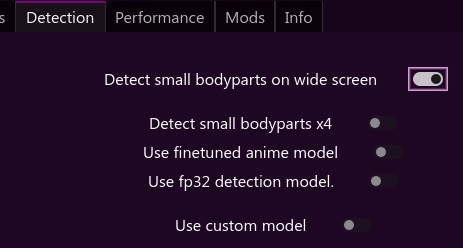
Some detections don't work in full-screen unless I turn off detect small bodyparts x4

Developer

"in full screen" You mean if you watch a video/game in fullscreen ? Weird.
Is Detect small bodyparts on wide screen enabled ?

(2 edits)

Yes Detect Small body parts on widescreen was enabled. I think it was just one time, I'm not sure. I'll mention it again if it notice it or it starts bothering me.

Don't mean to send you on a wild goose chase but I am seeing boxes work on thumbnails and then when enlarged it's no longer censoring it.

Specifically for me it's the reveal area censor function. 

(+1)

Would be nice if the pixel slider bar was bigger or had a field to enter the exact #. It is hard to get precise. Maybe increase font size too. Thank you.

The overlay doesn't always stay on top when a new window is opened. I have to manually alt-tab back to it for the censorship to work.


Hotscreen using profile : default

Hotscreen Overlay starting at Max FPS : 179

Translations added from ./CUSTOM_DATA/translations.csv — languages : ["en", "zh", "es", "fr", "ar", "ru", "pt", "ko", "ja", "de"]

Using saved language code : en

Windows version : Microsoft Windows NT 10.0.26100.0

CPU : AMD Ryzen 5 7500F 6-Core Processor, Cores : 6, Threads : 12, Max clock : 3701 MHz

Using video adapter : NVIDIA GeForce RTX 5070 from NVIDIA type DiscreteGpu

Driver infos : d3d12 version 12_0 api 12_0

Adapter 0 NVIDIA GeForce RTX 5070

Screen Rect 0 : Rect { X = 0, Y = 0, Width = 2560, Height = 1440, Top = 0, Bottom = 1440, Left = 0, Right = 2560, Location = Point { X = 0, Y = 0 }, Size = Size { Width = 2560, Height = 1440 }, TopLeft = Point { X = 0, Y = 0 }, BottomRight = Point { X = 2560, Y = 1440 } } Orientation : 1

Screen Rect 1 : Rect { X = 2560, Y = 296, Width = 1440, Height = 900, Top = 296, Bottom = 1196, Left = 2560, Right = 4000, Location = Point { X = 2560, Y = 296 }, Size = Size { Width = 1440, Height = 900 }, TopLeft = Point { X = 2560, Y = 296 }, BottomRight = Point { X = 4000, Y = 1196 } } Orientation : 1

Adapter 1 Microsoft Basic Render Driver

Starting Screen Recorder

Initializing DXGI using Video card 0 and monitor 0

DXGI initiated with a resolution of 2560 x 1440

Max FPS Record start at 179

Hotscreen version : Windows - Full version - v0.7

Max FPS of Overlay set to 179

Frame Latency of screen set to 0

MaxFPSRecord at 179

Avx is supported.

Detection starting using model : ./models/hs-real-y11n-320-fp16.onnx

Detection starting using eye model : ./models/eyes-detection-01.onnx

Detection starting using device : 0

Max FPS Detection start at 179

Use double Detection start at False

Update time of eyes detection start at 0

Setting MaxFPSDetection at 179

Setting usePreciseEyesDetection at 1

Setting useDoubleDetection at 1

It's only detecting my wallpaper and not any applications I have open. What may be happening?

I have messed with the config a bunch and it's still having extremely poor detection of anything that isn't my wallpaper. 

Developer

This settings should work well, especially for realistic style. Black&white expressive 2d style can be hard to detect, even for the finetuned anime model.

I have attempted toggling all of them, but it doesn't seem to work. However it seems to be tied to screen recording. Starting it recording on my 2nd screen makes it briefly work on my first screen. But them it breaks about 2 minutes later and stops functioning again.

Developer

Please post here the content of hotscreen_logs.txt.

When using DXGI and adding a Screen Latency larger than zero, my screen gamma seems to be thrown out of whack. Funnily enough I can't capture it on a screenshot because it corrects it. It works with BITMAP recording method just fine.

Hotscreen using profile : default Hotscreen Overlay starting at Max FPS : 60 Translations added from ./CUSTOM_DATA/translations.csv — languages : ["en", "zh", "es", "fr", "ar", "ru", "pt", "ko", "ja", "de"] Using saved language code : en Windows version : Microsoft Windows NT 10.0.26200.0 CPU : Intel(R) Core(TM) i5-10400F CPU @ 2.90GHz, Cores : 6, Threads : 12, Max clock : 2904 MHz Using video adapter : AMD Radeon RX 7600 XT from AMD type DiscreteGpu Driver infos : d3d12 version 12_0 api 12_0 Adapter 0 AMD Radeon RX 7600 XT Screen Rect 0 : Rect { X = 0, Y = 0, Width = 1920, Height = 1080, Top = 0, Bottom = 1080, Left = 0, Right = 1920, Location = Point { X = 0, Y = 0 }, Size = Size { Width = 1920, Height = 1080 }, TopLeft = Point { X = 0, Y = 0 }, BottomRight = Point { X = 1920, Y = 1080 } } Orientation : 1 Adapter 1 AMD Radeon RX 7600 XT Adapter 2 Microsoft Basic Render Driver Starting Screen Recorder Initializing DXGI using Video card 0 and monitor 0 DXGI initiated with a resolution of 1920 x 1080 Max FPS Record start at 60 Hotscreen version : Windows - Full version - v0.7 Max FPS of Overlay set to 60 Frame Latency of screen set to 1 MaxFPSRecord at 60 Avx is supported. Detection starting using model : ./models/hs-real-anime-y11n-640-fp16.onnx Detection starting using eye model : ./models/eyes-detection-01.onnx Detection starting using device : 0 Max FPS Detection start at 60 Use double Detection start at True Update time of eyes detection start at 0,1 Setting MaxFPSDetection at 60 Setting usePreciseEyesDetection at 1
Developer

Hotscreen doesn't work with HDR but I don't think it's the problem here. Where do you set the gamma of your screen, in the AMD settings ?

Hi, I downloaded the full version today and I'm having trouble with the app's opacity. The menu is semi-transparent from the start, and when I launch any collection, the censors also easily show through, even with opacity set to 100%. 


Hotscreen using profile : default

Hotscreen Overlay starting at Max FPS : 30

Translations added from ./CUSTOM_DATA/translations.csv — languages : ["en", "zh", "es", "fr", "ar", "ru", "pt", "ko", "ja", "de"]

Using saved language code : pl

Windows version : Microsoft Windows NT 10.0.19045.0

CPU : Intel(R) Core(TM) i5-4670K CPU @ 3.40GHz, Cores : 4, Threads : 4, Max clock : 3401 MHz

Using video adapter : AMD Radeon HD 7900 Series from AMD type DiscreteGpu

Driver infos : d3d12 version 11_0 api 11_0

Adapter 0 AMD Radeon HD 7900 Series

Screen Rect 0 : Rect { X = 0, Y = 0, Width = 2560, Height = 1440, Top = 0, Bottom = 1440, Left = 0, Right = 2560, Location = Point { X = 0, Y = 0 }, Size = Size { Width = 2560, Height = 1440 }, TopLeft = Point { X = 0, Y = 0 }, BottomRight = Point { X = 2560, Y = 1440 } } Orientation : 1

Adapter 1 Microsoft Basic Render Driver

Starting Screen Recorder

Initializing DXGI using Video card 0 and monitor 0

DXGI initiated with a resolution of 2560 x 1440

Max FPS Record start at 10

Hotscreen version : Windows - Full version - v0.7

Max FPS of Overlay set to 30

Frame Latency of screen set to 0

MaxFPSRecord at 10

Avx is supported.

Detection starting using model : ./models/hs-real-y11n-320-fp16.onnx

Detection starting using eye model : ./models/eyes-detection-01.onnx

Detection starting using device : 0

Max FPS Detection start at 10

Use double Detection start at True

Update time of eyes detection start at 0,2

Setting MaxFPSDetection at 10

Setting usePreciseEyesDetection at 1

Closing...

Setting usePreciseEyesDetection at 0

Screen recorder thread ends correctly.

Developer

This is an incredible bug. You don't have the last update of DirectX12 (neither Windows) so you should update your graphic drivers and test it again.

(+1)

Just updated to v0.7 from 0.6 and it seems that the Screen Latency to detect delay keeps resetting to 0 frames after a few minutes. Appears to even happen when the app is in 'Locked' mode so it's definitely not being manually updated when it reverts from the previous value

I believe it's a countermeasure necessary to avoid freezing your pc - in v0.6 it was set so any time that your pc lagged, it got set back to 0. In 0.7 it got changed, but I can still notice this changing to 0, especially after some resource devouring actions

This seems to be related to my (small) issue in 0.8.

'Screen latency to correct delay' seems to reset after starting up my pc and this the program again.

I haven't noticed it resetting during use.

Thanks for considering solving this.

---

I have to set this setting to 10 and all filter to `Stay detected during 1 second` to avoid seeing uncensored images on a next page or the current pages gets uncensored very briefly while the censoring for the next page already pops up.

My PC is pretty new and drivers are up to date so I believe `low framerate` shouldn't be a big issue.

Do maybe others have experience with this? Am I using it wrong / is there maybe another workaround?

Thanks.

0.7 opens for a split second and then closes. 0.5 worked fine for me. How do i fix it?

Developer

If hotscreen_logs.txt is not created, start hotscreen.exe from a command line :
Right click on the Hotscreen folder -> Open in Terminal Then type hotscreen.exe

(+1)

have told hotscreen to open up (0.7) on startup. It clearly does but the blocking doesn't work until I close it and reopen it, is this a known bug?

Developer

Weird. I just tested it on windows 10 and 11 and it worked. Be sure to have Screen selected at startup to Last used screen. (in case you have multiple monitors)

i only have the one screen. it starts up as planned but the filters just do not work at all. i have to close and reopen for the filters to work.

(+1)

looked through my screen options and it had 
0 Nvidia - GPU
1 AMD - iGPU
2 Nvidia - GPU

so it was listing 0 and 2 as same device. i have chosen 2 now and it may have fixed it. Thanks for the pointer

Hi, I have the following problem: when I lock HotScreen with a password, for example with the password 123, and then restart the PC, HotScreen starts as it should when Windows starts. However, HotScreen is no longer locked, but it behaves as if it were locked; that is, it cannot be closed until I re-enter the password in the field where it is normally entered to lock it. After restarting, I can freely use the HotScreen menu.

To briefly summarize the problem again, if I have entered a password and then restart the PC, the HotScreen menu is no longer locked but starts without the lock, although it behaves as if it were locked.


Developer

Indeed ! I fix this.

Thank you

Hello, I've tried several hours to create a video with OBS, but I get not a single one which includes the record and the censors. Can you explain please, in which order I have to set the sources (Overlay/video/Recorded window) and if there are any other settings, that I have to change?

Developer
  1. Performance / Screen latency to correct delay to 1
  2. Tools / Create a recordable window
  3. In OBS, start the capture of the recordable window
  4. Tools / Hide the window

Every time I try to start hotscreen it barely loads before shutting down

Hotscreen using profile : default

Can't open file ./hotscreen.save during file_to_dict_params.

Hotscreen Overlay starting at Max FPS : 60

Translations added from ./CUSTOM_DATA/translations.csv — languages : ["en", "zh", "es", "fr", "ar", "ru", "pt", "ko", "ja", "de"]

Setting auto language code to en

Windows version : Microsoft Windows NT 10.0.26200.0

CPU : Intel(R) Xeon(R) W-2135 CPU @ 3.70GHz, Cores : 6, Threads : 12, Max clock : 3696 MHz

Using video adapter : NVIDIA GeForce RTX 2080 from NVIDIA type DiscreteGpu

Driver infos : d3d12 version 12_0 api 12_0

Adapter 0 NVIDIA GeForce RTX 2080

Screen Rect 0 : Rect { X = 0, Y = 0, Width = 1920, Height = 1080, Top = 0, Bottom = 1080, Left = 0, Right = 1920, Location = Point { X = 0, Y = 0 }, Size = Size { Width = 1920, Height = 1080 }, TopLeft = Point { X = 0, Y = 0 }, BottomRight = Point { X = 1920, Y = 1080 } } Orientation : 1

Screen Rect 1 : Rect { X = 1920, Y = 0, Width = 1920, Height = 1080, Top = 0, Bottom = 1080, Left = 1920, Right = 3840, Location = Point { X = 1920, Y = 0 }, Size = Size { Width = 1920, Height = 1080 }, TopLeft = Point { X = 1920, Y = 0 }, BottomRight = Point { X = 3840, Y = 1080 } } Orientation : 1

Adapter 1 Microsoft Basic Render Driver

Starting Screen Recorder

Initializing DXGI using Video card 0 and monitor 0

DXGI initiated with a resolution of 1920 x 1080

Max FPS Record start at 60

Hotscreen version : Windows - Full version - v0.7

Max FPS of Overlay set to 60

Frame Latency of screen set to 0

(+6)

The paid version is showing as the demo version for 0.8 after download. 

Developer(+1)

Fixed !

It would be nice if the 'Detect only on a custom area of the screen' function worked for the inverted boxes as well so I can stop it from censoring the tabs as well.

in 0.8, when hotscreen gets paused, latency correction get's flushed - would be great if there would be an option to keep it stored, so when hotscreen gets resumend, latency correction is still there

Developer

Noted ! I will also rework how the latency is set to 0 when the framerate is low, since it seems annoying on some configs.

I usually use my iPad as a monitor for my PC with Moonlight/Apollo for privacy. I've tried using this program on the iPad, but it doesn't work, there's no censorship. It works fine on the real monitor.

Hotscreen using profile : default

Can't open file ./hotscreen.save during file_to_dict_params.

Hotscreen Overlay starting at Max FPS : 60

Translations added from ./CUSTOM_DATA/translations.csv — languages : ["en", "zh", "es", "fr", "ar", "ru", "pt", "ko", "ja", "de"]

Setting auto language code to es

Windows version : Microsoft Windows NT 10.0.26200.0

CPU : AMD Ryzen 5 9600X 6-Core Processor, Cores : 6, Threads : 12, Max clock : 3900 MHz

Using video adapter : AMD Radeon RX 9070 XT from AMD type DiscreteGpu

Driver infos : d3d12 version 12_0 api 12_0

Adapter 0 AMD Radeon RX 9070 XT

Screen Rect 0 : Rect { X = 0, Y = 0, Width = 2360, Height = 1640, Top = 0, Bottom = 1640, Left = 0, Right = 2360, Location = Point { X = 0, Y = 0 }, Size = Size { Width = 2360, Height = 1640 }, TopLeft = Point { X = 0, Y = 0 }, BottomRight = Point { X = 2360, Y = 1640 } } Orientation : 1

Adapter 1 AMD Radeon RX 9070 XT

Adapter 2 Microsoft Basic Render Driver

Starting Screen Recorder

Initializing Windows10Capture using Video card 0 and monitor 0

Hotscreen version : Windows - Demo version - v0.8

Max FPS of Overlay set to 60

Frame Latency of screen set to 0

Windows10Capture initiated on : 2360x1640

Max FPS Record start at 60

MaxFPSRecord at 60

Avx is supported.

Detection starting using model : ./models/hs-real-y11n-320-fp16.onnx

Detection starting using eye model : ./models/eyes-detection-01.onnx

Detection starting using device : 0

Max FPS Detection start at 60

Use double Detection start at False

Update time of eyes detection start at 0,1

Setting MaxFPSDetection at 60

Closing...

Screen recorder thread ends correctly.

Developer

This is the same problem as this : /t/5594887/not-working-in-virtualdesktop
You have to use the button in Tools -> Create a recordable window to be able to stream the overlay. However, you have to hide this recordable window to let Hotscreen see what is visible under the censor. This means that Moonlight/Apollo must have a compositing setting to recreate the entire desktop+overlay.

Hi,

I tried out the 0.8 Demo software on Windows 11.

Unfortunately simply opening Windows explorer and opening any image, will make the overlay move to the background (or something).

I have to select the overlay in the taskbar again.

Is this a known issue or only my system?

If this can be fixed, I will probably support on patreon.

Thanks.

Developer

In the Tools menu, you can check Prevent the overlay to be minimized. If that doesn't help, be sure to update your GPU drivers.

(1 edit)

Thanks for the advice.

I tested some more and seem to be getting closer to the root cause.

How to NOT reproduce the issue: use the `Photos Legacy` app!
I am happy I found this.

How to reproduce the previous issue:

  1. In Windows 11, open Explorer.
  2. Go to a folder with photos  (mosaic view).
    Censoring is workin fine.
  3. Open any picture with the `Photos` app.
    Censoring is workin fine.
  4. Close the photo by pressing `X` in the top right corner of ALT+F4. (The effect is the same for both)
    Censoring is no longer working fine.
    The censoring overlay seems to pull back behind Explorer.

Workaround: hover over the taskbar `photo` program and close the photo by clicking `x` there.


I tried version 0.6 which does not have the `Prevent the overlay to be minimized` option and 0.8 which has it.
It doesn't make a difference for the issue.

I updated the driver for my GPU Radeon RX550/550 Series and rebooted though it does not seem to make a difference.

Viewing posts 41 to 60 of 88 · Next page · Previous page · First page · Last page