
Indie game storeFree gamesFun gamesHorror games
Game developmentAssetsComics
SalesBundles
Jobs
TagsGame Engines
A jam submission

HareWireView game page

Submitted by whatFruit — 1 minute, 34 seconds before the deadline
Add to collection

Play game

HareWire's itch.io page

Results

CriteriaRankScore*Raw Score
Theme#473.4644.000
Visuals#613.1753.667
Gameplay#692.1652.500
Audio#702.3092.667
Overall#702.5112.900
Limitation#831.4431.667

Ranked from 6 ratings. Score is adjusted from raw score by the median number of ratings per game in the jam.

Leave a comment

Log in with itch.io to leave a comment.

Comments

Submitted (1 edit) (+1)

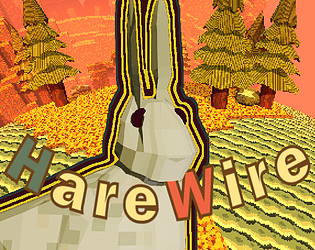
I really like the aesthetics of the game.

The frame rate wasn't great, but honestly what bothered me most at the beginning was that I didn't really understand the controls, despite having them under the game screen. I could build, but I couldn't. I could interact, but didn't know what with. Once I found stuff to interact with, I had to input the interact button, and then... I'm not really sure, click it with the mouse button, or click on the interact control again? Neither really worked the first time over, but it did when I spammed so I just did that.

Oh also, when you start the game you're very zoomed out and your character is underneath some terrain, so I truly misread the game and for a second I thought I was like in godmode and didn't understand I was actually controlling the little guy.

Thank you for sharing, I might get back to this game after the jam!

Developer(+1)

Thank you so much for giving it a go! You are spot on about the start, I had plans for a proper cave and ended up throwing in that last minute overhand which just hides the player. I figured out a fix for the frame rate issue, so I may also throw in some hints and see if I can clean up how the interact action works for a quick patch. 


Also congrats on the Jam win! Haven't found much time to play other's games this past week, but your's is certaintly one I'm looking forward to playing.

Submitted

Thank you! 

Submitted(+1)

Incredible aesthetics here, but the frame hurts for sure! I got stuck on the second puzzle after completing the fence and getting the leaf bot started. I couldn't figure out where to go or what to do next. Looking forward to giving this one another play in the future, and I'm really curious to learn more about your performance optimization journey as you embark on that. Thanks for making and sharing your game!

Submitted (1 edit)

Man, it’s hard to rate this. Your game has very strong visual side, I liked the autumn aesthetic and the dreamy feel of everything. I liked the level design but the building was the fun part, I liked how the mechanics were introduced through small puzzles. I couldn’t get the hopper to work though. You can remove the leafy trees, which can lead to a softlock.
But we need to address the elephant in the room the framerate… THE FRAMERATE. Your game runs at 6 frames per second (I’ve counted). Maybe my machine is not top notch but I feel like it should be able to handle a game like this a little better. It made it very tough to play, but I got until the 100 fences challenge, which would take a long time a block at a time as I couldn’t find a way to automate it. I did enjoy the game though, even if it was a little rough around the edges.

Developer(+1)

Thank you so much for playing! Especially despite the framerate issue. This is easily the most time I've put into one project and learned a lot.  Would you belive that I got the hopper and 100 fence challenge in the last 8 hours 😌?  Just missed putting in an example setup for the hopper so I'm tempted to put an explanation of how here, but will refrain in the spirit of fair voting + self explanatory mechanics is a goal of mine.  Again appreciate the play despite the frame rate issue, 3D is my focus so this is good information on how far I can push godot's web build with this kind of stuff, after the voting period I'm defintely going to take it as a challenege to optimize it so it's more playable on the web. 

Submitted(+1)

I also dabble in Godot, and there’s some optimizations I can give tips on, but the Debug tab is really useful for things like this, but I can give some shots in the dark. Using functions like set_process() and set_physics_process() to disable unnecessary logic. Use collision layers for big Area3D nodes so they only collide with what they need. Have physics objects ā€œprocess_mode = Node.PROCESS_MODE_DISABLEDā€ in _ready() function. These are some things that helped in my random projects. If you’re up you can hmu on discord: proti7 we can troubleshoot the issue, but if you want to go about it alone then good luck and I hope you’ll narrow down the issue because it could be a really cool experience with some extra polish.

Submitted(+1)

Agree, It is difficult to play with such low FPS.