


Hello, I just bought Thaluna and I'm having trouble starting it.
It displays an error message saying it can't find the model, even though it's definitely there.
Thaluna version: latest Stable
version: Windows 11
What's happening? I can't even launch the tool; it crashes immediately on startup with the following error message.
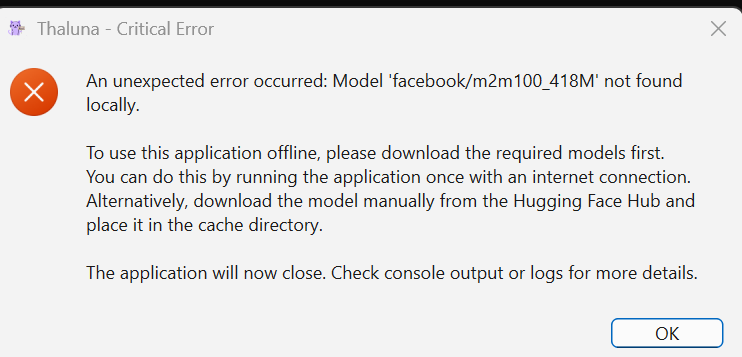
Log of diagnostic :
.\Thaluna.exe
[Thaluna] Starting... HOME=C:\Users\xxx
[Thaluna] Paddle models: C:\Users\xxx\AppData\Local\Thaluna\.paddleocr
[CUDA_DLL_DEBUG] add_dll_directory: D:\xxx\Téléchargements\thaluna-real-time-translator-diagnostic\_internal\paddle\libs
[CUDA_DLL_DEBUG] add_dll_directory: D:\xxx\Téléchargements\thaluna-real-time-translator-diagnostic\_internal\torch\lib
[CUDA_DLL_DEBUG] add_dll_directory: D:\xxx\Téléchargements\thaluna-real-time-translator-diagnostic\_internal\nvidia\cudnn\bin
[CUDA_DLL_DEBUG] add_dll_directory: D:\xxx\Téléchargements\thaluna-real-time-translator-diagnostic\_internal\nvidia\cuda_runtime\bin
[CUDA_DLL_DEBUG] add_dll_directory: D:\xxxx\Téléchargements\thaluna-real-time-translator-diagnostic\_internal\nvidia\cuda_nvrtc\bin
[CUDA_DLL_DEBUG] add_dll_directory: D:\xxx\Téléchargements\thaluna-real-time-translator-diagnostic\_internal\nvidia\cublas\bin
[CUDA_DLL_DEBUG] add_dll_directory: D:\xxx\Téléchargements\thaluna-real-time-translator-diagnostic\_internal\nvidia\cufft\bin
[CUDA_DLL_DEBUG] add_dll_directory: D:\xxx\Téléchargements\thaluna-real-time-translator-diagnostic\_internal\nvidia\cusparse\bin
[CUDA_DLL_DEBUG] PATH prepended dirs=8
[Thaluna] Models OK.
main.py:1981: DeprecationWarning: Enum value 'Qt::ApplicationAttribute.AA_EnableHighDpiScaling' is marked as deprecated, please check the documentation for more information.
main.py:1982: DeprecationWarning: Enum value 'Qt::ApplicationAttribute.AA_UseHighDpiPixmaps' is marked as deprecated, please check the documentation for more information.
[Thaluna] Starting... HOME=C:\Users\xxx
[Thaluna] Paddle models: C:\Users\xxx\AppData\Local\Thaluna\.paddleocr
[CUDA_DLL_DEBUG] add_dll_directory: D:\xxx\Téléchargements\thaluna-real-time-translator-diagnostic\_internal\paddle\libs
[CUDA_DLL_DEBUG] add_dll_directory: D:\xxx\Téléchargements\thaluna-real-time-translator-diagnostic\_internal\torch\lib
[CUDA_DLL_DEBUG] add_dll_directory: D:\xxx\Téléchargements\thaluna-real-time-translator-diagnostic\_internal\nvidia\cudnn\bin
[CUDA_DLL_DEBUG] add_dll_directory: D:\xxx\Téléchargements\thaluna-real-time-translator-diagnostic\_internal\nvidia\cuda_runtime\bin
[CUDA_DLL_DEBUG] add_dll_directory: D:\xxx\Téléchargements\thaluna-real-time-translator-diagnostic\_internal\nvidia\cuda_nvrtc\bin
[CUDA_DLL_DEBUG] add_dll_directory: D:\xxx\Téléchargements\thaluna-real-time-translator-diagnostic\_internal\nvidia\cublas\bin
[CUDA_DLL_DEBUG] add_dll_directory: D:\xxx\Téléchargements\thaluna-real-time-translator-diagnostic\_internal\nvidia\cufft\bin
[CUDA_DLL_DEBUG] add_dll_directory: D:\xxx\Téléchargements\thaluna-real-time-translator-diagnostic\_internal\nvidia\cusparse\bin
[UI_DEBUG][translation_window.update_language_buttons] idx=0 engine=? model=English -> Arabic button='EN → AR' ocr_button='English (Default)'
Pre-warming default models...
[DEBUG] OCR init: lang=en, gpu=False, ocr_device_setting=auto, models=OK
paddle\utils\cpp_extension\extension_utils.py:711: UserWarning: No ccache found. Please be aware that recompiling all source files may be required. You can download and install ccache from: https://github.com/ccache/ccache/blob/master/doc/INSTALL.md
paddle\base\framework.py:805: UserWarning: You are using GPU version Paddle, but your CUDA device is not set properly. CPU device will be used by default.
D:\xxx\Téléchargements\thaluna-real-time-translator-diagnostic\_internal\paddleocr\ppocr\postprocess\rec_postprocess.py:1229: SyntaxWarning: invalid escape sequence '\W'
noletter = "[\W_^\d]"
D:\xxx\Téléchargements\thaluna-real-time-translator-diagnostic\_internal\paddleocr\ppocr\postprocess\rec_postprocess.py:1455: SyntaxWarning: invalid escape sequence '\W'
noletter = "[\W_^\d]"
[DEBUG] OCR ready: en
Pre-warming complete.
[CAPTURE_DEBUG] logical_rect=(100,100,800x300) screen='U32J59x' screen_geom=(0,0,2560x1440) dpr=1.500 rel=(100,100) grab=(150,150,1200x450) pixmap=(1800x675, dpr=1.500) strategy=dpr_scaled screen_fallback=screenAt
[DPI_DEBUG] screen_dprs=[1.5] non_100_scaling=True mixed_dpi=False capture_spans_multiple_screens=False strategy=dpr_scaled screen_fallback=False
[DEBUG] OCR result: 'eprecationWarning: Enum value. 'Qt::ApplicationAttribute.AA_UseHighDpiPixmaps' is marked as deprecat...'
[ERROR_HANDLER] ts=2026-05-01T09:30:17 active_engine=unknown active_model=English -> Arabic message=Model 'facebook/m2m100_418M' not found locally.
To use this application offline, please download the required models first.
You can do this by running the application once with an internet connection.
Alternatively, download the model manually from the Hugging Face Hub and place it in the cache directory.
[ERROR_HANDLER] critical_path quit=True recovery_window_active=False
[DEBUG] OCR result: 'eprecationWarning: Enum value 'Qt::ApplicationAttribute.AA_UseHighDpiPixmaps'. marked as deprecated,...'
[ERROR_HANDLER] ts=2026-05-01T09:30:23 active_engine=unknown active_model=English -> Arabic message=Model 'facebook/m2m100_418M' not found locally.
To use this application offline, please download the required models first.
You can do this by running the application once with an internet connection.
Alternatively, download the model manually from the Hugging Face Hub and place it in the cache directory.
[ERROR_HANDLER] critical_path quit=True recovery_window_active=False
[DEBUG] OCR result: 'eprecationWarning: Enum value 'Qt::ApplicationAttribute.AA_UseHighDpiPixmaps'. marked as deprecated,...'
[DEBUG] OCR result: 'eprecationWarning: Enum value 'Qt::ApplicationAttribute.AA_UseHighDpiPixmaps'. marked as deprecated,...'
[DEBUG] OCR result: 'precat ohwarnlhd Enum value Qt::ApplicationAttribute.AA_UseHighDpiPixmaps' marked se deprecated pLea...'
[ERROR_HANDLER] ts=2026-05-01T09:30:41 active_engine=unknown active_model=English -> Arabic message=Model 'facebook/m2m100_418M' not found locally.
To use this application offline, please download the required models first.
You can do this by running the application once with an internet connection.
Alternatively, download the model manually from the Hugging Face Hub and place it in the cache directory.
[ERROR_HANDLER] critical_path quit=True recovery_window_active=False
[DEBUG] OCR result: 'eprecationWarning: Enum value 'Qt::ApplicationAttribute.AA_UseHighDpiPixmaps' marked as deprecated, ...'
[ERROR_HANDLER] ts=2026-05-01T09:30:47 active_engine=unknown active_model=English -> Arabic message=Model 'facebook/m2m100_418M' not found locally.
To use this application offline, please download the required models first.
You can do this by running the application once with an internet connection.
Alternatively, download the model manually from the Hugging Face Hub and place it in the cache directory.
[ERROR_HANDLER] critical_path quit=True recovery_window_active=False
[DEBUG] OCR result: 'precat ohwarhlhd Enum value Qt::ApplicationAttribute.AA_UseHighDpiPixmaps marked se deprecated pLeas...'
[Shortcuts] Unregistering all hotkeys...
Performing worker shutdown cleanup...
[Shortcuts] Unregistering all hotkeys..."
Can you help me ? thanks.