


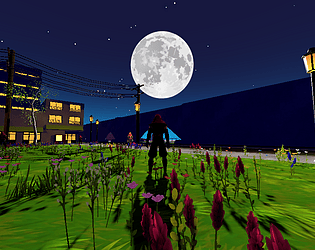
Play demo
Connections (Unfinished prototype)'s itch.io pageResults
| Criteria | Rank | Score* | Raw Score |
| Story | #160 | 2.846 | 2.846 |
| Aesthetics | #185 | 3.615 | 3.615 |
| Music | #204 | 3.231 | 3.231 |
| Overall | #426 | 2.769 | 2.769 |
| Fun | #538 | 2.231 | 2.231 |
| Mechanics | #560 | 2.231 | 2.231 |
| Sound | #603 | 1.692 | 1.692 |
| Theme | #728 | 1.538 | 1.538 |
Ranked from 13 ratings. Score is adjusted from raw score by the median number of ratings per game in the jam.
How many people worked on this game in total?
1
Did you use any existing assets? If so, list them below.
Chequered Ink Fonts Pack, GameDevTV - Castle Kingdoms Adventurer Characters Kit, freestylized.com textures, Kenney - Button Icons
Leave a comment
Log in with itch.io to leave a comment.
Comments
Thanks for the technical details. I like the artistic work here. I was rather impressed that the music was done within two hours, among other things. I know not every goes as you want to during a game jam, so I understand.
I'm glad you released this. The aesthetics were great!
im sure you already know this, but dont worry about it going unfinished, you did your best and you got something out, which is already amazing in of itself!
loved the music and the aesthetics, and it was really interesting to walk around and hear about your experiences. thanks so much for sharing!
congrats on the submission!!
the stars, I like that attention to detail. I took extra time to run around and see if I could find a way to die in the game as a challenge, I didnt find one. Amazing what one can do with a deadline , thats alot of work be proud! ty gg
An interesting tour through an unfinished game. Nice idea to put up characters to explain your development journey like in a museum. It seems to me you did everything the hard way. Would any player expect an accurate starmap as skybox? Barely. But it is impressing nonetheless, and at the trees, buildings and water as well.
Very interesting idea and also very informative. Great job!
I've played a lot of unfinished submissions, and I'm SO GLAD you submitted this one! Your idea to put devlog npcs in to explain things was great and every time I talked to one I was more impressed by what you had done.
The skybox and custom water reflection shader are amazing, but also your building system with geometry nodes is really cool. I would love to know more about the way you use linked blend files.
The main layout of the level was a "world.blend" file which I kept in res://assets/, so it would automatically update every time I made any changes to it. I kept all of my textures in "res://assets/textures/" and used Node Wrangler to quickly create PBR materials out of them in Blender. When importing the blend file, Godot would automatically detect that the textures were already in the project, and wouldn't make additional copies of them. I'd extract the materials from the blend file when importing in Godot, so that I could modify them. Mostly so that I could switch them to Toon shading. Godot also doesn't automatically detect height maps from blender materials, so I had to re-connect those. For a handful of materials, I ended up converting them to shader materials so I could add some custom code. Notably the fence and the plants.
I created a separate "props.blend" file, where I defined my materials and created props, building pieces, and geometry node trees. I added the blend file to my User Asset Library in Blender as "Linked", and anything I wanted to bring into my world.blend file I would mark as an asset. From there, you just drag it from the User Asset Library into the world.blend project. For individual objects, you'd have to create a Library Override to modify them within your world. If you mark an entire collection as an asset, then you can just drag it into your world and move/rotate/scale it freely.
Unfortunately, I never figured out a streamlined way to handle collision shapes with this workflow. I would probably just create a separate collection within my world.blend to hold collision shapes, and export it as a separate glb file. Unfortunately, I don't know of a way to automatically turn each mesh in a glb into a physics object in Godot, so you'd either have to mark them all individually, or write a script that does it.
That's basically my entire workflow. It lets you work on individual props/building pieces within their own environment, and any time you make a change to one, that change would automatically update in the game. All you would need to do is save your blender project, then tab back to Godot, and it would automatically re-import.
Thanks for the explanation! I will have to start learning about the User Asset Library in blender.
I like the lighting in the world on this, it's nice and vibrant while also feeling dark and moody. Good job!
Too bad you cannot make it to the end, congrats for the work you put in it. It's a really great addition to talk about your experience through the NPCs. Cheers.
I think your skybox system to be really cool. I would have spawned the player closer to the ninja who explains it, as it's easy to miss when your only exploring briefly.