


HOW TO GET SET UP WITH A TELEGRAPH! Suggestions, support and showcase.
Looking for the authentic telegraphist experience for operating MORSE? You're in the right place. This discussion is dedicated to sharing information and tips on setting up your own telegraph key, be that fabricating a homebrew solution or commercial options.
Here is a list of projects and solutions to delve into (Which I will add to as more suggestions come in!)
Something to quickly mention first, before splashing out on a telegraph, it'd be worth starting with a homebrew solution, there's lots of 3D printable projects available or as I'd prefer, ones you can fashion out of random objects around the house. For example, the inspiration for MORSE as a game came from experimenting with clothes pegs and realising it'd make a satisfying straight key.
HOMEBREW TELEGRAPHS
+ NAIL CLIPPER USB STRAIGHT KEY: Here's my tutorial on how to fabricate a homebrew telegraph key out a nail clipper and an old USB mouse: https://www.youtube.com/watch?v=ZfP5D6UTV48
(NOTE: Use this method for straight keys only, it won't work properly for the others!)
+ STRANGE CW KEYS: An absolutely spectacular collection of strange improvised telegraph keys made from all sorts of household objects by OH6DC, such as a hammock telegraph, banana iambic key and a horrifying Tellytubby key, easily my favourite. I am in awe of his work and would strongly recommend looking at the site for inspiration: https://sites.google.com/site/oh6dccw/strangecwkeys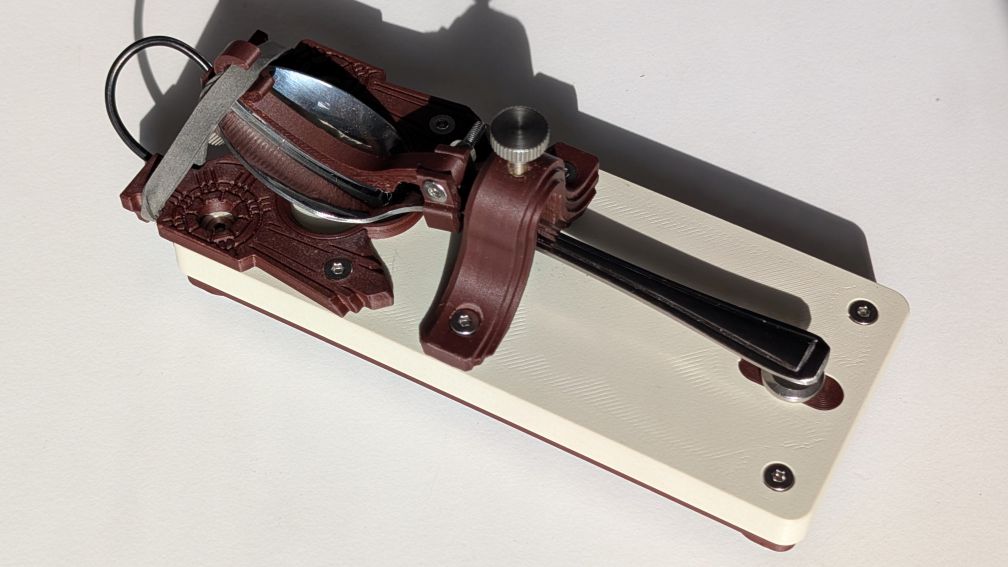
+ TEASPOON TELEGRAPH: A beautiful designed key by my colleague and good friend David Hayward, a 3D printed telegraph key with a teaspoon at its heart. The project is fully open source with a meticulously documented print, assembly and maintenance guide. https://ympt.co.uk/teaspoontx.html
+ SAWBLADE PADDLE KEY: A well documented and straightforward video tutorial explaining how to craft a paddle key out of a sawblade and some basic hardware, courtesy of channel Shack and Field (G0CNN): https://www.youtube.com/watch?v=HJV2cT65kuQ
+ PAPERCLIP IAMBIC KEY: A demonstration of a "$0 telegraph" made of scraps courtesy of N1JI CW Adventures, it's a really lovely design, the curves of the paperclips is such a nice finish: https://www.youtube.com/watch?v=oqJL08Wq2Fw
ADAPTERS
+ MOUSE: As mentioned above, taking a USB mouse to bits is the cheapest, lowest barrier method to getting a key wired up. Just requires access to a soldering iron and some crocodile clips.
+ VAIL ADAPTER: If you want a plug and play solution, I've been chatting with the Discord community for VAIL, which is an adapter which does USB to telegraph with lots of option for calibration. They've even added to the manual a guide on how to set up MORSE which I was humbled by their efforts for doing: https://vailadapter.com/manual
You find VAIL and their Discord community at: https://vailadapter.com/
+ VBAND: The folks at Ham Radio Solutions have produced a commercial adapter that works out of the box for CW to USB input. Whilst there were initial issues with support (because of the ctrl buttons being read as the same), this is now fixed and Vband should be supported for MORSE! You can check out their website here, they also have a Discord where they offer support: https://hamradio.solutions/vband/
+ MAKEY MAKEY: If you want something that's a bit more general use (that you could use for the fire input too), the Makey Makey is a fantastic work horse of a device, you plug it in, you put two wires together and it emulates keyboard presses. It's been a staple of my installation work for the last decade, would highly recommend. https://makeymakey.com/
Case in point, I use the Makey Makey currently to power the MORSE installation units, here's some footage of that in action at UK Hamfest in September: https://www.youtube.com/watch?v=6W_RJU0ssZg
+ ARDUINO: A very common form of microcomputer that is often used in hackspaces and tech communities as a workhorse, there is a bit of a technical barrier to using them but as long as you keep the project simple, they can be useful.
SilverSteeples shared below a script converts pin input to keyboard presses. You need to make sure you get the right model of Arduino that supports keyboard.h, I had the R4 Minima which worked well: http://cmd.pm/morse_connector/
Here's some footage of the telegraph key in action configured with the Arduino:
https://bsky.app/profile/alexvscoding.bsky.social/post/3m65t6zblb222
For MORSE, I edited SilverSteeples code so that pin 6 was bound to enter, which meant pin 6 could be used easily with fire without triggering sticky keys.
+ QMKeybox: A custom hardware project by David Hayward that creates a simple, 1 button input for operating a telegraph via USB. Documentation includes 3D printing and software documentation: https://www.instructables.com/QMKeybox-Anything-Can-Become-a-One-Button-Keyboard/
Please share you own tips, solutions and advice below! I am so excited at the prospect of folks getting to try the game out with bespoke controllers. Please share any playthroughs of the game using them, I would love to see what you come up with!
73, Alex