Indie game storeFree gamesFun gamesHorror games
Game developmentAssetsComics
SalesBundles
Jobs
TagsGame Engines

Crashes on startup (newest build)

A topic by Traitoris created Jul 05, 2026 Views: 518 Replies: 20
Viewing posts 1 to 11
(1 edit) (+1)

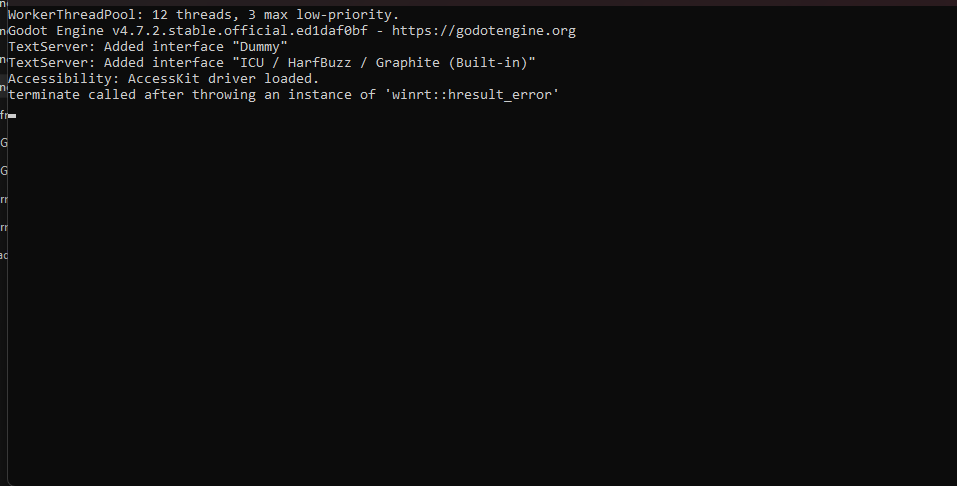
I don't know why, but even the game's window does not pop-up. Logs are clear. The only thing I managed to catch was this error. 

Interestingly, the v 0.7.1 still works without issues. Is this problem specific to my PC, or has it been encountered before?
(I couldn't insert the screenshot, so I'll paste the text from console instead)

Godot Engine v4.7.stable.official.5b4e0cb0f - https://godotengine.org
terminate called after throwing an instance of 'winrt::hresult_error'
(1 edit)

Hi there — thanks for the report, sorry it’s broken.

This is a new one for me, and apparently for googling “winrt::hresult_error godot” as well. We upgraded to godot 4.7 between the two builds, which is where I bet such a low-level sounding error is coming from.

Looking at the engine’s changelog, it looks like that WinRT (some sort of generic windows driver error?) might have come from changes in accessibility or audio interfacing – if you have any hardware drivers like tablets, screen readers, screen overlays, or complex audio setups that might be the contributing factor.

From what I’m reading it sounds like we might be able to get more information from running that console version of the game in verbose mode (I should probably add a shortcut that lets you do it automatically). If you open up a terminal at the game’s folder (shift+right click an empty space in the folder and pick “open in terminal”), you can run it in verbose mode with this:

.\LancerTactics.console.exe --verbose

And we might get some more hints with that?

(1 edit)

Unfortunately, no new details have emerged here.

---

PS C:\Users\User\Desktop\LT\1.0> .\LancerTactics.console.exe verbose

Godot Engine v4.7.stable.official.5b4e0cb0f - https://godotengine.org

terminate called after throwing an instance of 'winrt::hresult_error'

---

I have headphones that support Dolby Atmos. But even when I disconnect them and use the built-in speakers (with Windows Sonic turned off), the result is the same. I can't say for sure what the problem might be.

Oh wait I for sure went down that rabbit hole before asking the standard question: does it work when run in compatibility mode by running it from the LancerTactics_Compatibility.exe shortcut?

Sadly, it doesn't work either

(1 edit)

Alright… two more possible things to try to narrow things down: figuring out if it’s something with the graphics system or audio system.

To disable all graphics, run this in the console instead, with two dashes in front of “headless”. This will run the game without any kind of graphical output (which doesn’t help much for playing the game I know, but’ll help with where to look for next):

.\LancerTactics.console.exe --headless

To test disabling audio, I just uploaded a build of the game with all the FMOD stuff jettisoned. There should be a new download available called “lancer-tactics-pc-no-audio.zip”; try that?

If neither of those yield results, I’m going to make a post in the Godot support forums to see if anyone else is running into this. Would you mind sharing your video driver info? I don’t have a windows computer on me since I’m traveling but found these steps to getting driver information:

  1. Press Windows + R
  2. Type dxdiag and press Enter
  3. Click the Display tab

> .\LancerTactics.console.exe --headless

Hey, it worked! At least I can hear the game even though I can't see it.
---
PS C:\Users\User\Desktop\LT\1.0> .\LancerTactics.console.exe --headless

Godot Engine v4.7.stable.official.5b4e0cb0f - https://godotengine.org

FMOD Sound System: Successfully initialized

FMOD Sound System: Live update enabled!

ERROR: Condition "!actions.custom_samplers.has(function->arguments[j].tex_builtin)" is true. Continuing.

   at: _dump_node_code (servers/rendering/shader_compiler.cpp:1329)

ERROR: Condition "!actions.custom_samplers.has(function->arguments[j].tex_builtin)" is true. Continuing.

   at: _dump_node_code (servers/rendering/shader_compiler.cpp:1329)

ERROR: Condition "!actions.custom_samplers.has(function->arguments[j].tex_builtin)" is true. Continuing.

   at: _dump_node_code (servers/rendering/shader_compiler.cpp:1329)

ERROR: Condition "!actions.custom_samplers.has(function->arguments[j].tex_builtin)" is true. Continuing.

   at: _dump_node_code (servers/rendering/shader_compiler.cpp:1329)

 [ LANCER TACTICS v1.0.4 ]

Screen size : (0, 0)   scale : 1.0   DPI : 96    minimum : (0, 0)

Returning to titlescreen.

1.0fps                         ~| ~~ Load initial game content ~~ START

29.0fps               626 ms ~| ~~ Load initial game content ~~ FIN

~~~~~~~~~    New level "LevelTitle" ready     ~~~~~~~~~~~

...fin background load (1/19) : resgrp_fetchers

...fin background load (2/19) : resgrp_manufacturers

...fin background load (3/19) : resgrp_talent_categories

...fin background load (4/19) : resgrp_licenses

...fin background load (5/19) : resgrp_frames

(+1)

>“lancer-tactics-pc-no-audio.zip”

This version didn't launch too, just like the others.

The problem might be that my laptop has both a discrete and an integrated graphics card.
Drivers: igdumdim64.dll (display 1), nvldumdx.dll (display 2)

(1 edit)

Oh that might be it! You could try one of these to force use of one or the other:

.\LancerTactics.console.exe --gpu-index 0

.\LancerTactics.console.exe --gpu-index 1

maybe?

Well, that didn't work. :(
---

PS C:\Users\User\Desktop\LT\1.0> .\LancerTactics.console.exe --gpu-index 0

Godot Engine v4.7.stable.official.5b4e0cb0f - https://godotengine.org

terminate called after throwing an instance of 'winrt::hresult_error'

PS C:\Users\User\Desktop\LT\1.0> .\LancerTactics.console.exe --gpu-index 1

Godot Engine v4.7.stable.official.5b4e0cb0f - https://godotengine.org

terminate called after throwing an instance of 'winrt::hresult_error'

:( Thanks for being down to try so many different things to troubleshoot.

I’m really officially out of my depth here so have a bug post on the Godot repo. In making it, I noticed that our attempt to run it in --verbose mode may have missed the double dash at the front of the keyword (I think itch’s autoformatting ate it so I’ve edited the post to put it in code tags). Wanted to double-check whether it was entered correctly to see if we can’t wring any more information out of this.

The last thing I can think to recommend is manually updating your graphics drivers (google “intel update drivers”) to see if that helps at all. I’ll let you know if I get any responses on the bug report.

(+1)

OK, the folks on the Godot engine recommended exporting a build of the game with more Windows features turned off (text-to-speech and HDR colors). I got a friend to help me rebuild the export templates excluding winrt and just uploaded it as lancer-tactics-pc-no-winrt.zip — want to try that? I have a good feeling about this one. (with the double-dash --verbose mode, if possible.)

(+1)

It’s working! Thank you so much! I was actually thinking about switching to Windows 11 because of this error.

Now I can play the new version. Yippee!

Such a strange interaction with the dual-GPU setup, though. I hope this error won't occur in the future 4.8 version of Godot.

(1 edit)

Well, this question is admittedly off-topic, but are mods supposed to work in this version? Whenever I try to activate any mod, I get this activation error.
---
WARNING: Rejecting to activate mod "Wickworks-Sawhorse" since it has the following load warnings:

     at: VariantUtilityFunctions::push_warning (core\variant\variant_utility.cpp:1033)

---

Anyway, I can activate them manually by setting "is_active" to true in mod_user_profiles.json.

Oh yay! I’m so glad! Mods should be working; that error message is once again a new one to me. I’ll log it to see if we can reproduce before the next major build.

(3 edits)

Well, I did some testing and came across some rather strange findings. First, the issue persists in Windows 11, so I suspect it’s related to my PC setup. Second, performance has regressed compared to the previous version; in short, there seem to be frequent stutters. I suspect the problem lies specifically with the dual-GPU configuration (especially considering that the Intel Graphics is used for proper display output).

I’ll also share my setup details, just in case they’re useful to bug post:

- - -

CPU: Intel Core i7-11800H

GPU: GeForce RTX 3070 (laptop)

The laptop itself is Maibenben X568.

- - - 

I think I should wait for the new version of Godot.  If it would be useful to test something, I’m ready to help however I can.
-----
UPD: I also decided to test default version on another PC with different setup (Windows 10) — for some reason, the new default version wouldn't launch there either. o_0

If I manage to figure out the reason, I'll let you know.

Thank you for this post, followed along and got the no winrt build to work! Thanks

(2 edits)

Hey! Just bought the game and im having the exact same issues, dont know what could be the root cause, that zip without winrt seems to not be available to download anymore :(

I can see the console for a split second when I open the Verbose Console exe, this is what I get: 


(Atleast I can play it in my linux pc lol :D )

Ah, thanks for the heads up! I did a minor engine upgrade to Godot 4.7.2 and I think I forgot to get a WinRT-less custom export template for it. I’m putting another hotfix together for a few more issues this week and I’ll include this in that. Sorry for the trouble!

I thought I was going insane. Glad to know its being looked into. Im having the same thing happen, it will pull up a blank white window and  the console for all of a half second then end the program.