Today we’re launching the next version of the itch app with a handful interesting features that have been requested a few times over the years. Here are the highlights of v26.20.0.
You can now add games installed through the itch app to Steam! If you’re deep in the Steam ecosystem and are using a Steam Deck or Big Picture mode, you can now have your itch games show up directly in Steam and you can launch them without having to change apps. For this update, we’ve introduced a new headless runner mode for itch games that allows them to run with the full support of the itch app without having to actually boot up the app. More info below.
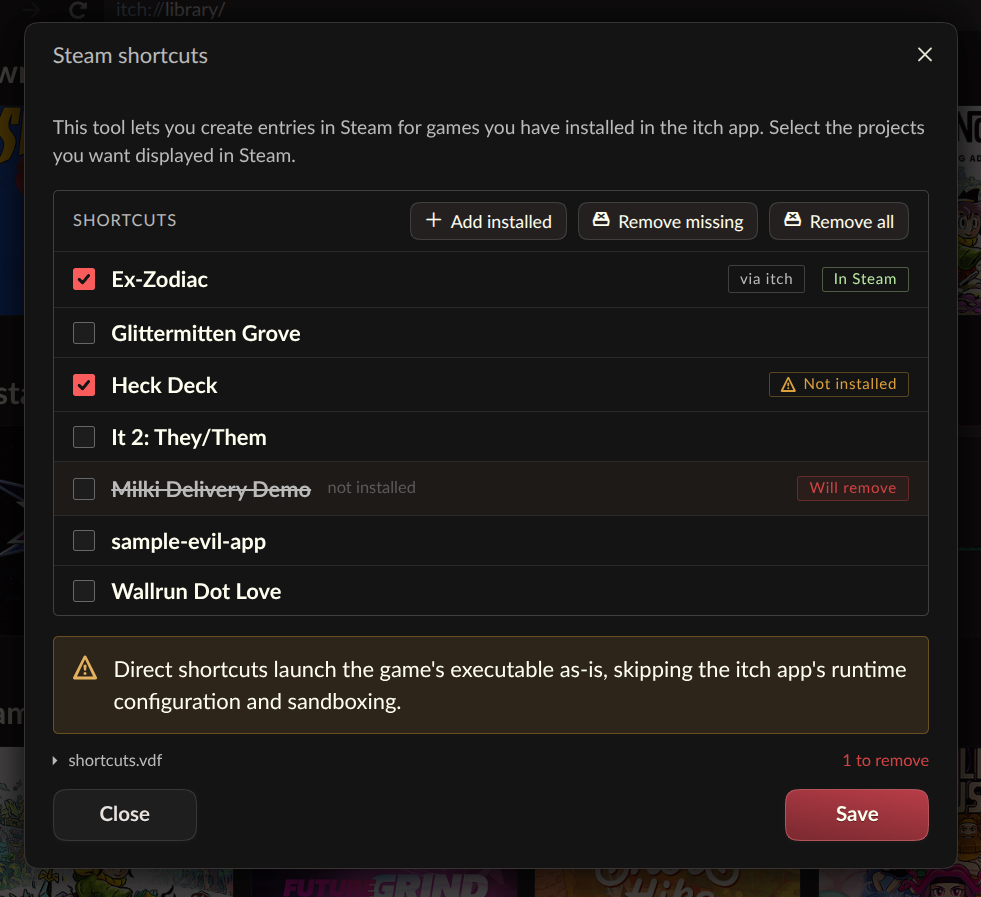
The Steam Shortcuts tool can be found from the itch apps preferences page or you can right click on any game within itch and click on Steam Shortcuts. All shortcuts synchronized to Steam are automatically placed in an itch.io collection.
This is a somewhat experimental feature, so please give it a try and tell us if you encounter any bugs. In order for the highest compatibility, you can configure each shortcut with two different launch modes:
Steam shortcuts needed a way to start a game without the full app in the way, so we added one. The new headless launch mode starts an installed game with a single command:
itch-setup --run-game <gameId> [--profile-id <profileId>]
We built this for Steam, but it isn’t tied to it. Any launcher, shortcut system, or script can use it, and we hope this makes it easier for other launchers to add itch.io integration.
Check out this guide we put together for interfacing with the itch app to build your own custom launcher: /docs/butler/launcher-integration.html
A headless launch still respects everything you’ve configured in the app. Sandboxing, prerequisites, per-game launch settings, play time tracking, and the API key passed to the game all work the same as launching from inside the app. (Under the hood this is a new butler launch subcommand that runs the launch machinery directly against your existing app database, while itch-setup locates your installation and settings and hands off to it.)
Note that not every type of game is supported. For example, HTML5 games require a browser, so if you attempt to use --run-game on an HTML5 game, the itch app will launch in order to run the game.
If you’ve downloaded a game from itch.io outside of the app, you can now register that folder with the app using the new Link existing folder… option, instead of downloading it again. Open the game’s install dialog and you’ll find it alongside the normal download options.
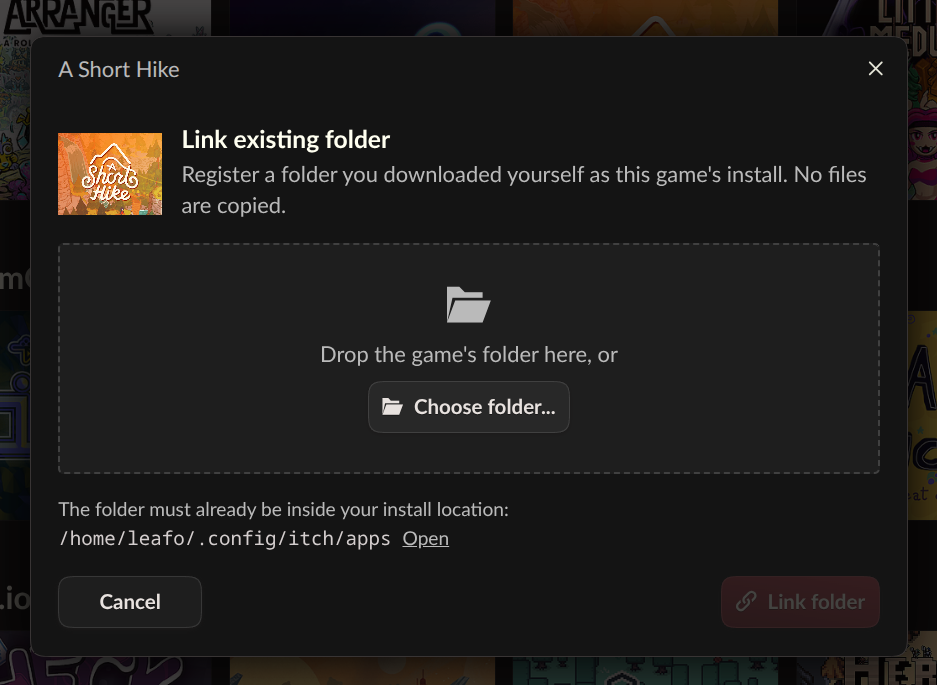
Once linked, the game appears in your library as installed, and it can be launched like normal.
This is an escape hatch, and we’ve kept it deliberately simple: no files are verified when you link a folder, and the app takes your word that what’s in there is the game. It’s meant for cases where a redownload isn’t practical, or where the project only offers a download the app can’t process on its own, like an external download link.
You can get the app from /app. If you already have it installed, it will update itself. You can also check for updates manually from the Preferences screen.
The full list of changes, fixes, and security hardening is in the release notes on GitHub.
Thank you to everyone who contributed translations for this version. You can help translate the app on Weblate.
That’s all for today, see you for the next update!
Did you like this post? Tell us
itch.io is an open marketplace for independent game creators. It's completely free to upload your content. Read more about what we're trying to accomplish and the features we provide.


Leave a comment
Log in with your itch.io account to leave a comment.
This is awesome!! I'll def check this out. any chance you'll be adding mobile support? There's been a big increase in Android handhelds and I think adding easier set up for mobile games and supported format work be greatly welcomed
This sounds very cool, and will have to check it out!
noice
Itch says it can't determine what user to make the shortcuts for ( i've already linked my steam account to it)
Can't wait to test this. I would really like a way to choose which version, wine GE for example, of wine this app uses instead of using the system wide wine. Some windows only games break when updated and using Lutris, GOG etc. These are great improvements though
Steam integration is not for me because I only support DRM free games but if you also add a GOG integration I would be more than happy.
Purchasing on Steam does not mean your game comes with DRM. Many GoG titles are DRM-free on Steam:
https://www.pcgamingwiki.com/wiki/The_big_list_of_DRM-free_games_on_Steam
Thanks for the reply and the clarification and sorry for the misunderstanding because what I meant was that I want to support companies who advocate DRM free gaming (like GOG, itch.io and some other small companies) and therefore I only buy my games there and never on Steam. Furthermore "without DRM" means that I still need the Steam client to install the game and that's what I don't like and I also don't like to pirate a game to get a standalone installer because I want to pay the people who made the game to get the installer officially.
Yeah I respect that dedication, I tend to buy on GoG and itch but as a Linux gamer I sadly find Steam much more conveniant, less tinkering to get my games running than using Heroic or Lutris. I do support DRM free and that's why I sometimes buy games on GoG that I already "own" on Steam even if I don't plan on playing them in the near future. However the sad reality is that most publishers treat GoG users as second class citizens and many updates, languages or DLC never make their way to GoG:
https://docs.google.com/spreadsheets/d/14haGnU2kcY6wV6ssBeyW6_mMk6kkVqZX-QvMKlgX...
Incredible! I also just discovered the upgrades of 26.15 and 26.17, and they’re making this launcher just perfect for small games. Great to see the itch app evolving, this is some amazing work.
Steam integration helps us all! Great work!
Do you plan to update the Mac version?
This is awesome, thanks for your work!
Awesome