Hello,
I may have encountered a graphics-memory retention/leak issue in PixelOver 0.19.1 on macOS. I searched the existing Report topics but could not find the same issue.
Environment
- PixelOver 0.19.1 stable, Steam version
- macOS 26.5.2 (build 25F84)
- MacBook Pro (MacBookPro18,2)
- Apple M1 Max, 32-core integrated GPU
- 32 GB unified memory
- Metal renderer
Image used
- PNG, 896 × 1344 pixels
- 8-bit RGB, non-interlaced
- File size: 84 KB
Observed sequence
1. I launched PixelOver 0.19.1 and worked with the attached 896 × 1344 image in a 2D project.
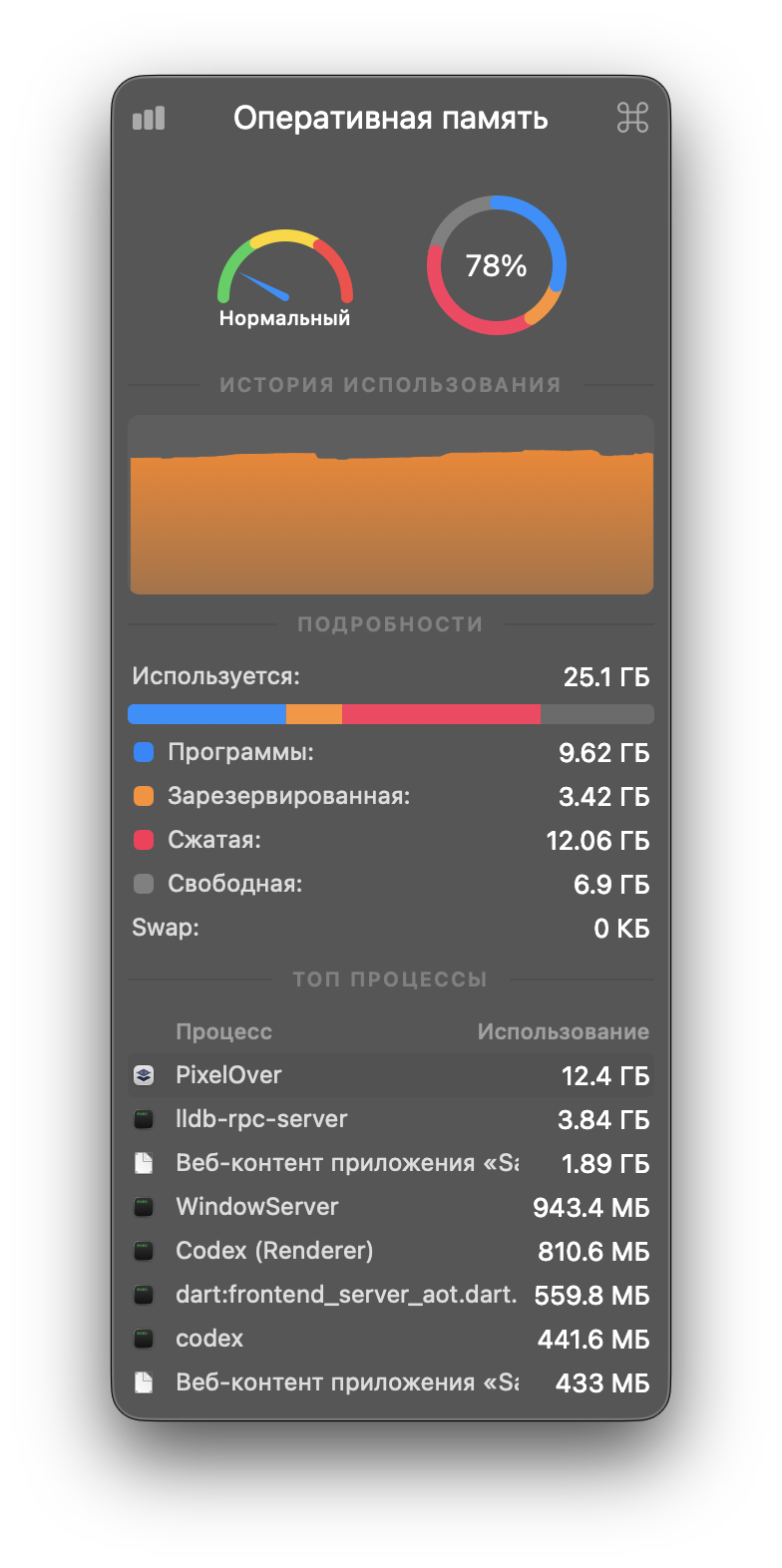
2. After approximately nine minutes, Activity Monitor reported 12.4 GB of memory for PixelOver.
3. A `vmmap -summary` capture shortly afterwards reported a 12.8 GB physical footprint.
4. The application remained responsive and macOS compressed most of the allocation, but the memory remained attributed to the PixelOver process.
Observed memory details
- PixelOver physical footprint: 12.8 GB
- Writable regions: 13.1 GB total
- Compressed/swapped writable memory reported by vmmap: approximately 12.0 GB
- `owned unmapped (graphics)`: 11.5 GB
- Approximately 2,674 `owned unmapped (graphics)` regions
- Activity Monitor showed 12.06 GB compressed memory and 0 KB disk swap
The process RSS later appeared much smaller (approximately 650 MB), but `vmmap` still reported the 12.8 GB physical footprint because most of the graphics allocation had been compressed.
Log observation
The session log contains 7,447 repetitions of this error:
ERROR: Condition "p_dest->get_format() != p_src->get_format()" is true.
at: merge (custom_modules/pixelover_module/po_image/po_image.cpp:511)
This repeated image-format error appeared during the same session as the graphics-memory growth.
The full session log is available on Google Drive:
https://drive.google.com/file/d/1_BsIL6ATFB2Aqw_XXEQBvel3NSsScrrg/view?usp=sharing
Expected result
PixelOver should reuse or release intermediate graphics buffers, and a single 896 × 1344 RGB image should not cause the process footprint to grow to approximately 12.8 GB.
Actual result
Graphics allocations accumulated to approximately 11.5 GB and remained retained/compressed while the PixelOver process stayed open.
Reproduction note
I have captured this occurrence with the full log and memory diagnostics, but I have not yet isolated the exact editor operation that begins the accumulation. Please let me know if you would like me to test a specific action, renderer setting, image format (RGB versus RGBA), or canvas size.