
On Sale: GamesAssetsToolsTabletopComics
Indie game storeFree gamesFun gamesHorror games
Game developmentAssetsComics
SalesBundles
Jobs
TagsGame Engines
A jam submission

Wizard's Unpaid TaskView game page

Submitted by Debashish0Sarker — 20 hours, 47 minutes before the deadline
Add to collection

Play game

Wizard's Unpaid Task's itch.io page

Assigned Twist
Field Work

Imaginary Cameo Used
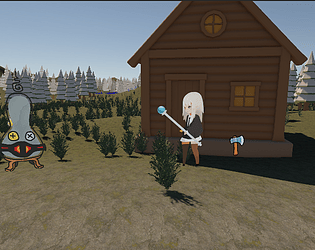
Furny appears as the Field Researcher, using artwork by Caxt Nova. The Imaginary Game Jam logo appears on the main menu. The game also uses a community-contributed dragon sprite by Boloy.

Prize Eligibility Confirmation

I am 18+ and can receive compensation if eligible

I would like to be considered for cash prizes if I win.

Leave a comment

Log in with itch.io to leave a comment.

Comments

Submitted

Cute game!

If a game lets me chop trees, I'll just chop trees forever.
Harvesting this much wood here feels so satisfying!

Developer(+1)

Thanks so much, I am glad that you enjoyed it!

Submitted

For first game jam, this is a good effort :)
Good job!

Developer

Thank you

Submitted

I am unable to play due to not being on windows :( 

Developer

I am really sorry, I didn't know how to make this game playable in a browser.

Submitted

Which engine did you use? :)

Developer

Unity 6

Submitted

Here’s the Unity 6 → itch.io workflow:

  1. In Unity, open File → Build Profiles. Select Web, or choose Add Build Profile → Web if it is not listed. If Unity prompts you to install Web support, install it through Unity Hub. Then select Switch Profile. Unity build profile guide
  2. Check that your game’s scenes are included in the build. Click Build and Run to test it in a browser. For the version you upload, turn off Development Build and click Build. Unity Web build settings
  3. Open the folder Unity built. Zip its contents, so index.html is at the top level of the ZIP alongside the Build and other generated folders. Do not zip the enclosing folder.
  4. On itch.io, create or edit your game page, set Kind of Game to HTML Game, and upload the ZIP. Set the embed size or choose fullscreen, then save and preview the page. itch.io HTML game guide
Developer(+1)

Thank you for the instruction.