Indie game storeFree gamesFun gamesHorror games
Game developmentAssetsComics
SalesBundles
Jobs
TagsGame Engines

AnimLab

FREE premiere animation software suite 路 By Keves

Please report any bugs here! Sticky

A topic by Keves created 81 days ago Views: 976 Replies: 74
Viewing posts 21 to 26 of 26 路 Previous page 路 First page

hi, i made an itch account just to report a few bugs that are making the application close to unusable on my end. one seems like it might be a ui bug, the new drag to hide or show toolbar at the top completely obscures the 1st item of each context menu, which ends up making it impossible to undo from the more options panel, or even create a new file, and so on. the other major bug i've encountered is that either i'm missing the point of how the first few "lasso select(?)" sort of tools on the left toolbar are supposed to be used, or it's some kind of bug (my guess). if i choose the button with the cursor icon, for example, doing so renders every other tool or option i try to use useless, and even if i select a tool that's not a lasso tool of some kind (i assume it's a lasso because it shows a dashed/dotted line as the stroke, not sure, disclosure i'm rather inexperienced with advanced level art applications)-- they still no longer do anything, draw tool/brush doesn't doodle or show that a stroke is even being made anymore. if i touch the canvas with that cursor icon tool selected, it does pop up some sort of viewport/camera looking thing, a yellow outlined box with a point in the middle that when dragged and dropped it makes the canvas move or rotate, seemingly according to where i pinch. second bug is in older versions too from what i've noticed. as an extra addendum, on my end within the application from the help panel > report a bug, the link that says "itch io bug report thread" does not work, i tapped it, pressed and held, tried several times, it doesn't send me to this page or anywhere, it's as good as underlined text and not much else, so i had to look this page up on my browser. i do not use a stylus or any external hardware/accessories. aside from all that, it runs pretty smoothly at least from what i was able to try. keep up the good work 馃憤. heres a video of the issues as best i could capture

, and i'm unsure how to hide the bug report under a neat info tab so i hope this is good enough and that i didn't break any rules posting.  AnimLab Bug Report
Version: 0.2.26
Runtime: Tauri
Screen: 1316x822
Viewport: 1315x821  DPR: 2.25
Max touch points: 5
CPU: 8 logical cores
GPU / adapter capabilities: ARM, WebGPU
RAM: 15526 MB

AnimLab Input Diagnostics Report
User agent: Mozilla/5.0 (Linux; Android 16; SM-X920 Build/BP4A.251205.006; wv) AppleWebKit/537.36 (KHTML, like Gecko) Version/4.0 Chrome/157.0.8103.50 Safari/537.36

Samples captured: 50
Pointer type(s) seen: touch
Pressure range: 1.000 (last: 1.000)
Tilt X range: 0.000 degrees
Tilt Y range: 0.000 degrees
Last contact geometry (width x height): 0.9 x 1.3
Last event isPrimary: true
getCoalescedEvents() available and returning samples: yes (48 total across buffer)

== Log ==
Full log file: /data/user/0/com.animlab.studio/logs/animlab.log

== Session log (latest 200 entries) ==
2026-11-20T16:35:30.867Z [info] event=device_info operation=device_info_capture code=AL-1010 cpu_model=unavailable cpu_cores=8 ram_mb=15526 gpu_vendor="ARM" gpu_name=unavailable gpu_driver=unavailable gpu_backend="WebGPU" version=0.2.26 platform=android
2026-11-20T16:39:39.330Z [error] event=recovery_failed operation=session_marker code=AL-2007 version=0.2.26 platform=android
2026-11-20T16:39:43.997Z [error] event=recovery_failed operation=session_marker code=AL-2007 repeats=1 version=0.2.26 platform=android
2026-11-20T16:39:52.823Z [error] event=recovery_failed operation=session_marker code=AL-2007 version=0.2.26 platform=android
2026-11-20T16:39:57.830Z [error] event=recovery_failed operation=session_marker code=AL-2007 repeats=1 version=0.2.26 platform=android
(1 edit)

As an Android user, how tf do I add audio, also I copied the drawing, right? And when I pressed paste while on another frame, it said "unable to use clipboard", additionally, it copied in my text clipboard, which is weird considering I want to paste an IMAGE, oh and, the bucket tool even at 0 overflow crosses the lines if they're drawn with a tool at 1 line size, and the overflow makes the bottom of larger lines look a bit weird

AnimLab Bug Report

Version: 0.2.25

Runtime: Tauri

Screen: 1280x800

Viewport: 1280x800 DPR: 2

Max touch points: 5

CPU: 8 logical cores

GPU / adapter capabilities: Qualcomm, WebGPU

RAM: 7708 MB


AnimLab Input Diagnostics Report

User agent: Mozilla/5.0 (Linux; Android 15; 2405CRPFDG Build/AQ3A.240912.001; wv) AppleWebKit/537.36 (KHTML, like Gecko) Version/4.0 Chrome/157.0.8103.50 Safari/537.36


No pointer events captured yet - move or draw on the canvas, then reopen this dialog.


== Log ==

Full log file: /data/user/0/com.animlab.studio/logs/animlab.log


== Session log (latest 200 entries) ==

2026-11-21T12:51:37.596Z [info] event=device_info operation=device_info_capture code=AL-1010 cpu_model=unavailable cpu_cores=8 ram_mb=7708 gpu_vendor="Qualcomm" gpu_name=unavailable gpu_driver=unavailable gpu_backend="WebGPU" version=0.2.25 platform=android

Also what do you exactly mean by "complex projects", this important because I only have 8gb of RAM and I want to use your app for my future game because I can turn it into PNG format(apparently at least, haven't actually tested it yet) and I'll have a lot of drawings here and there

I won't ask you to change this, but I don't like the key frames and ease stuff, I'd rather just do a pure frame by frame, then again I can just do that, ATP I'm just venting a bit... Sigh...

Also what program did you use to make this app? I would like to know in case it might be compatible with my tablet, I mean, it would be awkward to ask my dad to turn the computer and importing... I just want to code on my own device as a germaphobe(also no I would not use godot, the android ui is doesn't exactly match up with the tutorials and want to use as few apps as possible for my projects)

Also, the export doesn't work and a simple save makes the file essentially unviewable

The click and drag doesn't work on imported images.

(1 edit)

Thanks so much for fixing the image thing!

 New problem though, trying to make a 360 2d rig, but when I try to add the rig on top of a new key frame (so I can switch between the angle of the same limb in a turnaround), or draw on top of the rig, the drawing dissappears

I might just not know how to make one , but I thought I'd let you know! (Lenovo idea tab pro-android btw)

Update:

The drawing is still there just needs to be bound to the rest of the skeleton buy once its bound the first time, you can't add more new key frames  other than the ones you've already drawn

i have issue with importing image reference. the system said this file can't be imported. somehow after trying other files format, it's the same not working at all.


Hello! I need a bit of help and some little hiccups to report. 

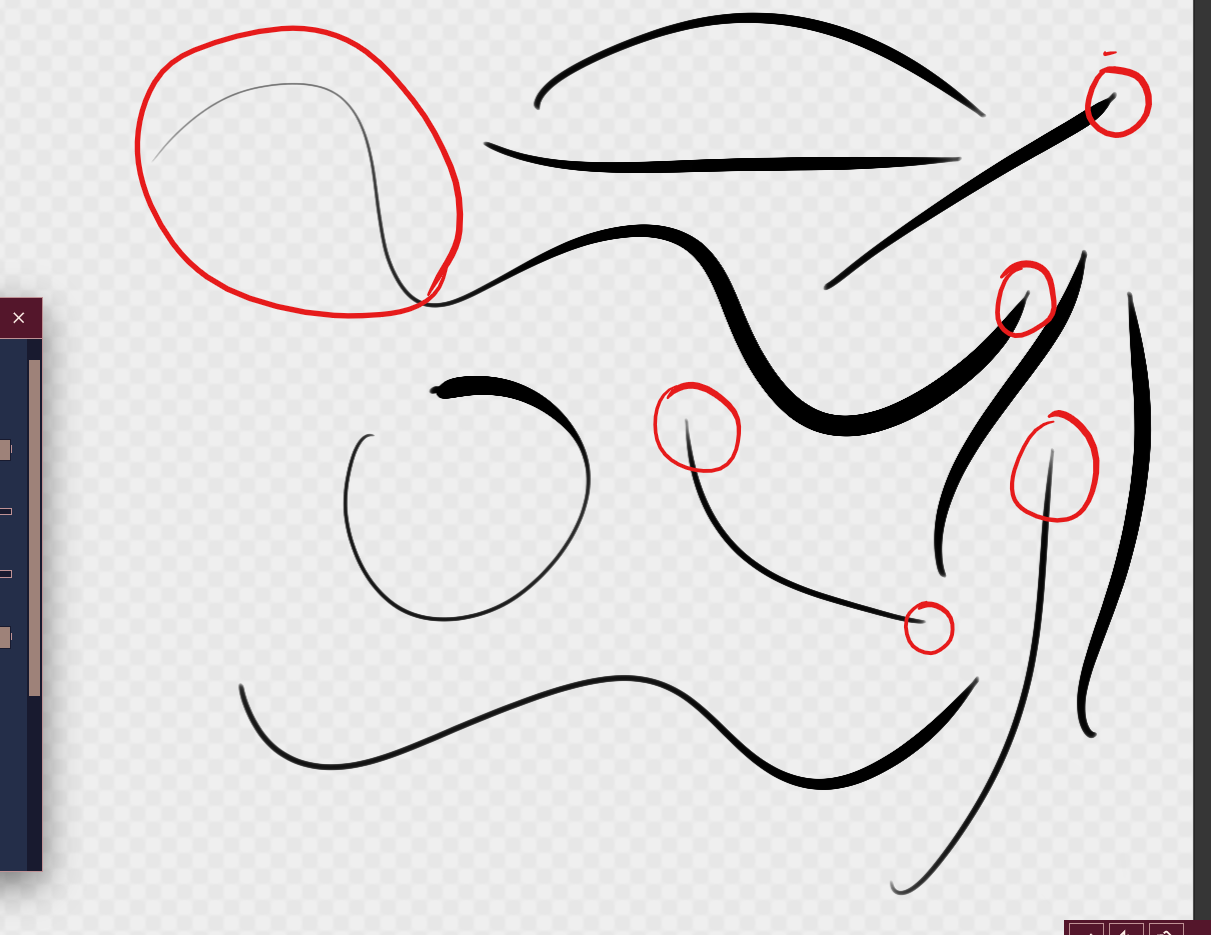
I cannot figure out how to make the hard round brush not have opacity/density, but I've made sure no settings are on to have opacity by pressure. I also noticed a little issue where the ends would would awkwardly do this little thing after doing a brush stroke  (I put a pic at bottom)

I've noticed two other lil hiccups;

While in the Settings > Preferences, the scroll bar can't be clicked/dragged. 

This isn't technically a bug, but may I request that the program to have the capabilities to have 'monitor memory', where it remembers which monitor for it to open on? Just so I don't have to drag it over to my tablet screen and maximize the program every time I open it?

Thanks for making this program! I can't wait to see it get further developed, it looks great so far!

Viewing posts 21 to 26 of 26 路 Previous page 路 First page