
Indie game storeFree gamesFun gamesHorror games
Game developmentAssetsComics
SalesBundles
Jobs
TagsGame Engines

plant daddy

grow plants in your sunny apartment! · By brady soglin

Support Thread Sticky

A topic by brady soglin created Feb 14, 2020 Views: 17,745 Replies: 268
Viewing posts 41 to 60 of 104 · Next page · Previous page · First page · Last page

oh no! It appears that the house disapeared??? well the tab was sitting in my browser for a long time and then i saw this:

(1 edit)

The "To-Do" list isn't refreshing anymore it still doesnt refresh when i reload the page, is this supposed to happen?

Developer

Hey, thanks for posting these! re: the to-do list, you probably have reached the end of the list! Congrats!

A quick question: did the "room disappearing" bug stop when you refreshed the page?

(2 edits)

yes the background bug didnt happen again

I need something to suppresso my depresso.

Developer

Have you tried turning that frown upside down?

(+1)

I've tried all to much :<

Developer

<3

Thnks though <3

I'm sad now... I went back into the game after reading an article, and it killed all my plants and progress. 😭

Show post...

sorry to hear that :(

(1 edit)

Hey so, when Plant Daddy opens, it used to boot in full screen mode. Now it only opens for me in large windowed, and while I can change the resolution size, no matter what size when I am trying to navigate the game my cursor does not line up with the "cursor" that selects in game objects. The result is that I am regularly clicking a plant over or a shelf below the plant I want, which is exceedingly frustrating when you're trying to have an efficient plant turn-over rate to farm multiple trait plants.

Edited to add: I cannot change it from windowed to full screen. I tried using f11 key and right clicking the window bar, but it wont give me an option.

Developer

Hi Featherfrost, sorry you're having problems.

  • I removed the fullscreen option from the downloadable game, that's why the feature is gone. A bug in the engine I use was screwing with the fullscreen so had to get rid of it
  • Sorry about your problems clicking, that's really annoying. I have noted that bug and have it in my list of things to fix. Tbh I am super busy right now and might not have time to get to it for a while, but I appreciate you letting me know!
(+1)

Duly noted! I'll just use the browser version for a while, not a big deal. I hope things calm down for you soon! <3

Developer

Thank you for your kind words, appreciate it :)

Unrelated, but I often wonder... what did this poor (player) do before they unlocked the bathroom? It takes what must be weeks in game before I'm able to fix the window, let alone the bathroom.

Developer(+1)

Some questions it's better not to know the answer to…

Every now and then, I refresh the page and get the message that my browser "does not support webgl" even though it clearly did earlier that day. I'm using chrome btw. None of the fixes work because it's already enabled everywhere that the troubleshoot people tell me to enable it.

So I just loaded in my game and all my data is erased with out  me doing anything what should I do????

Developer

Hey Strange, sorry to hear that :( were you playing the browser version? People have run into issues with their data being erased from the browser version–if you are willing to try again on the desktop version, that is more stable. I haven't been able to find the source of the problem for browsers yet

Sorry again for this problem, I know it must be frustrating

Thank you for the information, I'll make sure to keep this in mind.

(1 edit)

Hello Mister Soglin, I love your game very much :D but I think I found a problem or bug.

1. I can't find the to do list in the plantdaddy-pc-1.2.0 version or it doesn't appear for me. Not sure why.

2. The Volume: I can't tone it down it only increases in volume and I needed to throw away my head set or else I would have hurt my ears a lot.

Developer

Hello! Thank you for reporting these bugs! I'm hoping to fix them soon. Can you give me more details about bug #2? Never heard of that before. You just played through the game and it never showed up?

Hello and anytime :) That's okay, please don't rush anything :)

I played it at first on my browser but I wanted to play it as the pc version and bought it (2 days ago). Then I re-zipped it on my computer and started it. I like the background sounds but I wanted to make it quieter. I went to the setting and wanted to quiet it down but it went louder and almost like a screeching noise. It was so painful that I needed to throw away my head set xD

(1 edit)

I also tried to find a community-section than just adding a comment as new post, so heading to a sticky-note for my feedback and questions if those features being just found elsewhere or not added yet e.g.

How to get rid of the infobox "your apartment is empty..."?, when hovering to the windows (I adore the slidebar for bit opening that pane there), it kinda blocks my view to the "back"-button. It somehow vanished when clicking that top-left icon anyway.

First time clicking the shopping-cart in the top-left corner shows "9999" for some moments, referring to the bottom-left plant and red icons. Also when just hovering over them, I'd like to see bit of hints about what that red-icon could be? No subtitles seem to be available yet.

shopping-cart: oh, that red icon representing blossoms. Cool feature of using two colours, also the tree outside the window looks cute in animation. Browsing through plants and being excited if I try to buy unlocked ones: "locked until you buy unlocked (region)", I'd suggest it appearing like ...without that "locked"-textline somehow?

Browsing through furnitures: I could even see listed rooms like "unlock bathroom" as furniture tags? Actually I've expected a section for viewing or filtering just rooms only.

doodads/decoration: another "unlock bathroom"-item, I guess it could be like "locked until you unlock the bathroom" or something similar?

Switching from the buying-section to my inventory for the first time: each of those sections below showed left/right-arrows for some moments.

setting+credit looks cool so far.

Buying and placing my plant and another info-hint appears but can't be hidden even after placing my bought plant (or directly clicking it for more interaction/status or if the leaves getting ready to get some additional water added). I'd prefer e.g. hiding it by clicking or getting a setting-checkbox: "hide hints" which updates/affects either showing or hiding "all" or "just future texts".

Being able to "water" plants after clicking 4-leaves-textline, just zooming out and still that "he's ready, water your plant", nope not in mood yet so somehow don't want to be notified if I didn't instantly water them some moments ago xD Clicking the right window and still that text won't give-up and keeps mentioning to water that plant.


camera-mode when taking a pic (clicking its button) let me read those lines: "An error occurred running the Unity content on this page. See your browser JavaScript console for more info. The error was: TypeError: child is null". Used browser: basilisk similar to firefox, system: windows8.1, computer no mobile-device. While I could get into the cam-mode and also exit it, just taking a pic get that error mentioned as popup-hint (like if a browser's tab won't react/getting slowed down its progress, with ok/wait/debug-options, etc.) afterwards one of my computer's graphical-program still refers to an image getting able to save, including a nickname like your game's title. So I guess somehow the error wasn't quite aware of it? Another testclick on "take picture"-button let me instantly get the "save pic"-reference, no error there and I didn't check that "don't show this hint again" recently. I'm using "photofiltre7"-app and it mentions the file-nickname, "which is png-file in kb-size" & "from:blob". I'd prefer to see e.g. more hints about this game than just "from:blob"?

Opening without saving get me curious: with or without text-hints appearing and lol, yes even those hints getting visible there. In my case: water your plant. (nope, still not the right time to use the water-can, at least if it's about my mood or expectation when getting a selfie of my plant / room, could there be an option that pic also won't include text-lines, either in setting or somewhere else sounds useful)


The game's title and pic made my curious texting it & I adore the graphics, wow raindrops on that window (when bit opening/clicking and adjusting this option), look adorable.

What grows in the minifridge?

Just had a few hours of progress reset after closing the tab and coming back after a bit. Nothing major was lost, but still kind of jarring. Also lag here and there, specifically when mass collecting/watering, or looking through the inventory. I've amassed a ridiculous number of plants which I don't think helps

Developer

Hey, thanks for sharing! Sorry you lost some progress. I've got an update in the works that should have some data stability fixes

Hey, I love the game! I just have one question; how do you make the air wetter/ moister. I cant grow my lil mushrooms because the air is too dry lol. Thanks!

You need the bathroom, As far as I can tell, or the mini-fridge.

I have both and it still says the air is too dry. If I put the mushroom in the fridge it says its too cold.

(1 edit)

Turn the shower on in the bathroom.

Dude click the bathtub then that all also place your plants on the tub not near it.

I have an Idea, Once you reply I will tell you what it is.

What

Well, I was kinda waiting for the dev but.


While it is raining if you open the windows it should water the plants that are on the window sill but only if the window is fully open.

Deleted 5 years ago

I know it does not work but it would be a nice feature.

You are welcome, sorry. 

Hi I am revisiting the game after many months but It forget my progress D: It's ok though because I completed the game, but It's a nice game

Maybe you should make a sequel with more plants and stuff because it was very fun :D

Developer

:) thank you for your kind words! yeah unfortunately you can lose your browser save data if history is ever cleared or erased. if u download the game you should be safe from that!

& I am actually working on a new game with some similar concepts right now, about fossil collecting, so stay tuned for that!

oh ok, yay

I have a question about one of the To-do list tasks. It says I'm supposed to "Use a Plant Nursery to grow a plant" and when I put a plant on it and it fully grows it doesn't give me the notification that I completed that task. Any help would be grateful!

Developer

Ah, that means use another person's seed to grow a plant! Check the plant sharing thread for cool seeds

So uh can you fix the candles because when they are near a plant you cant click the plant only the candle and it also sometimes makes the currency the plant is producing disappear. 

Developer

Hey, thanks for the bug report! I'll add it to my list of things to get to. I'm not working actively on this game right now bc I'm finishing up another game, but this is good to know about for when I have time to get back to plant daddy

Thanks!

Hi! so i just started playing again, and I got four plants, but theyve all fully grown and I only get blossoms. I only have 2 leafs and it wont give me anymore to buy new plants haha. I saved up for a nursery but forgot i need to use leaves to grow a plants. should i reset the game? 

Developer

hmm... dang, that shouldn't be possible! the game is always supposed to make it so you have enough to buy a plant. do you have a plant in the inventory that's not fully grown?

(+1)

oh my I forgot I did lol ':3 thank you!

(+1)

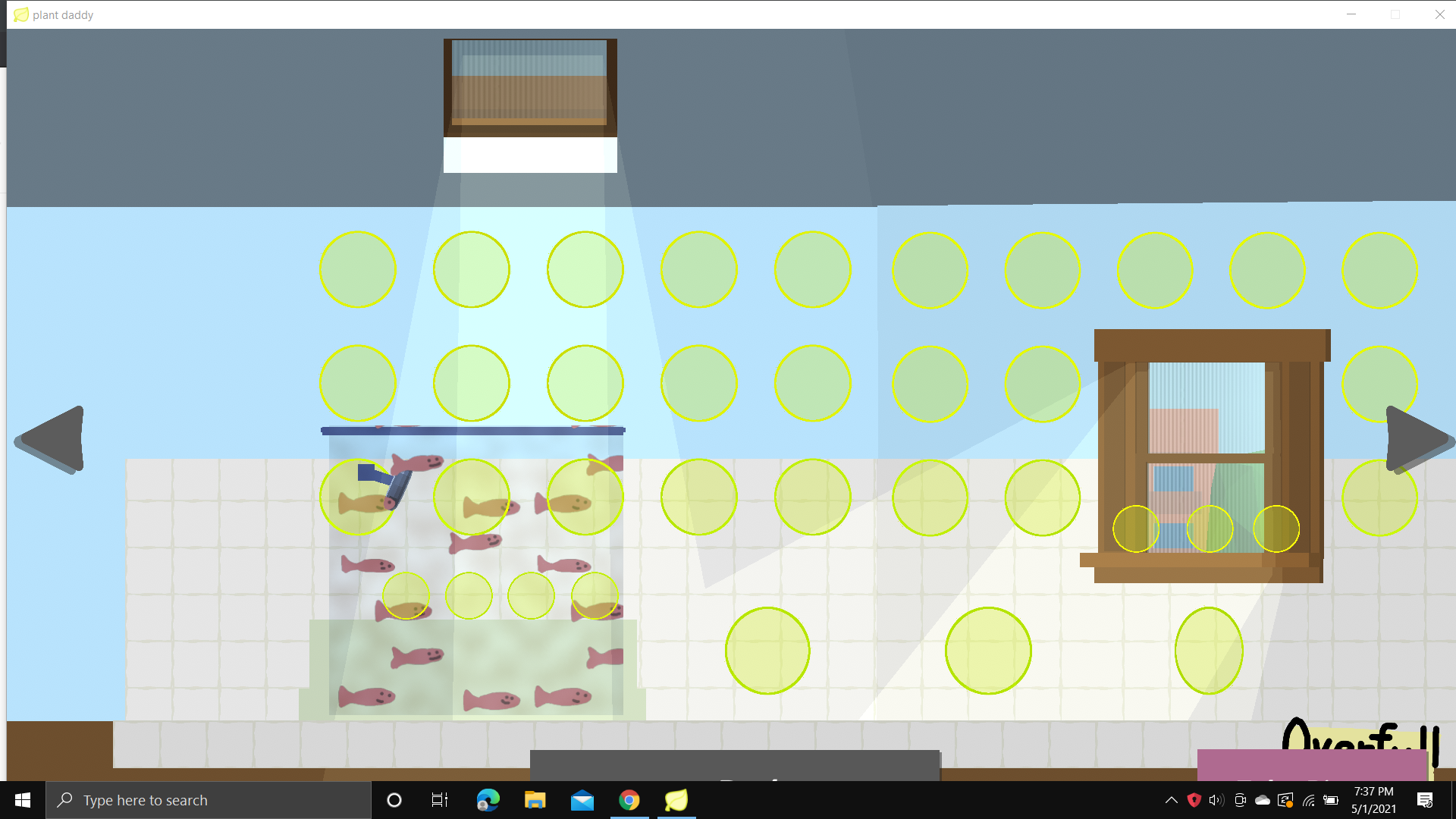
uh, hi! (I don't exactly know how things work here because I'm new. Sorry if I do anything wrong.) I have this really weird bug. I don't know if it's already been mentioned.  This happens all the time and I don't know why. Basically, whenever I open up the game it takes me to the bathroom. I can't really click on anything. I've tried reopening it and shutting off my computer. Still won't work. 
Developer(+1)

Hey, sorry to hear about this! This looks like a corrupted save to me. I'm not 100% sure how it got corrupted, but you may be able to restore from backup. Here's how to do that (on PC):

  1. Shut down plant daddy
  2. Go to the folder  `C:\Users\<YOURUSERNAME>\AppData\LocalLow\overfull/ LLC\plantdaddy`
  3. You should see a number of files there: `gamestate.gd` and `gamestate-backup.gd`
  4. Move both files out of the plant daddy folder onto to your Desktop
  5. Restart the game. The game should think you are starting a new save
  6. Go to the settings menu, and `Load from file` on `gamestate-backup.gd`. Hopefully that will be an uncorrupted save!

Hope this works for you, and sorry you ran into the problem in the first place!

Ahh, thanks a lot! I've started on the browser already though. I guess I could try this and use my downloaded version just in case my internet stops working or something. Thanks anyway! :)

Found a bug where plants can grow in your inventory so you can grow mushrooms before unlocking bathroom. Just buy a plant, put it in your inventory and every cycle take it out harvest it's petals/blossoms and stash it again.

this is how i did my mushrooms for a while and i was like "this definitely ain't right"

NOOOOO ALL MY HARD WORK NOOOOO

Viewing posts 41 to 60 of 104 · Next page · Previous page · First page · Last page