Indie game storeFree gamesFun gamesHorror games
Game developmentAssetsComics
SalesBundles
Jobs
TagsGame Engines

Autonauts

Make and teach robots to automate the world! · By Denki

Feedback, Bugs 'n' Stuff Sticky

A topic by Denki created Jul 12, 2017 Views: 83,200 Replies: 1,410
Viewing posts 361 to 380 of 496 · Next page · Previous page · First page · Last page

Hey When I save some blueprints will disappear and i'm trying to bride with robots but i can't

Relatable! >~< I have a similar problem.

Developer

Try updating to 13.3 and see if that fixes the problem. Thanks

There is a crisis! In my last save I had structures built (Walls and fences). But when I came back today, some of them dissipated!

I deleted the save, so I don't know a way to show you, but if it happens again I will!

Developer

There was a bug which may have caused this which has been fixed in 13.3. If you can find your old save it should still work with the new version.

I used it in 13.3, however I migrated to 13.4 to see if it's fixed!

(1 edit)

I am having trouble saving. The game stays on the Save Game? screen after I press yes. I am on a Mac with the newest version 13.4. Am I doing something wrong or is this a bug?

Developer

Mac doesn't like saving in the same folder as where the game is installed. Try saving to the desktop or another folder.

Thanks for the help

when i try to load my game all i see is a white screen help plz

Developer

That doesn't sound good :( Are you running on PC? Can you send me a file called Autonauts_Data/Output_log.txt please and I'll see if I can fix it for you.

Thanks

i have the same problem can you help me

(1 edit)

the game sometimes loads when i load autosaves but rearly and my autosaves are far behind 

Hey ! 

I love this game but I can't save my game  !! Can you help me because when I click on the save button  a gray screen is displayed :( 
PS: Sorry for mistakes , I'm french 
Developer

Hi! Try saving into a different directory like the desktop for instance.

Thanks!

Hi! Thanks but i changed the place of all files but it's not working and i delete and reinstall and any changement :(                                                                 I need help for saving my game please !

PS:I'm still french ;)

Developer

Ok I don't mean change the place where you install the game. I mean change the place where you save your levels. So save the levels onto the desktop. Let me know if that still doesn't work. 

The problem is that the screen to select the place where I want to download is not displayed

Developer

Oh I see. Sounds like it's breaking. Are you running on Windows?

yes

Developer

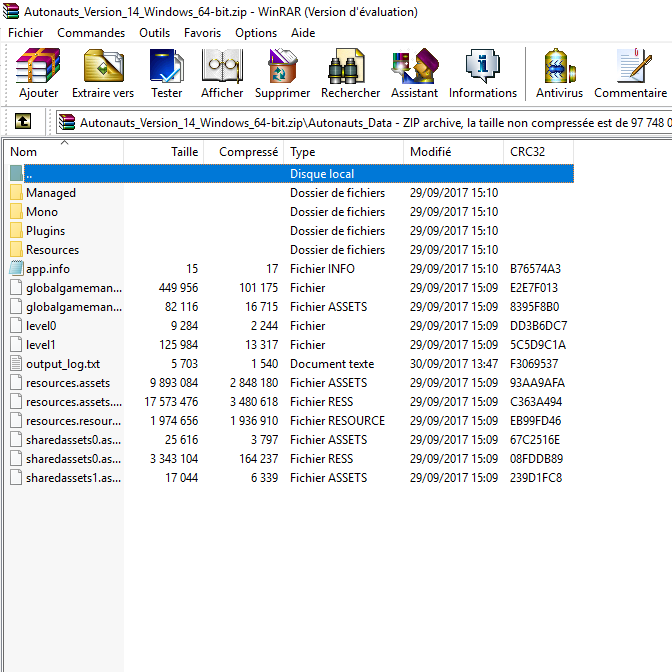
Ok can you send me a file called Autonauts_Data/output_log.txt please? You'll find it where you've installed the game.

I don't know how i can transfer file :/

Is that good ?

Developer

Not the one inside the zip file, I mean the one on your computer. Each time you run the game it will update this file on your computer

How do i actually write on a sign? :P

Developer

Press Z while holding it

thx :)

I am on version 13.4. Stared a new map played a bit. Also altered the map with Unofficial Level Editor

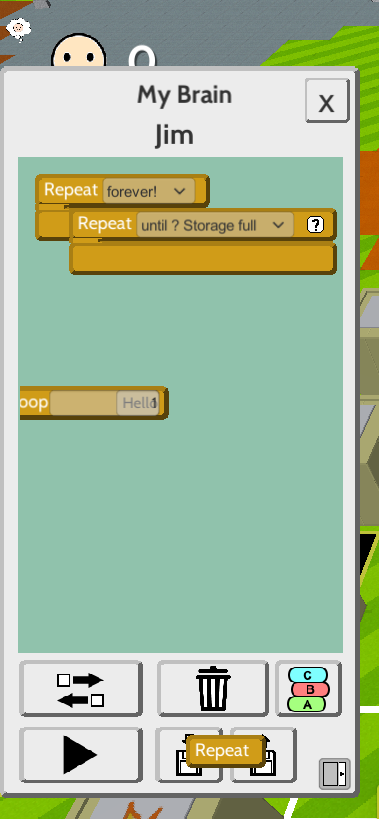
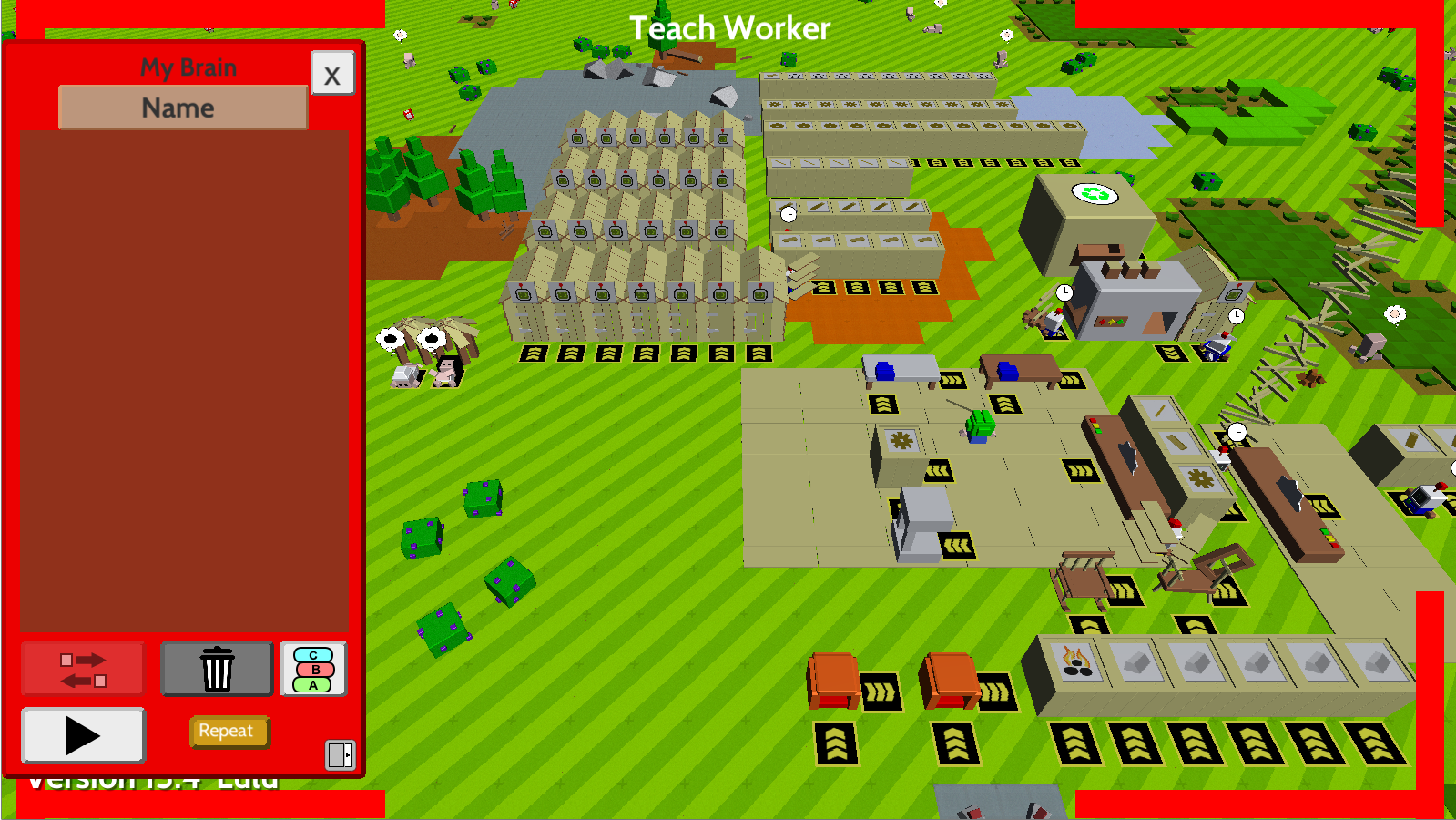
After a while bot teach screen has been messed up like the image below. It doesn't allow me to do anything. Also never get fixed even after a restart. Here is the save file

Developer(+1)

Ok it seems you've hit this problem because of something the editor is doing to the instructions. I'll forward this onto the creator of the editor and see what he makes of it.

Thanks

(+1)

Howdy, an update has been released to the editor that should correct this issue, if you still occurs after updating please get in contact with me over on the map editor, I have opened up the community to allow bug reporting.

I started a new map and edited it a bit. I continue to edit it after even playing some more. problem seems solved. Thanks.

Hi there! I'm new and I'm not in many communities...Autonauts brought me to this one... :-)

So, I enjoy playing Autonauts so much, that I have some questions about it (i think dumb stuff that everyone knows)....

....why doesn't it work, when I make a time-loop in another loop, that only has to repeat x-time? my workers repeat it forever, if this scenario happens. But...if I put various loops like "until hands full/empty" in a x-time loop, the workers will correctly stop the actions after x-time repeating...

Am I doing it wrong??  :-)

thx for help

bauinio

if you make a loop inside another loop, one probably is a "forever" loop and the other one  is the "repeat x times", that translates to "repeat x times infinite times"

(3 edits)

no, the one outside is also an "repeat x times"-loop...like in the example ;-)
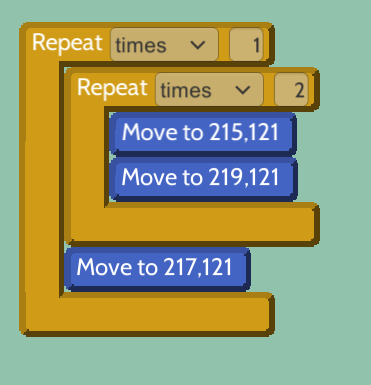
the 1-time repeat which contains all of it, doesn't work, the worker repeats it forever i think?!
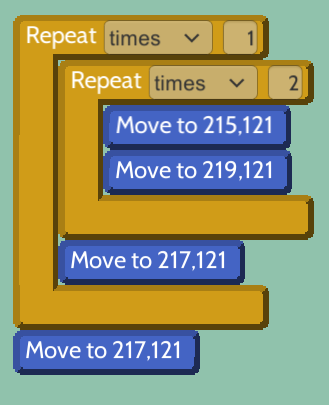
also like this, the worker repeats all forever, but he should go to 217.121 and then stop there, or i'm wrong?

like this it works, or the "repeat-x-times"-loop inside is replaced by another like "hands full/emtpy"...only when the one inside is also "repeat-x-time" it's not working...

hmmm you are right, but it used to work before :/ 

Developer

Hi. Unfortunately nested "Repeat X times" isn't supported yet. Sorry :(

(+1)

Hi! No worry, the game is so cool, and there are many workarounds to come over with it.

At least i know that I'm doing it right! :-)

Thanks for this great new game, i'm playing each major and minor release till "20 happy hangers", check the features an design/overlay-changes. great development, really nice!

Using 2 logs to get 1 coal seems like a rip off,it should give more than 1 coal. 

It's less wood (in price) if your making axes.

I guess you could say it's better in the log term! ;3

(1 edit)

It is actually charcoal, not coal. While creating charcoal, logs/branches are loosing a lot of volume during the process. It is acceptable to make 1 unit of charcoal from 2 logs. Even 1 on 1 is acceptable. It actually forces us to increase log production when we get into metal works. I personally like 2 on 1 rate. But if you hate to create log automation i can understand you :) I myself hate to create cereal seed automation because of the low yield/messy straw production and the amount of bots you need to feed everyone in the map
This is just a suggestion,

Okay Denki, think about this. how about you make us be able to SWAP characters :) We can be any character we want, as in The little mouse the dog the farmer in the autonauts thumbnail. i know this is not a super necessary but please think about it. i'd be fun. Also have different worlds not everytime the same world :P and make it bigger. make a World creation option menu. Where you can choose how big you want your map and stuff :P

Thanks for reading.

Keep on the great work Denki! :)

Developer

Yep we're going to do all of those things! We'll have proper player customisation and randomised maps in a future version.

Thanks

(+1)

Sick nice! Im excited for tomorrow's update :)

(1 edit)

I kinda wish there were clothing slots for glasses, shoes, pants and the like...

Developer

You can see there's placeholders for those things but we've just not had a chance to make any yet. We'll get around to it :)

Major bug when i was teaching a bot i had bot making automated and one of my bots put the bot into the storage in the middle of teaching cause the teaching screen to be glitched and i couldn't get out of it 

I also had a similar problem dude! i couldn't figure out what it was 


Lmao is this normal? :P

Developer

This was fixed in version 14 but only for new maps. Old maps may still have this happening

Ahh okay figures lol

If you do this the Bot will go to the top left corner, dont know what exactly will trigger this

Developer

Oh dear. I've added it to the bug list. Thanks

Developer

Actually would you be able to send me your save file please?

Deleted 8 years ago

The Save file

Uhh just asking but what's the point of the fish... the villages won't accept raw OR cooked fish

Developer

I just did a test with cooked fish and it worked fine. Are you sure the Folk was hungry?

hmm the folk just puts on a green, sour face and then throws the fish out

Developer

Yes but is it hungry? You need to wait until the happy face goes away

yep definitely hungry, i didn't feed them ANYTHING up to that point


I wonder how they're even alive...

Developer(+1)

And are they living in a hut? You need to house them first

ohh that's probably why...ok well thanks!

It would be nice if you can programm the Bots something like an if than else condition.

Also could it be nice when you programm the Bots the until not full condition with a named limit. For example do this until the Resource in the Storage reach 50.

Developer

Yep we've got "If" statements very high on our to do list but this requires a large change in the way scripts are handled so it will take a while. Same with your Repeat suggestion. 

Thanks

Well, I was playing autonauts for a while and it seemed pretty fun. I created a 3x3 simple flooring area where I was gonna put my workbenches and stuff, and when I created 2 workbenches and 2 crude benches, after I saved the game and later played it again, the simple flooring under one of the crude benches disappeared! It just...vanished. It still worked and all, but I couldn't place it back and it looks very weird. Please send help!

try deleting your workbench (when you place it down again it'll already be built) after its deleted , put down the flooring then thw workbench, that's the best I can do for you, sorry.

Developer

Oh dear. What's the version number you're running? We had a bug in an earlier version that was deleting things like that but it was fixed

I just noticed that in version 14 basic bots, when assigned to use a scythe on fertilized cereal crops will "stop" after awhile. they will keep doing the animation, but only on a single plant, and the plant won't vanish and produce wheat like normal. I think this is a bug, it happened both before and after I restarted the game.

Developer

Yep that's a known bug but thanks for reporting!

Viewing posts 361 to 380 of 496 · Next page · Previous page · First page · Last page