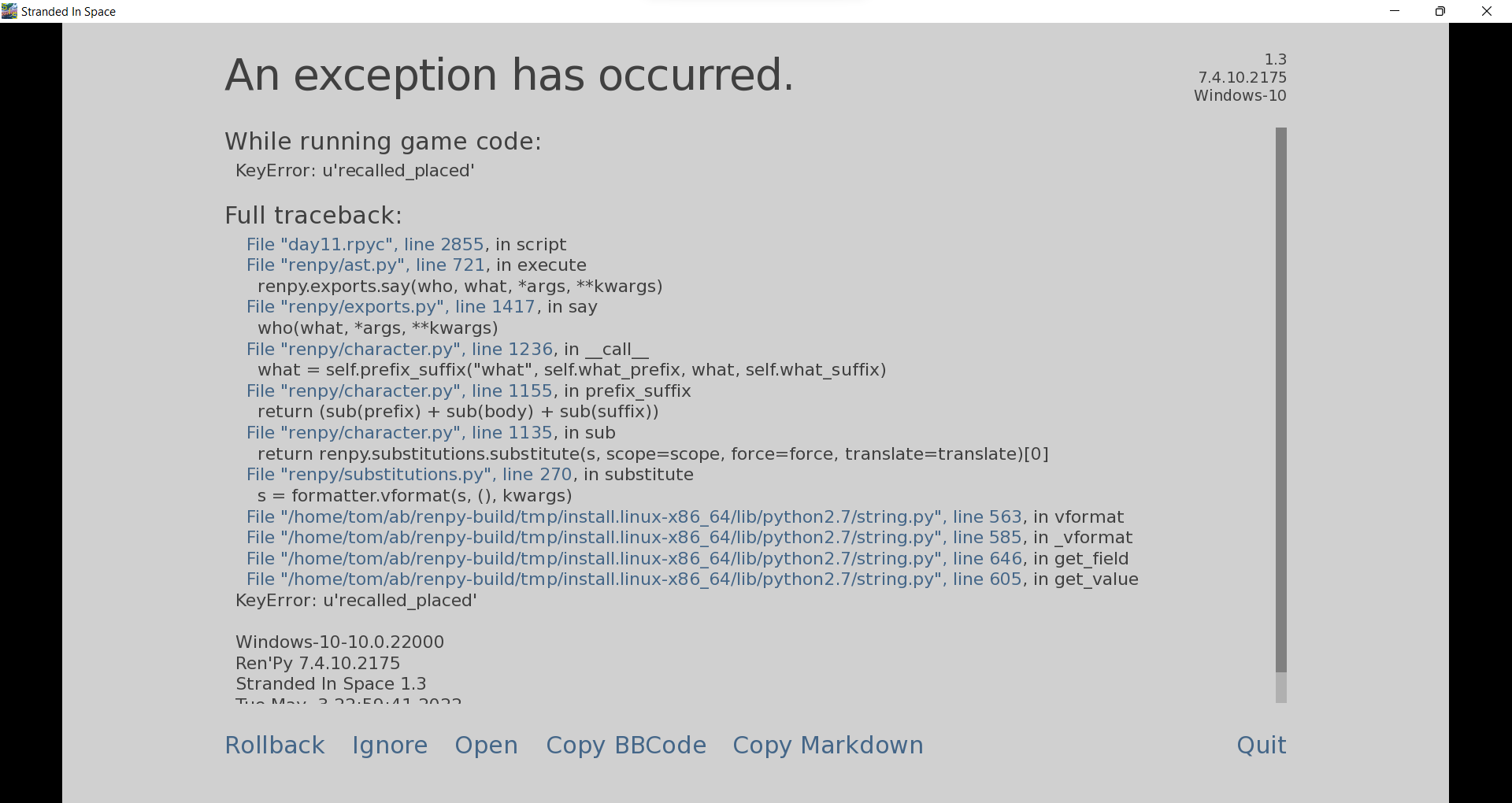
As the title says.
Stranded in Space may contain content you must be 18+ to view.
The creator of this page has specified that it contains mature themes and content. Please enter your birthdate to verify you are 18 or older:

A harem game about a man on an all-female spaceship. · By
So I'm trying to determine how that happened, because looking in the files I don't see how it could have.
The only thing I can think of is a version mismatch? If you downloaded the PC/Linux or Mac version from Mega, you don't need a patch. The same goes for if you downloaded the Android APK, you don't need a patch.
I'll reply to myself by saying I see in the error logs Ren'py is looking for pngs.
In order to reduce the size of my game, I switched to webP. This fact is only present in the Mega versions (PC/Linux/Mac) and Android APK version of the game, so if you download the patch on top of this it will give you this error.
Rather than copy and paste I did a snip and sketch image. If you have a preference let me know. This occurred as soon as I exited the laptop for the first time. I just downloaded, btw, never had the tutorial either, it skipped it for some reason. This was the 64bit version, I will try the 32bit just for giggles. Nope, same bug.
So I have no idea how this could have happened.
When you start a new day, the day counter switches. The laptop sessions begin on day 3, and the day counter is supposed to be day 3.
The skipping of the tutorial is only for Android, is that the version you're using?
The only suggestion I can think of is to say, if you downloaded the game from Mega (PC/Mac/Linux) version, or if you're playing the Android APK version, you don't need to downloaded/apply the patch fix. Patching it will cause some issues for sure.
Hey Wildman, this is the PC version from Mega, no patch installed, won't run 32 or 64bit version, same error. After those failures I did try the patch, that just crashed it period. I deleted the whole thing, and re-extracted the game from the Mega download, same result, same skipped tutorial. My system is win 10 pro 64bit, threadripper2 with rtx2070 video and 32gb ram, zip file not apk.
https://file.io/VPEWyykDl90l - Replace the scripts.rpa file in your game folder and the bug should be fixed. In the mean time I'm reuploading the versions with the correction.
I believe this is similar to another issue someone else had - you're trying to load the laptop conversation with Skylar on Day 5 after you already spoke with her on the laptop, right?
That's a typo error, and I have a fix, but it's sorta challenging to do on Android without some knowledge/file manager app.
So I'd recommend just not clicking her again. You're not really missing out on anything by not re-having the conversation with her.
If you really want the fix file/explanation on how to install it, I'll provide the file/walk you through it, but again - there's no real benefit to doing so. It's easier/simpler to not click on Skylar again during the D5 laptop scene, as you don't miss out on anything.
this happens on day 5 when i try to message skylar on the laptop.
```
I'm sorry, but an uncaught exception occurred.
While running game code:
File "game/laptoplabels.rpy", line 204, in <module>
File "game/laptopd5.rpy", line 977, in execute
File "game/laptopd5.rpy", line 979, in execute
File "game/laptopd5.rpy", line 980, in execute
File "game/laptopd5.rpy", line 981, in execute
File "game/laptopd5.rpy", line 981, in keywords
File "game/laptopd5.rpy", line 983, in <module>
NameError: name 'skylar_convo' is not defined
-- Full Traceback ------------------------------------------------------------
Full traceback:
File "laptoplabels.rpyc", line 204, in script
File "renpy/ast.py", line 928, in execute
renpy.python.py_exec_bytecode(self.code.bytecode, self.hide, store=self.store)
File "renpy/python.py", line 2245, in py_exec_bytecode
exec(bytecode, globals, locals)
File "game/laptoplabels.rpy", line 204, in <module>
File "renpy/exports.py", line 1561, in pause
rv = renpy.ui.interact(mouse='pause', type='pause', roll_forward=roll_forward, pause=delay)
File "renpy/ui.py", line 298, in interact
rv = renpy.game.interface.interact(roll_forward=roll_forward, **kwargs)
File "renpy/display/core.py", line 3315, in interact
repeat, rv = self.interact_core(preloads=preloads, trans_pause=trans_pause, pause=pause, pause_start=pause_start, **kwargs)
File "renpy/display/core.py", line 3735, in interact_core
root_widget.visit_all(lambda i : i.per_interact())
File "renpy/display/core.py", line 568, in visit_all
d.visit_all(callback, seen)
File "renpy/display/core.py", line 568, in visit_all
d.visit_all(callback, seen)
File "renpy/display/core.py", line 568, in visit_all
d.visit_all(callback, seen)
File "renpy/display/screen.py", line 436, in visit_all
callback(self)
File "renpy/display/core.py", line 3735, in <lambda>
root_widget.visit_all(lambda i : i.per_interact())
File "renpy/display/screen.py", line 447, in per_interact
self.update()
File "renpy/display/screen.py", line 637, in update
self.screen.function(**self.scope)
File "game/laptopd5.rpy", line 977, in execute
File "game/laptopd5.rpy", line 979, in execute
File "game/laptopd5.rpy", line 980, in execute
File "game/laptopd5.rpy", line 981, in execute
File "game/laptopd5.rpy", line 981, in keywords
File "game/laptopd5.rpy", line 983, in <module>
NameError: name 'skylar_convo' is not defined
Windows-10-10.0.22000
Ren'Py 7.4.10.2175
Stranded In Space 1.0
Fri Mar 4 16:31:21 2022
```
This is caused by a dumb typo after persistent data is set.
Here's the file if you really want the fix, however you're not missing anything by just choosing not to talk with Skylar again on Day 5.
https://www.file.io/mowB/download/D1CN5dBAENKS - replace the scripts.rpa file in your game folder.
I have an Exception Report from day 5 when selecting Haley on the PM sysetm.
Here's the text:
[code]
I'm sorry, but an uncaught exception occurred.
While running game code:
File "game/laptoplabels.rpy", line 204, in <module>
File "renpy/common/00action_other.rpy", line 99, in __call__
return self.expression()
File "renpy/common/00action_control.rpy", line 126, in __call__
renpy.show_screen(self.screen, *self.args, **self.kwargs)
Exception: Screen Haylee_convo_d5 is not known.
-- Full Traceback ------------------------------------------------------------
Full traceback:
File "laptoplabels.rpyc", line 204, in script
File "renpy/ast.py", line 928, in execute
renpy.python.py_exec_bytecode(self.code.bytecode, self.hide, store=self.store)
File "renpy/python.py", line 2245, in py_exec_bytecode
exec(bytecode, globals, locals)
File "game/laptoplabels.rpy", line 204, in <module>
File "renpy/exports.py", line 1561, in pause
rv = renpy.ui.interact(mouse='pause', type='pause', roll_forward=roll_forward, pause=delay)
File "renpy/ui.py", line 298, in interact
rv = renpy.game.interface.interact(roll_forward=roll_forward, **kwargs)
File "renpy/display/core.py", line 3315, in interact
repeat, rv = self.interact_core(preloads=preloads, trans_pause=trans_pause, pause=pause, pause_start=pause_start, **kwargs)
File "renpy/display/core.py", line 4155, in interact_core
rv = root_widget.event(ev, x, y, 0)
File "renpy/display/layout.py", line 1100, in event
rv = i.event(ev, x - xo, y - yo, cst)
File "renpy/display/layout.py", line 1100, in event
rv = i.event(ev, x - xo, y - yo, cst)
File "renpy/display/layout.py", line 1100, in event
rv = i.event(ev, x - xo, y - yo, cst)
File "renpy/display/screen.py", line 727, in event
rv = self.child.event(ev, x, y, st)
File "renpy/display/layout.py", line 1100, in event
rv = i.event(ev, x - xo, y - yo, cst)
File "renpy/display/behavior.py", line 979, in event
return handle_click(self.clicked)
File "renpy/display/behavior.py", line 914, in handle_click
rv = run(action)
File "renpy/display/behavior.py", line 322, in run
new_rv = run(i, *args, **kwargs)
File "renpy/display/behavior.py", line 329, in run
return action(*args, **kwargs)
File "renpy/common/00action_other.rpy", line 99, in __call__
return self.expression()
File "renpy/common/00action_control.rpy", line 126, in __call__
renpy.show_screen(self.screen, *self.args, **self.kwargs)
File "renpy/display/screen.py", line 1131, in show_screen
raise Exception("Screen %s is not known.\n" % (name[0],))
Exception: Screen Haylee_convo_d5 is not known.
Windows-10-10.0.22000
Ren'Py 7.4.10.2175
Stranded In Space 1.0
Sun Mar 20 17:54:33 2022
[/code]
This is from a Day 3 bug with Haylee that I'm fairly certain is fixed on the Mega download/version of the game, though I could be misremembering slightly.
Essentially on the laptop, for day 3, after you get done talking to Ariel, Haylee comes online about 15 seconds later.
If you don't talk with her, the bug mistakes her for being online when she isn't. The fix to this, if it's not already fixed on the Mega version of the game, is to not try to message Haylee on day 5, as she isn't online that day anyway.
When you log off, it should be fixed for the next day.
I've looked through the images in the base release and am having trouble finding the image you're referring to.
There's a rare one you can get with the laptop, I'll post it below.
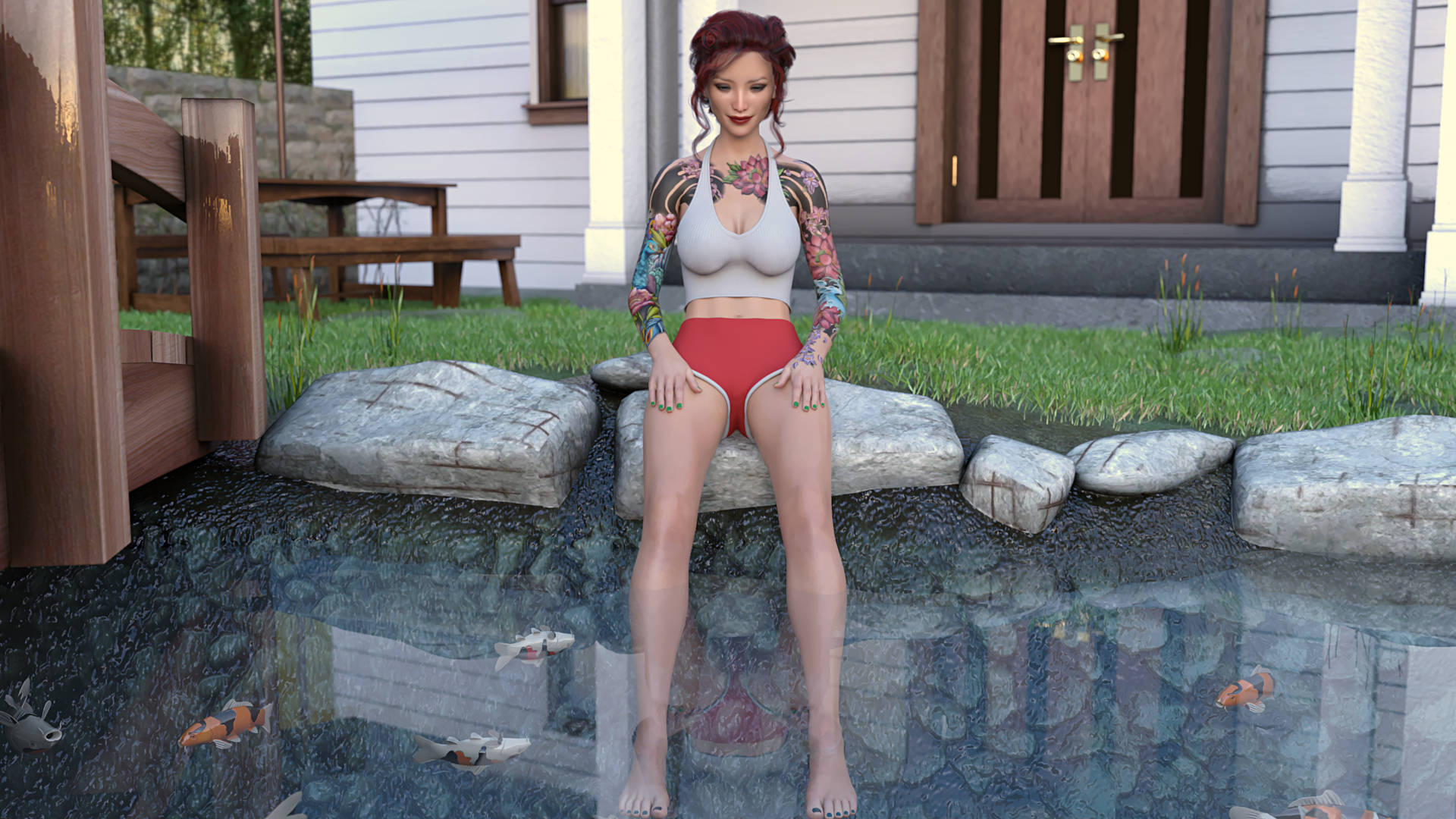
Is this the one you're referring to?
I photo edit everything, but that one escapes my memory. I think I removed like 70% of the Koi fish in the shot... maybe the hand thing got caught up in my editing?
Interesting. I can't remember it well enough to debate it, but I'll take your word for it.
This makes you the first person who's pointed a visual issue like this out.
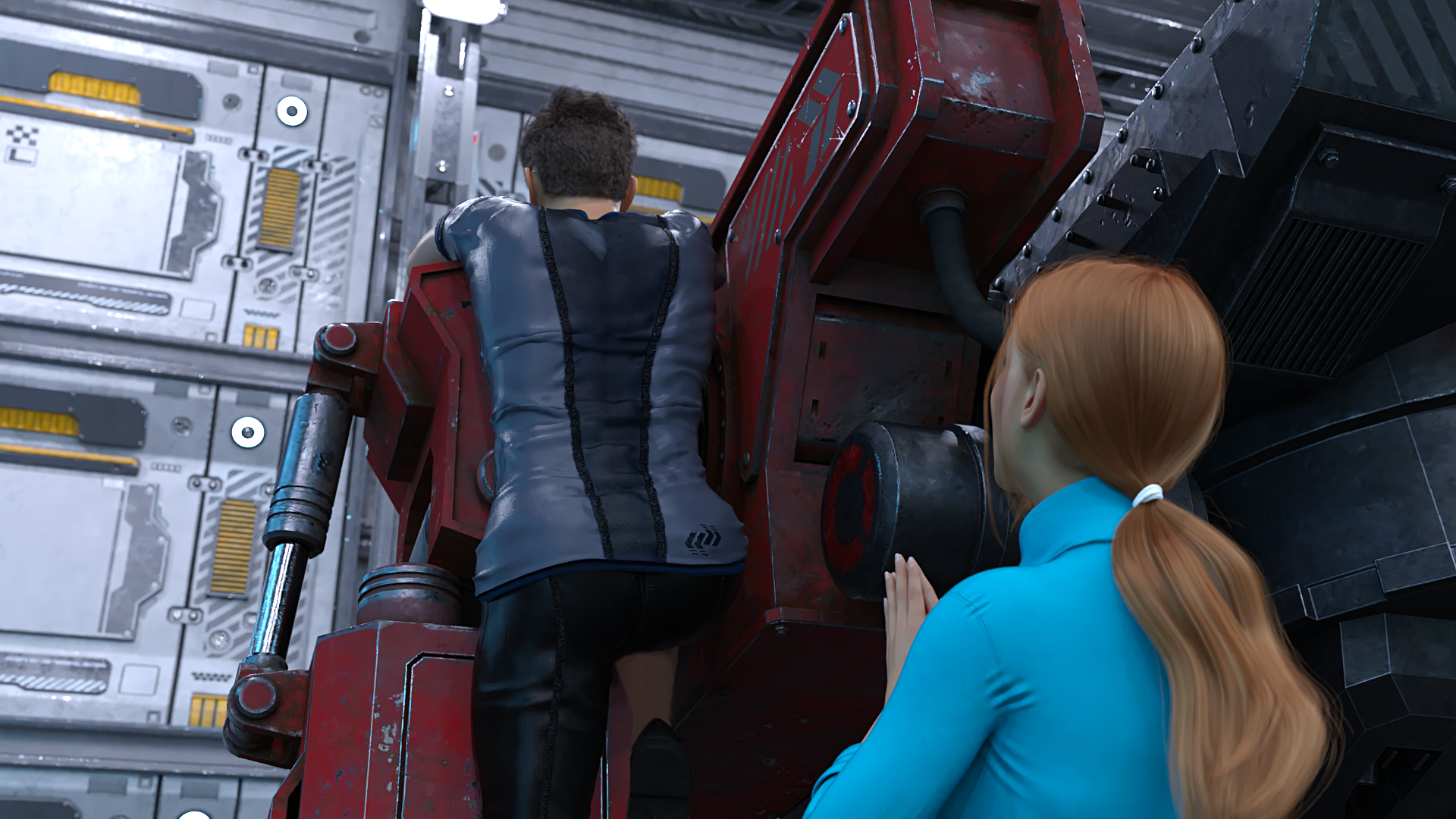
Since you are, here's a look at the most edited image in the base release.
The finished version:
The unedited, messed up version:
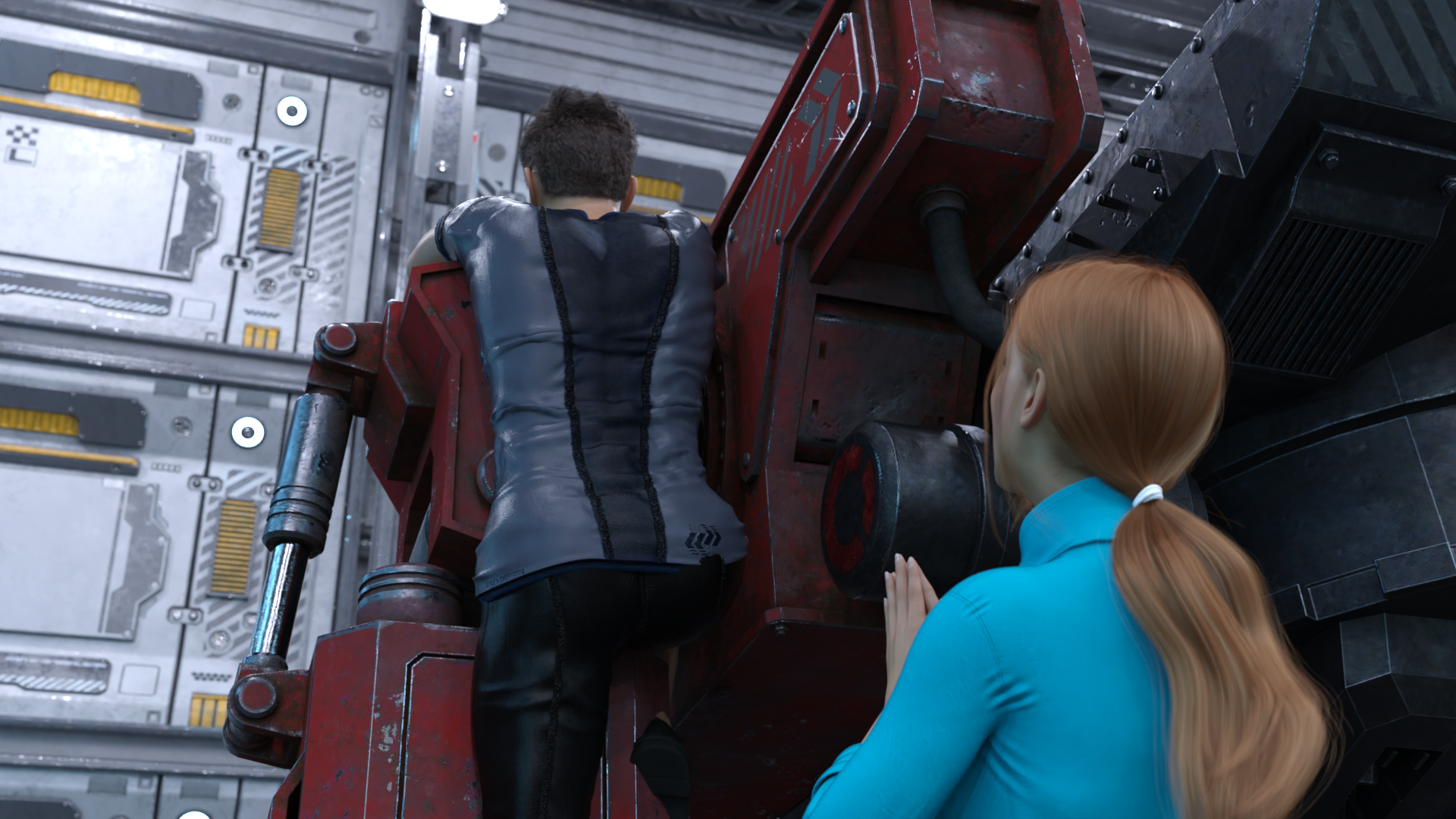
Notice the main character's right leg is completely missing, among other things.
When you render 2k images, it's tough to make everything go perfectly, but I'm not complaining. It honestly makes me laugh when I see the image.
I'm sorry, but an uncaught exception occurred.
While loading <'Image' u'images/Day 5/Bethany Intro/bethwork20.webp'>:
Exception: Could not load image u'images/Day 5/Bethany Intro/bethwork20.webp': error('Failed to allocate SDL_Surface',)
-- Full Traceback ------------------------------------------------------------
Full traceback:
File "renpy/bootstrap.py", line 331, in bootstrap
renpy.main.main()
File "renpy/main.py", line 652, in main
run(restart)
File "renpy/main.py", line 148, in run
renpy.execution.run_context(True)
File "renpy/execution.py", line 922, in run_context
context.run()
File "day5.rpyc", line 1398, in script
File "renpy/ast.py", line 1443, in execute
renpy.exports.with_statement(trans, paired)
File "renpy/exports.py", line 1682, in with_statement
return renpy.game.interface.do_with(trans, paired, clear=clear)
File "renpy/display/core.py", line 2752, in do_with
clear=clear)
File "renpy/display/core.py", line 3315, in interact
repeat, rv = self.interact_core(preloads=preloads, trans_pause=trans_pause, pause=pause, pause_start=pause_start, **kwargs)
File "renpy/display/core.py", line 3834, in interact_core
self.draw_screen(root_widget, fullscreen_video, (not fullscreen_video) or video_frame_drawn)
File "renpy/display/core.py", line 2555, in draw_screen
renpy.config.screen_height,
File "render.pyx", line 492, in renpy.display.render.render_screen
File "render.pyx", line 263, in renpy.display.render.render
File "renpy/display/layout.py", line 824, in render
surf = render(child, width, height, cst, cat)
File "render.pyx", line 170, in renpy.display.render.render
File "render.pyx", line 263, in renpy.display.render.render
File "renpy/display/transition.py", line 368, in render
top = render(self.new_widget, width, height, st, at)
File "render.pyx", line 170, in renpy.display.render.render
File "render.pyx", line 263, in renpy.display.render.render
File "renpy/display/layout.py", line 824, in render
surf = render(child, width, height, cst, cat)
File "render.pyx", line 170, in renpy.display.render.render
File "render.pyx", line 263, in renpy.display.render.render
File "renpy/display/layout.py", line 824, in render
surf = render(child, width, height, cst, cat)
File "render.pyx", line 170, in renpy.display.render.render
File "render.pyx", line 263, in renpy.display.render.render
File "renpy/display/transform.py", line 733, in render
return transform_render(self, width, height, st, at)
File "accelerator.pyx", line 187, in renpy.display.accelerator.transform_render
File "render.pyx", line 263, in renpy.display.render.render
File "renpy/display/image.py", line 501, in render
return wrap_render(self.target, width, height, st, at)
File "renpy/display/image.py", line 307, in wrap_render
rend = render(child, w, h, st, at)
File "render.pyx", line 170, in renpy.display.render.render
File "render.pyx", line 263, in renpy.display.render.render
File "renpy/display/im.py", line 623, in render
return cache.get(self, render=True)
File "renpy/display/im.py", line 287, in get
surf = image.load()
File "renpy/display/im.py", line 704, in load
raise e
Exception: Could not load image u'images/Day 5/Bethany Intro/bethwork20.webp': error('Failed to allocate SDL_Surface',)
Windows-10-10.0.19041
Ren'Py 7.4.10.2175
Stranded In Space 1.0
Mon Apr 18 22:55:18 2022
This one is strange, because I checked the files and that image is where it's supposed to be.
The Mega download is the most up to date version... is that the one you're using?
Only other thing I can think of is to reload the game and try again?
I have no idea... I could be missing something but like I said, I checked the script/image file... it's all there. It's weird.
It is indeed a strange one, maybe because of the OS, I thought of seeing an Chrome error, all open Chrome pages were closed after that, so I guess something memory and/or OS related... It all works now and I can't wait what you have in store for us on the next update...
Thanks for your nice response... Love your work....
This is from the morning of Day 10 in trying to chat with Haylee. Awesome game!
[code]
I'm sorry, but an uncaught exception occurred.
While running game code:
File "game/laptoplabels.rpy", line 365, in <module>
File "renpy/common/00action_other.rpy", line 99, in __call__
return self.expression()
File "renpy/common/00action_control.rpy", line 126, in __call__
renpy.show_screen(self.screen, *self.args, **self.kwargs)
Exception: Screen Haylee_convo_d10 is not known.
-- Full Traceback ------------------------------------------------------------
Full traceback:
File "laptoplabels.rpyc", line 365, in script
File "renpy/ast.py", line 928, in execute
renpy.python.py_exec_bytecode(self.code.bytecode, self.hide, store=self.store)
File "renpy/python.py", line 2245, in py_exec_bytecode
exec(bytecode, globals, locals)
File "game/laptoplabels.rpy", line 365, in <module>
File "renpy/exports.py", line 1561, in pause
rv = renpy.ui.interact(mouse='pause', type='pause', roll_forward=roll_forward, pause=delay)
File "renpy/ui.py", line 298, in interact
rv = renpy.game.interface.interact(roll_forward=roll_forward, **kwargs)
File "renpy/display/core.py", line 3315, in interact
repeat, rv = self.interact_core(preloads=preloads, trans_pause=trans_pause, pause=pause, pause_start=pause_start, **kwargs)
File "renpy/display/core.py", line 4155, in interact_core
rv = root_widget.event(ev, x, y, 0)
File "renpy/display/layout.py", line 1100, in event
rv = i.event(ev, x - xo, y - yo, cst)
File "renpy/display/layout.py", line 1100, in event
rv = i.event(ev, x - xo, y - yo, cst)
File "renpy/display/layout.py", line 1100, in event
rv = i.event(ev, x - xo, y - yo, cst)
File "renpy/display/screen.py", line 727, in event
rv = self.child.event(ev, x, y, st)
File "renpy/display/layout.py", line 1100, in event
rv = i.event(ev, x - xo, y - yo, cst)
File "renpy/display/behavior.py", line 979, in event
return handle_click(self.clicked)
File "renpy/display/behavior.py", line 914, in handle_click
rv = run(action)
File "renpy/display/behavior.py", line 322, in run
new_rv = run(i, *args, **kwargs)
File "renpy/display/behavior.py", line 329, in run
return action(*args, **kwargs)
File "renpy/common/00action_other.rpy", line 99, in __call__
return self.expression()
File "renpy/common/00action_control.rpy", line 126, in __call__
renpy.show_screen(self.screen, *self.args, **self.kwargs)
File "renpy/display/screen.py", line 1131, in show_screen
raise Exception("Screen %s is not known.\n" % (name[0],))
Exception: Screen Haylee_convo_d10 is not known.
Windows-10-10.0.19041
Ren'Py 7.4.10.2175
Stranded In Space 1.3
Tue May 3 12:08:37 2022
[/code]
It's not a huge deal on my end. But wanted to let you know that when you're name (characters name) is part of a conversation you're having with one of the girls.. the character's name doesn't so up its just "blah blah blah that's what 's thoughts were" (not a real convo from the game). just the extra space after whatever word and the 's
Not sure if it was stated or anything, but thought I'd state it just in case.
So happy for Days 9-11 though!!! the wait..... it's been killing me
Depending on which version you have of the game, there's an option to rename your character in the main menu.
I think that fixes the problem you're having. If not, you can download the Android patch fix (even if you're not playing on Android) and apply it, and then the option to rename your MC should appear on the main menu.
Alternatively if you play through the first day again (holding CTRL to skip through seen dialogue on PC) you can get to the part where you name your character super quickly, and that should also fix the issue, I think.
Indeed portgasdluigi, it's nice to see you on Itch.io.
It's a dumb typo that can be skipped with ignore, but it's fixed in the Patch script file on this page (for any version).
I don't use a spellchecker or grammar check at all, and like 99% of my writing is fine, but the one thing I typo? A variable. Of course...
I'm all over the place haha. Yeah I just clicked ignore so I could continue playing. I'm at the Day 11 flashback so I'm pretty close to finishing the update. Been loving it so far. I could go on and on with thoughts and theories but I should probably save all that for now. I might message you on Patreon about some of them if that's cool with you.
This happens when talking with Paige about MC's possible "training".
[code]
I'm sorry, but an uncaught exception occurred.
While running game code:
KeyError: u'recalled_placed'
-- Full Traceback ------------------------------------------------------------
Full traceback:
File "day11.rpyc", line 2855, in script
File "renpy/ast.py", line 721, in execute
renpy.exports.say(who, what, *args, **kwargs)
File "renpy/exports.py", line 1417, in say
who(what, *args, **kwargs)
File "renpy/character.py", line 1236, in __call__
what = self.prefix_suffix("what", self.what_prefix, what, self.what_suffix)
File "renpy/character.py", line 1155, in prefix_suffix
return (sub(prefix) + sub(body) + sub(suffix))
File "renpy/character.py", line 1135, in sub
return renpy.substitutions.substitute(s, scope=scope, force=force, translate=translate)[0]
File "renpy/substitutions.py", line 270, in substitute
s = formatter.vformat(s, (), kwargs)
File "/home/tom/ab/renpy-build/tmp/install.linux-x86_64/lib/python2.7/string.py", line 563, in vformat
File "/home/tom/ab/renpy-build/tmp/install.linux-x86_64/lib/python2.7/string.py", line 585, in _vformat
File "/home/tom/ab/renpy-build/tmp/install.linux-x86_64/lib/python2.7/string.py", line 646, in get_field
File "/home/tom/ab/renpy-build/tmp/install.linux-x86_64/lib/python2.7/string.py", line 605, in get_value
KeyError: u'recalled_placed'
Windows-10-10.0.19041
Ren'Py 7.4.10.2175
Stranded In Space 1.3
Mon May 16 20:12:56 2022
[/code]
A Small issue that I have found, and it might just be my laptop, but on Day 11 when your on your laptop Camila asks you to post a message into the group chat and when I do the game froze and all I can go is scroll up and down on the group chat and can't click on any thing else on the laptop. (I don't know if this is something that can be fixed as it might just be my hardwear but wanted to bring it up as a just incase).
My laptop doesn't freeze I can still save the game and scroll up and down in the group chat just everything else on the in game laptop freezes so I have to select a save file and reload the game, i've tried restarting the game a couple of times and it doesn't change anything and yes it's the PC-Linux version.
I can tell what's happening but I'm trying to figure out what's causing it. Essentially I have a variable called inConvo that's being set for you, but I don't know why it would be.
So can you confirm you're:
1) Making a normal group chat comment beforehand. I.E. interacting with the group chat like a normal day.
2) Talking with Camila then X'ing out of her PM chat window right after you say "Will do, Camila." This part is important!
3) Clicking the group chat comment entry bar thingy at the bottom left of the screen to enter the comment Camila wants.
The last 3 messages from group chat (after you enter the message Camila wants should be:
mc: It's a confession, Ishani. I'm atoning for my actions of being a pervert. I love ALL OF YOU, ESPECIALLY WHEN YOU'RE NAKED! MWAHAHAHAHA!
Sasha: ...Let us all pray for him. Ishani, on your knees where you belong!
Ishani: ...And that's enough group chat for all of us, I think."
I am doing all three of those things and as the message Camiila wants me to send shows in the group chat that's when it all freezes and I can't click on anything. Nobody responds in the group chat and Camila doesn't PM and I have to reload the last save to continue past that point and not do what Camila asks.
Everyone stopped using my name so it's just a blank space now. I'm at Gigi's first performance and it started with her on stage I think? I did close the game out at the same place and lost progress due to a power outage and so I spammed from the daily computer back to that part so idk if it has something to do with that or it's just the name thing not working after that part.
This error happened on Day 8 during the morning laptop sequence when I tried DM'ing Umiko. Attempting to ignore boots me into the main menu.
While running game code:
File "game/laptoplabels.rpy", line 364, in <module>
File "game/laptopd8.rpy", line 1205, in execute
File "game/laptopd8.rpy", line 1214, in execute
File "game/laptopd8.rpy", line 1219, in execute
File "game/laptopd8.rpy", line 1285, in execute
File "game/laptopd8.rpy", line 1286, in execute
File "game/laptopd8.rpy", line 1286, in <module>
NameError: name 'umiko_photo_hunt' is not defined
-- Full Traceback ------------------------------------------------------------
Full traceback:
File "laptoplabels.rpyc", line 364, in script
File "renpy/ast.py", line 928, in execute
renpy.python.py_exec_bytecode(self.code.bytecode, self.hide, store=self.store)
File "renpy/python.py", line 2245, in py_exec_bytecode
exec(bytecode, globals, locals)
File "game/laptoplabels.rpy", line 364, in <module>
File "renpy/exports.py", line 1561, in pause
rv = renpy.ui.interact(mouse='pause', type='pause', roll_forward=roll_forward, pause=delay)
File "renpy/ui.py", line 298, in interact
rv = renpy.game.interface.interact(roll_forward=roll_forward, **kwargs)
File "renpy/display/core.py", line 3315, in interact
repeat, rv = self.interact_core(preloads=preloads, trans_pause=trans_pause, pause=pause, pause_start=pause_start, **kwargs)
File "renpy/display/core.py", line 3735, in interact_core
root_widget.visit_all(lambda i : i.per_interact())
File "renpy/display/core.py", line 568, in visit_all
d.visit_all(callback, seen)
File "renpy/display/core.py", line 568, in visit_all
d.visit_all(callback, seen)
File "renpy/display/core.py", line 568, in visit_all
d.visit_all(callback, seen)
File "renpy/display/core.py", line 568, in visit_all
d.visit_all(callback, seen)
File "renpy/display/screen.py", line 436, in visit_all
callback(self)
File "renpy/display/core.py", line 3735, in <lambda>
root_widget.visit_all(lambda i : i.per_interact())
File "renpy/display/screen.py", line 447, in per_interact
self.update()
File "renpy/display/screen.py", line 637, in update
self.screen.function(**self.scope)
File "game/laptopd8.rpy", line 1205, in execute
File "game/laptopd8.rpy", line 1214, in execute
File "game/laptopd8.rpy", line 1219, in execute
File "game/laptopd8.rpy", line 1285, in execute
File "game/laptopd8.rpy", line 1286, in execute
File "game/laptopd8.rpy", line 1286, in <module>
NameError: name 'umiko_photo_hunt' is not defined
Windows-10-10.0.19041
Ren'Py 7.4.10.2175
Stranded In Space 1.3