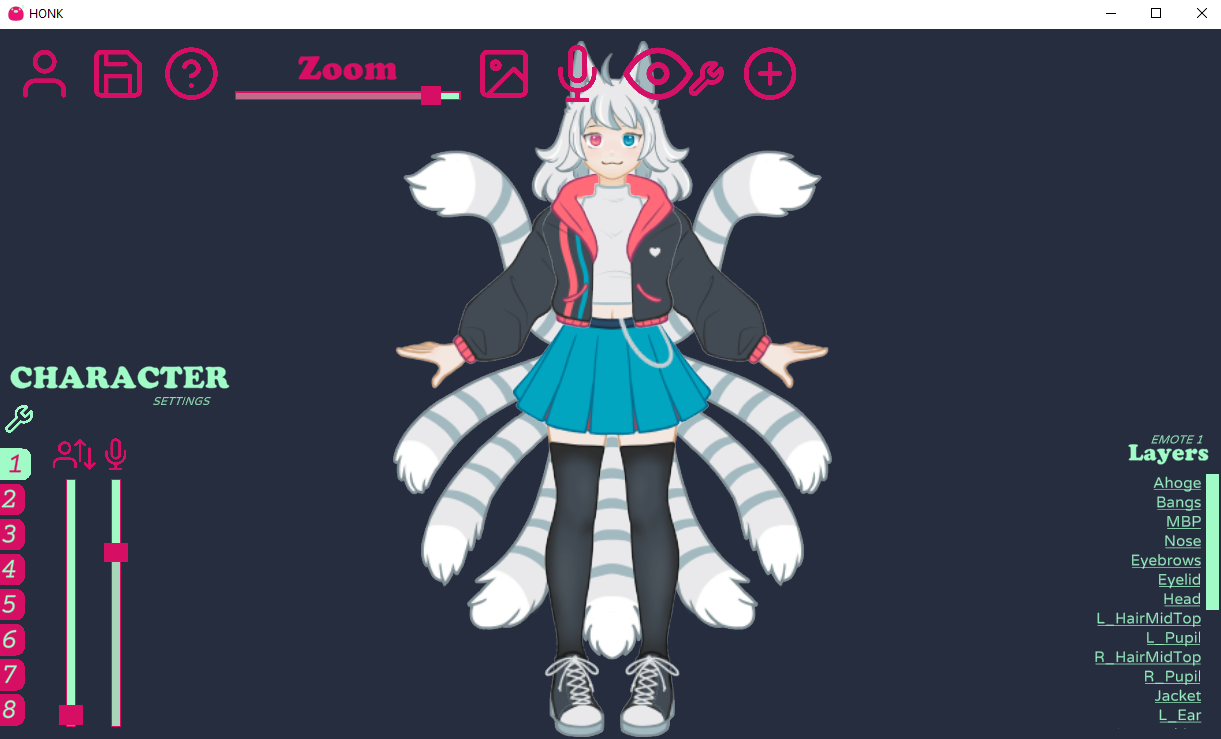
I would love a feature that allows me to move where the zoom focuses on! Right now, when zoomed in, it automatically focuses on the middle of the image. This makes it difficult to zoom in on bigger characters! Example below:

All-in-one suite for mic-only lip-syncing characters! · By
Another thought occurred to me about the "look at cursor" values. As I am working on a fairly small pixel art character the values are very very small. To the point that in order to have more fine control over exactly what values I was getting I was having to manually resize the honk window itself to get the slider to give me different values. This is one of the problems that would be solved with manual value entry as suggested in my previous post, but perhaps it could be solved by making the sliders change in relation to the largest component on the canvas?
Otherwise maybe the nature of the slider variable could be changed. I'm unsure exactly what the variable is supposed to be at the moment, but perhaps it could be changed that the value represents the maximum number of pixels moved at the extremes of the motion. This would bee a very intuitive way to represent the value and would make it very easy for people to "draft" the motion of certain elements inside the apps they use to draw their assets. The variable being representative of pixels would mean that people could take values directly from their drawing apps and copy them across into honk.
Finally, in regards to the oval settings, it would be nice to have a unified oval option that lets you input 2 different values for x and y, giving some freedom for characters with different eye shapes among other things, a similar equivalent for box tracking too maybe? Rectangle? And to put the cherry on top of that, an even more robust solution would be for both of those options to have 4 values, one for each of the 4 directions +x -x +y -y, this would give way to emulating a more "spherical" rotation, allowing both more extreme rotations as well as the ability to rig characters with plenty f tracking motion at extreme angles. Imagine (albeit this is a bit of a comical hypothetical) a character drawn facing directly to one side and being able to rig their iris to still roughly emulate where the eye would be facing while taking into account the perspective from the curvature of the eye.
Once again I've had alot to say but it's just my nature to never give suggestions that I cant think of potential solutions myself. I understand your vision for the app is probably a touch more simplistic than what I would like to get out of it and that's totally fine, I tried to give suggestions that could still be achieved in simple/intuitive ways. Once again this app is incredible and the 3.0 update has come with a bunch of wonderful features, you have done a very good job.
Really love your program, built my first avatar today using v3.0 :)
I would like to request a feature. It was suggested in another form already in this thread, but I want to support that request:
Thank you :)
I love Honk! It really takes PNGtubers to the next level! I have some ideas for new features:
Great job with Honk! Looking forward to next releases!
According to the 3.0a announcement post, that's whats being worked for 3.1!
https://dreamtoaster.itch.io/honk/devlog/388040/honk-30a-coming-this-week
Having the ability to move your view around the "canvas" (similar to the hand tool in photoshop) would be super useful. Right now the only way to adjust your view is to center everything, but for people who are making something that is horizontally tall rather than square that doesn't help, since it will take your focus window away from the face of your character and move it to the torso. Being able to zoom in and move around freely to the part you're working on would make things so much easier. A different way to achieve this would be allowing users to select all layers to move everything around together at the same time, rather than needing to individually reposition every layer.
Love this program btw. I'm having a lot of fun with it, and it has so much potential. Can't wait to see where it goes! :)
i see a lot of additional functionality in the blink feature, would it be possible to have an additional blink layer with a seperate timer and/or randomizer option for when it blinks and possibly what blinks when the timer goes off?
This would allow an additional character/pet to blink at a different time than the figure and possibly trigger small pet emotes (would be especially useful with the upcoming animation features)
Hope that all makes sense, thank you so much for all your hard work!
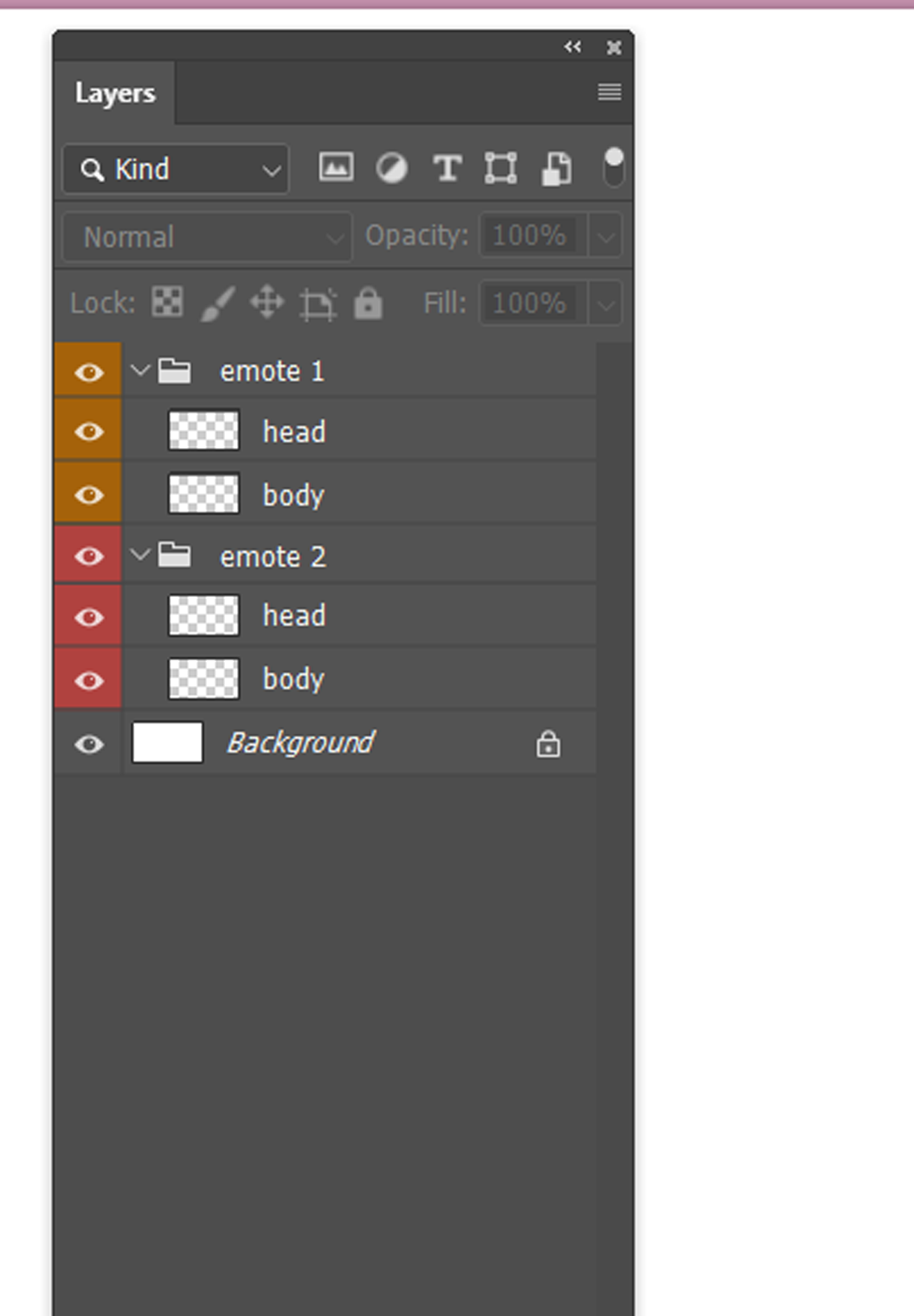
perhaps redesigning the layer manager ui to something that is similiar to what photoshop and clip studio paint provide.
most people use these programs to create there png avatars and are more familiar with the organisation system, this includes grouping assets into folders which will streamline more complex png models. Honk's Layer Manger system at the moment requires toggling assets on and off in order to create an emote. for a simple model the layer manager works well.
i have found when trying to create a 2nd emote for my model, that toggling between emote 1 and emote 2 is more of a guess despite reading the directory's and guides due to the fact that i am cycling between layers and turning them on and off and having assets from emote 1 get mixed in with assets from emote 2. the abilty to lock layers and lock groups would help immensely in creating emotes.
this is an example from photoshop, clip studio paint and procreate have similar layer manager ui.
you can see the layer order of the head being above the body, also the grouping in which these assets fall under for the specific emote.
Not sure if it's been suggested before, but an option to make emotes revert to the previous state on button release instead of toggling between states would be great.
For example, I want to make my character frown when pressing Ctrl+Z while drawing, but not have to press another hotkey after Ctrl+Z, basically making it push-to-emote.
Is there already a mic volume floor activation level? I found that while testing my PNGtuber, my low volume background noise or light mic static was making the mouth phonetics go off. Usually, in something like Discord or OBS, you can set up a noise suppression mic filter to make those issues go away. I couldn’t find that in Honk, so if there isn’t one, could that be added? Thank you!
The software is great as i expected ^^
Though! :0 is there a suggestion existing that to toggle if its able to disable shake image when talking?
Also bump up for the previous suggestion to have a noise supression filter to stop automatic talking when its just my ceiling fan xD
:D keep up the good work >w< ROOTINNNG FOR IT!
Hey, Hi! I recently bought the app and had a fantastic experience building my lil character.
The think that I'd love to see added is an option to have specific layers interacting with the voice bounce. That way I can setup my character and some props around it, but only him bouncing on speech, not the whole composition. Thanks for the amazing app!