Indie game storeFree gamesFun gamesHorror games
Game developmentAssetsComics
SalesBundles
Jobs
TagsGame Engines

What can I add or change to improve the game? Sticky

A topic by Sk1ds created Jul 05, 2023 Views: 15,512 Replies: 324
Viewing posts 1 to 20 of 116Next pageLast page
Developer (9 edits) (+1)

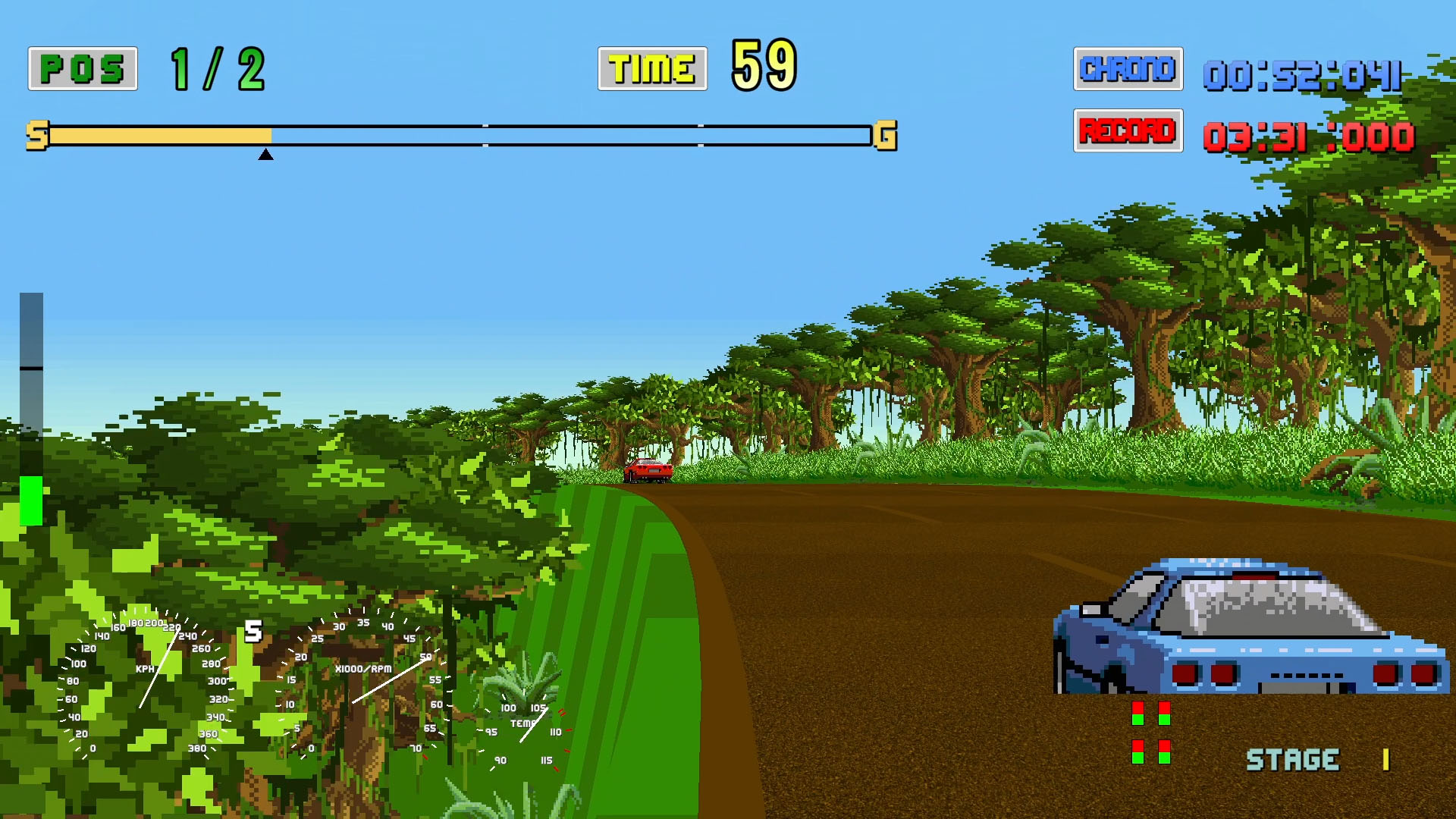
What do you think of the game? Did you like it? What can I improve? I appreciate all feedback, as long as it's constructive feedback!

Stuff to do (updated on 13/11/2024):

  • New sceneries
  • Objects like barriers that can break or move...
  • More cars
  • I'll add more stuff later...


    (+2)

    You did a fantastic job on this Outrun Clone! I especially loved the sounds! The graphics were spot-on to the Sega era! I would say the main thing that needs to be improved is after the upgrade scene, it should just take you into the next race without going through the title and car selection screen. Also, it would have been nice to see more background skyboxes. I would have loved to see the beach while you are on the canyon section! Other than that, this is really well done! Great job!

    Developer (1 edit) (+1)

    Thank you very much!

    I've been thinking the same about skipping the menus and go straight to the next race. So I went ahead and made it possible.

    About the skyboxes: you're right. But sprite/art work is my least favourite thing. 馃槅 But I'll do my best!

    Next update will be in a couple of days. Lightning struck somewhere and now we don't have internet. Just 4G on our phone.

    That sounds great! I can't wait to get the instructions for building a custom car! I want to try to make a 90s MX5 Miata.  I look forward to it!

    Developer

    If you want to give it a shot, I've added the instructions! I hope you're good at pixel art. ;)

    (+1)

    Great thing here! Since months I write a series on the german webzine GamersGlobal about fan games, see here: https://www.gamersglobal.de/user-artikel/fangame-mega-man-the-sequel-wars 
    (scroll down for the links to the other articles).

    Once your game is finished I look forword to write an article. :-)

    (1 edit) (+1)

    Hello Sk1ds, I just happened to come across your video on youtube.

    I instantly purchased your game as the spirit of it shone through.
    I would like to help you with this project and contribute with graphics, audio and UI/UX design.

    I have been doing commercial design for over 20 years, and gaming for even longer.
    Outrun was one of my favourite racing games also Super Hang On, Double Dragon and Final Fight.

    Have a look at some of my work
    https://robertmoyses.myportfolio.com/work

    You have a solid start but you could use some help.

    I will play through the game and take notes on how you can tighten up the entire thing.

    Are you intending to pitch this to Sega to sell?
    Do you intend to sell this on gaming stores like Steam, Nintendo, Microsoft, or Sony?

    There are numerous legal issues here If Sega, Ferrari etc say no to you.
    You can switch gears (hehe) and make a different approach, this is where I can help.

    First Impression notes:

    - No girl in the passenger seat

    - Other vehicles are doing wheelies constantly

     - Assets are of different pixel sizes (resolution) not matching, such as vehicles, gauges, scenery

    - Menu navigation, consistency and clarity

    Thank you for your Outrun Game, it made my day.

    Where are you located country and city? 
    I am in Melbourne, Victoria, Australia

    I look forward to hearing from you, email me.

    Developer(+2)

    Hello Bizarre Creative,

    Thank you very much! I really appreciate the gesture.

    I'll email you tomorrow with all the answers. It has been a busy day and I finally tackled an issue that no one seemed to care about, except you, me and my 10-years old nephew: the other cars doing wheelies.

    I'm from Tremelo, Vlaams-Brabant, Belgium by the way.

    (+1)

    Hello Sk1ds, great to hear back from you.

    Actually, my name is Robert.

    Only a few hours ago I was playing through your game taking notes.

    There is a lot of work, but as I said you have a great start.
    Most of it is graphics consistency, menu navigation and gameplay.
    These are the elements I can take care of, I can create a wireframe of the navigation for you.

    I just need to know the specs you require the assets in, we need to pick a pixel size for the assets
    to keep everything consistent. I can look into this.

    This way we can have the 16Bit Arcade look consistent.

    I have started looking for a workflow to turn 3D models into pixel art, and I think it could work well.

    Here are a few challenges for you to think about implementing.

    - Branching paths
    - Large Checkpoint Banners for each checkpoint
    - Career Mode (race upgrade vehicle, unlock new vehicle which can also be unlocked for Arcade.
    - Arcade Mode (race to unlock $ to upgrade career mode items. Completing races unlocks more girls as passengers and more music tracks)

    I look forward to your email.

    Best regards.

    Developer (2 edits) (+1)

    Hello Robert,

    My name is Yves by the way, but you probably knew already.

    To answer your questions:

    - I actually wanted to prove myself that I could make a racing game inspired by (Turbo) Outrun and Super Hang-On. But because I'm not an artist, I simply wanted to use those games' sprites as placeholders, until someone would make custom sprites for me. Oh, and I wanted to create a game that I would enjoy. Something with an in-depth damage system and a realistic handling model, without the grinding of Super Hang-On's original mode on the Genesis.

    Once finished, I indeed wanted to sell it on Steam, but with a different name. However, if I could pitch it to Sega, why not. As long as it's still my little project. I'm just a one man's team with hardly any programming skills and I have to keep my guards so the project wouldn't become too big.

    - About the pixel size: I like the esthetics of 80's Overdrive. Perhaps we can use that game as a reference?

    - The large checkpoint banners are certainly possible.

    - I'm working on the branching road already. At this stage it's possible to split the road in 2, but both sides still follow the same corners. That's the next challenge, after I can change the height of both sides independently.

    - Career and arcade modes: I like the idea of having these two modes, although it will be quite a bit of work to separate these two modes. Perhaps the arcade mode can have the branching paths? For the career mode: instead of using currency, I prefer the idea of doing the repairs/upgrades within a time limit. I would also like to give the player the choice between a male and a female driver.

    I'm looking forward to seeing some images of a pixelated 3d model!

    Best regards.

    (1 edit)

    Hello Yves,  I am beginning to build a picture in my head.

    So you have not worked on a published game just challenging yourself and for enjoyment?

    Well, there are numerous options here.

    1. You keep going with what you are doing
    Scenario 1 You will be ok and make a little money.
    Scenario 2 Sega finds out and tells you to stop using their assets.

    2.  You take this a little more seriously and intend to publish something to make money.
    Scenario 1 You switch gears and remove all Sega, and Ferrari assets and replace them and call it something else.
    You can then approach different publishers and see if they wish to publish it and make some money.

    Scenario 2 We work together to develop a good structure and workflow and show Sega to get their blessing to publish and promote it.
    This is 90% not going to happen as they have not released anything since Outrun 2 on XBox 360 PS3 and they may not be willing to put money into the Ferrari licence.

    Scenario 3 We approach Lamborghini and see if they wish for an ego-stroking game, they may not like the pixel look and ask for something like Outrun 2  XBox 360 PS3 . Lamborghini is more approachable and there could be a 50% chance of something developing with them.
    We would then need to find a publisher which could be Sega as it is right up their alley.

    This comes down to you are you doing this as a hobby or have you done this professionally?
    Is this how you wish to approach this as a hobby or with a goal to actually publish this game.

    How are you at using Unreal Engine? I wish to start learning.

    Developer(+1)

    Hello Robert,

    I guess option 2 scenario 1 is pretty much what I had in mind when I started this game, except for finding a publisher, but that can be an option ofcourse. If it's 90% sure that Sega won't be interested and that Lamborghini probably wants a true 3d game, I'm happy to go for something similar as games like Slipstream and 80's Overdrive with just generic cars, similar to the real ones. Would you like to cooperate if I follow this scenario?

    Indeed, this is the first time that I got so far in developing something. I also have a full-time job and I work until 8 pm (not to mention that I also have a wife and a daughter), so I don't have a whole lot of time.

    I've never touched Unreal Engine. At this moment Unity does the trick for me. (And I mostly know the basics, but I learn along the way.)

    Hello Yves,  yes I understand your challenges but good to hear you wish to try something while improving your skillset.

    Unity is licensed, while Unreal is free until you publish, we need to compare the pros and cons of them in terms of cost when publishing.
    Both can export to all consoles, pc etc.

    Take a look at the following games and get some ideas.

    Horizon Chase Turbo = Very Lotus Esprit Turbo and Outrun 
    Crusin Blast = This is crazy pure nitro high speed
    Hotshot Racing = Similar to Horizon Chase Turbo
    Pure Chase 80's = This is a high-speed ride with more reaction than skill
    80's Overdrive = Outrun this is 100% like Outrun

    I think you need to figure out the branching paths and add 3D vehicles which fit in well with the road,
    Perhaps make the road and ground 3D too? You can even have a mix of 3D and 2D if it works well.
    We can take vehicle models and turn them low/lower poly 1/3 or 1/2. to give it a look.
    This is something we would need to work on to get the look down and then start creating the elements.

    How can we make it different?

    Do you wish to keep the Authentic Outrun feel reproduced or go a little more exteme like Cruisin Blast?
    I feel we should stick close to the Authentic Outrun feel with a few new elements which work well with it.
    As the player reaches the finish line it could unlock items such as a radar detector, CB radio, and radar jammer.
    Police could will be waiting on the side of the road so drive past slowly when you hear the alarm to avoid them.
    This would add another element that still keeps it within outrun I feel.
    We could add railway crossings, you need to beat the train to the crossing.

    We could make each section a different country look, major landmarks and seasons, Japan blossoms.
    France in Summer Eifel Tower, Moroco in Summer, Austria green grass blue skies and the alps.
    Once we have the assets for one track figured out we can copy-paste it and replace the assets with grey numbered boxes
    as placeholders for each track so as the artwork is complete you just need to replace the artwork pack.
    This way you can continue testing the new tracks and make any changes until the artwork is ready to be replaced.
    This ensures accuracy and speed in assembling this, you need to be able to add or remove any track section and move it around
    in any order, look at how you have it set up you need to have this modular to give us the flexibility and not re-work everything.
    Are you using a sprite sheet? This way each track asset can be placed on one .png otherwise with 3D you need separate elements
    for each track section asset and be consistently named and numbered for instance France Summer Cloud Small = FR-S_Cloud_S.png

    When this is presentable with a good menu and one or two working tracks, music and sound fx we could start pitching the game 
    to Lamborghini, publishers or even Kickstarter (after we figure out how much time and money it will take to complete.)

    We would also require a contract to protect us both, too many projects and friendships turned sour because there was no contract.
    Right now we would be putting in our time and effort and treating it like a hobby, but as we draw closer to pitching it and especially
    releasing it we need a bank account set up in which all earnings enter and then automatically deposit the agreed % into your account and mine.

    I have some handwritten notes which I need to type out, I also collected some royalty-free music which I think will really work well.
    The artist of which can be contacted to request to do something similar to Outrun but that would be extra money.

    I think the two of us could pull it off, if you focus on the game elements and putting it all together, I can focus on graphics, music, sound and UI

    Looking forward to developing something great with you.

    Developer

    Hello Robert,

    It took a while to respond. It's been a busy week and I needed some time to think about answers, while working late on the branching road.

    - Unity vs Unreal: I've chosen Unity for its accessability/low learning curve. It takes some time for me to get familiar with a new platform. It even took me years to get to the point where I am now, and it's probably going to take me quite some time (months?) to just refactor everything to Unreal. If I know myself, I'm probably going to abandon the project if I try this, like I did with my other projects that grew over my head in the past.

    - I'm a really big fan of the esthetics of 80's Overdrive. Bright and colorful, all sprite based, looks like Outrun, ... There's another game on Itch.io (Max Downforce) that uses 3d car models. It works for a still image, but in motion it doesn't click with me. I like the choppy animation of the sprites when you see an AI car going around a corner, although it's a lot more cumbersome to program. (But I already did the programming, so meh.) But I like the idea of using 3d models and make images in different angles of them.

    Police and radar: yes, I've been thinking about that for quite some time. The police shouldn't be too annoying, but annoying enough to motivate you to get the radar stuff. Perhaps the radar stuff can be upgrades in my current parts system. 

    Then, what should be the speed limit? It shouldn't be too low, because that's the speed traffic should drive. The lower, the more difficult the game will be. I've been experimenting with a speed limit and a limit between 220 and 260 kph works well (which is absurd in reality ofcourse.) This speed limit will probably stay in my next update.

    I also want the police to chase your opponent if he's ahead of you, to make things fair, giving the winning driver a disadvantage, just like in Test Drive 2: the Duel.

    - Railway crossings: cool idea!

    - Countries, landmarks and seasons: sounds great! It sounds a bit like Outrunners.

    - About the gray boxes/placeholders: it depends on the objects. Perhaps some combinations and patterns work better than other's, but my system is pretty modular. It's always possible to move objects.

    - Speaking of modularity: each corner and each hill is created by a single line of code that's easily edited, or moved. One disadvantage: you have to restart the game each time you make a change to see the result. But perhaps I can make a track editor.

    - Sprites and sprite sheets: at this point every object has its own sprite, but putting them all in a single sheet per country for example shouldn't be much of a problem. Right now the naming is like O_tree, where O stands for Outrun, TO for Turbo Outrun CSM for custom and so on...

    - Publishers, Kickstarter, ...: OK, as long as the code is pretty much finished, or at least in a state that there aren't any programming challenges any more.

    - Good idea about a contract and bank account!

    - About the royalty free music: good idea, but I'm going to make it in a way that the music is easily replaceable by the user.

    Meanwhile I'm going to continue working on the branching road!

    Sorry for the delay, I saw your post and started writing and I was almost done then left it and shut down my computer.
    The next day I realised I lost it all and was too busy to type it out again.

    Anyhow that's ok Unity will be more than enough to do the job.
    I thought you would like 80's Overdrive, Yes Max Downforce runs really smooth and has 100% the pixel look.

    I have some inspirational music for you to listen to play the game and listen to the tracks.
    I have set up a Dropbox send me an email and I will send you the link, so you can download and listen to them.

    Yes, the sprite sheet per track sounds great this way we can ensure to apply a consistent look and again keep everything modular.

    I think we should start setting goals on things to do, and meet up in 4 weeks.

    For yourself, I would suggest

    - Create the track editor, this enables us both to design them
    - Work on the branching tracks
    - Implement the large checkpoint banners for every checkpoint
    - Add the large Goal banner with the crowd in the background

    I will look at the following

    - Develop UI wireframe
    - Find more suitable fonts
    - Create consistent menus
    - Create in-game elements gauges, score, etc
    - Obtain low poly 3D vehicles, I think we may be able to apply a pixel look or voxels.

    I have also created a spreadsheet where I placed all the tasks, we can give the cell a green fill when complete.
    This is in the Dropbox. robert.moyses@bizarrecreative.com

    This should be enough for us to work on over the next 4 weeks, let me know what you think.

    We can make it at the beginning or end of the month to make it a regular thing.
    You do not have to have it complete but you are working on those things. 

    Best regards.

    Developer

    Hello Robert,

    I'll try to answer within a few days. I'm having a bit of a rough time since my oldest aunt is about to pass away and another one is fighting lung cancer.

    Nonetheless I'm still working on the game, albeit at a slower pace. The large checkpoint  banners are now in place for instance.

    Hello, focus on your Family FIRST.

    Don't worry about this project, come back when you are ready.

    All the best to you and your family.

    does it have wheel support?

    Developer

    You're the first one who asks this!

    No, not yet. But I definitely want it. It even has to work with a clutch and h-shifter.

    I'll start working on it soon!

    Amazing job! I wish I had the ability to fully customize the controller. Also drifting would be a nice touch.

    Developer

    Thank you for your donation and feedback!

    I'm going to try to dive into the world of Unity's new input system and I hope I can offer input customization and even wheel/pedal/h-shifter support in the future.

    About the drifting: I've been thinking about if for quite some time, but there's no easy way to implement it. The drifting mechanism has to be compatible with the tire simulation, and it has to be easy to learn, but hard to master. Also, I don't want it to be mandatory to win the races, but rather a way to be slightly faster.

    If I'm going to try implement it someday, it will probably something in between drifting and trailbraking.

    Thank you for your reply. I feel that it could be done the way it was done in OutRun 2. Hit the brakes then gun the gas around a corner. However, you're the expert here on this one not me. I still can't stop playing it. It's so damn cool! Thank you again. OH! How many vehicles can be unlocked? I got the Countach and the Bike.

    Bill

    Developer

    The problem is that it will become a bit too arcadey if you understand what I mean. Do you know the game Slipstream? It also have a drifting mechanism, but controlling the car is so vague that it becomes frustrating to me.

    If I'm about to implement drifting, I want it to feel natural and predictable to me. I've been thinking about how I can achieve this all day, and I think I have an idea, but it's going to be a lot of work.

    At this moment you've unlocked the only two vehicles, but there's a 3rd on the way: the Corvette ZR-1 that you race against with the bike.

    And I guess I have to make more stages!

    Oh, have you tried the manual transmission?

    Yes. I tried them all and manual trans is awesome! Thank you again!

    Hi! Congratulations! you have already done an extraordinary job! I will definitely talk about this game on my channel ginzu emulation (fr) the game is very addictive and respects the arcade and the outrun series!  What I would like to see in future versions: - better animation of the car when falling into ravines! - and an HD mode for all vehicles! but maybe I'm asking a little too much. - Being able to choose to play HD mode or old school classic mode.
    Developer(+1)

    Thank you very much!

    - Yes, the falling animation is horrible. I'm going to rewrite it in the future.

    - At a certain point all Sega related images will be replaced with custom images. These images will be in a higher resolution, probably something like the game 80's Overdrive.

    And i tried to use reshade to apply some shaders to the game ( crt like scanlines) but i never succeeded to make it to work with your game...  do you think  it will be compatible ? Does unity work with opengl? Vulkan? Dx9? Dx12? Thanks

    Developer

    To be honest, I have no clue. I've been looking into the settings, but I don't know how it works. Maybe someday I'll find the answer.

    Ok,  please keep going! Thanks!

    (+1)

    Great work and game.  The game doesn't need any more features.  If anything though, try to make it as faithful to the original outrun game as possible, so more enemy-car sprites, and track layouts, from the original.

    I've played the original recently on an emulator and yours is so much smoother and easier to see obstacles in the distance, so more playable.  Well done.

    Developer(+1)

    Thank you very much!

    Yes, I'm going to work on new sceneries, although all sprites will probably replaced by custom made sprites somewhere in the future.

    I'm glad you've enjoyed it!

    its doing that speeded up light speed driving thing again (v0.3.4)

    Developer

    Hello! Could you possibly make a video of it? That way I can try to figure out where the problem is.

    Tiz ok.... false alarm. My apologies. I got my zip files mixed up! i unzipped the wrong one. Its working fine.

    (2 edits)

    Thanks for making this really cool game! I made a video of my clumsy playthrough attempt ^ _^

    I noticed a few things that seemed like they might be bugs, or just alpha stuff--probably already known, but just in case:

    - other cars' shadows too wide...and extend up in the air a bit?

    - goes to car upgrade screen after you lose a race--then shows scores, then straight to title screen

    - volume sliders don't actually lower volume

    - sometimes can't adjust "AI cars volume" slider - "Skid volume" moves instead (oh I think you have that covered in your list in the OP : )

    - other cars drive in wheelie position for long periods (ah Bizarre Creative noted this a while back)

    - can't use controller on options screen

    - throttle is on a face button as well as a trigger, but brake is only trigger?

    - physics of cars being knocked off track are a little odd, they just kind of move sideways:

    - game makes my laptop fan crank even when left on the title screen

    And one small suggestion:

    - suggestion: let player skip animation of technicians after picking gear type

    I was very impressed by how smoothly it drives. : ) And the colors are really fantastic! ^ _^

    Developer(+1)

    I'm glad you liked it! And thank you for your feedback! Here are my thoughts about it:

    other cars' shadows too wide...and extend up in the air a bit?

    Yes, I've been struggling with the shadows in the past, but I'm probably going to use two shadow sprites that move when the angle of the car changes. That way it will look more natural.

    - goes to car upgrade screen after you lose a race--then shows scores, then straight to title screen

    You're supposed to repair your car after each race, whether you win, lose, or didn't finish. But I understand it's weird that you go to the title screen if you didn't finish. I've changed that. Now you only go to the title screen if you run out of lives.

    - volume sliders don't actually lower volume

    That's weird. They're supposed to work. But I'm going to throw out this option screen anyway and make a nice one that supports button control and no mouse. Maybe that will do the trick.

    - sometimes can't adjust "AI cars volume" slider - "Skid volume" moves instead (oh I think you have that covered in your list in the OP : )

    Yes, Unity is weird. The new options screen will fix that.

    - other cars drive in wheelie position for long periods (ah Bizarre Creative noted this a while back)

    It used to be worse when I used flat shadows instead of the sprites now. It will look better with the new shadow system. But yes, the system that calculates the angles of the other cars need some more fine tuning. However, I'm also stuck with the sprites that I have. 

    - can't use controller on options screen

    True. The options screen was just a quick job.

    - throttle is on a face button as well as a trigger, but brake is only trigger?

    On a controller, only the right trigger should do the throttle, or on my old Logitech game pad: the right joystick. On a keyboard you have the choice between the up arrow button, or ctrl. It's weird that that face button works too.

    - physics of cars being knocked off track are a little odd, they just kind of move sideways:

    I'll try to rework them a bit.

    - game makes my laptop fan crank even when left on the title screen

    Maybe because it doesn't have a frame limiter? Not sure why that happens. I'm a driving instructor that happens to know how to program a bit. 馃槅

    And one small suggestion:

    - suggestion: let player skip animation of technicians after picking gear type

    Yes, I totally understand. It's possible now, but I've made it one second shorter too.

    Thanks to your video I also noticed some other flaws, like a misunderstanding in the parts screen. The minus sign is supposed to mean "worse", so "heat-" means "more heat". I've written it all out now.

    And I'd like to point out why you can't always choose a branch in Outrun mode. The leader chooses the branch, so if your opponent leads, you have to follow. There is supposed to be an arrow to point that out, but I haven't implemented that yet.

    I'm also thinking about writing a manual, because I don't like tutorials or long messages in an old school game. But I understand that the game is a little vague in some areas.

    Oh and one last thing: the full manual mode doesn't actually make you faster. The automatic mode is actually the fastest because it shifts really quick and at a good rpm, and you don't have to manage your throttle and brake because of the traction control and abs. Manual is just harder and more spartan. 馃榿 Maybe I'll add an option to turn off traction control and abs with the automatic.

    (3 edits)

    And I'd like to point out why you can't always choose a branch in Outrun mode. The leader chooses the branch, so if your opponent leads, you have to follow. There is supposed to be an arrow to point that out, but I haven't implemented that yet.

    Oh! Getting sucked over to the other branch is pretty weird, also pretty jarring and makes it tough to stay on the road. In OutRun 2006, when you can only take one of the branches, the other is blocked off with big red arrow signs--that works pretty well. : )

    Maybe because it doesn't have a frame limiter?

    Yeah, that seems to be it. I set the frame limit to 60 using RivaTuner Statistics Server and that fixes it (and the weird shrill little shrieking sound my laptop was making when running it, too...that was probably bad ; D). Can't use RTSS when running it through Steam but I guess it still controls okay even without the Xbox analog input--and now I can have it as a taskbar shortcut and use the little icon I made for it. ^ _^


    Oh yeah and now that I'm not running it through Steam Input--I'm using keyboard controls through Joy2Key--I'm reminded that without that Steam Input, the Throttle key doesn't work on the Car or Transmission select screens (or for skipping the pit crew animation after Transmission select in 0.3.5)--have to hit Enter instead, which is a unintuitive/inconvenient.

    Oh and one last thing: the full manual mode doesn't actually make you faster. The automatic mode is actually the fastest because it shifts really quick and at a good rpm, and you don't have to manage your throttle and brake because of the traction control and abs.

    Oh good, I really like automatic. : ^D I drove stick in real life but I don't seem to get along with it in OutRun, like even the 2-gear toggle shifting in the original OutRun just does my head in somehow, I suppose because the games are so fast and there's other stuff that seems a lot more critical to be thinking about! ^ _^

    (1 edit)

    v0.3.5 Alpha feedback


    - Now that I'm using keyboard input on DS4 through Joy2Key, rather than Xbox controls on DS4 through Steam (although I realized afterwards I could get and remap Xbox controls by using DS4Windows--so I'll do that next time instead of Joy2Key : D), I got really confused by the Upgrades screen:

    -- Upgrades screen bottom bar legend shows only Xbox buttons, not keyboard equivalents--and Francky doesn't always say them; so I got a bit confused trying to work out which keys to map to my controller for Select (Enter?) and Canceli (Backspace?), and then the key for overall Confirm Repairs (Space?)

    -- I keep thinking it would be more intuitive if at the end of the top row of repair-type icons was an overall "make repairs" button to advance, which you could activate with the same button you use to activate any menu thing, usually

    -- And then if you got some confirmation, like a brief "Car repaired/upgraded!" message across the screen or something, that might be hepful; there's no confirmation right now and it just goes right to the next thing (currently "Best OutRunners," which always seems to me like a Game Over type display), so I always think I somehow hit the wrong button and skipped out on the intended upgrades/repairs

    -- Why not let Throttle/Brake keys & buttons also do Upgrades Select/Cancel? Turbo (in effect) does Confirm Repairs; anyway for me trying to map keyboard controls to the controller through Joy2Key, it feels confusing to have a new set of keys just for the Upgrades screen

    - 35:09 - was passed by motorcycle going REALLY fast, then just after they disappeared over the horizon, came across two odd little ~three-pixel-high marks left in that same lane

    - 35:27 - punched car through tunnel wall

    - Knocked car off cliff in last race (40:13); they slide straight sideways, not down, then later were driving in space down there! = DD

    - Cars still have shadows under them while in the air off the cliffs

    - No CPU-driven Lamborghinis?

    - Get "GAME OVER" when lose race but still have lives remaining (then goes straight to Upgrades screen; would be a lot less confusing if got something like "X LIVES REMAINING..." instead of "GAME OVER" there)

    - "Best OutRunners" screen is shown AFTER upgrades screen; it should probably be shown ONLY immediately after COMPLETING a race, BEFORE the upgrades screen, and probably shouldn't be shown at all if you're continuing (ie didn't finish but still have continues left). So maybe the scenarios could go something like:

    --If win a race that isn't the final race: Name entry, Best OutRunners, Upgrades, next race

    -- If win the final race (I haven't got this far so may be missing something!): Name entry, Best OutRunners, "GAME OVER," title screen

    --If lose race but have lives left: "X LIVES REMAINING", Upgrades, repeat race

    --If lose w/ no lives left: "GAME OVER," Best OutRunners, title screen

    - Title screen says only "Turbo Outrun," not "Turbo Outrun Reimagined" (probably just an alpha thing, but it seems like something that might be a little confusing for people seeing the game for the first time, especially just in a video or something)

    - (and I'm not sure if it can be changed at this point, but the itch page address is "outrun-clone" rather than "turbo-outrun-reimagined" or whatever, and the downloads are "Turbo Outrun clone.zip" rather than "turbo_outrun_reimagined_[version number].zip" or something)

    - Standard practice would show the version number somewhere on the title screen as well, usually in a lower corner, or just below a corner of the title

    - Suggestion (I suppose this is probably just an alpha thing ^ _^): EXIT/QUIT option on main menu, with "Are you sure you want to quit the game?" confirmation dialog--rather than instant exit via ESC key, which is kind of easy to do accidentally

    - I'd meant to play for just a few minutes this time, but somehow I did much better and my one Original mode game went 45 minutes = o; I may have to start limiting myself to one life or a few races ^ _^...at least until the OutRun mode is further along : D

    - The external framerate limiter might have been helping me do better somehow? But it (RivaTuner Statistics Server) also interferes with the OBS recording software in certain games, including this one, meaning I have to record my whole desktop instead of just the game, making for a slightly clunkier recording

    Developer(+1)

    -- Upgrades screen bottom bar legend shows only Xbox buttons, not keyboard equivalents--and Francky doesn't always say them; so I got a bit confused trying to work out which keys to map to my controller for Select (Enter?) and Canceli (Backspace?), and then the key for overall Confirm Repairs (Space?)

    True, and I've added keyboard buttons right before you've made this post. xD Not sure if I already uploaded that update.

    -- I keep thinking it would be more intuitive if at the end of the top row of repair-type icons was an overall "make repairs" button to advance, which you could activate with the same button you use to activate any menu thing, usually

    That's a great idea. I'll look into that and see if I can make that possible.

    -- And then if you got some confirmation, like a brief "Car repaired/upgraded!" message across the screen or something, that might be hepful; there's no confirmation right now and it just goes right to the next thing (currently "Best OutRunners," which always seems to me like a Game Over type display), so I always think I somehow hit the wrong button and skipped out on the intended upgrades/repairs

    Exactly. Someone suggested another (short) pit crew animation sequence. I'd like to do that while the clock ticks down and perhaps show you a list of the repairs/upgrades that are being executed.

    -- Why not let Throttle/Brake keys & buttons also do Upgrades Select/Cancel? Turbo (in effect) does Confirm Repairs; anyway for me trying to map keyboard controls to the controller through Joy2Key, it feels confusing to have a new set of keys just for the Upgrades screen

    I immediately binded those keys to the select and cancel commands, but I also immediately found out why that doesn't work. When using a keyboard, down = brake and down = also 'choose upgrade part'. If I bind down to select, you also choose the next upgrade at the same time. It would mess up the controls.

    - 35:09 - was passed by motorcycle going REALLY fast, then just after they disappeared over the horizon, came across two odd little ~three-pixel-high marks left in that same lane

    Yes, for some reason the flame sprite of the motorcycle doesn't deactivate when it goes off screen. I've been too lazy so far to fix this. Also, there are no flame sprites when you look at the motorcycle at an angle that is different from straight from behind. This damn motorcycle has slightly less than 30 sprites and I didn't feel like adding flames to every sprite, which are 2 flames per sprite and 3 flame sprites per motorcycle sprite. (2 x 3 x 30...)

    - 35:27 - punched car through tunnel wall

    Track limits are dynamically calculated, but I haven't found the courage yet to fine tune that track limit when that tunnel entry starts. (All this 3D stuff is calculated in-game by code instead of creating the mesh beforehand in a visual editor like 3DS Max.) That's why you can clip right through that wall.

    - Knocked car off cliff in last race (40:13); they slide straight sideways, not down, then later were driving in space down there! = DD

    Yeah, it needs some fine tuning to make it more believable. But that car is not supposed to be driving down there. xD Not sure why that car didn't stop.

    - Cars still have shadows under them while in the air off the cliffs

    I could turn off the shadow at the moment the fall down animation starts. Turning off the shadow of the Countach is a difficult task because it's part of the sprite and the artist of Chase HQ didn't provide visible wheels, so I would have to draw them myself.

    - No CPU-driven Lamborghinis?

    No, it doesn't look nice, because I haven't ripped all Countach sprites yet. (The ones angled up and down.) If I rip them all, I could add it to the CPU-driven cars.

    - Get "GAME OVER" when lose race but still have lives remaining (then goes straight to Upgrades screen; would be a lot less confusing if got something like "X LIVES REMAINING..." instead of "GAME OVER" there)

    Great idea!

    - "Best OutRunners" screen is shown AFTER upgrades screen; it should probably be shown ONLY immediately after COMPLETING a race, BEFORE the upgrades screen, and probably shouldn't be shown at all if you're continuing (ie didn't finish but still have continues left). So maybe the scenarios could go something like:

    --If win a race that isn't the final race: Name entry, Best OutRunners, Upgrades, next race

    -- If win the final race (I haven't got this far so may be missing something!): Name entry, Best OutRunners, "GAME OVER," title screen

    --If lose race but have lives left: "X LIVES REMAINING", Upgrades, repeat race

    --If lose w/ no lives left: "GAME OVER," Best OutRunners, title screen

    I'll look into it. I've put the Best Outrunners screen at the end because of the music. The congratulations music is also the parts music, so for me it's obvious that you immediately go to the parts screen right after you've finished the race. But perhaps I can show the Best Outrunners screen when the game is over, but then it should show the best times for all the races that you've done.

    - Title screen says only "Turbo Outrun," not "Turbo Outrun Reimagined" (probably just an alpha thing, but it seems like something that might be a little confusing for people seeing the game for the first time, especially just in a video or something)

    I know. I've been too lazy to at that. That picture of the car was already a pain in the ass to make it look right, without the American map behind it and the text that used to be in front of the car.

    - (and I'm not sure if it can be changed at this point, but the itch page address is "outrun-clone" rather than "turbo-outrun-reimagined" or whatever, and the downloads are "Turbo Outrun clone.zip" rather than "turbo_outrun_reimagined_[version number].zip" or something)

    I don't want to change the page address because it will probably break all the links to it. But yes, the file name is still the old name. It's easier for me to keep things clean in my folders if I don't change that. I could add the version number though.

    - Standard practice would show the version number somewhere on the title screen as well, usually in a lower corner, or just below a corner of the title

    Good idea!

    - Suggestion (I suppose this is probably just an alpha thing ^ _^): EXIT/QUIT option on main menu, with "Are you sure you want to quit the game?" confirmation dialog--rather than instant exit via ESC key, which is kind of easy to do accidentally

    Also good idea!

    - I'd meant to play for just a few minutes this time, but somehow I did much better and my one Original mode game went 45 minutes = o; I may have to start limiting myself to one life or a few races ^ _^...at least until the OutRun mode is further along : D

    Hah, I'm glad you enjoy it!

    - The external framerate limiter might have been helping me do better somehow? But it (RivaTuner Statistics Server) also interferes with the OBS recording software in certain games, including this one, meaning I have to record my whole desktop instead of just the game, making for a slightly clunkier recording

    I'll enable vsync in the next update. Perhaps that solves the problem.

    Also, I've enjoyed watching your playthrough. And I've noticed some stuff and perhaps I can give you some tips.
    First of all: I have no idea why the sun repeats itself in the first stage of the last race. It doesn't do that in the 2nd stage of the first race and it's the same damn sun.
    The arrows next to the road indicates how sharp a corner is. The more arrows, the sharper the corner. 1 arrow = go flatout, 2 arrows = short brake, 3 or more arrows = long brake. The arrows are shown sooner if it's a sharp corner, so it gives you an idea when you have to brake, usually when you pass those arrows.
    Sparks flying from your car means you have no brake material left. It's just metal to metal and it indicates that your stopping distance will roughtly be doubled.
    You can brake while holding the throttle, but there is no advantage doing that. On a contrary: your engine and brakes will wear out faster, it increases your braking distance and make your brakes hotter which might introduce brake fade. (It's indicated by the left green bar, although I've hardly ever experienced brake fade. Maybe I should crank it up a notch.) Also, releasing the throttle will cool down the engine as it's no longer burning fuel and therefore not creating heat.
    Speaking of engine temperature: the faster you go, the faster the temperature drops. Air flow cools down the radiator. If you want to cool down the engine faster, manual shifting might help because high rpms create more heat. So shifting earlier cools down the engine faster. (That's probably the only advantage when choosing the manual transmission.)
    About upgrades: I recommend choosing the tires first, because it will make you faster off the line and you can corner faster. For the heavier cars, like the Countach, I also recommend choosing the weight reduction as it will significantly increase your acceleration. Because the DX40 is already basically an F1 car with a body on it, there isn't much left to strip out.
    When you have ABS, the brake upgrade it kind off useless, until brake fade becomes a thing.
    Next up is the transmission because it limits your top speed. Adding a 6th gear makes you go faster without bouncing off the rev limiter and it also lowers your rpm and therefore lowers your engine temperature. (The DX40 doesn't have a transmission upgrade because it already has a pretty high top speed. The Vette already has a 6th gear, but it's a very long one and therefore useless for racing, so the upgrade will shorten it.)
    Oil and radiator upgrades are great for lowering the engine temperature and increasing the lifespan of your engine and turbo and are essential when choosing engine and turbo upgrades.

    When using a keyboard, down = brake and down = also 'choose upgrade part'. If I bind down to select, you also choose the next upgrade at the same time. It would mess up the controls.

    Oh hm. Well, for what it's worth, the up/down selection for upgrades as it is now is kinda confusing. You can't tell where you are in the parts order, really. Like, if it would fit, something like a row of descending upgrade icons on the left side with your current version of the part highlighted could really help clear things up.

    But maybe it could also instead be a left-right row of upgrade icons, becoming active once you've picked the part type--so then you're still browsing with the left/right button keys.

    I'll enable vsync in the next update.

    Ooh--well, I hope there will be an option to disable vsync as well. ^ _^


    I have no idea why the sun repeats itself in the first stage of the last race. It doesn't do that in the 2nd stage of the first race and it's the same damn sun.

    Oh man I hope the repeating sun stays, it's so cool. ^ _^_^


    (It's indicated by the left green bar, although I've hardly ever experienced brake fade. Maybe I should crank it up a notch.)

    Oh, so that's what that is. I had no idea. = o It seemed sort of pointless, in that regard. ; D Good to know about the sparks though, I had a feeling those were showing SOMETHING was wearing out. I'm never gonna remember those other parts tips, so I'll just hope they're more or less covered by the descriptions of the parts in the upgrade screen. ]_] ; )

    Exactly. Someone suggested another (short) pit crew animation sequence. I'd like to do that while the clock ticks down and perhaps show you a list of the repairs/upgrades that are being executed.

    I hadn't wanted to suggest the pit crew animation because I'd been afraid it would have been too much work to add in or something. ^ _^ Although it just occurred to me that even a sound effect, like a repeated quick whirring sound (as in a mechanical bolt fastener), or a glug glug sound for an oil change, would go a long way in telling the player that the upgrade work they'd ordered was being carried out. : )

    Turning off the shadow of the Countach is a difficult task because it's part of the sprite and the artist of Chase HQ didn't provide visible wheels

    Oh wow, I was just looking at Chase HQ (in one of the JP PS2's Taito Memories collections) yesterday, now I wish I'd paid more attention to the car sprites! ^ _^

    Hm although I'm less sure how cool Taito is with fan games, so maybe I won't use the Lamborghini anymore.

    Developer(+1)

    So I did a couple of stuff, like the addition of the quit option. There's no confirmation request yet. (It's getting too late now.)
    I've also added the "Reimagined" part to the title and I've added the version number.

    In the parts menu, I haven't reworked the navigation system yet, as it will take a lot of time to redo that. I'm probably going to add some visual indication on the left of the parts description to let you know where you are in the parts order.
    But I did add an extra icon that you can choose to confirm the repairs. Pressing the space button on your keyboard will immediately send you to that icon. When you've confirmed the repairs, the clock resets, and you'll hear the sound effect of an air wrench.

    Instead of "Game over", you'll see what you've suggested: "x lives remaining", until you have no lives left.

    Oh and instead of enabling vsync, I've added a frame limiter. At this point it is set to 120 fps.

    And you may be right, perhaps I should remove the Lamborghini. Perhaps I can try to make my own sprites, using a 3D mesh of the car.

    Slightly out of date feedback here--was 0.3.5, not the new 0.3.6:

    Suggestions:

    - Have controller Start button and keyboard ESC key bring up a pause menu

    - Allow end-of-race name entry or at least confirmation with controller, so I don't have to keep reaching for the keyboard ^ _^

    - Have d-pad do steering during a race (currently does nothing)


    I had a funny-looking wipeout where I was close to the cliff edge as the road narrowed to the cliffside in the jungle setting--51:27 in this video; the car sunk to the right across and down into the road:

    0.3.6c

    Floating upside-down along the edge of the road was kind of a nice break. ^ _^ It happened after I flipped and then immediately hit another sign and flipped again, dunno if that had something to do with it.

    Some silly suggestions I had:

    - Option to swap triggers (gas / brake)

    - Xbox controller puts gas on X--but there's no corresponding brake face button, which seems strange

    - An option to let the game hold the gas button for you (only letting off when you brake) might be a handy ergonomic option ^ _^

    - Would be handy to be able to move around the menus with the left analog stick--currently only the d-pad can navigate most of the menus (left analog works in main menu but not in car select, gear select, upgrade screen, maybe others I'm forgetting--well and neither work in the placeholder Options screen, which I thus tend to avoid = o)

    Developer(+1)

    I'll do my best to add some options, once I've figured out the input system!

    Nice.

    Please add 320x224 screen mode and screen filter.

    And i think you should use pseudo 3d calculation same as Outrun. Sprite zooming is unnatural.


    Developer(+1)

    Thanks!

    I'll look into it and try to add a low resolution mode. What filter would you like to see?

    The way the sprites zoom in are the responsibility of Unity's 3D engine. I didn't do anything about it. Changing this means I have to start over from scratch and build my own pseudo-3d engine, which I tried 14 years ago, but never finished.

    Thank you for replying!

    I want a scanline filter at least.

    >  sprites zoom

    Search for "Unity pseudo-3d" and I can find some articles, but does it sound difficult?

    Developer(+1)

    Not only does it sounds difficult, it actually is difficult. I know, because I did it 14 years ago. I eventually managed to do it with the use of sin/cos, but using Unity's built-in 3d engine is so much simpler and more reliable.

    I'm making a compilation video of all my iterations of my game. In the first fragment you'll see how it used to look like when I did it the hard way.

    By the way: take a look at Outrunners, because in that game sprites are scaled like they appear in real life. It looks much more like my game.

    (-1)

    As a matter of fact... I exported Space Harrier 1/2 to Genesis/Megadrive Mini 2, pseudo-3D is not as difficult as it sounds. :-)

    It is quite simple than real 3D calculation. But it is difficult on Unity.

    Anyway, I think it's fun enough as it is. I look forward to the future.馃憤

    Viewing posts 1 to 20 of 116Next pageLast page