Indie game storeFree gamesFun gamesHorror games
Game developmentAssetsComics
SalesBundles
Jobs
TagsGame Engines

"Voices Of The Void" Alpha

Gather unknown signals from deep, silent space · By mrdrnose

Debug 07 build

A topic by mrdrnose created Mar 03, 2024 Views: 12,299 Replies: 38
Viewing posts 1 to 20 of 30 · Next page · Last page
Developer (1 edit) (+2)

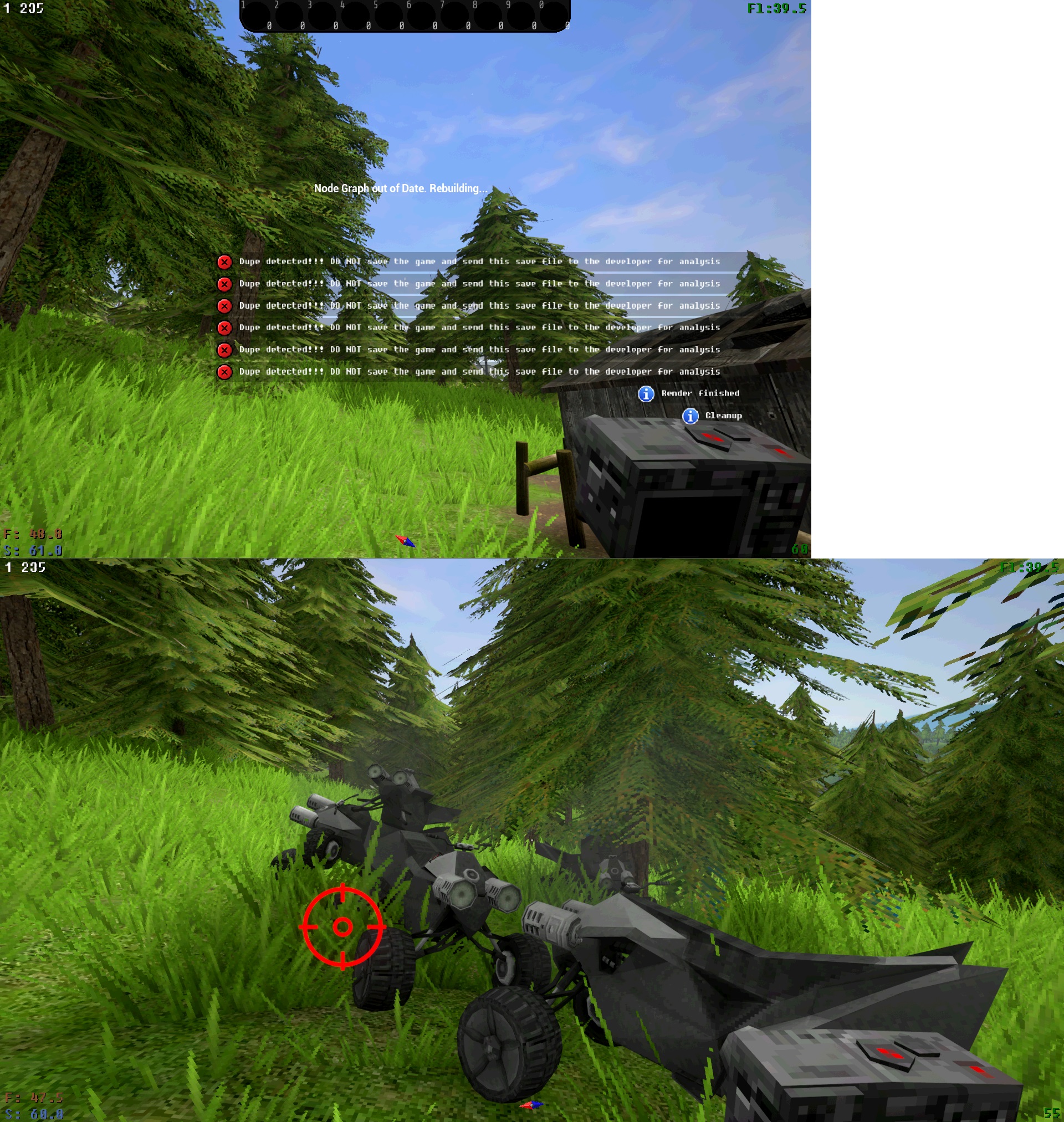
"Dupe Debug" build was made to track down the dupe glitch that is difficult to catch

If you get an error on loading - go to main menu without saving the game and DM me your .sav file (sav files are stored in appdata\local\votv\saved\savegames)

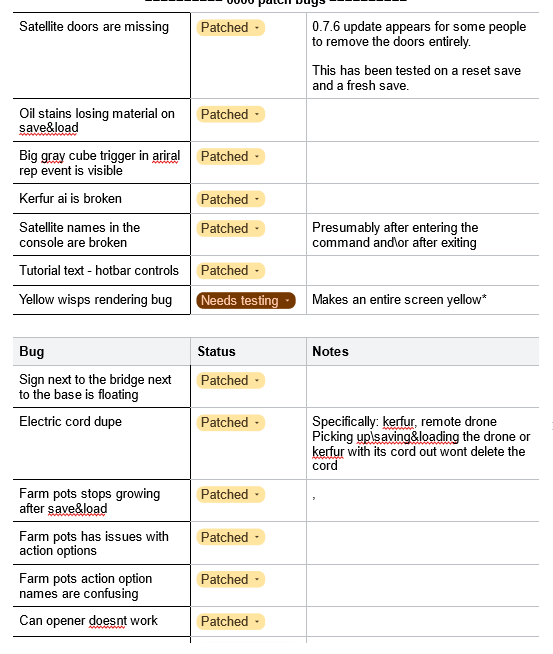
Additional list of bug fixes as a bonus:

ig im first to download it

ok

Russian language Pog, thx mr Nose 

Welp looks like my save is duped, where can i dm? 

On discord I guess

Are these patches included in the debug build? Should I use it instead of SUPER EXPERIMENTAL V2, or they're already included in the V2 version as well?

I think these patches are in debug build, because 0.7.0a still has all these bugs, so you can use debug build if you want all the latest patches

Does this count as a "dupe"?

Also, I'm not sure what the error would be. I got a "Cannot plant this item" notification (a yellow triangle), but I'm unsure if it could be considered an error. I'm past the autosave checkpoint either way.

In previous version there was a bug where doors dissapeared on save&reload, so this is probably caused by its weird fix, that causes doors to duplicate instead of normally respawning on reload

Is this the dupe glitch?

(2 edits)

It does looks like it! Did you not get the "dupe detected" and crosshair overlay when it happened?


I don't recall seeing it. This wasn't in the dupe debug build though, it was build 6

I would assume the message and overlay are part of the debug build then. There's likely some other debugging info on the save that's unique to this build too, so I don't know how useful your save may be to MrDrNose.

Launched myself off a cliff with the ATV and died, on reload the ATV duped and triggered the debug build's dupe detection: https://files.catbox.moe/quvzm1.sav
 
How bad would it be to continue on this save, by the way? I had just finished cleaning the base and migrating my things out of the mail box, but here's a few events that target the ATV and that sounds like trouble.

...On the other hand, I'm curious what would happen when there's multiple ATVs at play.

you can play on the save the dont save part was just so mrdrnoseguy knew why the dupe occured

Ahh just got the dupe notif on my second day. Here's my save, I hope its of some value

https://files.catbox.moe/u0ooow.sav

i have this bug but i don't know where is the save file, i looked in "VotV" but there is only binaries, content and index pls help me(((( i'm stupid

The save files are in C:\Users\(your user name)\AppData\Local\VotV\Saved\SaveGames

Deleted post
(1 edit)

Got the "dupe detected" overlay, so here's my save:

https://files.catbox.moe/0v9eok.sav

Dupe here https://files.catbox.moe/mdcd8k.sav

So, after I had the ATV dupe itself, I moved my things back into the mailbox, started a new game, got the base cleaned up and moved everything out of the mailbox yet again. Then after a reload, the ATV duped itself on this new save, yet again. This is what tipped me off that maybe the data.sav might be involved somehow.

So, I deleted all saves, including data.sav, and started a new game. Saved and reloaded while I was still at the gatehouse, not having touched anything, and this time the alarm clock duped itself. New game again, save, reload; and as expected the same alarm clock duped.

I removed all save files, repeated the process, and an object somewhere duped, don't know where. But the point was, it was neither the ATV nor the alarm clock.

Same process again: remove all .sav files, including data.sav. New game, save, reload. This time it was a drive tape. New game, save, reload. Same drive tape. 

To finish it off, I restored the data.sav that had the ATV dupe themselves, and added one of the saves where a drive had duped itself. Curiously, when I loaded the game with the duping tapes, it was the tapes that duped themselves, not the ATV as I was expecting. I saved after the drives duped, then loaded that game again, and nothing duped. I made a new a save, and strangely enough, the teleport donut duped (those in the know already know what donut I'm talking about).

Here's a zip with the saves and the data.sav for each of them: https://files.catbox.moe/v45bc7.zip

Out of curiosity, I got rid of this atv-dupe-turned-donut-dupe data.sav, replaced it with a fresh copy the ATV dupe data.sav again, and made a new save. This time what duped itself was the same clock from earlier. Deleted the data.sav, again dropped in a new copy from the ATV dupe data.sav again, and this time new saves where back to duping the donut! 

Is it the data.sav that determines what gets duped? Is it the data.sav's creation date, affecting any copies I try to make of existing data.savs? I don't know! I'm giving up. It's up to MrDrNose to make sense of all this. At any rate, dupes seem to be guaranteed on save and reload, no matter what I do.

(1 edit)

I have a dupe going on after every save and upload. Even on a new save.
https://files.catbox.moe/k3m63s.sav

Dupe save alert
https://files.catbox.moe/eko3ad.sav

Thanks for adding Russian language!!!

dupe

https://files.catbox.moe/jj6zyy.sav

dupe!

https://files.catbox.moe/4evb9b.sav

Viewing posts 1 to 20 of 30 · Next page · Last page