


Hello,
There's probably a trick for that, but I didn't find a way to create a single element dict:
("foo") dict ("bar") => {"f":"b", "o": "r"}
Whereas:
("foo", "baz") dict ("bar", "qux")
does the expected.
To obtain a list of the cards with a particular group number you could use a query something like
c:extract value where value..widgets.group.text=2 from deck.cards
(Note that if a 'group' field doesn't exist it will behave the same as a card in group "0"; you probably want to count from 1 for your groups)
Given that list, you can pick a random item and navigate to some card like so:
go[random[c]]
Or, all at once,
go[random[extract value where value..widgets.group.text=2 from deck.cards]]
Does that make sense?
You can adjust the widths of the columns of a grid to hide trailing columns. In "Interact" mode, a small draggable handle appears between column headers:
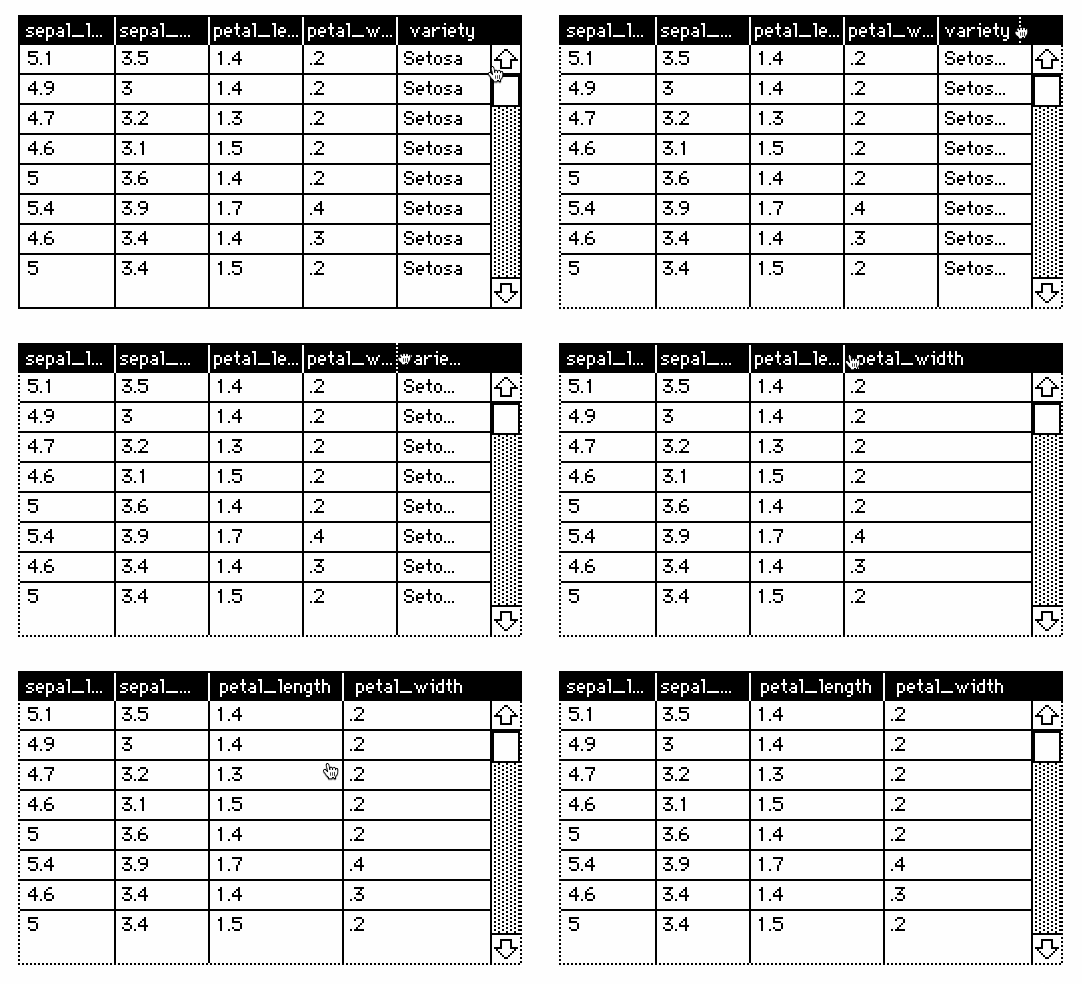
You can reset the columns to their default uniform spacing with the "Reset Widths" button in grid properties.
Manually resizing column widths enforces a minimum size. You can set column widths to 0 programmatically via "grid.widths", but a 0-width column looks a bit odd; I'll make a note to fix that in the next release.
FYI i've patched the problem with 0-width columns in grids; that should now offer a fairly flexible option for visually suppressing columns without physically removing them from the underlying table. You can try it out now at the bleeding-edge source revision, and the fix will be incorporated into the v1.41 release; probably next week.
Starting from the two fields you describe:
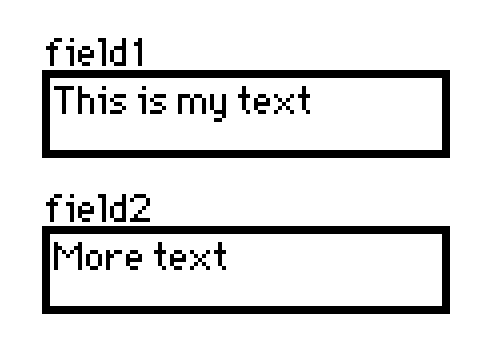
You can obtain the text of either field through its ".text" attribute. The "split" operator breaks a string on the right at instances of the string on the left and produces a list. Splitting one string on spaces gets us part of the way to what you're asking for. We can then use the comma operator to join a pair of lists.
" " split field1.text
The best way to experiment with this sort of thing is to use The Listener. Ask a "question", get an answer:

Another approach for gathering space-separated words from several fields would be to use an "each" loop:
Does that help point you in the right direction?
This does! When looking at the docs I guess this made me think "split" and such were tied specifically to tables. But now I'm starting to wrap my head around this.
In general, for string manipulation the main tools Lil provides are:
...and a few of the more complicated utility functions functions in rtext do also apply to plain strings.
The Lil "comma" operator forms a list by combining the elements of its left and right arguments.
If you use this operator to combine a table and a number, the table will be coerced to its list interpretation (a list of the rows of the table, each a dictionary), and then combined with the number 1 (whose only element is itself), forming a list of several dictionaries and the number 1. Applied to such a list, random[] will occasionally choose the 1.
When you call a Lil function with multiple arguments, commas should not be placed between arguments. You probably meant
random[temp 1]
Instead of
random[temp,1]
Furthermore, note that if you specify 1 as a second argument to random[] you will get a length-1 list as a result, whereas if you call random[] with only a single argument you will get a single value.
In preparing this post I have also observed that there is some inconsistency between native-decker and web-decker with respect to applying random[] to table values, which may have compounded the confusion; I'll have this fixed in the v1.41 release tomorrow. In the meantime the alternative is to explicitly crack the table into rows before making a random selection, like so:
random[(rows temp)]
In the context of query clauses, column names refer to the entire column as a list. The "where" clause expects an expression which yields a list of boolean values. Arithmetic operators like =, <, and + conform over list-list and list-scalar arguments.
Depending on how a predicate is written, it might naturally generalize to operating on lists for the same reason. For example:
on iseven x do 0=2%x end
iseven[5]
# 0
iseven[11,22,33]
# (0,1,0)
extract value where iseven[value] from 11,24,3,8
# (24,8)
If a predicate is only designed to operate on a single scalar value at a time, you can use the "@" operator to apply it to each element of a column, like so:
on seconde x do x[1]="e" end
extract value where seconde@value from "Lemon","Lime","Soda","Demon"
# ("Lemon","Demon")
This shorthand is semantically equivalent to
extract value where each v in value seconde[v] end from "Lemon","Lime","Soda","Demon"
(And of course in this particular case the "like" operator would be simpler:)
extract value where value like ".e*" from "Lemon","Lime","Soda","Demon"
Does that clear things up?
Thanks! That does explain why it seemed to work sometimes and not others. I will give it another try. For the record, It looks like my skimming skills failed me, because I now see where this is explicitly noted in the docs:
When computing columns, you're working with lists of elements, and taking advantage of the fact that primitives like<and+automatically "spread" to lists. When performing comparisons, be sure to use=rather than~! If you want to call your own functions- say, to average within a grouped column- write them to accept a list
It even calls out “where” in the next paragraph.
Widgets have an attribute called "show" which controls their visibility; this can be "solid" (the default), "invert" (an alternate color-scheme), "transparent", or "none".
Suppose the button X is on card C1 and the button Y is on card C2.
You could give X a script for toggling Y's visibility:
on click do
 C2.widgets.Y.toggle["solid"]
end
Or a simpler version that just makes Y visible:
on click do
 C2.widgets.Y.show:"solid"
end
There are several other examples of doing this sort of thing in this thread.
To make clicking a button "unlock" dialogue or behavior elsewhere in the deck, you'll need to remember that the button has been clicked, and consult that record at a later time.
Checkboxes are just a special visual appearance for a button, so every button widget has a "value" attribute that can store a single boolean (0 or 1) value. Thus, we can use the button itself to keep track of whether it's been clicked. Suppose you've given the button Z on card C1 a script like so:
on click do
 me.value:1
end
A script on another card could reset Z's value,
C1.widgets.Z.value:0
Or test its value in a conditional:
if C1.widgets.Z.value
  # do something special
end
If you have lots of "flags" like this, it may be a good idea to centralize them in some kind of "backstage" card so you can keep track of them easily, and perhaps to give yourself a script for resetting the state of the deck.
Does that make sense?
That would be a logical "and", produced with the & operator:
if C1.widgets.Z.value & C1.widgets.W.value
 # ...
end
The "random[]" function can be called in several different ways to produce different kinds of random values. In your case, you want to select a random value from a list of possibilities and then supply that value to the "go[]" function.
The "go[]" function can navigate to cards by index (a number), by name (a string), or by value (a Card interface). We'll go with the latter. Within a script, all the cards of the deck are available as variables of the same name. Commas (,) between values are used to form a list. If we have cards named "cardA", "cardB", and "cardC", and we wish to navigate to one of those cards randomly when a button is clicked, we could give it a script like:
on click do
 go[random[cardA,cardB,cardC]]
end
Does that help?
You might also find some of the examples in this tutorial illustrative: /t/3593043/make-your-own-chicken-generator
You can find documentation for format strings in Lil, The Formatting Language.
The format string of a slider widget is only given its value, which would usually be displayed as an integer (%i) or a floating-point number (%f); the rest of the string could, for example, provide units, like "%f degrees". In this way you *could* hardcode a maximum into the format string, like "%i/20" for an integer between 1 and 20 to be displayed like "7/20".
Extending the current behavior of sliders to make min/max and possibly other attributes of the widget available for formatting could be an interesting feature; I'll mull it over. For now, including that sort of information would require scripting. If you need this functionality in more than one place, perhaps you could use The Enum Contraption as a starting point?
Okay, thanks. The description of the "v" pattern type in the Lil docs made me think I could maybe insert any variable using just format strings. It's not too bad to just hardcode it and update it with a script whenever I change the max, though.
When you open the "Action..." dialog, Decker will attempt to "unpack" any script already attached to the button and reflect it in the settings you see in that dialog, and when you confirm it writes an entirely new script. This dialog exists purely as a convenience for composing simple scripts without writing code, and is not intended to manipulate or append to arbitrary user-generated scripts.
It is not possible for an unmodified copy of web-decker to programmatically fetch external files hosted e.g. somewhere on github pages, make http requests, etc. Doing this sort of thing would require adding custom javascript extensions to web-decker. An example of how such an extension might be written can be found in this subthread.
In general, decks should be self-contained objects pre-packed with any data they require to operate. A deck is a database, with grid widgets for storing tables and Lil for querying and manipulating them.
Lilt can be used to import or export data to or from a .deck or .html file in an automated fashion. If you insist on storing some dataset independently from a deck that uses it, it might be possible to use Lilt as part of a continuous integration pipeline or "build script" to bake out an updated web-decker build when an associated csv file is changed.
Many widgets will render in white-on-black instead of black-on-white if you set them to "Show Inverted".
If you set widgets to "Show Transparent" you can draw underneath them and have it show through, and thus provide background colors or patterns. The same trick is also handy for making buttons that appear to have an icon instead of text: draw the icon underneath!
Canvases can be drawn on in any color or pattern; you can use these directly or within Contraptions to make colorful variations on normal widgets. The fancy button contraptions I made recently can be configured with color images.
Finally, you can customize Decker's palette, substituting some different color globally for white and/or black.
Hi, I'm not IJ but I did some experimentation and I think I've figured it out - it seems the card.copy and card.paste commands let you copy multiple widgets at once.
So you'd do like this:
card.paste[A.copy[A.widgets.X,A.widgets.Y,A.widgets.Z]]
(As a side note, if you're referring to a card in a script you can just use the card's name, you don't need the deck.cards in front of it)
Let me know if this works for you!
Just to build on this, if the only widgets on card A are X, Y, and Z, you can copy them all with:
A.copy[A.widgets]
And here's one other slightly more concise way to select a bunch of widgets by name:
A.copy[A.widgets @ "X","Y","Z"]
There would be somewhat less overhead to having a single animated "pump" which is responsible for updating everything else on a card.
Have you tried enabling the script profiler (Decker -> Script Profiler) to confirm that it's scripts which are slowing things down? Having a large number of widgets shown at any given time (or particularly large canvases) can also start to stack up.
If you're updating large numbers of widgets individually- like lots of separate fields displaying stats- you might find that it's more efficient to replace them with multi-line rich-text fields or grid widgets, both of which can be useful for displaying formatted bulk data. There's no hard-and-fast rule about the best way to approach things; you may need to experiment. If you find any particular operation which seems unusually slow, and you can provide me with a minimized example, I can investigate and possibly improve Decker's performance.
The .text attribute of a Field is a string. Performing any sort of arithmetic operation on a string coerces it to a number (as a convenience), and in many places a string like "23" is fully interchangeable with the number 23:
100+"23" # 123
Unfortunately, indexing into lists isn't one of those places:
 foo:"Alpha","Beta","Gamma"
 foo[1]      # "Beta"
 foo["1"]    # 0
 foo[0+"1"]  # "Beta"
Part of the reason Lil draws a hard line here is that indexing lists by strings is one way to force them to "promote" to dictionaries when you assign through them; trying to parse strings into numbers could lead to some very nasty ambiguity:
foo["z"]:"Delta" # {0:"Alpha",1:"Beta",2:"Gamma","z":"Delta"}I apologize for the confusion stemming from my suggestions.
One possible alternative would be to make "counter" a Slider widget instead of a Field; The value of a Slider is always a number.
Ah, don't worry, you have nothing to apologize for! I thought this could be the case, but that might have had another workaround I wasn't figuring it out.
The code works perfectly now, so I'll keep it as-is with the +0 and write a small note that field.text is always a string, so I don't forget. Thanks for the help!
The rect module (which, for those unfamiliar, is included in the "All About Draggable" example deck) includes functions like rect.overlaps[] and rect.inside[] for manipulating "rectangles", which can either be a dictionary containing pairs with the keys "pos" and "size" or any Decker interface value that happens to have those fields- widgets, for example.
The pointer interface has a .pos field, but no .size field. Using an invalid index into an interface type returns 0, so the pointer interface kinda fulfills the contract and sort of works as an argument to these utility functions (as if it were a rectangle of size 0), if only by coincidence/accident.
I whipped up a little test, and sure enough this seems to work fine given an animated button:
on view do
 field1.toggle["solid" rect.inside[pointer button1]]
end
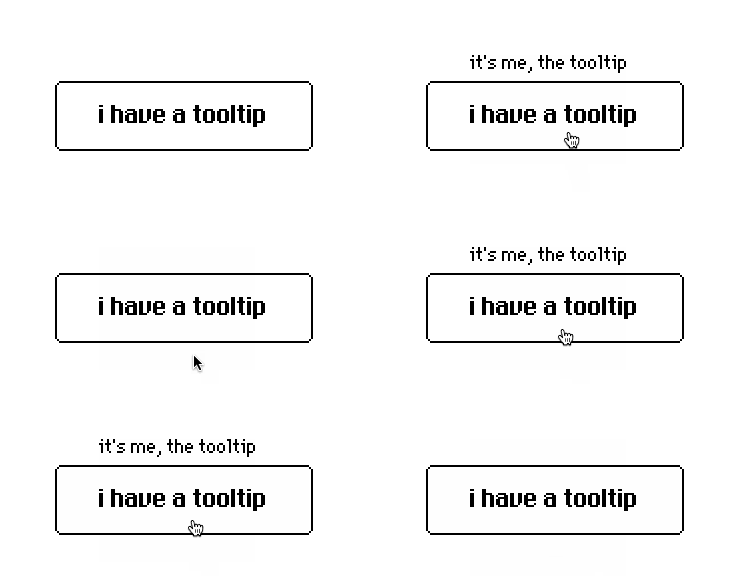
(Note that "tooltips" like this won't work properly on multitouch devices, since such input devices do not update the pointer position while a user's finger happens to be hovering above the display; this is why Decker doesn't have any sort of tooltip functionality built in.)
The same script body ought to work just fine from a centralized event pump rather than having every object with a tooltip be individually animated. I don't really follow what you mean in terms of the rect module "detecting the widget type".
thank you for the answer! this already opens up a lot of possibilities, actually.
what i meant was if there was a way of having, for example, an animated field widget that displayed text whenever the pointer went over a button. and i figured the way to do this was such field having something like:
on view do
 if rect.overlaps[pointer (((any button)))]
  me.text:"pointer over some button"
 else
  me.text:"pointer over any other thing"
 end
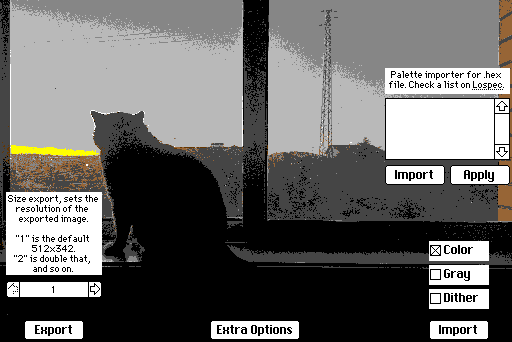
So, I'm trying to add import options to the image importer/exporter contraption I'm building. So far, this is the interface and everything seems to be working fine. "Extra Options" just makes everything disappear, keeping only itself and the Import/Export buttons.
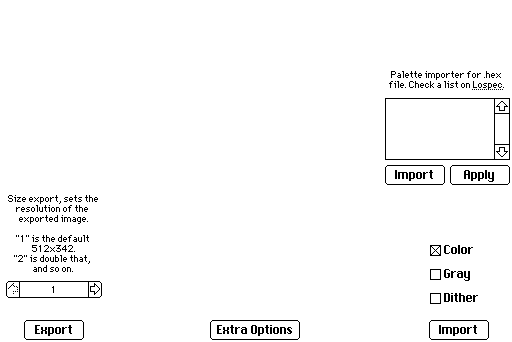
Only one of the checkbox buttons can be selected at a time (I'm using a basic "if" to check the value of each one and unmark the other 2 if is true).
Here's how the images look when imported in the order of the checkboxes.
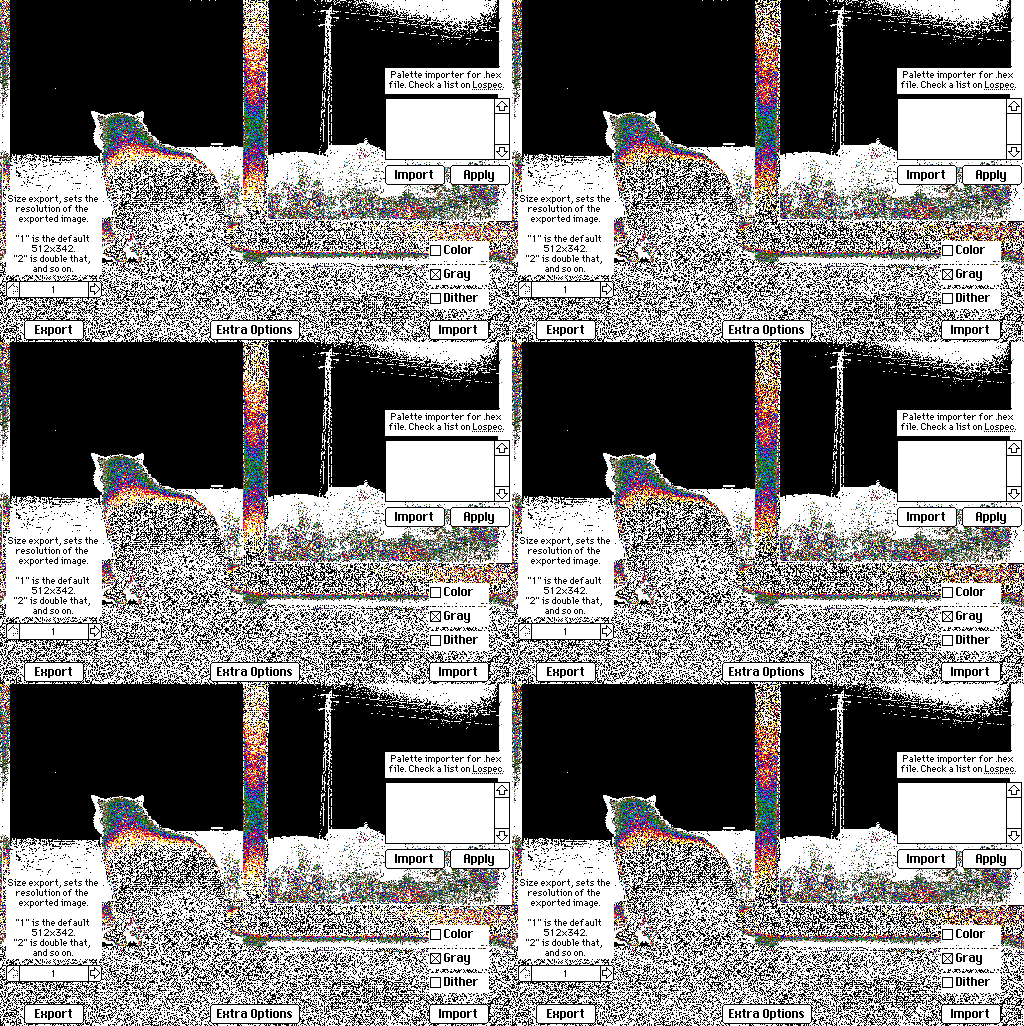
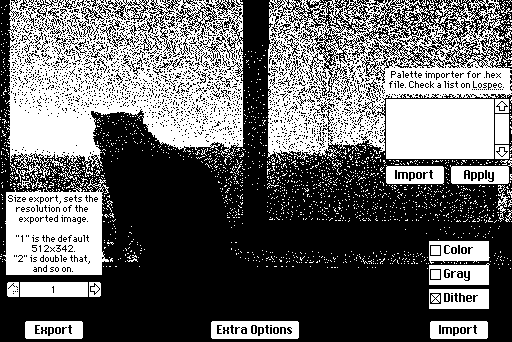
So, erm, I think the issue is clear. The Gray Import isn't importing in grays, but rather in a psychedelic way. Funny enough, the Dither Import relies on the Gray Import to use transformation, otherwise it just completely breaks too. But even so, the Dither result is noisier than just dragging and dropping an image into Decker.
It's worth noting the image is a jpeg, so I'm not sure why it's getting animated with the Gray Import.
Here's the code in the Import button:
on click do
    if colorbutton.value=1
        i:read["image"]
        card.image.paste[i 0,0,card.size]
    end
    if graybutton.value=1
        i:read["image" "gray"]
        card.image.paste[i 0,0,card.size]
    end

    if ditherbutton.value=1
        i:read["image" "gray"]
        i.transform["dither"]
        card.image.paste[i 0,0,card.size]
    end
end
I tested it with a canvas, and also did some testing in the Listener, but I can't figure out what's going on, if there should be some other sort of conversion happening before, or something like that.
This is working as designed. 256-gray images are not directly displayable within Decker, since Decker's color palette does not contain 256 colors and patterns; only 48:
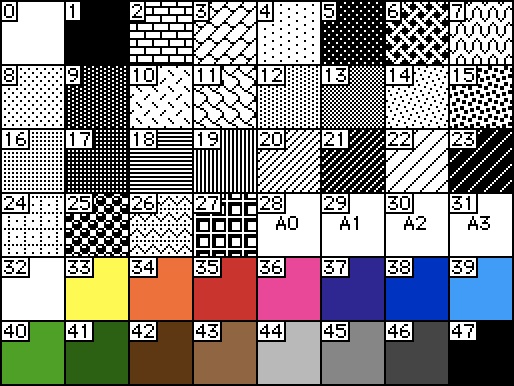
A grayscale image must be converted into a proper paletted image before it can be displayed; otherwise the grayscale values are effectively randomly mapped to entries in the above table, and any higher indices appear as white. The image.transform["dither"] function is one way to produce a 1-bit dithered image from a 256-gray image, using Bill Atkinson's algorithm. Rescaling a dithered image will considerably reduce its quality. The correct order of operations to prepare a dithered image therefore must be:
I was talking about this on cohost and millie also told me about Decker not being able to display the 256 grays which... makes complete sense tbh, as you yourself explained the palette limitation (which I actually know but didn't connect the dots, so I'm a bit embarrassed). Funny enough people liked the result, so I think I'll rename the option and leave it there for them to use and give life to fever dreams.
And the order for the dithered image makes sense now, I'll rewrite its import code and see if I can get it right then. Thanks a lot!
Edit: the dithering improved a lot now!
From inside a contraption instance, "card" refers to the contraption instance itself; this is handy if you want to send events to the "external" scripts on the contraption or inspect default properties like .locked, .show, or .font.
If you want to refer to the card within which a contraption resides, you can generally use "deck.card". Strictly speaking, "deck.card" is the active card on the deck; the card the user is looking at. This will only be distinct from the contraption's parent card if the contraption is being sent a synthetic event from some external script.
A different angle to consider would be prompting the user for a destination card when importing an image. You could, for example, use alert[] in "choose" mode to select cards from the deck by name, using the current card as a default:
alert["pick a destination card:" "choose" deck.cards deck.card.name]
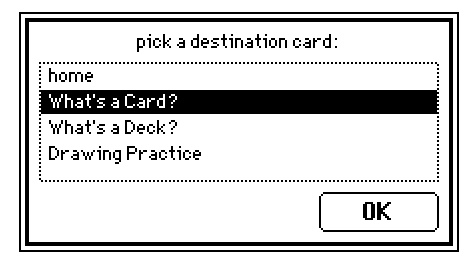
The downside to the above is that if a user hasn't given cards logical names they're "picking blind", which can be error prone. Every design problem is fractal in nature...
Using "deck.card" worked, hooray! The contraption is now working as intended with all the features I wanted, I'll just do some testing in the next few days and upload it to the jam.
I decided to avoid the "alert" route because, at least for my usage, I need it to just behave like a "stamp", copying the contraption background (which uses Decker full screen) and pasting it exactly like it's shown in the card below. Then one can delete the contraption and work straight on top of the "stamped" image with other widgets, including invisible ones. And I figured being pasted into the background allows image manipulation/editing/painting too.
Now, this whole thing led me to 2 other questions:
- I'm using this code in a button to paste the contraption background into the card:
deck.card.image.paste[deck.card.widgets.deckstamp1.image.copy[]]
Is there a way to make the "deckstamp1" be a string pulled straight out of the contraption's own name field? This way, the script would always "autocomplete" and the button wouldn't stop working if someone changed the contraption name, for example. I did some testing with various syntaxes, but as always, not sure if I'm doing something wrong or if it's not possible.
- Is there a way to access a contrast adjustment, like the one with "j" and "k" that works only after dragging an image into Decker? I looked around and didn't find anything. I figured that if there is, it would be cool to have a contrast slider and a button to update the image, even if it works just with the dithered import.
Anything that you want to "remember" across event handlers needs to be stored in a widget. A true/false flag, for example, could be stored in a hidden checkbox. If we had a card named "flags" with a checkbox widget named "hasKey" your scripts might look something like
on click do
 flags.widgets.hasKey.value:1
 go[bednokey]
end
...
on click do
 if flags.widgets.hasKey.value
  go[bednokey "SlideUp"]
 else
  go[bed "SlideUp"]
 end
end
If the widget happens to be on the same card as the script which references it you can shorten paths like "flags.widgets.hasKey.value" to just "hasKey.value".
If you want to show or hide objects on a card, you may find it more flexible to use a transparent Canvas widget containing an image of the key. You can show, hide, or reposition canvases at will, sort of like a sprite object:
myCanvas.show:"solid"
myCanvas.show:"transparent"
myCanvas.show:"none"
myCanvas.toggle["solid" booleanExpression]
myCanvas.pos:otherWidget.pos
This may also remove the need for a separate "flag" widget; the canvas itself will remember its visibility setting:
if bed.widgets.keyCanvas.show~"none"
 # ...
end
Does that help answer your question? There are lots of other examples of doing this sort of thing in this thread and elsewhere on the forum.
This absolutely goes above and beyond answering my question, thanks! I'll try all these out right away.