Indie game storeFree gamesFun gamesHorror games
Game developmentAssetsComics
SalesBundles
Jobs
TagsGame Engines

Idol Manager

Idol Manager is a business sim about conquering the entertainment industry using any means you deem necessary. · By sadambober, Kuiper

Bugs Sticky

A topic by sadambober created Nov 20, 2018 Views: 78,947 Replies: 879
Viewing posts 201 to 220 of 458 · Next page · Previous page · First page · Last page


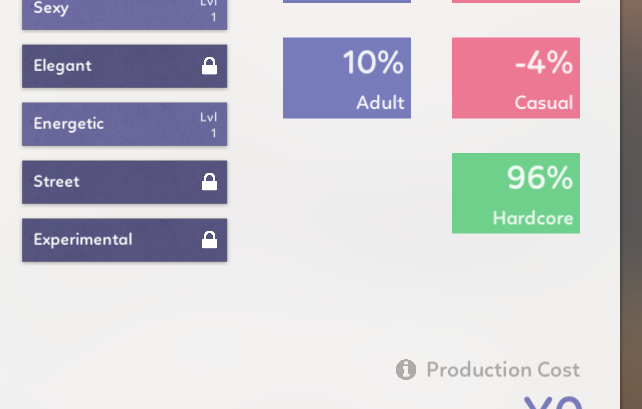
According to the Tool-Tip (and pretty sure it worked that way before), Energetic Dance-Style should push Hardcore appeal and lower Casual Appeal, notthe other way around as it appears here.  

Or the Tool-Tip is wrong.  ;)

Developer

Casual and Hardcore appeal are now also affected by the current popularity of that genre / lyrics theme / dance style (check the sales chart), so it's probably because of that.

Popular dance style = bonus to casual and penalty to hardcore, unpopular = bonus to hardcore and penalty to casual.

(1 edit)

Not sure I am a fan of that change tbh, especially if the swings are so big to create a total opposite of the expected.  

Makes it kinda hard to establish an identity to your group. 

Also the old bug, of the game getting stuck after hiring new Idols still exists.

My screen is all blurry and I can't do anything  to leave there game or save. nothing works. 

I have had something similar happen to me yesterday after an audition. The game still worked, though, and I could click the buttons in the background, but it was virtually unplayable since I couldn't see anything.

I am experiencing what I assume is a bug. I have an idol that has ben on hiatus for a bout a year. lol. It just says "On hiatus until" with no date. How do I get her out of hiatus?

Developer(+1)

Yeah, that's a bug. If you want you can edit your save file

C:\Users\*username*\AppData\LocalLow\Glitch Pitch\Idol Manager\data\manual_saves

Find "data_girls__Girls", find your idol in there and change "status": 6 to "status": 0

Thank you for the quick reply!

Just a note, I was having the same problem and this worked great for me, but I also had to edit the auto_save file to save my hiatus'd idol--I think because I used "save and quit" when I quit out of the game before editing the save files. So, yeah, if anyone tries this and it doesn't work, I'm guessing editing both the manual AND auto save will do the trick.

For some reason, my game keeps crashing after the unity player logo fades in, even though I updated to 10.1?

Developer

Please upload this file somewhere, or just send it to me at sadambober@gmail.com
C:\Users\*username*\AppData\LocalLow\Glitch Pitch\Idol Manager\Player.log

And also this folder:
C:\Users\*username*\AppData\LocalLow\Glitch Pitch\Idol Manager\Crashes

There's one other person having this issue, I wasn't able to figure out why yet

Just noticed this, but the chart bug goes beyond your singles never being flushed from the chart after you release them: any single released will appear in that month's chart for EVERY year past and future. (So if you released a single in March 2020, not only will it appear again in March 2021, but it also appears in March 2019, 2018, etc. if you check the chart.)

So this is a weird one. I started up my game, added some idols to the 'push', and then noticed that time was frozen in place--neither the day or the task bars (like business proposals, projects, etc) were moving at all. Saved and quit, reloaded the game, and found that it was running fine, so I added the idols back into the push...and...nope, paused again. Took them out, still paused. Saved and quit the game, went back into the game, time was moving as normal, one of my tasks completed fine, etc, so I'm pretty sure it's somehow tied into putting the idols into push? I've used pushes without issue before now, though.

(1 edit)

Rarely at the point when I chose the formation for a single (right before) I'm locked into the attached screen. It might have happened at other points too but not sure. There's also a delay in this screen before auditions but that one isn't permanent. The only thing I can do here is alt + F4

Are you running Beta #10.1? This issue was reported by some people when Beta #10 came out and the devs released 10.1 that was supposed to fix it. At least it worked for me. If you're not running 10.1, update your game and see if you can progress past the formation screen.

It's the Beta #10.1. Doesn't really happen that often, maybe it's a problem with long sessions?

Just recently updated today, and I started playing the new game. Unfortunately, the game suddenly pauses out of nowhere and the game doesn't continue. I press 1, 2, 3 gazillion times, but there is no response. The game is paused for whatever reason. Also, I noticed all my shows were wiped and there's isn't even a trace of them. Was this suppose to be a bug update because I've never encountered bugs until now XD

Additional Info: I have tried redownloading the game, quitting and coming back, and etc. There is no trigger, it just randomly happens out of nowhere.

Developer

Please upload your save file somewhere or just send it to me at sadambober@gmail.com

Win: C:\Users\*username*\AppData\LocalLow\Glitch Pitch\Idol Manager\data\manual_saves
Mac: ~/Library/Application Support/Glitch Pitch/Idol Manager/data/manual_saves 

Hi, I'm seeing a glitch where after an event happens and I click out of the screen, it blurs out the rest of the game and I'm not able to do anything else so have to force close the game and restart. Sample screenshot attached - this happened immediately after one of my idols graduated. I'm playing on the latest version, 10.1. 
(1 edit) (+3)

Hi, I wanted to mention a performance issue I have been seeing. I have been playing on the same save file for the past 6 months and over time I realized that the game was really slowing down. I had tremendous lag issues just scrolling through my list of 20 or so idols, and my company only occupies 5 floors of the building. I also play with the settings on Fastest. My auto_save.json file was 95k lines long. After some trial and error on my part I realized that if I deleted all the graduated idols from my file, the performance was much improved. Anything below 75k lines in the save file seemed to run well. Just wanted to flag it because more people may run into this issue at some point. 

(+1)

Hi, I'm seeing an issue with my younger idols where they are capped out on Sexy and Cool style values for their age, but they are being auto selected into training for these values anyway, which is just wasting time and taking up Stylist slots that my older idols could be taking advantage of. I know I can manually remove them from the training pool, but I think it would be better if idols who have hit their cap for a value are not selected by default - it would be much easier than having to keep track of their birthdays and remembering to put them back in the training pool when they age up. Thanks!

If the game is paused - game hangs when loading an audition.

After quitting an audition w/o selecting any idols and reloading the save *or* restarting the game, the game hangs on the audition screen.

Now, no matter what I do, the game hangs on the audition screen.

Developer (1 edit)

Do you have any mods enabled? If not, please upload Player.log and Player-prev.log to https://file.coffee/

from here C:\Users\*username*\AppData\LocalLow\Glitch Pitch\Idol Manager

And maybe try deleting everything in this folder

C:\Users\*username*\AppData\LocalLow\Glitch Pitch\Idol Manager\data\cache\portraits

No mods installed, deleted the cache file and that seemed to work (didn't hang with the game paused).

I also am having this issue but in my case I tried deleting the cache folder and that didn't work for me. 

I'm having this issue, too. :( Brand new save as well

Developer (1 edit)

This actually happens if you played before the update but started a new game after updating.

You can try to load an old save once (this will "reset" the game) and then continue playing your new save, or delete everything from this folder

C:\Users\*username*\AppData\LocalLow\Glitch Pitch\Idol Manager\data\cache\portraits

Another option is to open your new save file with a text editor and replace "version":"Beta #11" with "version":"Beta #10"

Unfortunately, none of these things worked :(

Something I noticed was that although only the blurry screen came up, I could still hover my mouse over where the portraits would be and click there - but doing so would crash the game immediately.

After I changed Beta #11 to Beta #10, it no longer crashed when I clicked the ghost portraits, but I couldn't get out of the screen either

Developer

Okay, that's weird. Are you playing on a laptop? 

Please upload Player.log and Player-prev.log to https://file.coffee/ after it happens again

from here C:\Users\*username*\AppData\LocalLow\Glitch Pitch\Idol Manager
(1 edit)

Hi, in the new version released today, I'm not able to load into my previously saved up file when I click Continue from the main menu. I can hear the game music and I see lines appear on the loading screen. It almost looks like the game has loaded behind the loading screen, but I'm not able to access anything. 

If I try to load the same save from version 10, it's working normally.

Developer (1 edit)

Please upload your save file here: https://file.coffee/

C:\Users\*username*\AppData\LocalLow\Glitch Pitch\Idol Manager\data\auto_save.json

Sure, it's uploaded here: https://file.coffee/Db4qkWafm.json

Developer

Okay, instead of deleting the entire cache folder try deleting everything inside this folder instead

C:\Users\sadambober\AppData\LocalLow\Glitch Pitch\Idol Manager\data\cache\portraits

(or create this folder if you don't have it)

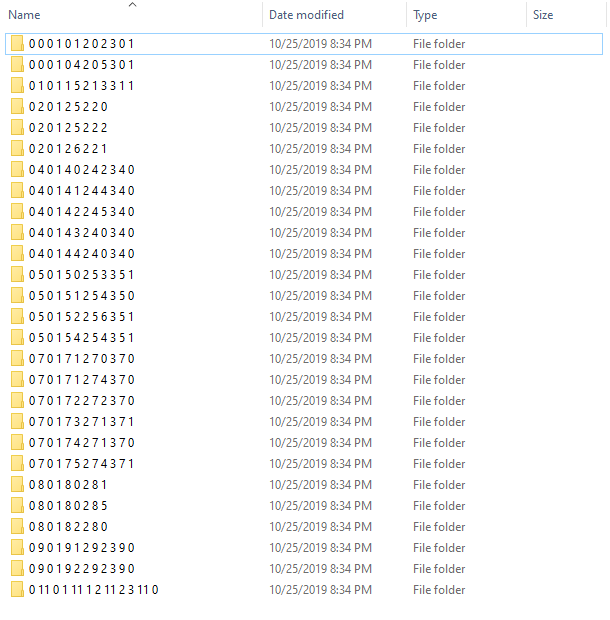
Then try to load this save again. Maybe try waiting a bit longer (initial loading now can take longer, but the game should work faster). If it doesn't work, please let me know what folders you have in data\cache\portraits. It looks like this for me after I load your save:
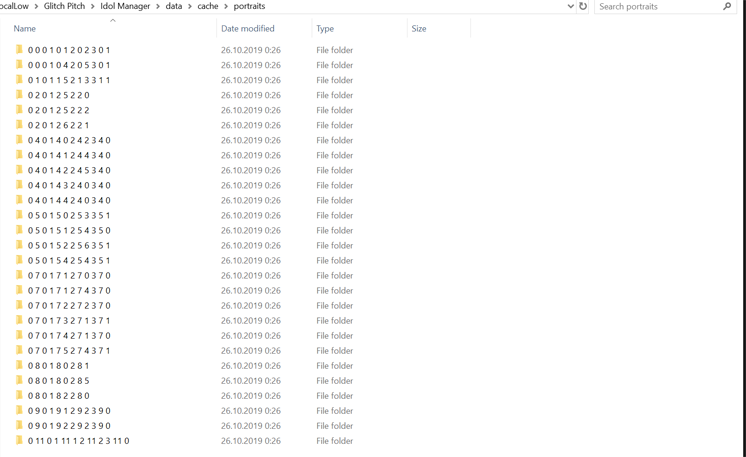
Okay, I removed everything from the portraits folder and reloaded the save. I waited about 5 minutes this time since I do have a large save file. These are the folders that I have in portraits now so it looks the same as what you have. But unfortunately I'm still seeing the issue and not able to load this particular file.
Developer

Yeah, this looks good. There are 3 images inside each folder, right?

Now don't clear this folder, but try adding "version":"Beta #11", in the beginning of your save file https://file.coffee/ZNr11l3dF.json

If it fails once, try again. If that doesn't help, please upload your log files

C:\Users\*username*\AppData\LocalLow\Glitch Pitch\Idol Manager\Player.log

C:\Users\*username*\AppData\LocalLow\Glitch Pitch\Idol Manager\Player-prev.log

(+1)

Thanks very much for your help, after adding the version to the save file and restarting twice I was able to access my save :) 

(1 edit)

Hey, just starting to play an the previous update’s bug of freezing upon formation pages/sms updates seems to have returned. Additionally, while not a bug, I feel like the game’s auto save has gotten worse? Before the constant freezes were bearable because auto save was plentiful and you could easily load back in, yet now the game seems to not auto save even after important events such as finishing a concert or releasing a single.

(1 edit)

Commenting to add that the game is hanging badly on auditions now, can’t even load the five idols after clicking the A and need to restart and then simply not use auditioning at all if I want to keep playing.

I hit the same problem with auditions hanging, and sadambober posted a procedure to clear the cache which cleared the problem for me.   Scroll up a bit and you'll see it.

(+1)

I agree about auto save having gotten worse. Before, auto save would bring me right to the moment before the game crashed. Now I'm losing entire concert performances, upgrading song genres, song releases, etc. I was fine with the game crashing before because auto save was so good but now I lose so much!

Having a lot of "blurry" screen freezes after almost any random event that occurs... Auditions, Concerts, Scandals, anything really seems to be setting it off. I uninstalled and wiped all data for IM from my computer and went with a completely fresh install of 11.0 but still happening regularly

(2 edits)

My game just started pushing me broken events, seemingly out of nowhere. Now, every 2 in-game days or so, an event pops up, but the event does not go away when I pick an option (clicking options can yield results, such as increasing influence over an idol, and clicking on the same option multiple times will keep increasing that influence). The background does not go out of focus, and while the game time is paused while the event is active, I can still interact with the background, and sprite animations still run. Also, it's worth mentioning that this always happens at the end of the in-game days, kinda like how it was with those time freezing bugs. It basically forces me to quit to the main menu and reload my save every time it happens.

Oh, and as you can see in this screenshot, one of the broken events that popped up was in English, even though I was running  my game in Portuguese.

Developer

Upload your save pls

Here it is: https://file.coffee/xpFaOk6f7.json

Developer

I tried like 5 times, there's always a dating scandal happening. There's probably an issue with translation? Upload Player.log too, there might be a hint

(But I did get a different bug once, a scandal popup and the sales chart opened at the same time, breaking the game, I'll need to fix that.)

Here you go: https://file.coffee/O3zenjrOZ.log

I got one broken shoplifting event, then two broken cosplay scandals in a row. Do let me know if you see anything wrong with the file.

Developer

Yeah, there's nothing in the file unfortunately

Maybe try replacing translated event_templates.json with original one and see if that fixes the issue. Or other files like vars.json

Or you can just email me the translation, I can test it in the editor

(2 edits)

I'll try replacing those files with their original versions, see if that fixes it. Just for some extra context, I managed to play Beta #11 for over 2h with the updated, translated files before this issue started happening. Maybe it was something I changed in one of the files between last night and today, but either way, I'll send you the translated files.

Developer(+2)

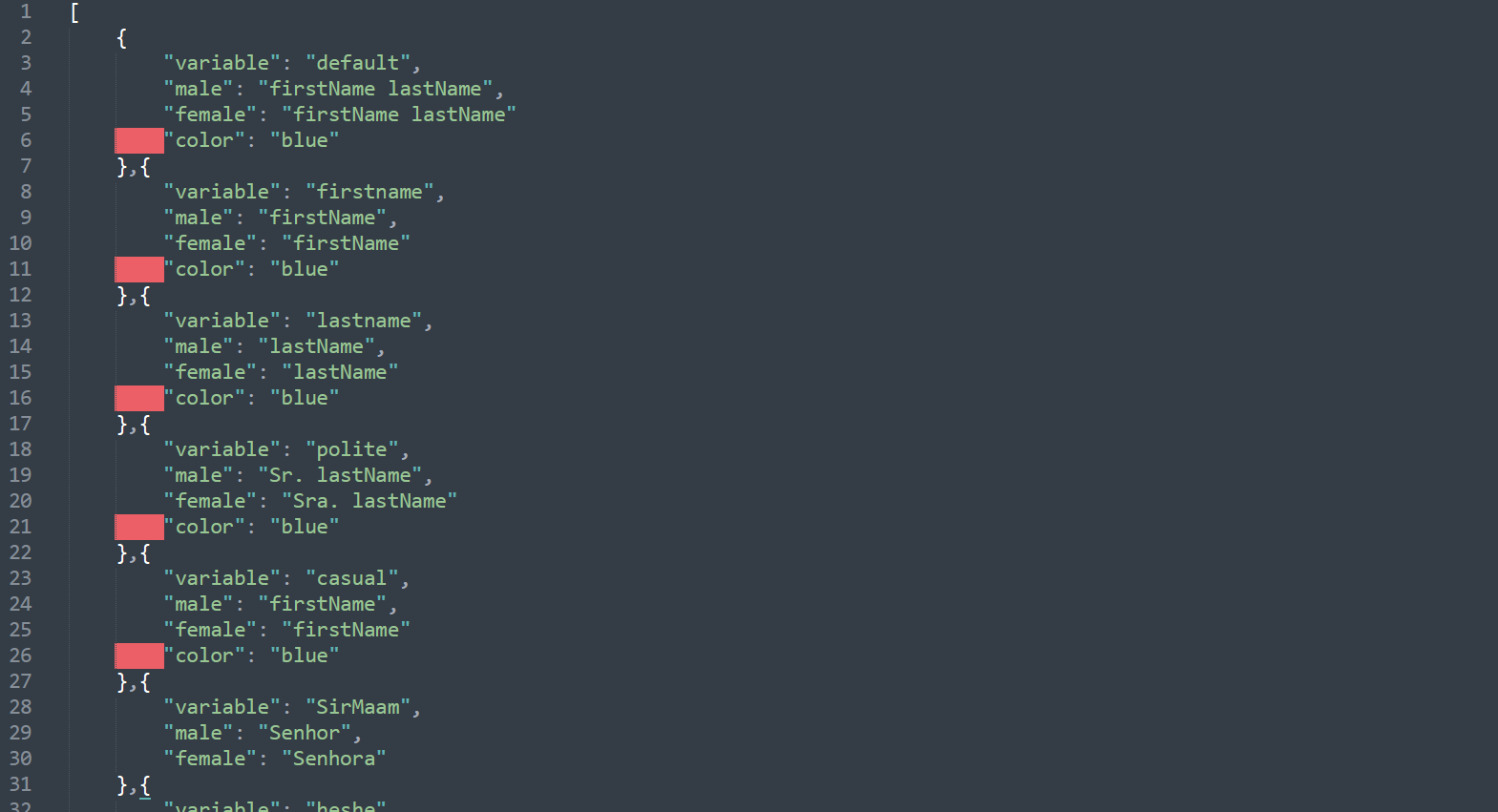
Okay, you just missed commas in vars.json, adding them should fix it. Btw you can use something like Sublime Text to edit files, it can highlight errors

Sweet, thanks for the help!

found some bugs relating to the awards mechanic:

Best Debut Idol is broken: my first year (2019 Awards) I had no nominees despite obviously having idols on my roster with 3 stars, lol. Second year (2020 Awards Show)  it nominated one of the first hires I had from 2018. The next year (2021 Awards) it nominated that same idol again, as she still had the most stars, despite there being idols hired after the 2020 show with 3 stars. So basically the game didn’t look at the idols I hired for the first award show, and now it ONLY looks at the idols hired before the 2019 Awards for the best debut each year.

Also, the awards about individual idols seem bugged: none of my gravure/variety/fashion award trackers tick up in numbers throughout the period. Performance/Promotions do. Additionally, my Most Prolific tracker doesn’t reset to 0 after the awards like Perf/Promo do and remains at 12.

Just realized as well that the game definitely isn’t awarding those same awards that aren’t upticking (gravure, variety, fashion). They were awarded the first year but not the two after that. Also iirc the hosts/game doesn’t give out awards for anything your own group isn’t nominated for? (Ie the first year every award was assigned to a group but now only things you are eligible for are mentioned.) Is that a bug or purposeful?

Developer(+1)

Yeah, that's on purpose, I thought it would get annoying to sit through the same thing every year

Is the trendiness/obscurity system weird for anyone else? I just released a single that used the same genre/choreo/lyrics as the top two songs for the previous month, and that month's curent chart. I got a obscurity bonus in return. I also can recall getting a trendiness bonus for single types I know weren't within the Top 10 for example

Hello, sadabmbober.

Just letting you know this is what my settings menu looks like after today's update. The 'English' language checkbox can't be unticked, and the 'Brazilian Portuguese' checkbox is now invisible (although it's still there, since my pointer changes when I hove over where the checkbox was supposed to be). Clicking on the 'English' checkbox doesn't do anything, even if I apply the changes. 'Run in background' checkbox also cannot be unticked. Last, but not least, the 'Background Music' slider is broken (slider moves, but number doesn't change), aside from not having its translated text (though I honestly don't remember if it was already that way before today's update).

I know this is all most likely temporary, and caused by the addition of a new checkbox to the settings menu (might also mess with some translated stuff), and though it's not something critical, at least to me, I'm just giving you a heads-up.

Cheers!

Developer(+1)

Check constants.json, I added a new one there, it's probably because of that

All good now, thanks!

When I try to hold local auditions after a new game, the screen blurrs but the idols don't appear on it. My mouse changes as if there were icons , but there's nothing more than a blurred screen...

Scroll up to my post about having problems with auditions, sam gives directions for clearing the cache which cured the problem for me.

None of it works… The last comment below your post perfectly illustrates my problem.

Player.log : https://file.coffee/JualBUXGY.log

Player-prev.log : https://file.coffee/k9_iWR-4H.log

Developer

Okay, I see the issue, thanks.  I'll try to fix this asap, but for now updating your video card driver could help (I have the same video card but more recent driver and it works (26.21.14.3630 vs your 24.21.13.9901))

Developer

Actually, what's your email? I want to send you a new build to check if the issue is fixed

(1 edit)

My e-mail is [not here anymore] . Thanks you, I'll tell you if it works !

Viewing posts 201 to 220 of 458 · Next page · Previous page · First page · Last page