Indie game storeFree gamesFun gamesHorror games
Game developmentAssetsComics
SalesBundles
Jobs
TagsGame Engines

PixSort

After Effects Pixel Sorting Plugin 路 By Wunkolo

Bugs Sticky

A topic by Wunkolo created Jul 17, 2016 Views: 9,412 Replies: 105
Viewing posts 10 to 29 of 30 路 Previous page 路 First page

Hi, having significant issues re-opening a comp made by someone else that uses PixSort  - get all the attached issues - AE in an attempt to self regulate seems to delete all the layers with pixsort on it so the file is unusable. When I delete PixSort from my plugins the AEP opens absolutely fine (and alerts me that the plugin is missing).  I've done as AE says which is save with a new name.  This strips all the PixSort stuff out of the comps making it unusable.
Developer

Are the two of you using the exact same version of PixSort? Be sure to check the "Build Date" value when clicking "About". Also are the two of you using Macs or is it a mix between Mac and PC?

So, as soon as I posted this I installed a 1.1 which brought everything back.  The animator was using Windows but we're on Mac.  All good now, thanks.

Developer

Glad it got resolved!

Hi, I'm experiencing crashes when I click on the Reverse checkbox under Sort. This happens when I set the Threshold to 1.0. Running After Effects CC 2017.2 (14.2).

Developer

Oh man I seem to be able to recreate this on my end too. Looking into it now!

Developer

Added some patches! Redownload for the new build. Should be fixed now!

Great, thank you for the quick fix! It's working again. Fantastic plugin, really happy with it so far.

(1 edit)

So I noticed one more thing, when I apply the PixSort plugin, I'm getting a single pixel border all the way around my composition. is there a way around this? I believe it's related to the Reverse checkbox, because when I unclick it, the borders are filled out properly.

Developer

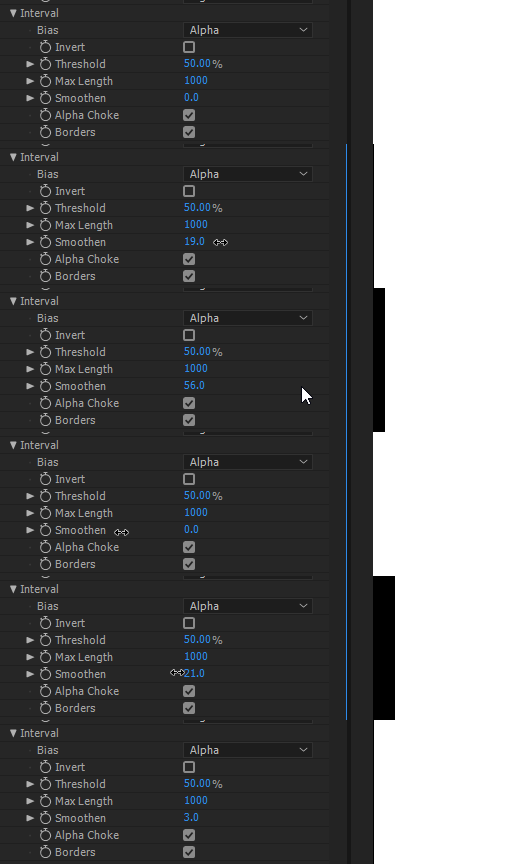
It seems to be from my Smoothening option under the Interval section. It blurs the Interval Mask and when trying to blur the border-most pixels it pulls in a black pixel from the edge:


In your case a solution would be to set the Interval-Smoothen option to 0 for now if it isn't too drastically affecting your results while I work on implementing a better interval-smoothing.

Thanks for the clarification, I'll just have to change that setting for now.

(1 edit)

Hi, I jusy pay for the Pixel sort plugin but I can't use it because it's not match :/ 

I'm on macOS Sierra and AE CC 2018

Developer

Hey! Sorry about the error you are getting. Did you properly extract the downloaded .zip file into the plugin directory? Something that might cause this are file permission errors during extraction of the zip file. Also what is the exact MacOS version that you are using? (10.12.1, 10.12.3, 10.12.6, etc)

(1 edit)

it's gonna mix now! don't know why ahah 

thanks a lot

Deleted 3 years ago
Developer

Hello! Sorry you're encountering this problem. It looks like you downloaded the PC version(The ".aex" is for the PC version while the ".plugin" is what Mac OSX uses). Be sure to download and extract PixSort.plugin.zip and drag the extracted PixSort.plugin into the plugin folder. When extracted right the icon in your file browser for PixSort.plugin should change as well.

Deleted 3 years ago
Developer

Glad you got it working!

Hi Wunkolo,

Love the plugin — it's been working fine so far but weirdly when it came to rendering out - After effects just ignores the plugin entirely and none of the pixel sorting appears in the final render at all, do you have any suggestions at all? It's for a fairly urgent client project but I've resorted to screen recording the preview in the mean time.

Many thanks!

Henry.

Developer (1 edit)

Hey Christmasham,

That's a very strange bug... Is this the first time this has happened? Is it only with this one composition in particular? Are you sure you don't have the layer that PixSort is applied to set as a guide layer?

Hey, Thanks for the quick reply! — It is the first time it's happened, though this is also the first time using PixSort, but I use plugins like trapcode and don't encounter any issues, I found out I can render out fine if I use the legacy renderer in after effects (instead of media encoder) but this is obviously not ideal as it's extremely limiting in format/codecs/etc. 

Developer

Can you tell me some more context of what version and OS you are using? I am unable to replicate this using  Windows 10, After Effects CC 2018 (15.0.0), Media Encoder CC (12.0).

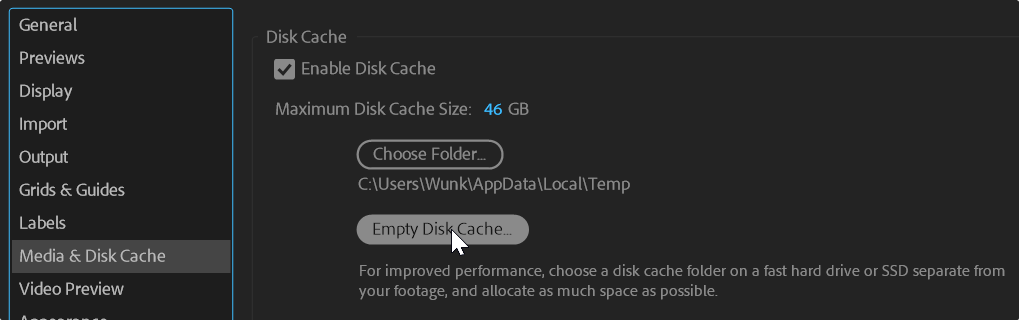
Are you able to create any other compositions that do the same thing? Such as a very minimal composition where this seems to happen. Also have you tried clearing your media disc cache in After Effects? It is possible that the cache coherency between After Effects and Media Encoder has gotten compromised.


Hey Wunkolo,

Thanks for the reply again, I'm using macOS Sierra 10.12.6,
After Effects CC 2017 14.2.1.34 — do you think this is the root of the problem?

I've purged the cache and tested a new comp but no luck, fortunately being able to render 
from after effects directly and converting afterwards is working okay for this project,
I'll update After effects when I can to see if this resolves it.

Thanks!
H

Hello. I just updated the .plugin file and now its not showing up into my AE.
Before the update it was fine. I'm using OSX El Capitan i7 16Gb. After Effects CC2015

Developer

Sorry! I had to dust off some old build chain stuff when updating to the latest AdobeSDK. Should be fixed now!

Hi Wunkolo,

Recently updated to the latest version of macOS Mojave 10.14 (18A391) and the latest version of After Effects CC (16.0.0), I've placed the .plugin file into the respective folder but its not showing up in my AE.

Please advise, thank you!

Developer

Should be fixed now! Sorry about that. Some build pipeline issues

Hello,

bought your incredible plugin but, after I assume is a correct placement of the file in the plugin folder, I can't find it in the plugin list. I tried a previous version of after effect and it didn't work either. I work on a : iMac - Mojave v10.14.1

Would you happen to have an idea ?

Thank you for your time <3

Developer

Hey! Did you make sure to unzip the archive before putting the file into the plugins folder? It should have an icon similar to some of the other files you may find in there from within finder.

What are the exact steps that you did to install it?

Thank you for your reply.

I followed the exact same steps as on my PC (it works there).
- unziped it, - placed it under the plugin folder (applications/adobeaftereffectCC2019/plug-ins), - and that's it, there should be no problem right ? I use other plugins from videocopilot.net or old Trapcode versions for exemple and they work fine.

Thank you for taking some time to help me ! <3

Developer

Very strange that this is happening...

Do you have multiple versions of After Effects installed and might possibly be running a version different to the folder that you are installing it in?(this is something that has happened a couple times to people with install-issues)

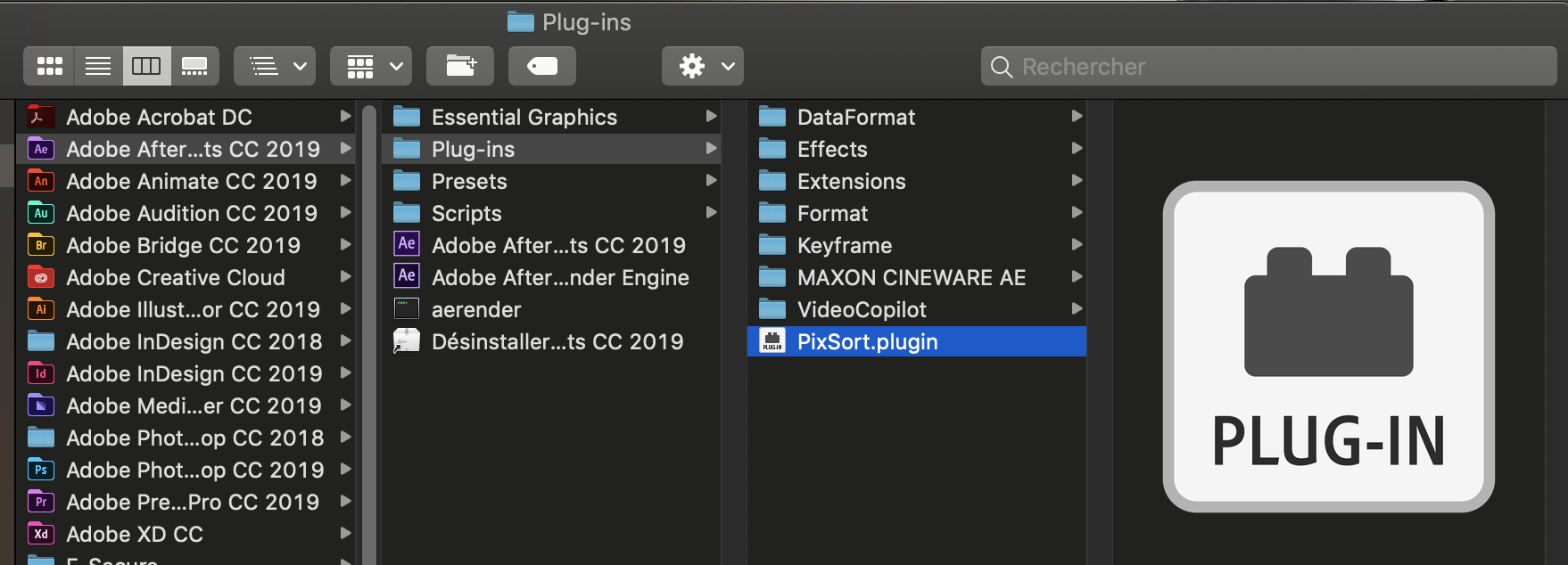
When the file has been fully unzipped, PixSort.plugin should have a different icon that will imply that you've got the right file to put into "Applications/Adobe After Effects (version)/Plug-ins"(PixSort.plugin within the PixSort.plugin.zip should go in here).  And then it should show under "Wunk Effects" just like in the PC version.

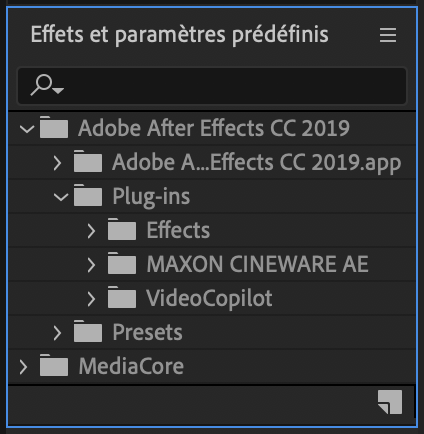
Everything is perfectly set up as you said. I reinstalled After Effect, still not showing. I don't have any remaining previous versions of Ae either. 


Even when I search for the plugin with the Finder, it does not show...


Am I not seeing what I am doing wrong ?

Developer

That's very strange that it doesn't show up there. Even OSX is regarding it as a valid plugin but After Effects refuses to recognize it and you mentioned it happening to a previous version of After Effects as well...

Just one more thing to make sure:

on that .plugin file you should be able to right-click>Show package contents to browse the contents of the plugin archive. Within it, verify that the contents look like this:


Particularly that the "PixSort" file is within the MacOS folder as it might imply that you have an older download of the plugin or the initial extraction did not work correctly.

Everything is right where it should be:


I have made some more tests and It does not work on any previous versions of Ae. Unfortunately, I do not own another iMac to test it on another computer. I don't know how to help you more..

Developer (1 edit)

I'm booting up my OSX installs and I can't seem to be able to recreate this issue at all to find out what is going on here exactly unfortunately... Nothing seems to stand out to make it seem to be a locale or filesystem issue either from some of the other tests that I've done and the current upload at the moment is using the latest SDK from Adobe(Oct 2018) and it is using a statically linked OSX that supports version 10.11 or above so it should show up just fine... I can offer a full refund to your stripe purchase(ending in "xqJrF6") if it is not suiting your needs at the moment as I can't think of any other reason for it to not show up... Really sorry about all this

I thank you for your time ! And it's ok it works on my other PC so I can still use it

I'll be sure to post again if it works !

<3

I'm using Pixsort in an AE file with music synced animations.

The issue is: 70% of times the audio won't work when I start the software. (all sounds are on and doesn't matter what audio output I choose)

I'm not 100% sure it's because of Pixsort, anybody had the same issue? Any fix?

I get a 

can鈥檛 be opened because Apple cannot check it for malicious software.

when opening AE 2019...

Developer

Looks like a Mac operating system security measure of some kind..

Does this happen when you open After Effects in particular? Any more contextual information you can give?

Mac OS asks me to authorize the file when putting it into the plugins folder, then, when you open AE and drag the plugin onto a layer, it says it鈥檚 unable to authenticate

Developer

This sounds like a security measure similar to the Windows UAC system of some sort that Mac OSX has. 

Maybe check some of the security settings mentioned here? There seem to be other softwares that have this issue as well.

Since upgrading to Catalina, I keep getting these errors when I have PixSort in the Plug-in folder (with CC2019, and 2020). Any idea on what I should do? I've tried downloading, and installing again. Thank you for you help! 


Developer

Some others have encountered similar issues like this after upgrading to the latest OSX and I think it's basically the OSX equivalent of Window's UAC authorization to serve as a first line of defense against unsigned software.

There are some other software that run into this issue but there seem to be people finding a resolution in just right clicking and clicking open. Maybe that may work?

Right clicking and then clicking open didn't work for me, but I did find a solution in the reddit link that you attached. After getting the "cannot be opened because the developer cannot be verified," I pressed cancel, and then opened System Preferences > Security & Privacy > General. Under "Allow apps downloaded from:" there was an option to "Allow PixSort anyway." (I don't remember the exact phrasing). After clicking that I closed AE, and reopened it and the plugin worked! 

Thank you for your help! I'm a big fan of your work! 

Hi Erica,
I'm having the exact same trouble, same windows pop out when i'm clicking the plugin and after closing these the plugin doesn't work anyway.
I've tried to follow your suggestion going to the system preferences, but i simply don't have an option allowing to download apps from anywhere other from app store and verified developers.
Is there anything else you tried that helped you start running the plugin?
Thank you

Developer

Hey! Have you tried the "RightClick>Open" option before doing the System Preferences stuff?

I'm seeing better luck with the RightClick>Open one and it appears to work immediately after doing this at least once.

(1 edit)

Hi, when I use this effect, it doesn't open to the whole composition. It annoys me that I can't solve this problem


https://prnt.sc/rqvepu

Developer

Sorry, but you are not using my PixSort plugin in that picture. You are using "AE Pixel Sorter" in that image which is not the page that this plugin is for.

Sorry for bothering you. I did not notice it

Hi,  
I've just bought the plugin and I'm pretty satisfied with it. Unfortunately I've a rendering issue with Adobe Media Encoder 2022 (22.4) which is not displaying the plugin at all on the rendered file. The problem is that the file is rendered correctly (no crash report or error code) but the result is like if PixSort would have been disabled.
Everything is working properly when working with the After Effect built-in rendering process but the .avi file generated is way to big for what I have to deliver, that's why I have to use Media Encoder in order to export the project in .mp4. I've tried to copy the plugin in the Media Encoder folder (didn't work either), also to export in .avi and then convert in .mp4 via AME2022 (not valid because of quality loss), reboot etc but nothing seemed to solve the issue so far.

Do you have any idea on how to fix this problem ?

Thank you for your help :)

Developer

The only thing I can imagine is that it may possibly be a caching issue of some kind. Where it is picking up old cached frames rather than actually rendering the Pixel-Sorted-ed frames somehow.

Could you try clearing your cache and seeing if that helps somewhat?

Hi Wunkolo,
Thank you for the quick reply. 

I cleared the cache and the database but got the same result unfortunately.

Developer

I'm having some trouble on my end trying to re-create the situation at the moment. Creating a composition in adobe after effects and rendering+encoding it out from adobe media encoder.

Would you be able to provide more context or a minimal setup that you can send(wunkolo at gmail dot com) that recreates the situation?

No problem, I just sent you an email with a video recreating the whole issue. 
Thanks !

Developer

Thank you! We can debug this further over email. 馃憣

Hello I Just wanna ask if there is any way to work with the Plugin on MACs with M1? 

Thanks

Developer (2 edits)

At the moment no! This plugin does not work with Apple-M1s.

The disclaimer is on the page as well:


Hi @wunkolo, I just purchased Pixsort after watching a Youtube tutorial saying how great it is, and looks sick, just not showing up in After Effects once i've extracted it from the Zip and put it into the plugins folder?? I running Adobe CC latest version on a MacBook pro m1 Max
I have a big job on with a tight deadline and really need this sorted asap if possible 馃槬 

Developer (1 edit)

Hey there! I responded to your email as well. Unfortunately PixSort does not currently support ARM-based M1/M2 Macs. 馃槚This is stated on the page for PixSort as well.
image.png

If you'd like I can begin the refund process for your purchase.

oh damn it, yeah I just read it on the page, should have really checked :( damn. Yeah if you could refund me that would be great! Thanks Wunkolo! my email: ryanwinters.av@gmail.com

Cheers,
Ryan

Developer

For sure! Sent it over 馃憣Sorry for the trouble.

Hi we just bought the Plugin Pixdither too, but didnt seen the disclaimer, is there any chance that you developing the version with osx ARM right now? or you're publishing it soon? Think a lot of people would love that. 
Greetings  Phill

Developer

Apple-ARM support is currently in the works! Aiming for a release this half of the year.

Developer

Just following up to say that PixSort now supports Apple-Silicon MacOS!

Downloaded Plugin for Mac and it is telling me it cannot verify the authenticity of the effect and to re-download or contact the developer. I have tried to re-download 3 times and can't get past the issue. Any help? If not I hope I can get my money back

Developer (1 edit)

Seems to be related to the fact that the application is "technically" unsigned and MacOS wants you to allow it explicit permissions, but it is not clear how to do so for a plugin. Some others have had situations like this and some have had luck by just right-clicking the plugin file and clicking "Open" at least once. Try some of these solutions!

https://support.apple.com/lv-lv/guide/mac-help/mh40616/mac

https://github.com/hashicorp/terraform/issues/23033#issuecomment-539736692

https://community.vcvrack.com/t/rack-cant-be-opened-because-apple-cant-check-it-...

Unfortunately still can't get it to work /: If possible can I get a refund?

Developer

For sure. To initiate a refund, please contact support with your Transaction ID and they can process the refund.

Hello,

I purchased the Mac version - I'm running a Mac Pro with Monterey and Adobe After Effects CC 2023

I installed it by putting the extension to /Applications/Adobe After Effects CC 2023/Plug-ins/Effects

Every time I try to use the plugin in after effect I have to error messages : -  The first one in affer effect is the ( 0 搂 1 ) error message, Impossible to import the file PixSort.aex : file or extension not recognised. - The second one is in from Finder : Impossible to open "PixSort.plugin" as it comes from an unknown developer 

So I updated my Adobe After Effects* to version 2022. Tried again, and the same messages appeared.

Developer

 Some others have had situations like this and some have had luck by just right-clicking the plugin file and clicking "Open" at least once. Try some of these solutions!

https://support.apple.com/lv-lv/guide/mac-help/mh40616/mac

https://github.com/hashicorp/terraform/issues/23033#issuecomment-539736692

https://community.vcvrack.com/t/rack-cant-be-opened-because-apple-cant-check-it-...

Hi I bought and downloaded the product but everytime I attempt to use on Adobe After Effects 2025 "After effects error: couldnt find main entry point for PixSort"

Developer

Are you on MacOS? There seems to be a widespread issue involving After Effects 25.2 in particular and I suggest downgrading for now or waiting for a newer version that possibly resolves the issue.

See here for more info: /post/12668362

Yes ! I am. Thank you, it's working on After effects 24 whilst I wait for a newer version!

I was using this plugin for a long time. now it will not initialize. it says "After Effects error couldn't find main entry point for pixsort plugin ( 48::72)" will there be a future update or is this no longer supported.

Developer

This is a known issue introduced with Adobe After Effects 25.2 in particular, causing lots of other people's plugins to break as well on MacOS in particular.

/post/12553459

https://x.com/DaveChap/status/1909237942536577222

https://community.adobe.com/t5/after-effects-beta-discussions/my-plugins-fails-to-load-in-25-2-and-25-3-on-macos/m-p/15192946

I would suggest downgrading to 25.1 if you can, or possibly getting some of the newer updates that may address this issue in particular.

Viewing posts 10 to 29 of 30 路 Previous page 路 First page