


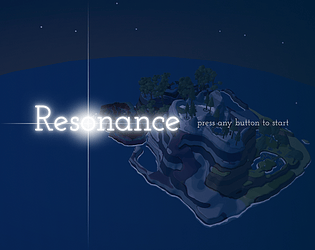
I really enjoyed the level design and vfx. I thought the sound puzzles were a cool idea, however I found the amount of sounds playing, especially on the later puzzles to be overwhelming and the volume of the current puzzle felt quieter than the background sounds. Multiple times I also fell into water and was unable to get out or respawn, requiring me to restart from the beginning to make further progress.
Play game
Resonance's itch.io pageRate this game
In order to rate this submission you must be logged into itch.io and have submitted your own entry. Anyone with an account can leave a comment.
Design Statement
We heard the theme track as a journey and a quiet transformation. It sets out from somewhere familiar, grows more urgent as it pushes into the unknown, then ends abruptly and leaves a wistful silence. We turned this into a walk across a mountain island where nature only answers once you learn to listen.
Our key design choices:
- Guidance is sound and light, not maps or text. Each light ball carries its own instrument. Face the right way and its melody grows clearer while a thread of light points ahead.
- Puzzles are solved by ear. Glowing creatures each sing one note, and the player places them on stone tablets to rebuild a melody. Mistakes are pushed out gently, with unlimited retries and no fail state.
- The world grows with the music. Each restored melody adds its instrument to the score for good and brings the landscape to life, until the journey ends in a flight up into the sky.
- Controls stay minimal, so attention stays on listening.
Game Instructions (launch steps, controls, and gameplay overview)
Launch steps
1. Download the game (Windows) and unzip the whole folder. Keep all the files together.
2. Double-click ThatGamejam2026.exe to start. If Windows shows a security warning, click More info, then Run anyway.
3. The game opens in fullscreen and you begin playing right away.
4. Please play with headphones. You find your way by listening, and sounds come from where things are in the world.
Gameplay overview
Goal: Restore three lost melodies and return three light balls to their altars.
1. Tutorial: the White ball
- You start empty-handed. Scroll the mouse wheel to raise the White light ball.
- Turn slowly on the spot. When you face the right way, a thread of light extends from the ball and its melody becomes clearer. Follow it.
- At the White altar, press E to place the ball. The rock blocking the road crumbles, and the Yellow, Blue and Purple balls unlock.
2. Find the three areas (any order)
- Switch between Yellow, Blue and Purple with the mouse wheel. Each ball only guides you to its own area.
- The first time you enter an area, a pillar of light marks the location of its altar, and the area's creatures light up one after another to greet you.
3. Rebuild the melody
- Holding the matching ball, aim at a creature of the same color. It sings its note and grows a little.
- Press E and the creature follows you. Only one creature can follow at a time. Right-click to hear its note again.
- Walk it close to an empty stone tablet of the same color and it settles there.
- Fill every tablet. The tablets then sing the whole melody in order and show which notes are right. Wrong creatures pop out, so rearrange them and try again.
- Stuck? With no creature following, right-click inside the area and the creatures replay the correct order with a glowing hint. This hint also plays automatically from time to time.
4. Return the light ball
- Solving the melody unlocks that area's altar. Hold the matching ball, stand next to the altar and press E.
- The ball's instrument joins the background music for good, and the area comes to life.
5. Ending
- Once the Yellow, Blue and Purple altars are all complete, sit back for the final journey and the credits. Press any key afterwards to play again.
Good to know
- There is no way to lose. If you fall into water or out of the world, you return instantly to your last safe spot with all progress kept.
- Progress is not saved when you quit, so play through in one session.
Gameplay walkthrough video
https://youtu.be/1WBO4E9vh7g
Did your project use any AI tools or assets? If yes, please specify.
AI for debugging
Leave a comment
Log in with itch.io to leave a comment.