You can post your suggestions for the game here. It could be useful. I give no guarantee that I will implement them.
Gain Factory Reloaded may contain content you must be 18+ to view.
The creator of this page has specified that it contains mature themes and content. Please enter your birthdate to verify you are 18 or older:
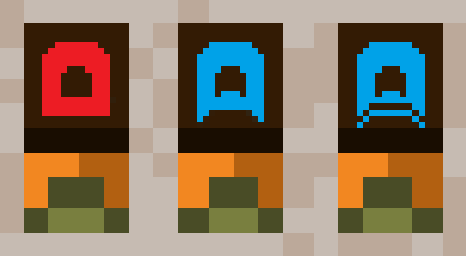
after conweyor plasing update i find out that logic gate's hitbox has 2 zones -"base" and "door" and that you can plase it with owerlaping door, but can't plase anything in gate's door, so i think game need better hitbox visualization, with orange parts
so now we have blue physical hitbox, and orange working hitbox
It would probably make sense to separate the hitboxes for structures into a passive blue hitbox and an active orange hitbox, and I do think that it is a good idea, as it would make it more clear to the player how and where structures interact with things. For now tho, when it comes to the gates, if you want to place stuff overlapping their door hitbox, you can open the gate temporarily by inverting it, then place the structure, after which you can close the gate again.
Some recipes require temperature ranges that are 5 wide, but the temperature setting on the Inspector panel only lets you adjust in denominations of 10, so lining them up can be pretty awkward. Is there a way that could be rectified, like making the recipe temperature ranges bigger or more centered on temps divisible by 10? Like, maybe this one could be +5 to -5 so you can aim for 0.
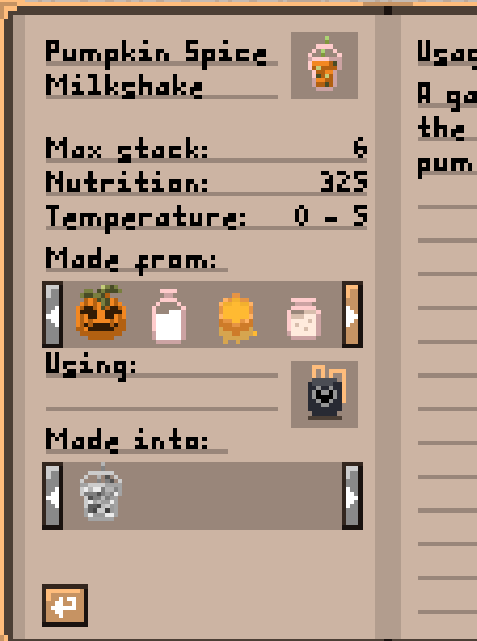
Edit: Also, apparently the threshold for the cooler is treated the same way irrespective of whether you're looking at inventory, product, or temperature, so I can't use the Inspector do any logic based off of how many items are inside it since the threshold goes up and down by 10 while it can only hold 6 items.
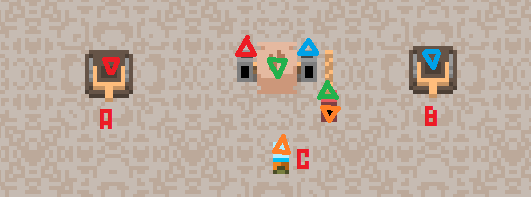
Yes, so the gates react to gates as well as items, so the orange gate sees that the red/blue gates are closed and reacts to that (and stays open because it's inverted), and then when red and blue are open, the orange gate no longer sees them and instead sees the item underneath (which it reacts to by closing since items always give a true signal and the gate is inverted).
Does clockwork wrench do something? If no i think it can be useful to use it to change building's source/target
I think it will make it allot more useful (if it already does something, you can add selection wand or something)
what about a personal chest and blueprints? the personal chest would help with early game as you wouldn't have to leave items everywhere but the personal storage couldn't retrieve items. right now the biggest time sink for me is building because of how the game is made, i like the jankyness but a blueprint maker would be nice. maybe one way you could do it is have a item that saves the configuration of the buildings, could pair nicely with the personal storage chest.
Yeah I honestly gotta admit that having blueprints you can create and place down would be a game changer. I think the only annoying part of Gain Factory is when I'm making a huge farm and I have to place every part individually over and over, but I don't know what engine it's running on so I honestly don't know if it's even possible to do this.
I haven't gotten too far into the game yet (not a single auto assembler automated) but I've already reached max breast size on the engineer (mostly from automated fossil chocolate mining) and I've been thinking about how much potential this game could have for growing character's own breasts or other body parts further. There isn't any other game like this one, so imagine some sort of moving platforms or other vehicle you'd have to build to be able to keep your mobility once you reach extreme sizes, maybe some endgame limit breaker item that's extremely hard to craft and ups the size cap on one body part of you or a single cow/bee by one? I'm not sure how hard it'd be to implement that, but it could be the one hyper game to rule them all potentially
Edit: Just reached max size on one of the cowgirls, and seems like with milk they can get to breast size 12. Is there a way to get player character to that size, or not yet?
I would have made the max size 20 or something, but every level is close to 700 frames of animation I need to edit or at least duplicate and look over, so it would be too much work. The two extra cowgirl boob levels are exclusive to cowgirls because cowgirls have more powerful boobs than other characters, so the player simply isn't powerful enough. Also you can probably edit the savefile and set the boobs level of the player to 11 or 12, but the game will crash if you load the save and you're wearing a different bra than the cowgirl one.
The games learning curve is too steep i played for 15 minutes and could only figure out how to mine chocolate by hand; and there was huge areas of empty space that i couldn't find anything in, and i couldn't figure out how to start making and using factories. Game is too confusing and the tutorial you get from the goddess is bunch of huge textboxes that my eyes glaze over.
Anyways the beginning of the game needs some work so that its possible to understand what to do.
Belt mergers would be nice, especially if they had a forced order setting like the splitters. It'd take away a lot of logic stuff with the gates and screens and whatnot, but having screens everywhere isn't that nice either
A mass select for destroying and maybe even copying buildings
A way to set a priority to funnels for when there are multiple accessing the same building's products
A shortcut to open the recipe to something in your inventory
An eyedropper keybind for selecting a building in the world to pull the building from your inventory
An indicator/selector for the screen when multiple numbers are shown, like in the "special" tab for the queen bee
Screen should be able to have a higher threshold than 1000, at least for targets that easily exceed that number
Range indicator for the hovering hand and forcefield crane
A setting for NPC to follow but keep some distance. I like having a 'companion' follow me, but with how they try to get as close as possible to me, it's a bit annoying
Honeycomb Graphene and Arc Furnaces needs some sort of change to make arc furnace worthwhile over normal furnace, cuz as is its a pain to use them, like I can brain off for normal furnaces with a very basic setup that isnt too busy either and it will work without me ever needing to see it again, meanwhile arc furnaces take up so much room for all the extra stuff you need alongside it in addition to the normal inputs and outputs of resources, doesnt help they DEVOUR graphene even while ice cold at a rate that doesnt make using arc furnaces feel remotely feasible
My personal solution is get rid of graphene as a "fuel" source and instead have it be part of a high tier craftable like a motherboard or something (i.e. 3x Honeycomb Graphene + 1x Glowy Transistor +1x Caramel Brass + 1x Tungsten), and high tier machines would need at least 1 motherboard so graphene isnt just instantly obsolete
a filter tunnel with a logic on/off state would be great, and the splitter is kinda finnicky to place on a line when you want to siphon excess materials off a different conveyor belt, having a lopsided splitter with an input on its side would be a gamechanger for my factory
Edit: oh and absolutely, wish there was a way to reverse latch functionality
Another edit: a logic blinker would be great - activates for a frame or ten frames when receiving a logic state change
Streamlining the controls would make this a lot more accessible. I spent 5 minutes with an industrial oven stuck in my crafting slot because left clicking and right clicking wouldn't take it out, even though that's how I put the materials in and took them out, until I finally discovered that I had to click the mouse wheel to do it. And I don't see a reason for crops to need shift+left mouse button, but you can just use the right mouse button for mining deposits.
Easier access to information would be good too. Like just putting a basic controls/gameplay tutorial right in the options menu so you don't have to go back to the goddess to review things, and maybe tooltip popups for the various gathering places.
That is a very fair complaint, the controls aren't the smoothest always (and I always need to double check what the combo actually was when replying to people asking for help). It seems that the controls are a big barrier for people when playing the game, and I kinda painted myself into a corner with how I designed things, like the shift + left click for taking stuff out the output slot was because left click was already in use for taking stuff out of the input stack, and that in turn is because I really didn't want inventory ui to be a thing in this game.
If it helps, the recipe book has a [ ? ] button that opens the controls cheat sheet. In hindsight it isn't the most obvious thing to click for controls help (given that it's in the recipe book), and definitely it should have been in the options menu as well. I can't fix it at the moment, but I could actually add the controls cheat sheet to the description for the game on itch.