


Having a lot of fun with Decker and Lil.
Thank you.
Is this expected behaviour for joining arrays?
a1:("aa","bb","cc","dd")
a2:("x")
show[ a1 join a2 ]
--> (("aa","x"),("bb","x"),("cc","x"),("dd","x"))
show[ a2 join a1 ]
--> (("x","aa"))
From the lil reference manual:
If join is applied to non-table arguments, it produces a list by pairing adjacent elements from x and y. If either argument is a number, it is considered "range" of that argument, and otherwise it is interpreted as a list. For example, "ABC" join 3 gives (("A",0),("B",1),("C",2)).
As you can see, it has a preference for preserving the length of the left argument if they don't match. Some functional languages call this operation on lists "zip()". Applying "join" to tables performs a natural join.
If you simply want to concatenate lists and atoms, use the comma operator (,):
 a1,a2
# ("aa","bb","cc","dd","x")
(Lil doesn't have list literals per se, just atom literals and the comma operator.)
Does that make sense?
Is there a way to get
(("x","aa"),("x","bb"),("x","cc"),("x","dd"))from a1 and a2 without using each?
The only video I’ve found is this one.
It’s not bad and kind of takes you on a journey of someone figuring out Decker, while you watch it to figure out Decker. It’s very meta. ;-)
Not a video, but here is a handy list of screenshots of these Decker examples.
Hmm. Could be tricky to make this fast in Lil.
In general, using queries is much more efficient than loops. You can slightly simplify
where (on f x do "r" in x end)@value
as
where value like "*r*"
and you could hoist that "in" out of the loop, since it accepts a list as a left argument. Together, these ideas can make the query much more concise:
on strip x do "" fuse "r" drop x end
still:select word:value wod:strip@value
 where (strip@value) in words
 where value like "*r*"
 from words
...but probably not much faster.
You can also avoid stripping the r's twice by using a "subquery"
still:select where wod in words from
 select word:value wod:strip@value
 where value like "*r*"
 from words
wods:"\n" split "r" drop words:read["/usr/share/dict/words"]
words:"\n" split words
still:select word:words@index wod:value
  where (wods in words)*(extract value like "*r*" from words)
  from wods
show[table random[still -10]]
this gets an answer in 13min, or 880ms without the 'wod in words' test. I've tried a few alternatives (words dict 1, readdeck of a grid, parsing and reading a json of a table) and nothing seems to cut that down. It seems like building large tables is slow. Maybe due to the allocator?
But, this was only for learning purposes and I gained a better appreciation of the query language from it.
I made some localized improvements to C-Lil's implementation of the "in" operator. Using this dictionary file:
https://github.com/dwyl/english-words/blob/master/words_alpha.txt
and this version of the entire script:
words:extract where 5<count@value from "\n" split read["words_alpha.txt"]
on strip x do "" fuse "r" drop x end
still:select where wod in words from
 select word:value wod:strip@value
 where value like "*r*" from words
show[table random[still -10]]
The patch brings execution time on my laptop from about 12 minutes (oof) to about half a second.
You could use a conditional to compute the extracted column (this is evaluated once per group):
extract if count value first value else () end where 1<count index by value from str
Or you could use the "gindex" column to make the filter retain at most one element per group:
extract where (!gindex)&1<count index by value from str
How's that?
Both of those work! I didn't know about gindex, and that seems useful. I kept looking for some way to have a 'where' apply after an earlier 'where' without multiple queries, and the conditional shows a way to do that.
The conditional also suggests this solution:
extract () unless first value where 1<count index by value from str
You could define a function which "wraps" the default play[] in the deck-level script, preventing the original from being called unless your flag is set:
on play x y do
  if options.widgets.soundsandmusic.value=1
    send play[x y]
  end
end
The "send" statement is specifically designed to make it easier to set up these kinds of overrides for existing functions. (Overriding go[] has some interesting potential!)
If you think there are some situations where you may want to call play[] normally, a less invasive approach would be to give your wrapper a different name instead of shadowing the built-in function, and to change e.g. all the instances of play["foo"] within your own scripts to sfx["foo"]:
on sfx x do
  if options.widgets.soundsandmusic.value=1
    play[x]
  end
end
Keep in mind that scripts within modules and contraptions don't "see" deck-level definitions, since they're supposed to be reusable from deck to deck. If you're setting up sound effects for dialogizer text, for example, you'll need to perform the same flag-check. This can also be done in a centralized place with deck-level functions.
Does that make sense?
Hello, welcome! I have a simple script for you. Where to put it is going to vary a little bit based on what you're doing.
If you're changing the number inside the slider by having the user click on it, you could put something like this in the slider's script:
on change val do
 if slider1.value > 69
  button1.locked:0
 end
end
Or, explaining what that means: "Whenever my value is changed (by the user clicking on me), check if my value is above 69. If yes, unlock the button. End (for the if statement). End (for the on change val do event)."
This only unlocks the button -- it doesn't re-lock it if the number goes back down. I'm not sure if that's even something you want, but you could have it re-lock below 70 with an added "else":
on change val do
 if slider1.value > 69
  button1.locked:0
  else
  button1.locked:1
 end
end
I'm locking and unlocking the button in this example but you can use nearly the same snippet to change the button's visibility instead.
Rather than using .toggle here I'd prefer to use .show just to feel like I had complete control over it:
on change val do
 if slider1.value > 69
  button1.show:"solid"
  else
  button1.show:"none"
 end
end
If you end up hiding the button you'll probably want to use .show:"none" rather than .style:"invisible" in the script.
The difference between them is that even though "None" buttons are effectively locked AND hidden from view... Invisible buttons can still be clicked. This is useful for users who are drawing scenes and want to use buttons as containers for their clickable areas without the standard appearance of a button.
The above scripts are assuming that the slider's value was changed by the user clicking on it and that the script is inside the slider.
But if the slider's value is going up because of something happening in a script somewhere else you could add the "check if >70, unlock or show button" snippet to the end of that other script instead.
For example, a script inside a button which adds +10 to the value of the slider, and also unlocks a button if the new number is more than 70... could look like this:
on click do
 slider1.value: slider1.value+10
  if slider1.value>69
  button1.locked:0
  end
end
I hope this points you in the right direction! If this isn't what you needed, then I'm happy to try again.
I'm pretty sure the Style menu option is only available in drawing mode.
That said... I'm very curious what you're up to with tracing mode, if you're inclined to share.
I often make a timer in a basic widget when I need one.
A simple example:
If you make a field and set it to be "animated" (select the widget, then in the menu select Widgets > Animated) it will experience 60 view events per second.
Since this example is using a field we can also ask it to store a number to keep count of how many view events have happened. And when it reaches a certain number (60 view events multiplied by the number of seconds -- for 60 seconds this is 3600) tell it to do something special.
on view do
me.text:me.text+1
if me.text=3600
#the stuff you want to happen#
 end
end
(When you're writing a script inside a widget, you can refer to that widget as 'me', which is what I'm doing in the script here.)
This may not be needed but you can also make a custom event handler pretty easily:
on view do
me.text:me.text+1
if me.text=3600
my_event[]
 end
end
I'm using the example name "my_event" but you can name it something more specific and then define what happens during this event inside of the same widget's script that uses it (or on a higher level like the card or deck-level scripts) by writing it out like any other event handler:
on my_event do
# the stuff you want to happen #
end
Also there was a recent thread about making timers for someone else's game that has some more discussion, if it's of any use to you: (link here)
Yes, by sending events. A script on CardA can call function "foo" with the argument "bar" on CardB like so:
CardB.event["foo" bar]
This expression returns the result of the function call. In this way you can design cards that act as "APIs" to be called by scripts elsewhere in the deck.
You can likewise call .event[] on widgets. This "synthetic" event is indistinguishable to the target (thatButton) from an event generated by Decker itself:
thatButton.event["click"]
When an event is sent, all the deck parts and other magic variables will be in scope from the perspective of the target: widgets will "see" other widgets on the same card, "me" will be bound to the target, etc.
Thank you! If a card has a numerical value as a name, is the best way to access the card globally to use:
deck.cards["123"]
Yes; That's how you'll need to do it.
As a general rule, though, I strongly recommend naming cards and widgets with valid Lil identifiers; it makes scripting much easier and less error-prone.
Yes! A widget's order placement can be modified with .index
For example:
on click do
 me.index:999
end
index:0 places a widget at the bottom of the order, index:999, or any other sufficiently large number, places a widget at the top.
You can put this snippet into an "on drag do" event handler as well.
If you refer to the Decker Reference Manual, grid widgets have a ".rowvalue" property that can be used to obtain the data in the selected row; this will be a dictionary. The "first" of such a dictionary will obtain the value for the first column:
on click do
 f.text:first g.rowvalue
end
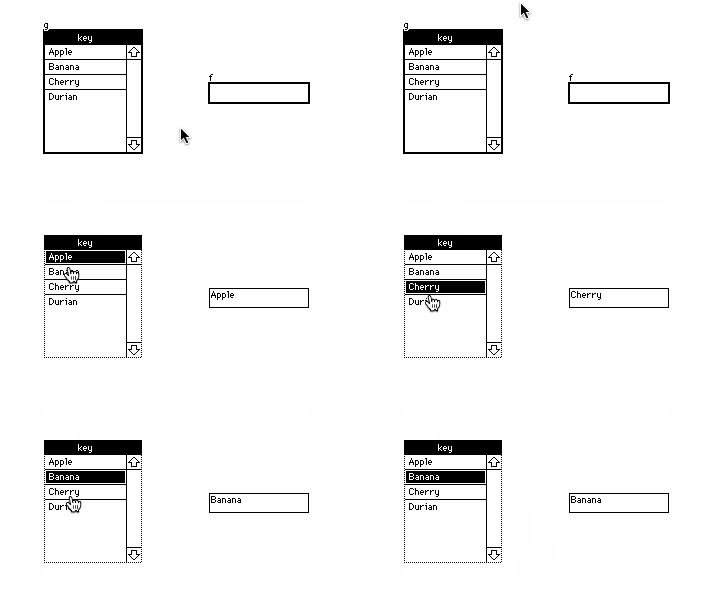
In this particular example it would be equivalent to ask for the "key" entry of the dictionary, as that is the name of the first column:
on click do
 f.text:g.rowvalue.key
end
As for adding rows, it looks like you were consulting a very old example from before the "insert" syntax was overhauled. Given a grid "i" with a single column "name", I think you want something closer to:
i.value:insert name with "sworde" into i.value
The Lil Reference Manual has detailed explanations and many examples of the "insert" query form.
Does that make sense?
This makes so much sense I'm so sorry I think I just got lost digging through the documentation and must have missed it. Thank you for your time!
You may be looking for the "floor" primitive? There's no corresponding "ceiling" primitive but you can take the negation of the floor of the negation:
 select value down:(floor value) up:(-floor-value) from .1*range 21

+-------+------+----+
| value | down | up |
+-------+------+----+
| 0     | 0    | 0  |
| 0.1   | 0    | 1  |
| 0.2   | 0    | 1  |
| 0.3   | 0    | 1  |
| 0.4   | 0    | 1  |
| 0.5   | 0    | 1  |
| 0.6   | 0    | 1  |
| 0.7   | 0    | 1  |
| 0.8   | 0    | 1  |
| 0.9   | 0    | 1  |
| 1     | 1    | 1  |
| 1.1   | 1    | 2  |
| 1.2   | 1    | 2  |
| 1.3   | 1    | 2  |
| 1.4   | 1    | 2  |
| 1.5   | 1    | 2  |
| 1.6   | 1    | 2  |
| 1.7   | 1    | 2  |
| 1.8   | 1    | 2  |
| 1.9   | 1    | 2  |
| 2     | 2    | 2  |
+-------+------+----+
…oh! Well, I feel silly now. I searched the docs and this forum for “round” and “truncate”, but I never thought to search for “floor”. Thanks!
This thread has some examples of how to make things happen on mouseover/hover.
It also has an important caution about how mouseover triggers can't work the same way on mobile and touchscreen devices since they don't have a mouse pointer. It's an extra thing to think about if you'd like your project to be playable on those platforms (and if the mouseover event isn't just a optional detail that won't be missed if it doesn't work).
Yes. Lilt is a command-line wrapper for the Lil programming language with a few additions to its standard library like the ability to shell out to other programs and interact with the filesystem. It's easy to build from source on MacOS, Linux, or BSD. I also provide a multi-platform prebuilt binary here on itch.io alongside Decker releases.
If you just want to try something out quickly or share a snippet, TryLilis a browser-based sandbox for Lil.
The Decker repo includes basic syntax highlighting profiles for vim, emacs, Sublime Text, and CodeMirror; you can use those as a starting point for a syntax profile for other editors.
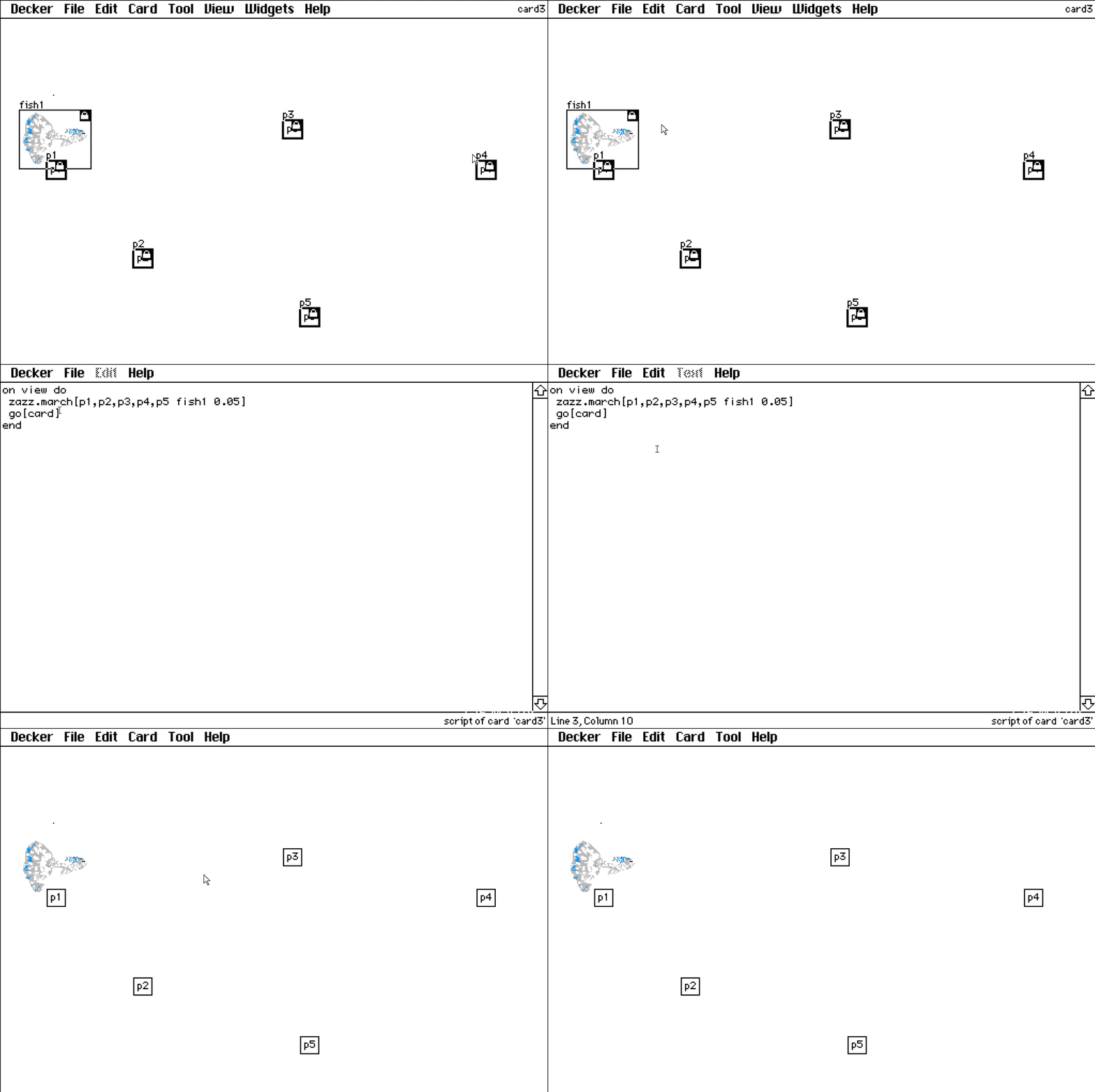
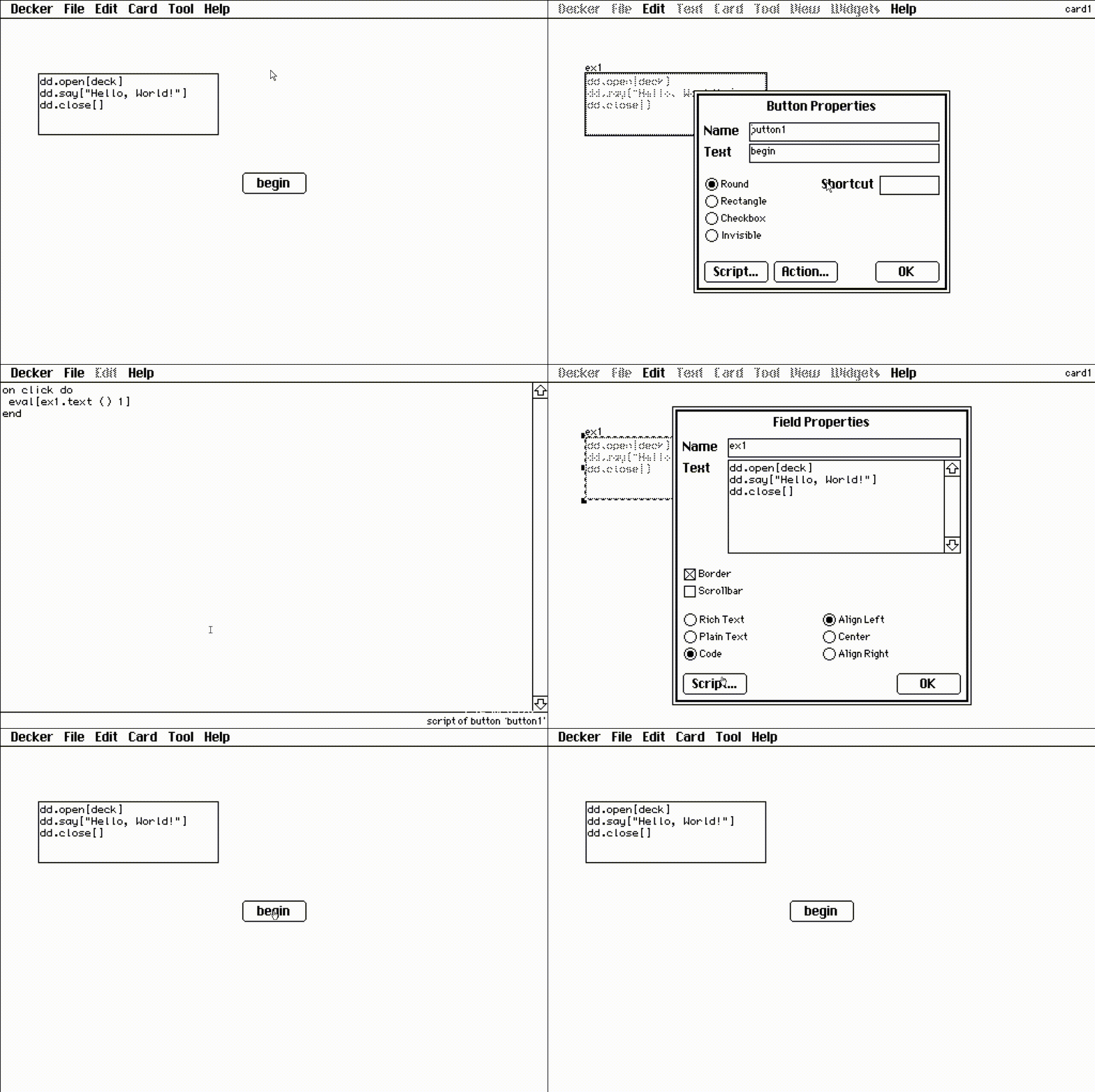
Recently, I encountered a problem when learning text dialogue and canvas bit movement painting: 1. DD follows the steps in the tutorial, and the dialog box cannot appear
2. Zazz can't exercise according to the steps in the tutorial
Even if you copy the card from the tutorial to your local computer, it has no effect.
You can just say something like:
field1.text:alert["What's your name?" "string"]
Here’s an Ask button that asks the question, and sticks the response into a field:
%%WGT0{"w":[{"name":"field1","type":"field","size":[100,20],"pos":[154,108],"value":"blorp"},{"name":"button1","type":"button","size":[60,20],"pos":[174,74],"script":"on click do\n field1.text:alert[\"What's your name?\" \"string\"]\nend","text":"Ask"}],"d":{}}
All questions welcome!
When you import an image into Decker, it has the selection box around it, right? And when you click outside the box, the image is placed on the back of the card.
But you can also copy (or cut) the image while it's still inside that selection box, switch to Widget Mode... and in the Edit menu select "Paste as new Canvas".
Personally I like to turn on the Toolbars (Decker > Toolbars) for this, to save a click while switching back and forth between importing/drawing and pasting my images into canvases.
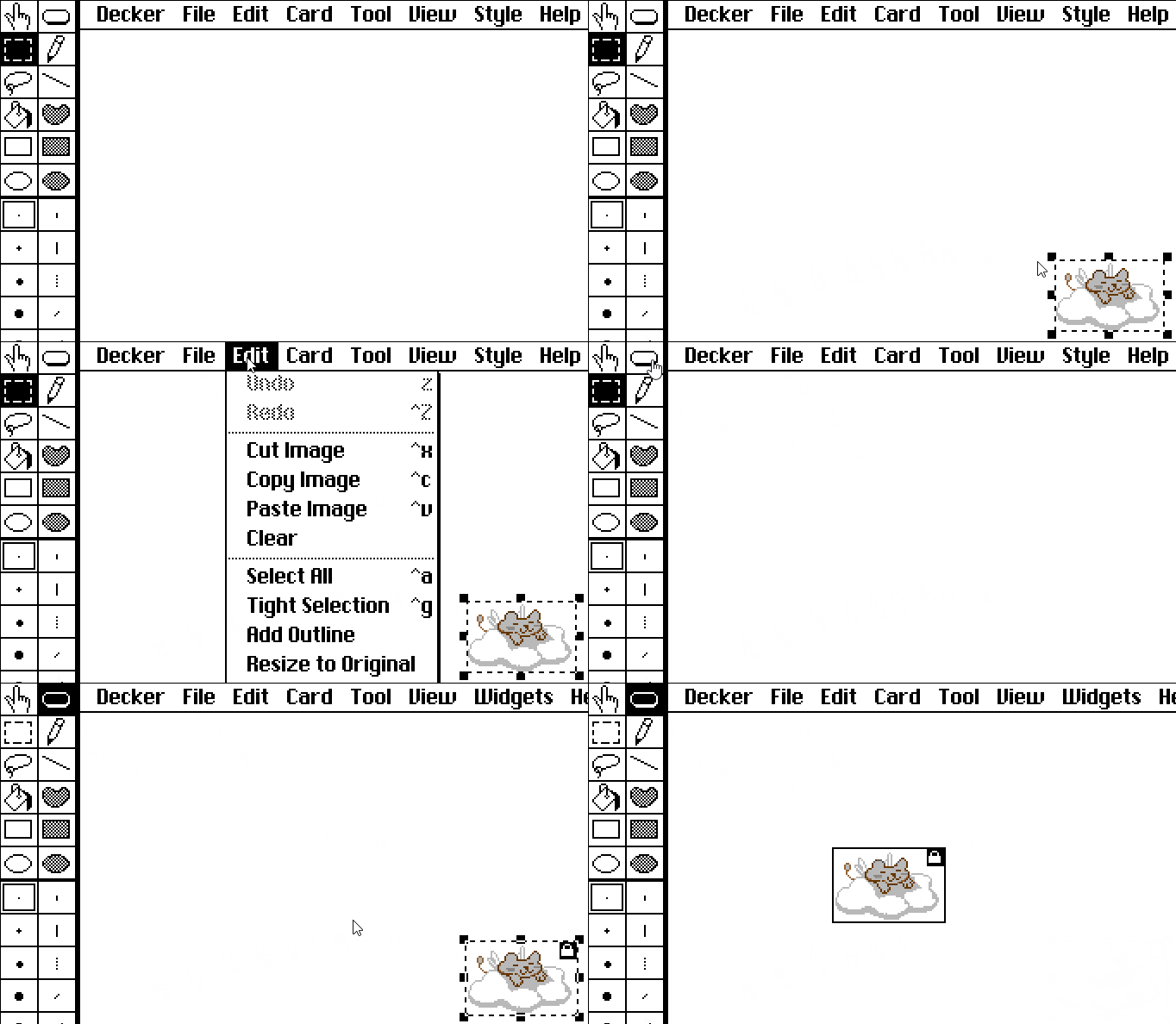
Also, anytime your image is on the back of a card you can draw a selection box around it and then use the Edit menu option "Tight Selection" to shrink the selection to only contain your artwork.
As a follow up, I’ve tried creating variables too, but it didn’t work either.
I’m trying to make an invisible counter tracking the amount of time a player visited a card (and could be reset), so like a numerical variable…
EDIT AGAIN: Counters. That’s how it works. then add +1 to the text. Got it.
Just for the record, you can represent counters using a field widget via its .text or .data attributes, or alternatively you could use a slider widget via its .value attribute. Sliders are slightly more convenient than fields for representing numeric values within a known range, since their .value is always a number and is automatically "clamped".
Widgets set to "Show None" behave identically to visible widgets from a scripting perspective; they "remember" their contents across events and when the deck is saved. If there are any widgets whose contents you don't want preserved, you can mark them as Volatile. Sometimes volatile widgets are useful for "resetting" the state of a game.
Does that help clarify?