

Step 1: Download Intiface Central
- Download for your platform (Windows, macOS, Linux, or Android).
- Install:
- Windows/macOS/Linux: Install from the official website https://intiface.com/central.
- Android: Install from the Google Play Store.
- If you want to play on your computer and connect to the Intiface on your Android/iOS device, you can do that by using the IP address shown on the mobile device. (Enable"Listen on all network interfaces")
Step 2: Set Up Intiface Central
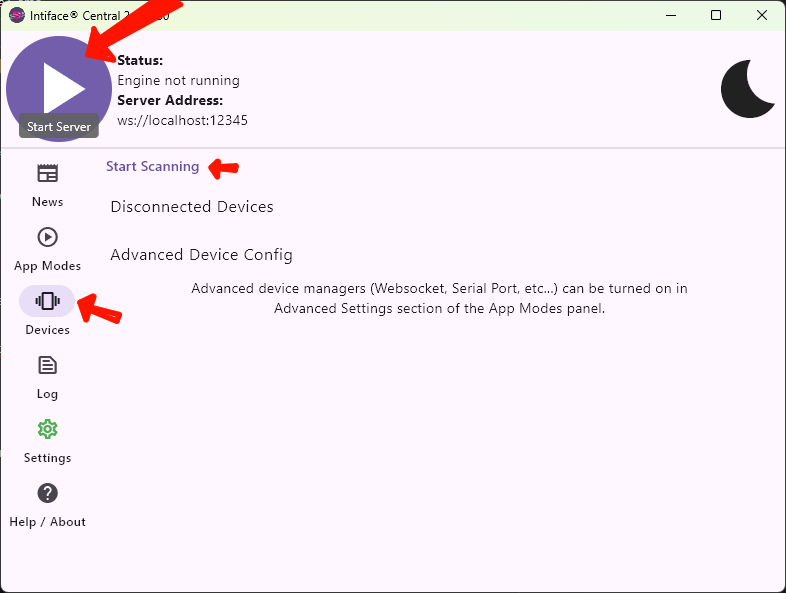
- Click the purple "Play" button (top-left) to start the server.
- Go to "Devices" tab
- Enter your toy into pairing mode (you may need to restart the device)
- Click "Start Scanning"
- Connect a device:
- Bluetooth: Enable Bluetooth; the device should connect automatically.
- USB: Plug it in and follow prompts.
Step 3: Connect to a Game
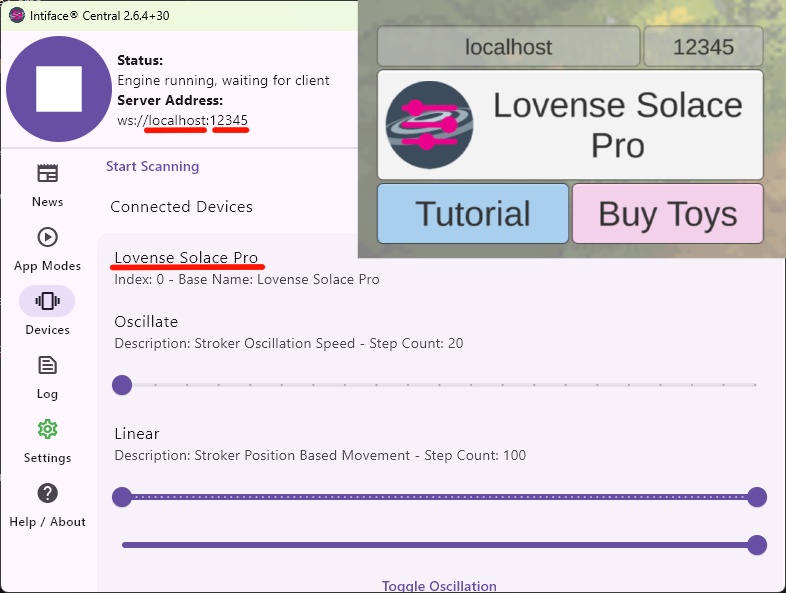
- Use the same IP:PORT shown in Intiface Central.
- The game already comes with the default, and on Android it should also work with localhost even if it shows a different address.
- Click on "Initialize Buttplug" inside the game.
- If you have 1 device, its name will appear; if you have 2 or more, the number of connected devices will be shown.
- Start "SEX" or "GAME" mode.
Troubleshooting
- Device issues? Check Bluetooth, USB connection, or battery, Restart the game and Intiface Central. Reset User Device and Application Configuration on "Settings" tab.
- Game not working? Verify the ip address and port. Confirm that Intiface Central has the server running.
- Get help at Intiface Documentation or Intiface Discord.
Enjoy the game!