
Спасибо за отчёт об ошибке, я разберусь. А пока вы можете поиграть в версию для браузера. Простите за произошедшее.
Caulino (JOI LAB)
Creator of
Recent community posts
Hey everyone!
We want to make the game accessible to as many players as possible, and we are already planning new localizations for future updates.
Please drop a comment below letting us know which language you would like to see added to the game! The most requested languages will be prioritized in upcoming patches.
Thank you for your support!
Hello, are you referring to the demo version or the final version? It’s difficult to diagnose this here in the comments without logs, system version, how you installed it, and other details. If it is the purchased version, you can request a refund, and I will accept it. I am very sorry for the inconvenience.
Can you try to follow this step-by-step or provide more information?
https://steady-crawdad-4d6.notion.site/Troubleshooting-1246002f2a5480b4b606cfbd5...
This version is the same as the one on Steam; when you purchase it, you will receive a Steam key. Could you try uninstalling Virtual Desktop and trying again with Meta Link? What device are you using? You can reinstall it afterwards. It's possible there's an error with the registry entries that Virtual Desktop leaves in Windows. If none of these options work, you can request a refund.
Hey! On Itch.io you need to download again when there is an update. The game will not receive future updates, however I am working on a spiritual successor that is yet to be announced.
The demo version has approximately 10% of the story (it doesn't reach the JOI part), no additional maps, and few poses.
I've never tested with the 3S Model, and you're the first person to report a problem with this device. Not many things usually cause this type of issue on the Meta Quest, so I'm not exactly sure what to suggest you try to see if it works, other than checking that its storage isn't full and that it's updated to the latest system version. If this problem is happening with the purchased version, you can either initiate a refund request yourself or ask me here, and I can contact the Itch.io team to have them issue your refund.
What process are you using to install it? Does it show any error? Are you used to installing APKs on your Quest? Do other APKs install normally?
The simplest way to install is by using the "Install APK file from folder on computer" option in the top right of SideQuest, but it’s necessary for both the Meta Quest and PC to be properly set up.
To install these file manager apps that allow direct installation on the device, you first need to install them APK using a method like SideQuest, which is notably the easiest to use. You can find support on SideQuest Suport or through tutorial and troubleshooting videos.
https://sidequestvr.com/space/142/sidequest-support
Step 1: Download Intiface Central
- Download for your platform (Windows, macOS, Linux, or Android).
- Install:
- Windows/macOS/Linux: Install from the official website https://intiface.com/central.
- Android: Install from the Google Play Store.
- If you want to play on your computer and connect to the Intiface on your Android/iOS device, you can do that by using the IP address shown on the mobile device. (Enable"Listen on all network interfaces")
Step 2: Set Up Intiface Central
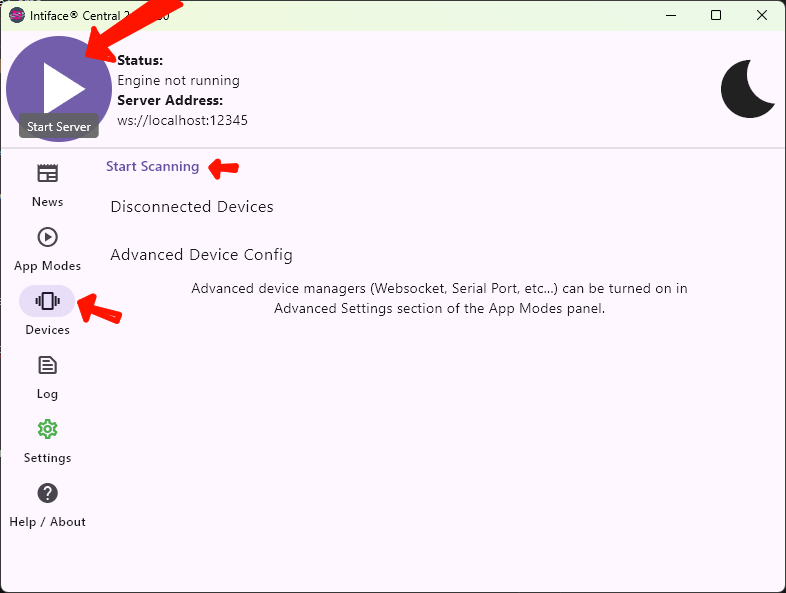
- Click the purple "Play" button (top-left) to start the server.
- Go to "Devices" tab
- Enter your toy into pairing mode (you may need to restart the device)
- Click "Start Scanning"
- Connect a device:
- Bluetooth: Enable Bluetooth; the device should connect automatically.
- USB: Plug it in and follow prompts.
Step 3: Connect to a Game
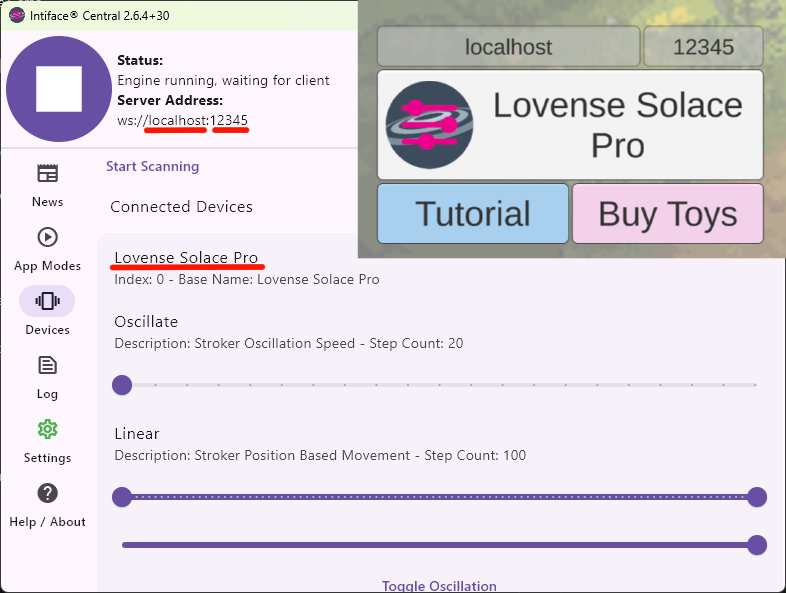
- Use the same IP:PORT shown in Intiface Central.
- The game already comes with the default, and on Android it should also work with localhost even if it shows a different address.
- Click on "Initialize Buttplug" inside the game.
- If you have 1 device, its name will appear; if you have 2 or more, the number of connected devices will be shown.
- Start "SEX" or "GAME" mode.
Troubleshooting
- Device issues? Check Bluetooth, USB connection, or battery, Restart the game and Intiface Central. Reset User Device and Application Configuration on "Settings" tab.
- Game not working? Verify the ip address and port. Confirm that Intiface Central has the server running.
- Get help at Intiface Documentation or Intiface Discord.
Enjoy the game!
You can follow this tutorial — it's a bit old, but it's extremely similar. If you can't manage it, let me know.
/t/67604/how-to-get-a-steam-key-from-your-itchio-purchase
I have a report from someone who managed to activate the key and lives in Germany. I'm not 100% sure it worked for them, just a "both worked thx" referring to the game and soundtrack keys. However, I don’t recommend proceeding with this if it’s considered a crime in your country, unless there’s an exception for games acquired via keys.
Hello, wmerritt72. You made a donation of $7, the minimum donation amount is $1. This is the demo page for the game, the game has not been released yet. The game will be sold for $15 on Itch.io and Steam. I'm not sure if Itch.io allows you to pay only the difference after the game is released, but in any case, I can provide a refund if you regret making this donation thinking it was the full game.
https://store.steampowered.com/app/3004030/JOI_Lab_VR/


