The renders have a blurry look to them. Have you tried turning off vignette?
Try this:
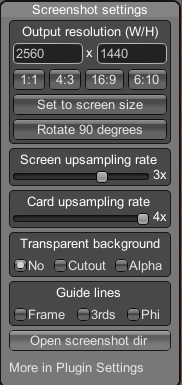
Screenshot Settings:
Screen Upsampling Rate x3
Card Upsampling Rate x4
Shortcut for screenshot settings should be Shift + F11
No I haven't but I will look into this thank you for letting me know.
This is the current settings I use.
As for shader shadow type, I go for perfectly smooth.
I will do that thank you for the advice! Appreciate it. :)