
Indie game storeFree gamesFun gamesHorror games
Game developmentAssetsComics
SalesBundles
Jobs
TagsGame Engines

Pictures UI Creator - RPG Maker MV/MZ plugin

Create game UI or custom menus using pictures and drag-n-drop · By Sang Hendrix

[1.2.5a, MV] Mouse Interactions not working?

A topic by SparkleArts created Jan 08, 2026 Views: 349 Replies: 5
Viewing posts 1 to 4
(+1)

Do I miss something or why does Mouse Interactions with the Buttons doesn't work?

Developer(+1)

Hello. Are you by any chance using any plugin that modify mouse/touch? If not, can you provide me some screenshot of your eventing?

(+1)

Here are the plugins I have enabled:

  • YEP_CoreEngine
  • YEP_X_CoreUpdatesOpt
  • YEP_BattleEngineCore
  • YEP_MessageCore
  • YEP_OptionsCore
  • YEP_SaveCore
  • YEP_StatusMenuCore
  • YEP_ItemCore
  • YEP_EquipCore
  • YEP_WeaponUnleash
  • YEP_ShopMenuCore
  • YEP_BuffsStatesCore
  • YEP_X_VisualStateFX
  • YEP_DamageCore
  • YEP_ElementCore
  • YEP_QuestJournal
  • CustomLogo
  • Hendrix_Pictures_UI_Creator

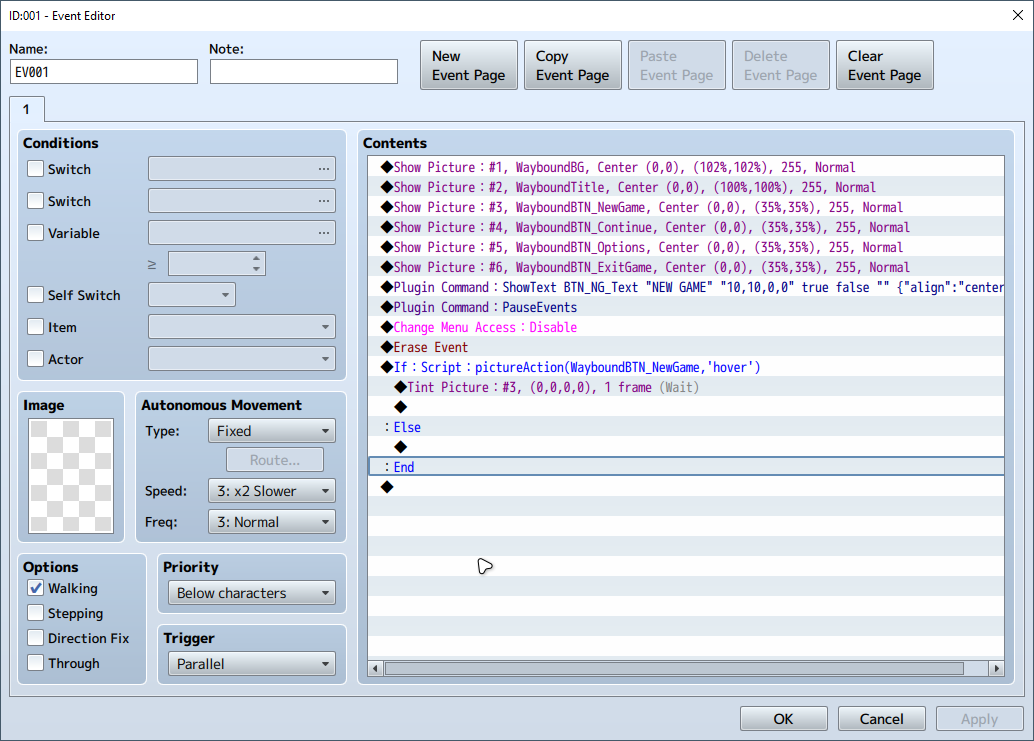
Also here is the Screenshot of the Eventing:
Developer (2 edits) (+1)

You erased event so nothing under it will run due to the event is already erased. Make sure you've watched some video tutorials on the plugin's page. They're for MZ but the similarities in both engine will help you understand eventing somewhat.

(-1)

Whenever I use Erase Event the mouse interaction doesn't work at all. After I remove the "Erase Event" the mouse interaction works.

Developer(+1)

Of course! Erase Event means delete the event immediately, therefore nothing under Erase Event works, cuz your event is already gone.