Indie game storeFree gamesFun gamesHorror games
Game developmentAssetsComics
SalesBundles
Jobs
TagsGame Engines

Easy Text & Icon on Events - RPG Maker MZ Plugin

Display text & icon on events within a few clicks, non-destructively · By Sang Hendrix

Change Color of Text

A topic by SaltyGamesDE created Feb 14, 2026 Views: 198 Replies: 5
Viewing posts 1 to 3
(2 edits)

Hello,

i use your plugin for displaying enemies names. I want to change the color for agressive mobs to red, non-agressive mobs should stay white.

I've decided to use the notetag-system, as i want to put all enemies with that name together, maybe like <enemy1NotAggro> and <enemy1Aggro>. <Enemy1Aggro> should be red.

i tried the overwriting comment command but it didn't change it. Also would it be easier to manage with the notetag-system.

Also didn't i recognize how i can change the font-size specifically for different notetag-entries.

How can i do this?


Thank you.
Developer

Hi,

So notetag system in RPG Maker is unchangable, meaning it's not dynamic. If you want your name to change, the right way is to use comment (green text).

For font size, you can only change it via plugin parameter, the plugin doesn't support changing it dynamically via notetag or comment.

Do capture me a screenshot of how you did it if you couldn't make it work.

Hi,

thanks for clarification.

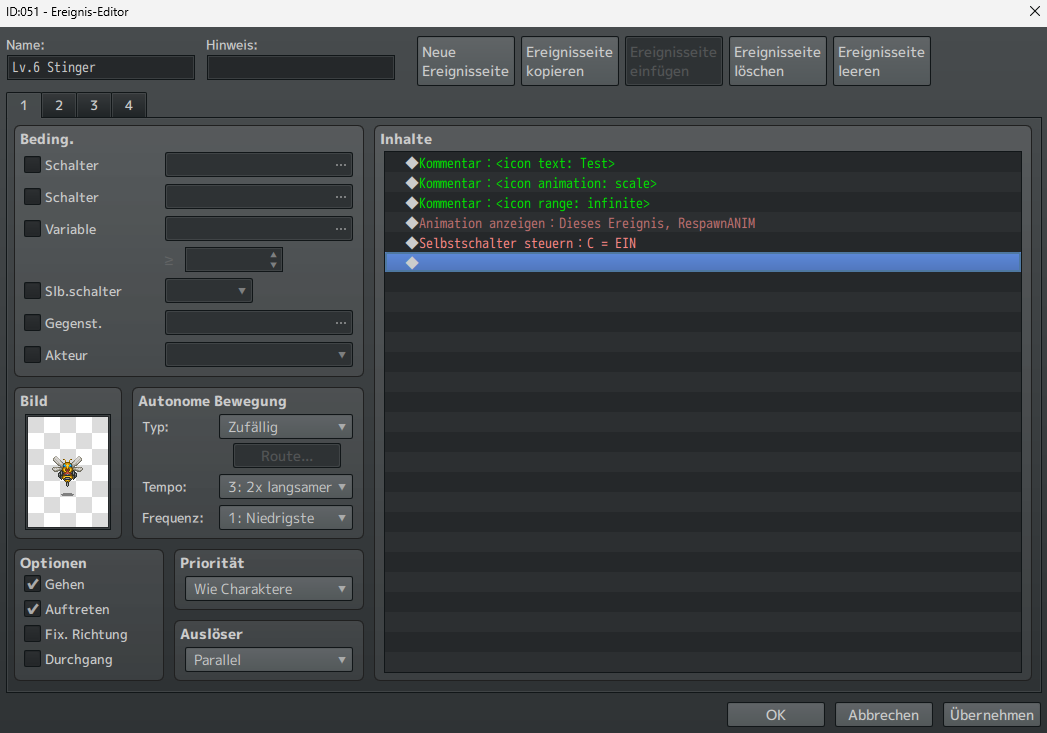
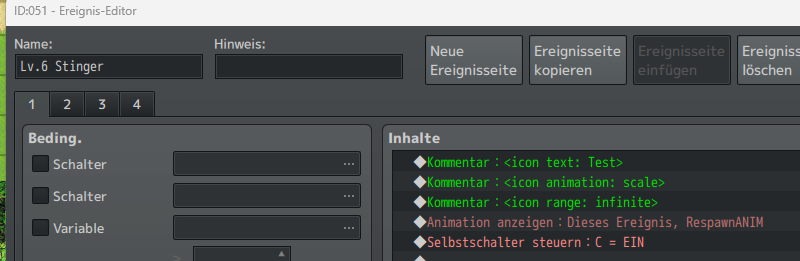
here's like i tried to make it. I've chosen an enemy which has no notetag, so i just wanted to label him directly.


 --> nothing appears

Developer

Are you using the latest version? And can you capture the whole screenshot instead of a cropped one?

I am using Verion 2.0.1a (is it the latest?)

Developer

You have your page as parallel, it'll automatically switch to another page the moment the event appears on map. So all those comment on your current page is gone cuz it's not current page anymore.