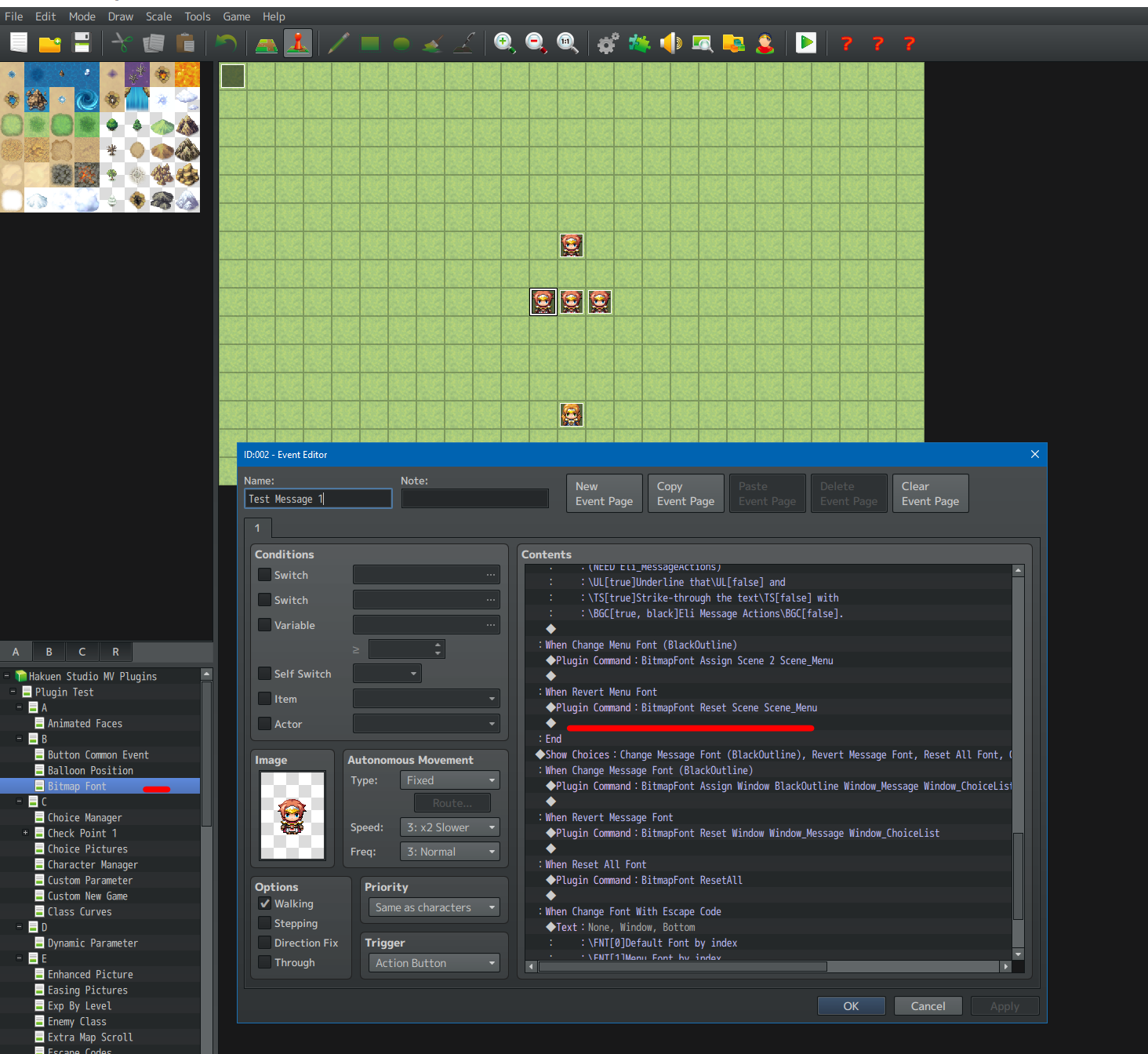
hi! i wanted to say i've been using the bitmap font plugin and i have been super happy with the results so far. however, and it might entirely be an error on my part, i am having trouble understanding exactly what inputs are being asked for. there are just too many ways for me to interpret it to try all of them.
so the main format for a command is this: BitmapFont [action] [type] [FontIndex] [container] [container]
i have several questions/assumptions for each piece. BitmapFont I assume just tells the game that the command is for that plugin so I have that at the front and am generally unconcerned by it. once we get to the pieces in the brackets, i am assuming the brackets should be in the final version of the command as well and they aren't just signifying placeholders? i'm having trouble phrasing this well but when I fill in [action] it should be with [Assign] not Assign without the brackets, correct?
for [type] I have been writing [Window] or [Scene] as instructed. I am pretty sure the quotation marks around "Window" or "Scene" in the instructions should not be included in the command.
font index: for the font index number, does it count up from 0 or from 1? i had been assuming it counted up from 0, but I realized that in the plugin parameters it actually lists the fonts starting from 1. since font face is clearly listed as a setting in the font set-up, i have no confusion on it.
container: why is it listed twice? is it to show that you can list multiple containers back to back in that fashion or do i need to list two for it to work? or repeat the same one? because I am already specifying the type as scene or window, then when trying to make it apply to the map scene, do i just put "Map" or "Scene_Map"? I am assuming that window/scene refers to the scenes and windows listed in rpg_window.js and rpg_scenes.js and have been looking there for reference of which scenes/windows i should be able to apply it to. (also if i apply it to the base scene, will that let it affect the entire game?)
i know a lot of this probably feels obvious as the person who wrote it and could even be obvious for other people but trying to guess the exact information needed by the command system without having any reference is super difficult for me. T_T even just a couple screenshots of functioning plug-in commands without placeholder text would help 100x towards letting me know what to do.