
On Sale: GamesAssetsToolsTabletopComics
Indie game storeFree gamesFun gamesHorror games
Game developmentAssetsComics
SalesBundles
Jobs
TagsGame Engines

First try fails. Need to know file dependency

A topic by NewQuestGaming created Jul 10, 2026 Views: 121 Replies: 8
Viewing posts 1 to 4
(1 edit)

I just started testing in MZ and put this plugin into the new project. It fails to load the map.

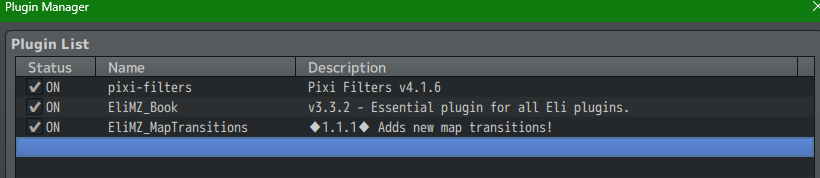
Only pixi-filters Eli Book and Map Transitions installed. Gives error Eli.AnimeGroup is not a constructor. Line 538

I am not sure about the pixi thing. It was not included in MZ and finding on the internet has a ton of options. And knowing where to put the files and what was needed was not a good starting point for learning.
Also just grabbed your latest demo and tried the command there. It's not working. What am I doing wrong. I tried placing the map notetag, using an event with map transfer and the default ID set to Pixelated.

Developer

Hi there!

I don't know if I will be able to take a look into this today and on the weekends I'm not always around. Some things that may help:

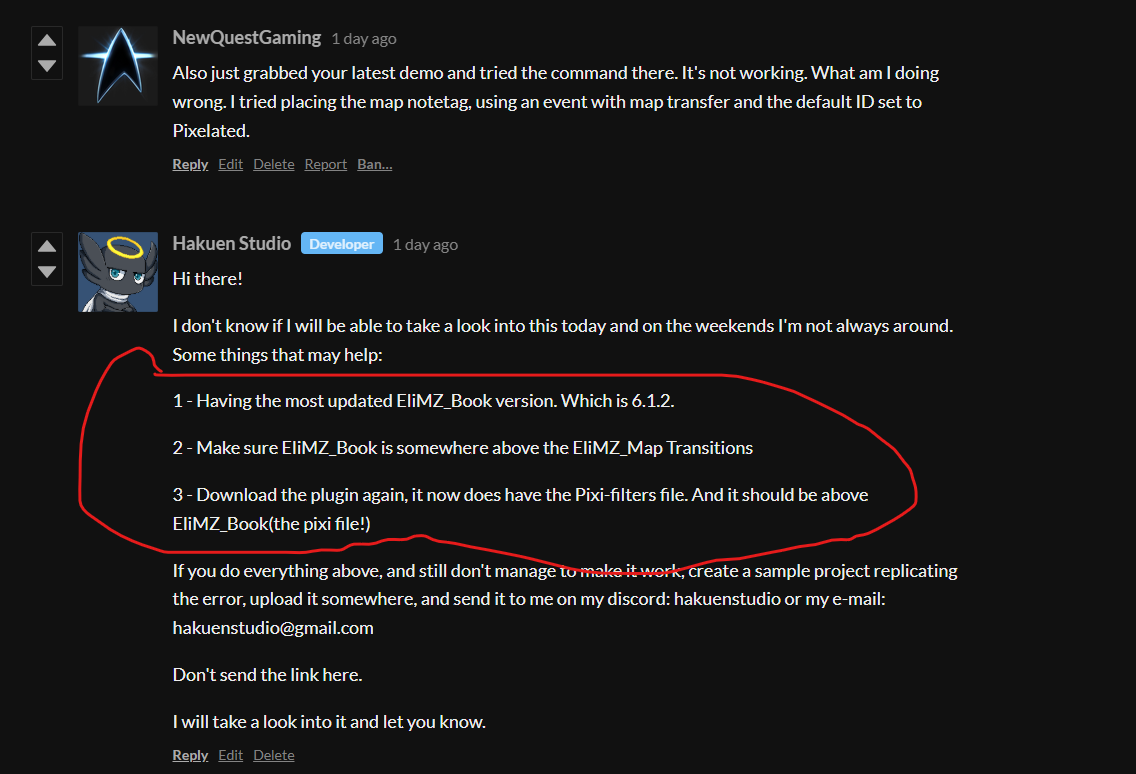
1 - Having the most updated EliMZ_Book version. Which is 6.1.2.

2 - Make sure EliMZ_Book is somewhere above the EliMZ_Map Transitions

3 - Download the plugin again, it now does have the Pixi-filters file. And it should be above EliMZ_Book(the pixi file!)

If you do everything above, and still don't manage to make it work, create a sample project replicating the error, upload it somewhere, and send it to me on my discord: hakuenstudio or my e-mail: hakuenstudio@gmail.com

Don't send the link here.

I will take a look into it and let you know.

Email sent. I removed the audio and images folder

Developer

I received, but maybe I will only be able to take a look at monday.

Did you remove the image and audio folder, but if I open the game and hit playtest, I will be able to reproduce the error? Because that is what I need, reproduce the error and with that find where the problem is

I removed the audio and img folder just to make it a smaller file. Just copy from a new project. I don't have anything in there that is paid for.

As soon as you hit new game it will give the error.

Developer (2 edits)

I copy and pasted the audio and image folder from a new project. then I opened the project, and opened the plugin manager and saw this:

EliMZ_Book version 3.3.2. Why didn't you follow my instructions before? I said to you:


You should have sent me the sample project after you did those 3 steps and it didn't worked. Will wait for you to do that.

Well that sucks. I have downloaded your plugins many times. It was a case of where you had done many updates and I was not aware. 

However in my defense, when I paid for the plugins it was assumed that the version of EliMZ_Book needed was the one downloaded when I paid for them.

I grabbed the new file and did some testing. After selecting to use Pixelated as the type (not 5) then it worked.

Sorry for the trouble. Lesson learned. when using any of your plugins, go get the new ones, not the ones already downloaded.

Developer

No need be defensive, it was a genuine question. I didn't understand why you didn't download the EliMZ_Book 6.1.2 before sent me the the project, since I had told you about it before. But it is all good things like that can happen ^^

By the way, version 3.3.2 was 5 years outdated o.O

I grabbed the new file and did some testing. After selecting to use Pixelated as the type (not 5) then it worked.

- Nice you manage to make it work! Have fun :)

Sorry for the trouble. Lesson learned. when using any of your plugins, go get the new ones, not the ones already downloaded.

- No need to be sorry, I'm also here for that kind of stuff ^^. By the way, you may not need to manually look for the updates version of my plugins anymore, because EliMZ_Book 6.1.2 now has a feature that will let you know when a plugin update is released(as long as you have internet connection when playtesting your project)

If you need anything else, let me know :D
