
Indie game storeFree gamesFun gamesHorror games
Game developmentAssetsComics
SalesBundles
Jobs
TagsGame Engines

You must be 18+ to view this content

Starmaker Story may contain content you must be 18+ to view.

The creator of this page has specified that it contains mature themes and content. Please enter your birthdate to verify you are 18 or older:

or Return to itch.io

Game keeps crashing please help

A topic by Lawliet1452 created 42 days ago Views: 371 Replies: 6
Viewing posts 1 to 2

Alr so whenever I try saving my game (auto save), the game crashes before saving the current progress, so am basically stuck on the same day. I thought it was maybe just a corrupt save file so I tried a new file but then the game doesn't even start, it's just stuck on a black screen right after I finish naming all the characters. PLEASE HELP
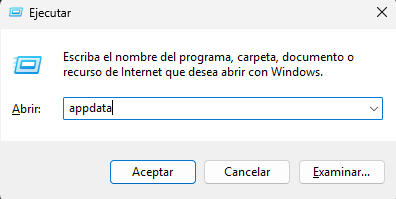
It’s really rare for that to happen, and while I’m not 100% sure it will work, I recommend this:

First, open AppData (Win + R), type ‘appdata’, and press Enter. image.png

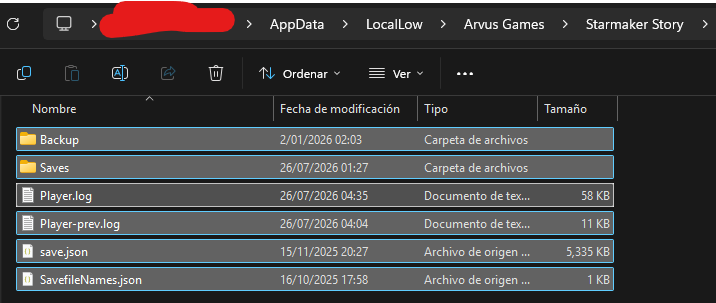
Navigate to the LocalLow folder until you find the ‘Arvus Games’ folder. Delete all the files in that folder. This will delete your saved games (which, if the game crashes at the beginning, will result in no progress), as well as any corrupted files. image.png

That should be enough, and when you start a new game, everything should be fine. But if it isn’t, you can try running the game as administrator to avoid any potential conflicts. Let’s hope it works.

Thanks for the reply, what I noticed is that the save file in my case wasn't corrupted, it was happening to my every save file, ALSO the issue got fixed SOMEHOW, the game starts working after a few minutes of crashing lol

Haha, it all seems very strange

idk what it is but screen sometimes just freezes randomly, I just leave it for a few seconds or a minute and it starts working again (it's not my pc cause only the game freezes the pc is still working

Maybe your PC doesn’t have the best specs, or maybe your resolution is set too high. xD. If it freezes again, try pressing F1 repeatedly; that unfreezes the game and the UI that sometimes lags.

ryzen 7 3700x, gtx 1660ti, 16 gigs of ram, I think it should be more than sufficient to run a pixel game 😭😭