

Also, out of curiosity, how the hell do you create these images if you're okay with me asking that? I've used many different image generators, different prompt combos to 0 success and even tried to dabble in Blender (failed that one miserably). Not asking for anything in-depth, more so just a general ball park so I can dabble.
70 days ago(+3)
For quick ones like this it can be simplified, but I could write a 3 page guide on the tweaked LoRas/Configs and the Manual Steps I use.
However, here is a quick getting started workflow:
1. Download & Install Stability Matrix
- Search for “Stability Matrix” (by LykosAI) and download the version for your OS.
- Extract and run it. Choose a data directory when prompted (keep the path short).
2. Install ComfyUI
- Inside Stability Matrix, go to the Packages tab.
- Click Add Package → select ComfyUI → install.
- Launch it when ready. (Use the built-in Inference tab in Stability Matrix for simpler generation.)
3. Download the Anima Model
- Search Hugging Face for “circlestone-labs/Anima”.
- Download the needed files (usually from the split_files folder):
- Main model (anima-base-v1.0.safetensors or similar) → place in Stability Matrix’s Models/DiffusionModels (or the equivalent ComfyUI diffusion_models folder)
- Text encoder (qwen_3_06b_base.safetensors) → Models/TextEncoders
- VAE (qwen_image_vae.safetensors) → Models/VAE
- Stability Matrix’s model browser can often handle the downloads directly.
4. Download Starmaker Story Style LoRA(s)
- Go to CivitAI.
- Important: Enable 18+ / NSFW content in your account settings so restricted models appear.
- Search for “Starmaker Story” (or “Starmaker Story Style”). Look for the one by tang1qt and similar style LoRAs.
- Download the .safetensors LoRA file(s).
- Drop them into Stability Matrix’s Models/Lora (or LyCORIS) folder. Stability Matrix usually auto-detects them for ComfyUI / Inference when starting the service.
5. Generate
- Go to the Stability Matrix’s Inference tab.
- Load the Anima model + the Starmaker Story LoRA.
- Example prompts and recommended settings (CFG, steps, weight, trigger words) are listed on the individual LoRA pages on CivitAI, copy those.
- Common starting point for style LoRAs: weight around 0.7–1.0, add the trigger word if the page lists one, and use tags/natural language that match the game’s pixel / anime look.
If you are still struggling, join the Discord on the main page I am sure someone will be willing to help you get going 👍
46 days ago(+1)
The hash for the LoRa is E88A754D7B you can paste into search and it will come up with model page
You can see 18+ Models by going to your account settings and enabling the following
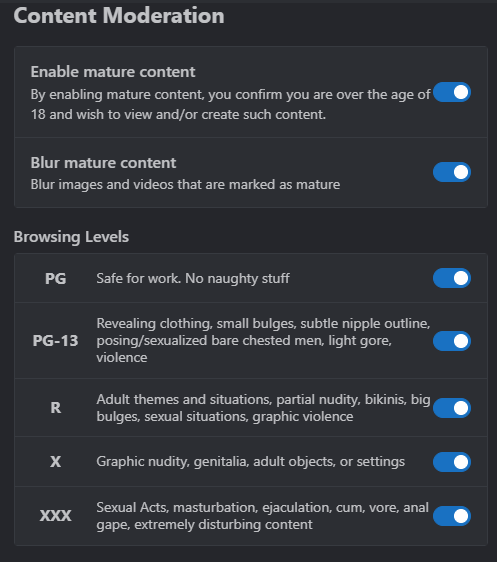
You might also need to use a VPN to travel to Africa or something if you spawned in a restricted location when you reincarnated into this other world...
Okay, I found what the problem. Now the main site only has "safe" content. Basically, the green version has moved to the main (blue) site, and all the NSFW content is now on the red version. The point is to prevent them from being banned from accepting payments for prohibited content.
Don't want to add link, but u just need to add word 'red' after civitai. And that's it. Thx ckyman for the guide!