Indie game storeFree gamesFun gamesHorror games
Game developmentAssetsComics
SalesBundles
Jobs
TagsGame Engines

The Choicer Voicer

Match your voice against your choice of audio clips in a mini-gameshow! · By YeahMaybe

The light of god (visual issue) Sticky

A topic by Mantaxfan217 created 33 days ago Views: 10,720 Replies: 21
Viewing posts 1 to 18
(+5)

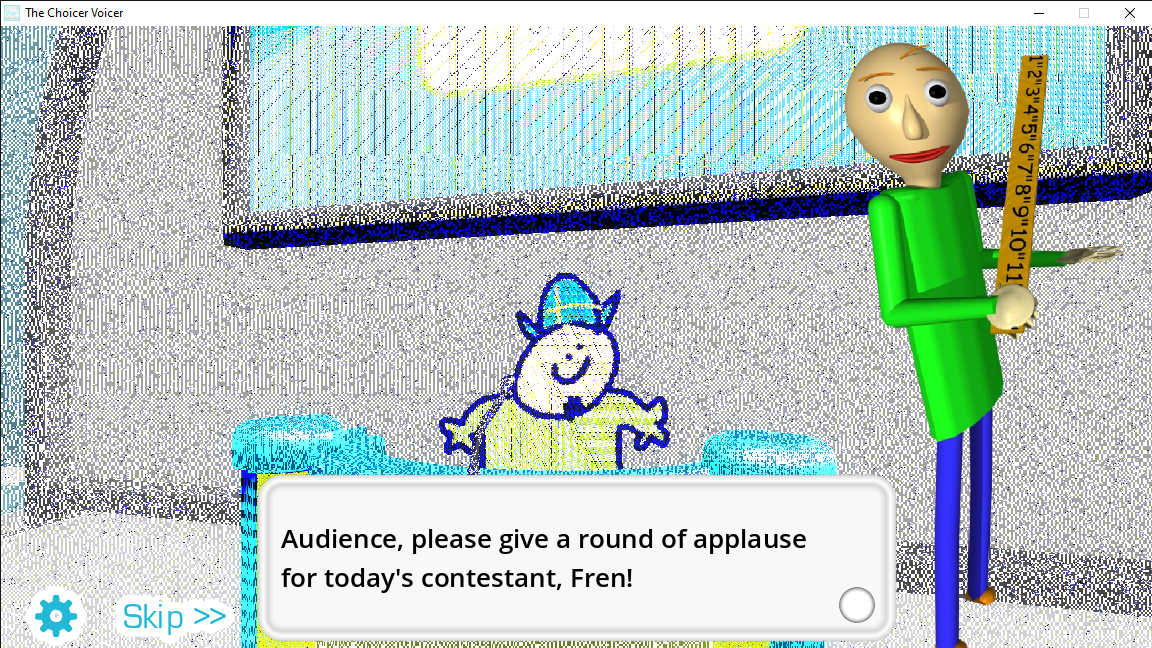
So I just purchased the choicer voicer about a day ago and I've come across a strange visual oddity, in which the 3d area of the game is cast with a bright white light, I have restarted my computer, removed all of my mods (there were not many) and completely uninstalled and reinstalled the game, (including removing the yeahmaybe folder from my roaming folder) and this issue still persists. Has anyone else come across this issue and is there a fix? below are a couple screenshots for proof's sake.


Developer

I would like to know more about your PC specs as well as those of anyone else experiencing this. It's an incredibly rare glitch, and I have no clue what circumstances cause it. I assume this is only in the gameshow studio?

(+1)

yeah it only shows up there. Anyways my specs are as follows
my cpu is a AMD ryzen 5 3600

I have 48 gigs of ddr4

My gpu is a nvidia rtx 5060 ti 

and everything runs off an ssd

Hope this is useful info.

(+2)

also I'm on windows 11 if that's anything

I’ve got the same problem

32GB DDR5

AMD Ryzen 5 7500F

RTX 5060 Ti

I've got the same problem, and I also noticed that no matter if I launch the stable version or the compatibility version, both do this and says ''compatibility mode'' on the top right corner.

64GB DDR5
AMD Ryzen 7 9800X3D
RTX 5070 Ti

i have the same problem 128 gb of DDR5 AMD Ryzen threadripper with a Nvidia RTX PRO 6000

HE HAS RAM GET HIM

Developer(+1)

I appreciate each of you contributing your specs. Hopefully the more reports I get about this, the easier it will be to pinpoint the cause. Hopefully it's a problem with what I coded, as opposed to another Godot Engine issue. For now, I can only speculate. I would be interested in hearing whether this is a problem with any other Godot games, though.

I had a similar visual bug, but it wasnt glowing, but rather it looked like this

i def think its interesting every commenter here except one uses ryzen and EVERY comment mentioned rtx

which is also my setup and now im scared lmao

but take that with a huge tablespoon of salt weirder coincidences have happened

I have the same issue as well, glad to see I'm not alone lol

Seems to be maybe AMD-CPU based given how much its cited in reports?

Specs:

Ryzen 9950x3D

RTX 5080

64 GB DDR5

Same Issue 

Windows 11

AMD Ryzen 5 5600X 6-Core Processor - RAM: 32 GB

NVIDIA GeForce RTX 5070 Ti - VRAM: 16 GB

(1 edit)

Same here 

AMD Ryzen 9 9950X3D 16-Core Processor  32 GB RAM

NVIDIA GeForce RTX 5080


(1 edit) (+1)

(This is for the developer)

All issues involving the 'Light of god' seem to involve rtx 5000 series GPUs (except that one comment that said RTX PRO 6000, however it is based on the same Blackwell architecture as the RTX 5000 gaming gpus, which use the GB202 silicon die family)

It is highly likely this issue is specific to Blackwell/GB202 silicon die family chips, no idea why but if i find anything new I'll let you know, hope this message helped in some way 🥲

(-1)

Same

Windows 11

NVIDIA GeForce RTX 5070 (12 GB)

AMD Ryzen 7 9700X 8-Core Processor (3.80 GHz)

32 GB RAM

(1 edit) (+1)

What anti-aliasing setting is used in the game?

Is the “Glow” post-effect enabled?


I just bought the game and I have the same issue. 
AMD Ryzen 5 7500F 6-Core Processor
16GB ram
NVIDIA GeForce RTX 5060 (8GB)
Windows 11

For anyone looking for a quick fix, just use the compatibility version

Developer(+1)

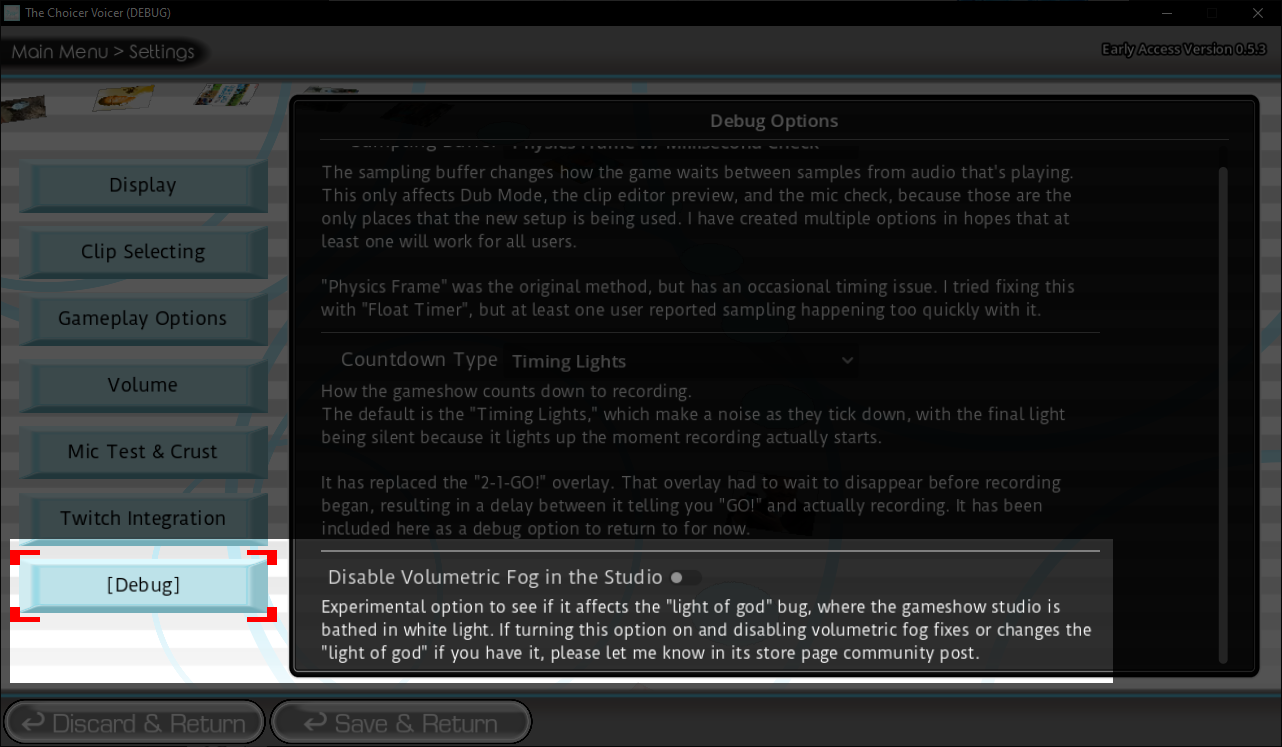
In the latest version 0.5.3, I've added a debug option in the settings to disable volumetric fog. For anyone experiencing this bug, I'm curious if turning this option on changes anything. Volumetric fog is currently my only lead, and hearing whether or not disabling it fixes the problem will help to rule it out or not.

When I tried with the new option ON it didnt change anything for me lets see if others have something changed


it seems to be a bug with AMD CPUs specifically. Maybe a driver bug?