
Indie game storeFree gamesFun gamesHorror games
Game developmentAssetsComics
SalesBundles
Jobs
TagsGame Engines

Vertex Studio

Godot plugin for editing, managing and painting vertex colors and vertex normals of 3D meshes. · By Alfred Baudisch (Pardall)

I can't select the R, G, B channels by holding the shift key?

A topic by Local_Dingus created 19 days ago Views: 35 Replies: 3
Viewing posts 1 to 4

Using Godot version 4.5, with vertex studio as my only add on.

I'm following along with the texture splatting tutorial and loving it, but I'm stuck on this weird software issue in the title. Here's a video demonstrating:

View post on imgur.com

Why is this happening? Do I need to update my version of vertex studio or something? Is Godot 4.5 the problem?
Developer (2 edits) (+1)

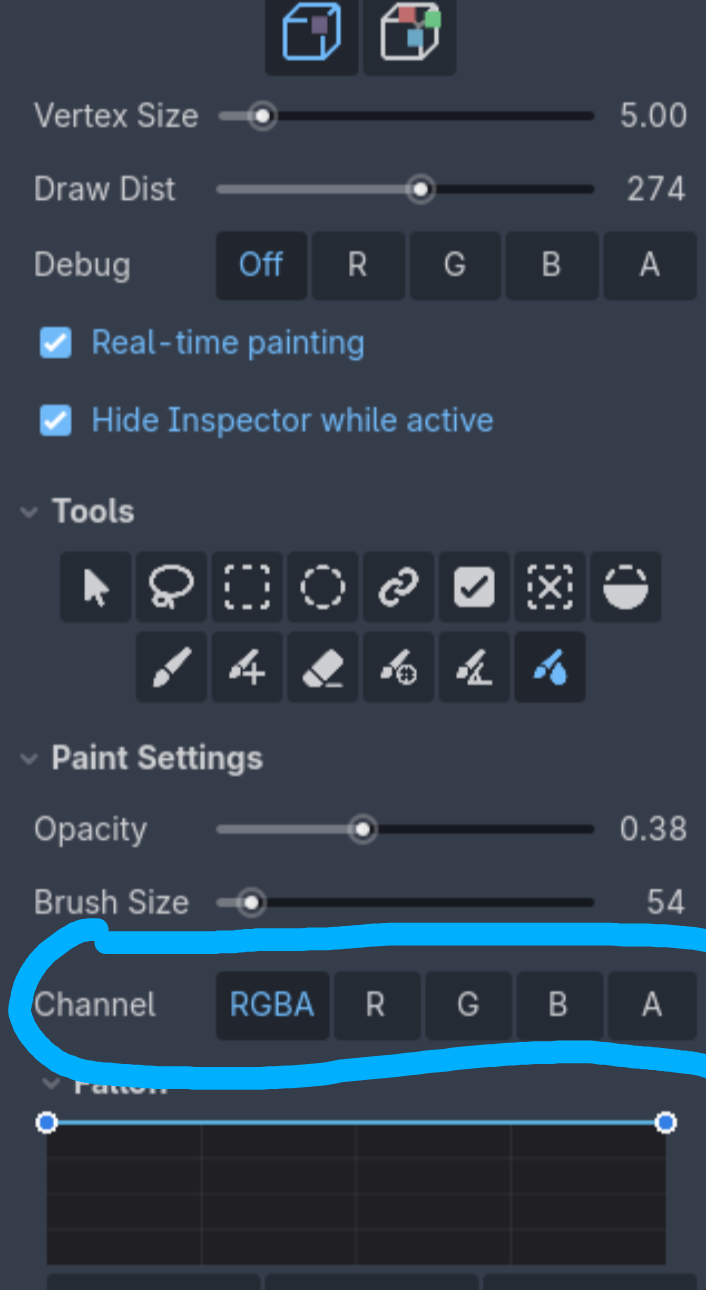
These that are you trying to select are debug channels ("what channels do you want to view?"). 

The channels for painting are further below, in Paint Settings. There you can shift+click to add to the selection. 

Developer(+1)

(+1)

Oh my god. You are absolutely completely right. God bless you and keep you my king.