Indie game storeFree gamesFun gamesHorror games
Game developmentAssetsComics
SalesBundles
Jobs
TagsGame Engines

Versions 1.2.X / #32-34 are kind of Borked

A topic by mai created 82 days ago Views: 116 Replies: 4
Viewing posts 1 to 5

at least for me, at least. i use itch.io and i've tried everything from repairing the files in itch.io to turning on compatibility mode on the graphics to disabling and even uninstalling my mods to removing all my player data to even returning to an older version. turns out, only returning to an older version fixed it (#31 was the newest one that wasn't broken). I am on Windows 10 and have experienced the following issues (among others I have probably forgotten):
- Extremely sluggish performance at random points, with frame drops and whole seconds of input lag.

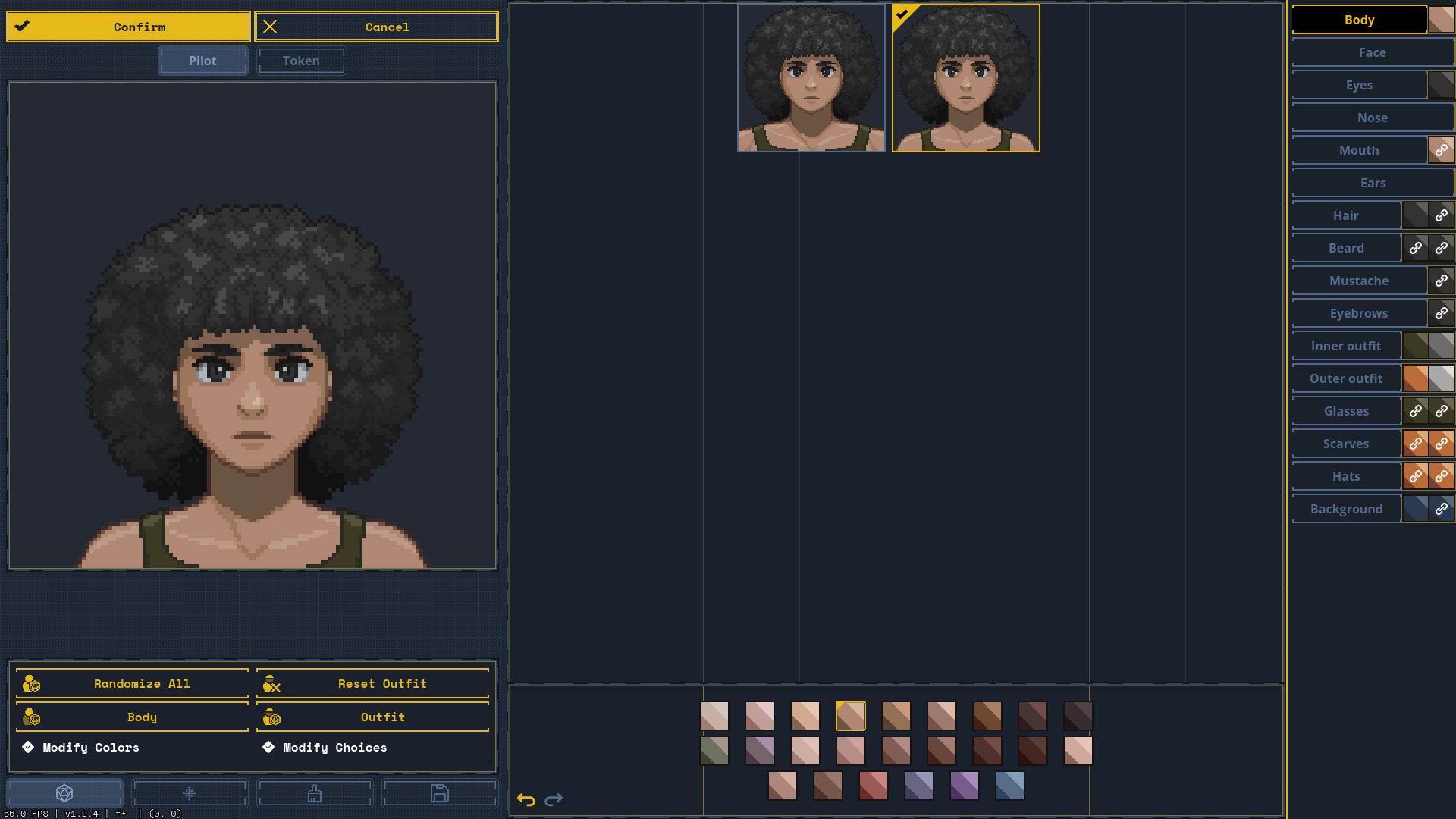
- Colors in the portrait editor are broken. The colors for skin are all shuffled up (as seen in the image) and when importing a profile from a file, it shuffles up the colors and gets them all wrong.

- I straight up cannot download or update 90% of modules and maps. With some, the screen flashes and nothing happens, or it just doesn't download or update at all. A lot of the maps affected are older but even new ones are.

- I have been unable to use custom mech frame assets without them resetting to the frame default after exiting the mech menu (see this thread).

This all started happening after I downloaded a small handful of mods, specifically the Sunzi, wallflower NPC rebake, rainstorm weather and Ace 2 Jump Jets mods. I fear that one of them might have carelessly edited a core file of the game that is not being replaced when I press the redownload button on itch-io, since these persist even after all but Sunzi was deleted, and even that was disabled when i purged all my mods. I know that its maybe impossible to diagnose things from mods, but I'd at least like to know how I can get a 100% clean install if nothing else works. Or maybe it's a glitch for Windows 10? I have no idea, I'm not a game developer.

Thank you for your time,

mai <3
Aiyiyi, that is a mean host of issues. Thanks for the report, and I’m sorry it’s having that many problems.

It’s odd that something change between the 1.1 and 1.2 builds — we didn’t upgrade the Godot nor make any engine-wide rendering changes which is usually what triggers widespread system incompatibilities like this. (the image you mentioned didn’t appear to make it into your post)

I would love to see some logs of the game to see if they have a hint of what might be going on. After running the game and seeing some issues, would you mind submitting some to either the google form or emailing them to me at olive@wick.works? You can find them in the logs/ folder in the user data directory.

Out of curiosity, how are you testing various versions of the game? Did you just have them saved? I’ve been wishing itch.io provided a way for people to download prev versions for a long time — have I just miss it?

Finally, to get a 100% clean install, you can delete the entire user data directory which it looks like you’re familiar with in the custom assets bug post. LT doesn’t store or change any files outside of that “LancerTactics” folder. Rerunning the game will cause it to regenerate that folder from scratch.

(1 edit)

that's a lot of stuff to do! i'll see what i can do bit by bit, but i'll start with a fully fresh clean install!

so, turns out, even with a 100% fresh install, the system logs still seem to be mega borked, as can be seen by the colors in the body section. i will send the logs i have per e-mail. thank you for your time!

p.s. the itch.io downloadable client allows you to change the versions of your games to previous releases

Oh neat! I didn’t know the itch client let you do that. Thanks :)

I’ll take a look at the skin palette ordering issue — I’m seeing that too on my machine. However, that should be a purely UI issue and not affect pilot imports (I’m currently able to export/import portraits without issue). If you get a chance, could you also include the profile you’re trying to import to that same email?

I also didn’t see anything alarming in the system logs you sent over — it looks like it was a quick session where only the pilot roster was opened. They’re more helpful after a session where you saw an issue after e.g. trying to download a map/module and it failing.

Thank you for helping me troubleshoot this!

no problem! i'll see if i can get a log sent after my next play session (unless i forget)