
Indie game storeFree gamesFun gamesHorror games
Game developmentAssetsComics
SalesBundles
Jobs
TagsGame Engines

Does the Morse key feel right? — feedback wanted on a browser demo (horror, ~1 hour)

A topic by NRNB Games created 73 days ago Views: 134 Replies: 1
Viewing posts 1 to 2

I put out a horror game yesterday whose core mechanic is copying Morse code by ear, and I'd like honest feedback on two specific things from people who haven't played it for 200 hours like I have.

It runs in the browser, no download and no account:

https://nrnbgames.itch.io/isolated-frequency-demo
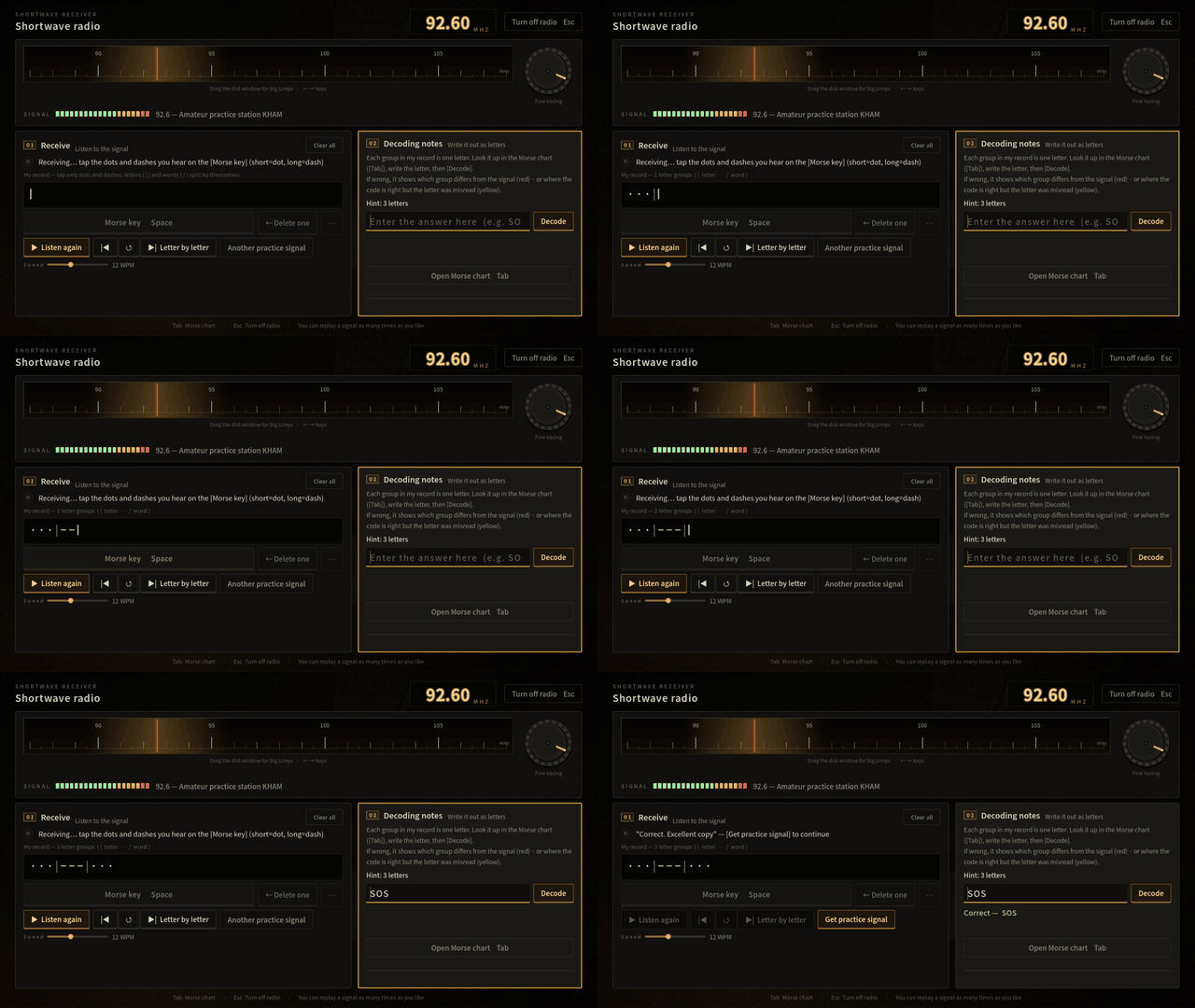
1. The straight key (Advanced difficulty). Hold = dash, tap = dot — but the record is pre-shaped to the answer: each letter already shows the right number of empty cells, so you never have to time a letter gap yourself. Real operators time those gaps. I took it out because playtesters kept saying "I heard it right and the machine says I'm wrong." Does the pre-shaped record read as relief, or as the game doing the interesting part for me? (Pick Advanced when you start, then use the practice station on the radio — Space is the key.)

2. The first ten minutes. Is it clear what you're meant to be doing before the first real signal arrives, or did you wander the room? I've watched myself do the opening a hundred times and can't see it fresh anymore.

Things I already know about: the first load compiles shaders for a few seconds, and the room is dark on purpose. Everything else is fair game — including "this is not how CW works."

I'll reply to every comment, and anything I change because of this thread I'll come back and post here.

(+1)

I played through the opening in the browser on version 1.2.0 and reached the end-of-day objective.

The first few minutes were generally clear. The objective pointed me toward the shortwave radio, and I never felt that I was wandering around the room without knowing what to do. The persistent goal text and interaction prompts worked well.

While tuning toward the requested 88.7 MHz beacon, I found the 92.6 MHz practice station first and spent a couple of minutes decoding signals there. This felt more like an interesting optional discovery than a serious problem, but initially I wasn’t sure whether I was supposed to remain there or continue toward 88.7. Calling it an “optional practice station” might make that distinction clearer while preserving the discovery.

There also seems to be an important mismatch between this post and the current build. The post says to choose Advanced and use Space for the Morse key. In version 1.2.0, however, Intermediate is described as the mode where you tap the Morse key and the letter breaks are handled automatically. Advanced now says that nothing is recorded and that you decode directly from what you hear. I followed the post and chose Advanced, so I never received the pre-shaped Morse-key record and couldn’t evaluate that specific mechanic. Updating the instructions in this topic would probably help future testers reach the mode you want feedback on.

On the no-record Advanced mode, the assistance options worked well. Slowing the signal to 6 WPM, replaying it, using letter-by-letter playback, checking the character-count hint and receiving specific mismatch feedback allowed me to recover from several wrong answers and finish the objective.

One smaller usability observation: the Morse chart is readable and being able to drag it is helpful, but it covers a large portion of the radio and decoding interface. I moved it repeatedly to see the information underneath. A smaller docked version, adjustable size or more compact collapsed state might reduce that friction.

Overall, the opening was understandable, the radio interface communicated its state well, and the restrained room and sound-focused interaction established the atmosphere quickly.