


You can post plugin requests here. I may make the plugin if I can do so within an hour by hand.
Sounds doable, and like a good small request!
To clarify, which one would you prefer:
I haven’t looked at the code yet, so this is just in case either isn’t too complicated for a “sketch plugin”. It could make a difference in terms of side effects (like whether status effects are inflicted).
Yeah I'm only interested in the visuals. Fake is good. I just tested it and it works like a charm. Thanks a lot! The only difference between a true miss is the animation though. I didn't think about that. It's displaying the hit animation with the miss text. In case that's an easy fix you may consider making. But otherwise it works as intended. Thanks again.
In my test, it seemed to play the skill animation and then a miss/evade motion on the target.
I just tried changing Game_Action.prototype.executeDamage instead, but got the same result.
At least currently, it doesn’t look like something I’d be likely to figure out within an hour, so a ‘true miss’ implementation that doesn’t show the skill animation isn’t something I’ll attempt for now.
Edit: Typo.
Done. I’ll update the page in a moment, but the file is there.
(Untested, but it’s a really simple issue and I’m quite confident.)
It’s Bitmap.drawText CanvasTextAlign Default Fix / TSk_Bitmap_drawText_CanvasTextAlign_Default_Fix.js, to be specific.
Note that I defaulted it to ‘start’ instead of ‘left’ since I think that’s what the web API does internally when that error occurs.
So far, this seems to be working almost entirely as expected. Only thing I've seen is warnings of
The provided value '36' is not a valid enum value of type CanvasTextAlign.
which happens in the Equip screen 5 times each time a different Actor is displayed, apparently once for each equipment slot that's visible, or when the list of slots scrolls (my game has a 6th slot that's always empty for now). If you want a call stack, let me know.
There's also occasional "[Violation] 'requestAnimationFrame' handler took ###ms" with various values that I don't remember happening before.
But that's still immeasurably better than a warning for each text character sent to the screen.
THANK YOU!
A call stack would help, but a a 36 appearing there sounds like someone is calling drawText on Window_Base as if it was the method on Bitmap. The former doesn’t have a lineHeight parameter preceding align.
I’m pretty certain that this line here in Window_EquipSlot.prototype.drawItem is the culprit:
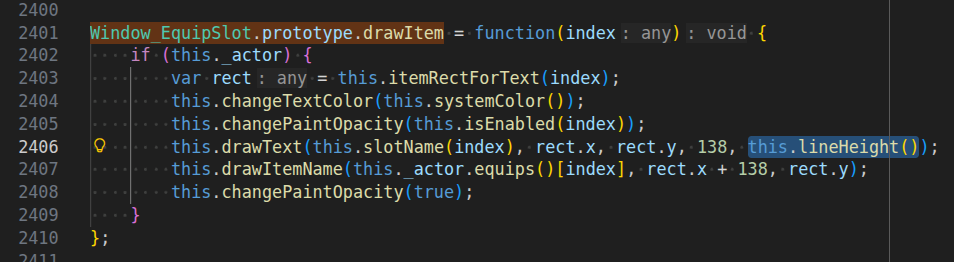
The bug is present in both MV and MZ, but fixed in the YEP_EquipCore.
You can just delete the , this.lineHeight() part there to fix this, but I’ll make plugin to auto-check that argument tomorrow, too.
Regarding ”[Violation] ‘requestAnimationFrame’ handler took ###ms”, that’s a performance warning with unspecific cause. It means something took too much time and caused a lag frame.
You can figure this one out using the profiler, but usually it’s just something like resource loading not running in parallel.
It would be helpful if these came with comments explaining the issue they work around 😅
I believe 1-3 are either plugin-specific or target older versions of the core scripts, since I can’t find their "key" in my project folder.
4 has roughly the same effect as my “Bitmap.drawText CanvasTextAlign Default Fix” sketch plugin.
5 I believe is a workaround for something that can occur on mobile due to texture size limits. It also just masks an error with potentially unintended behaviour instead of really solving it.
I think the additional ones are out of scope for me.
I had much the same response for #4. I'd have to go on the JoiPlay Discord to even start to track this stuff down, and I'm only interested in case these are patches that would help all users and not just one Android-based emulator. Thanks for checking it out, though!
It’s an editor limitation, yes. However, “Script” first composes the lines and then uses eval from scratch each time internally, so I don’t recommend using that with large functions in the first place (at least not when it runs frequently).
The easiest option is to make a small plugin like so:
function myScript() {
  // You can name this anything in place of `myScript`.
  // Ideally, use at least somewhat descriptive names.

  // Also, just add multiple functions if you need more.

  // Your Script goes here.
}
And then call it inside the “Script” Command like this: myScript.call(this)
.call(this) instead of passing the interpreter as argument means you can use this inside myScript as you would in the “Script” Command.
I could make a tiny plugin that combines any adjacent “Script” Commands into one, though, thinking about it!
The performance issue would still apply, but it should work without problem, since concatenating JavaScript like this with a newline should (hopefully) not change its meaning. I can give it a go later this week.
Edit: It can change the behaviour in cases where this is manipulated to skip the next “Script” or this._index matters during script execution, though. Hm.
No need to pursue this, I don't actually have a need for this functionality right now AFAIK. Any code that got close to the limits can be minified to frustrate everyone, or should be in its own plugin file probably.
I’ll hold off on it unless someone else asks, then.
I think larger Scripts in Events would be fine if combined with a function cache, but getting that just right in a way that breaks nothing (some plugins edit Command lists at runtime and eval can read surrounding variables so I’d have to detect that) is definitely too complicated for a sketch plugin.