Thanks! I’ll keep this in mind for future releases and updates.
Tamschi
Creator of
Recent community posts
Edit:
I forgot that the cursor is .shown even earlier than that. Hm…
For now you can try to add the following as plugin:
$gameScreen = new Game_Screen();
This should create the necessary (temporary) object as soon as possible. I’m very busy this week, but I’ll also try to add a workaround option to this plugin here that avoids the .show call.
Original reply:
The one by Triacontane, right? My TSk_Early_$game.js should work around this, you can find it on my Sketch Plugins page for free.
Technical explanation:
This happens because my plugin here can show a (kind of) Picture as virtual cursor before the game state is fully initialised. D Text Picture (reasonably) expects that to happen the other way around, so there’s a timing conflict there.
Early $game causes a placeholder game state to be created very early when the game boots up (Edit: but likely not early enough in this case), so that D Text Picture will find the object shape it expects even on the title screen. This placeholder is automatically discarded when the game starts or loads in earnest.
There’s no intersection between the plugins’ features or how they hook into the engine, so: Yes, seamlessly.
Just note that the live background won’t be blurred in MV even if you enable the “Blurry Background” in Main Menu Manager, since it only affects how the snapshot image that’s normally shown in the background is taken.
(I mostly just haven’t wired that up, admittedly. I could apply the filter manually in MV if you need it, but it would only work in WebGL mode.)
I’ll hold off on it unless someone else asks, then.
I think larger Scripts in Events would be fine if combined with a function cache, but getting that just right in a way that breaks nothing (some plugins edit Command lists at runtime and eval can read surrounding variables so I’d have to detect that) is definitely too complicated for a sketch plugin.
I could make a tiny plugin that combines any adjacent “Script” Commands into one, though, thinking about it!
The performance issue would still apply, but it should work without problem, since concatenating JavaScript like this with a newline should (hopefully) not change its meaning. I can give it a go later this week.
Edit: It can change the behaviour in cases where this is manipulated to skip the next “Script” or this._index matters during script execution, though. Hm.
It’s an editor limitation, yes. However, “Script” first composes the lines and then uses eval from scratch each time internally, so I don’t recommend using that with large functions in the first place (at least not when it runs frequently).
The easiest option is to make a small plugin like so:
function myScript() {
// You can name this anything in place of `myScript`.
// Ideally, use at least somewhat descriptive names.
// Also, just add multiple functions if you need more.
// Your Script goes here.
}
And then call it inside the “Script” Command like this: myScript.call(this)
.call(this) instead of passing the interpreter as argument means you can use this inside myScript as you would in the “Script” Command.
It working exactly once is strange. Are you sure it doesn’t depend on the direction the cursor moves in? Does anything change depending on which order the two plugins are loaded in?
If there was an error message in the debug console, that could give me a hint, too. Otherwise, it may be easier to ask Olivia about this, since her plugin is paid and I don’t have access to it.
I’m available for questions if needed, and if she’d like me to make a specific change for better compatibility, then I’ll gladly do that (within reason).
Beyond that, it’s not always feasible for me to provide compatibility support regarding specific third-party plugins, so while I generally give it a try, please understand that it’s not guaranteed unless mentioned directly here on Itch.
Easy 5★. I’m aware this is alpha stage, but it’s already very solid.
I noticed that mouse enter will only fire if the cursor moved, but mouse exit works fine if the Picture is moved away.
There are some good reasons it’s implemented this way by default, but an equivalent option to “Event Touch” would be cool to have (for avoidance QTEs).
Something else I’m missing is the option to attach a sound effect directly. I know that’s possible through JS, but is less convenient without the picker. I’d understand if you think that’d make it too cluttered, though.
A technical suggestion: I think it would make sense to call ImageManager.loadPicture for the alternative images as part of the Attach Command and Sprite_Picture.prototype.initialize, to make sure the bitmap change doesn’t flicker or lag.
Lastly, a question: Would you mind if I treat cgmz_altImages and the cgmz_…Pressed properties as public API?
One of my plugins causes Game_Pictures’ names to vary, so I’m thinking I may absorb the alt images configuration and inject the values contextually based on hovered/pressed state on my side.
I can always check the object shape a bit more thoroughly if you think you may change this is the future, though.
Oh, I had gotten this in a bundle already 😅
Ah well, consider it a small tip 🙂
If it’s not too much hassle: I’m doing this myself right now, but a FLAC version with the MP3s’ meta data would have been convenient. If I convert with --best from the WAVs, most of them fit into a bit less than half the original size.
Maybe it would be possible to make the (clearly labelled) buggy version available officially as bonus to an eventual fixed version? 😄
I have the Steam version too, so no pressure, but it was a nice surprise to stumble across the soundtrack when I checked your page due to the Itch feature of A MANSION on the HILL today.
It would be helpful if these came with comments explaining the issue they work around 😅
I believe 1-3 are either plugin-specific or target older versions of the core scripts, since I can’t find their "key" in my project folder.
4 has roughly the same effect as my “Bitmap.drawText CanvasTextAlign Default Fix” sketch plugin.
5 I believe is a workaround for something that can occur on mobile due to texture size limits. It also just masks an error with potentially unintended behaviour instead of really solving it.
I think the additional ones are out of scope for me.
There’s currently still a small problem with how the 0/None-Actor condition (first party member) is checked. I’d used the object identity instead of the ID there and that check of course fails for equipment previews.
I’m a bit too swamped right now to do another release just for that, but let me know if you run into it and I’ll prioritise it. (Goes for anyone else too, of course!)
I’ve fixed it locally already, so at the latest it will be part of the next feature release. At which point I’ll hopefully get around to updating the store page here, too.
Done: Ver. 1.8.14: Equipment Previews and paintOpacity support
I underestimated the complexity somewhat 🫠
On the plus side, I fixed more issues along the way.
There may be small differences (only with equipment slot plugins, I think) in how BM MV Shop applies equipment to calculate the stat differences vs. how Dynamic Characters constructs the preview (optimal slot). Players should be unlikely for to notice that, though.
Somehow I didn’t expect this to have an engine interface, but it turns out that it’s quite reasonable for Window_EquipStatus and only a bit more complex for Window_ShopStatus specifically. The latter fortunately is what BM_ShopCore uses.
(It would actually work already if those windows drew the temporary Actor they use to calculate stat changes, minus Character tags not being taken into account. I’ll fix the latter generally.)
Unlike making the sprites work, this is hopefully not fiendishly complicated, so I’ll give it a go this week.
No, this plugin doesn’t affect draw order.
I normally recommend Galv’s Layer Graphics (MV, MZ) for that purpose, but since it doesn’t use Sprite_Picture, it wouldn’t be affected by Dynamic Pictures.
You may be able to use Dynamic Characters instead. You can use the “!Margins” Plugin Command to display an Event’s entire sprite sheet image. Positioning would be trickier and it would be attached to the Map rather than screen, though.
That’s good to hear.
I found a mention of the controller being supported better starting with Chrome 89, which I think is a bit newer than the Chromium 85 MZ ships with: https://github.com/thayallans/ds5chrome/issues/6
It’s likely technically possible to special-case this on my end if the Chromium version is too low, but in my opinion updating the runtime would be the cleaner solution since that has other compatibility benefits too.
Ah, and another possibility: The DualSense controller is around two years younger than the default runtime that comes with MZ.
Maybe it’s not supported properly by that older version, in which case updating it might fix the issue: /blog/484532/how-to-update-nwjs-in-rpg-maker-mv-and-mz-for-rpg-devs
That would also explain why the controller test site reports everything as centered.
Thanks! The increasing “x” value is actually fine in this case, that’s a side-effect of the plugin interpreting the R-stick as overall outside the deadzone and it being very slightly off-centre.
The main problem is that the fourth axis (which would normally be R-Stick downwards) is being seen as -1, i.e. all the way up.
Maybe the controller has a different axis layout due to the gravity sensor.
I you could add console.log(axes, gamepad.mapping, deadzone); at the second insertion, that should give me enough information to at least look this up. (You can remove the other ones.)
It would also be helpful to know which numbers in the axes array change when you move the R-stick.
If the axes are indeed different, then that along with the mapping or id will be enough to special-case it.
There’s another place that could be helpful:
Where it says
dx += x;
dy += y;
add console.log(x, y, gamepad.id); so that it’s:
console.log(x, y, gamepad.id);
dx += x;
dy += y;
This should show any devices that the plugin sees as controllers.
(Edit: I should be able to exclude the one that causes problems, that way.)
There’s one other place where the plugin can move the cursor, that this doesn’t cover, but that is only reachable when using the “Point at” plugin command.
I forgot that I used locals, which are a bit more difficult to debug.
There’s a line in the plugin that reads
x += dx, y += dy;
please insert console.log(x, dx, y, dy); directly above that so that it reads:
console.log(x, dx, y, dy);
x += dx, y += dy;
Press F12 and tell me what’s shown in the console there, if anything, when the cursor moves:
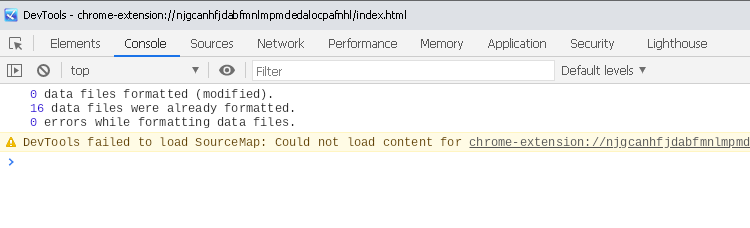
Right, and it’s the left stick that’s non-zero, which schold have no effect.
I’ll try to replicate this here with the newest version of the MZ core scripts.
If I can’t figure it out that way, I’ll reply with a few JS commands that should help with debugging this.
How fast does the cursor move upwards?
Could you check what https://controllertest.io/ shows (for all controllers it reports as connected)?
There were problems before where certain other hardware appeared as controllers with different axes, throwing the plugin off.
This is explained in the following paragraphs. It depends on the operating system and whether you’re updating the Maker’s versions or a published game, so I can’t give you a direct answer here.
In general though, for published games you only need the “Normal” version. The “SDK” version goes into the -test folder, for other runtime folders use the “Normal” version.
Regarding ”[Violation] ‘requestAnimationFrame’ handler took ###ms”, that’s a performance warning with unspecific cause. It means something took too much time and caused a lag frame.
You can figure this one out using the profiler, but usually it’s just something like resource loading not running in parallel.
A call stack would help, but a a 36 appearing there sounds like someone is calling drawText on Window_Base as if it was the method on Bitmap. The former doesn’t have a lineHeight parameter preceding align.
I’m pretty certain that this line here in Window_EquipSlot.prototype.drawItem is the culprit:
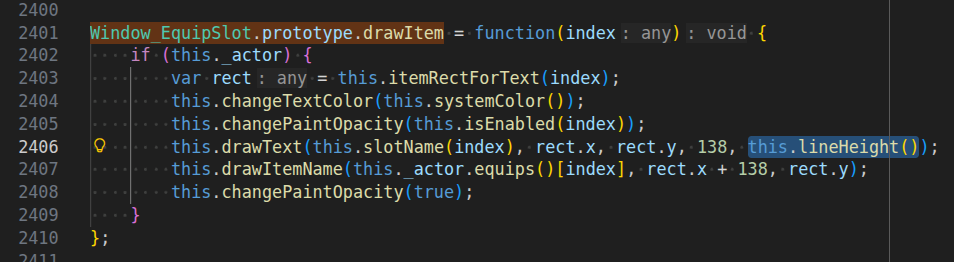
The bug is present in both MV and MZ, but fixed in the YEP_EquipCore.
You can just delete the , this.lineHeight() part there to fix this, but I’ll make plugin to auto-check that argument tomorrow, too.
That’s a great bug report, yes, especially that it gives me a good way to reproduce the issue.
I roughly know what causes this. I’ll play around with the rounding a bit to see if I can fix this pixel-perfectly (or at least clamp it to the correct area of the bitmap). Might take a few days though, it depends on how busy I am next week.
Are you using the latest version 1.1.4?
No worries 🙂
Admittedly, this only happens to work because I wanted to support distinct left- and right-click behaviour on the same Event (the hover tags are combined between those entry points, btw), but this approach that makes use of the existing engine is something I aim for in general.
That’s (part of) why so many of my plugins are rule-based instead of relying on Note Tags now.
Use “Exit Event Processing” as first Command and then “!OnTouch:” right after.
(“!OnTouch:” acts as entry point, so Event processing will start right at that line.)
The Event may still turn to face the Player if it’s not Direction Fix.
If the Event should turn, you can do that manually with “Set Movement Route…” (“Direction Fix OFF”, “Turn Toward Player”) and then reset with “Revert OnTouch Turn” and “Set Movement Route…” (“Direction Fix ON”).