
Indie game storeFree gamesFun gamesHorror games
Game developmentAssetsComics
SalesBundles
Jobs
TagsGame Engines

Pixel Art Studio

Blender add-on for pixel perfect pixel art drawing and texture painting in 3D and 2D · By Alfred Baudisch (Pardall)

[SOLVED 50%, IN PROGRESS v1.2.0] REQUEST - Quick Eyedrop (ALT+Click or just ALT)

A topic by Mafellir created 1 day ago Views: 43 Replies: 1
Viewing posts 1 to 2

Quick Eyedrop action. Similar to Aseprite, holding ALT will swap current active tool for Eyedrop. releasing ALT would go back to previous active tool.  Even if you click ALT it would altopick the color from the current cursor position will also help a lot! Another thing would be color pick from other places/ objects. That could help a lot with larger color palettes. this way I can import a plane-as-mesh or image-as-reference and leave it on the side of my current editing object. This will match perfectly with the quick eyedrop action!
Developer(+1)

Hello,

- Eyedropper from other objects, added in the tracker: https://github.com/PardallTools/pixel-art-studio-docs/issues/27

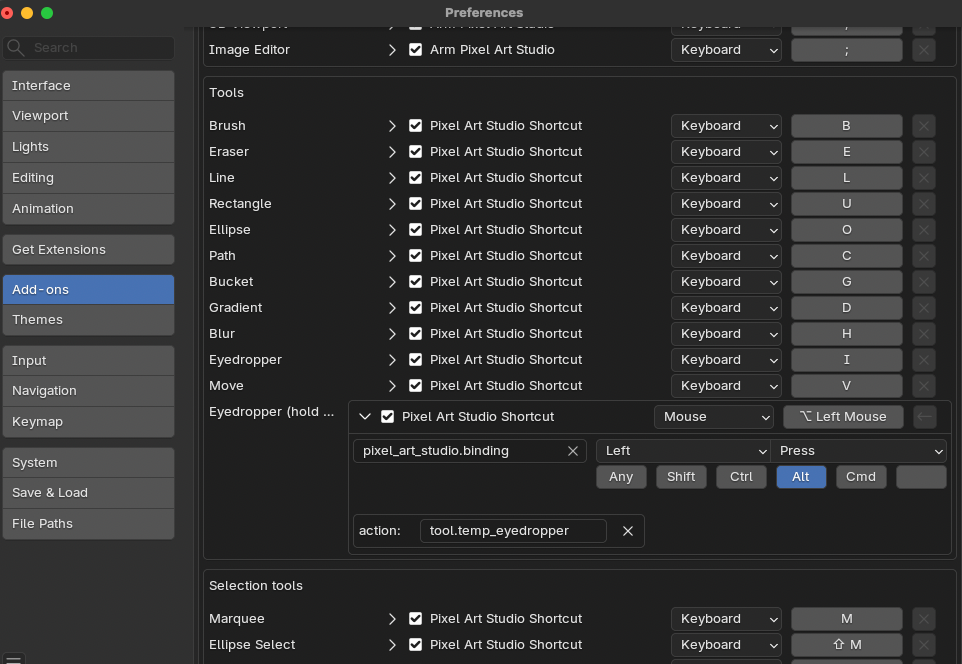
- ALT+click for the eyedropper is already possible: Preferences > Add-ons > Pixel Art Studio > Shortcuts > customize "Eyedropper (hold and click)" like this: