
Indie game storeFree gamesFun gamesHorror games
Game developmentAssetsComics
SalesBundles
Jobs
TagsGame Engines

GDDKit

The native, offline-first Game Design Document (GDD) workspace for game developers. · By camyesili

A bug when trying to drag and drop one of the menu options

A topic by Kozelek created 34 days ago Views: 136 Replies: 16
Viewing posts 1 to 6

I have found a small bug. When I try to drag and drop one of the menu options to change the order, the tool freezes, and I have to close the process to restart it. (I'm using the Linux version)

I still can work fine, I can change the order manually by editing the gddkit file, but it certainly would help if this was fixed. 
Developer

Hi! Thanks for reporting this. I tested section reordering with the current 2.0.1 Linux release on Ubuntu, but I haven’t been able to reproduce the freeze yet.

Could you please share your Linux distribution/version, desktop environment, whether you’re using Wayland or X11?

My linux distribution is Garuda Linux (based on Arch Linux). But I will try to execute the tool from the terminal as soon as I arrive home, maybe there's some useful log information I can share with you.

This is the log of the error, after executing it from the terminal:


Unhandled exception. System.FormatException: Invalid format. TranslateY expects 1 value(s).

   at Avalonia.Media.Transformation.TransformParser.ThrowFormatInvalidValueCount(TransformFunction function, Int32 count)

   at Avalonia.Media.Transformation.TransformParser.ParseFunction(ReadOnlySpan`1& functionPart, TransformFunction function, Builder& builder)

   at Avalonia.Media.Transformation.TransformParser.Parse(String s)

   at GDDKit.Desktop.Views.EditorView.SectionsListBox_PointerMoved(Object sender, PointerEventArgs e)

   at Avalonia.Interactivity.EventRoute.RaiseEventImpl(RoutedEventArgs e)

   at Avalonia.Interactivity.EventRoute.RaiseEvent(Interactive source, RoutedEventArgs e)

   at Avalonia.Interactivity.Interactive.RaiseEvent(RoutedEventArgs e)

   at Avalonia.Input.MouseDevice.MouseMove(IMouseDevice device, UInt64 timestamp, IInputRoot root, Point p, PointerPointProperties properties, KeyModifiers inputModifiers, Lazy`1 intermediatePoints, IInputElement hitTest)

   at Avalonia.Input.MouseDevice.ProcessRawEvent(RawPointerEventArgs e)

   at Avalonia.Controls.PresentationSource.HandleInputCore(Object state)

   at Avalonia.Threading.Dispatcher.Send(SendOrPostCallback action, Object arg, Nullable`1 priority)

   at Avalonia.ManualRawEventGrouperDispatchQueue.DispatchNext()

   at Avalonia.X11.X11PlatformThreading.RunLoop(CancellationToken cancellationToken)

   at Avalonia.Threading.DispatcherFrame.Run(IControlledDispatcherImpl impl)

   at Avalonia.Threading.Dispatcher.PushFrame(DispatcherFrame frame)

   at Avalonia.Threading.Dispatcher.MainLoop(CancellationToken cancellationToken)

   at Avalonia.Controls.ApplicationLifetimes.ClassicDesktopStyleApplicationLifetime.StartCore(String[] args)

   at GDDKit.Desktop.Program.Main(String[] args)

Abortado                   (`core' generado) ./GDDKit-linux-x64.AppImage

Developer

Thanks, the log revealed the exact cause. I’ve released an update that should fix the issue. Could you please go to Help → Check for Updates, update to v2.0.2, and let me know whether section reordering now works correctly?

Yes! Now it works wonderfully ;) Thanks for the quick answer!

I seem to be having some issues with the PDF export though (it says "PDF export failed: The provided document content contains conflicting size constraints. For example, some elements may require more space than is available.")

Ok, I noticed why that happens. I included some external images in one of the sections, and it seems it didn't like it. After deleting the images, it exports the PDF without any problem.

It's not an important issue for me, but I guessed you'd like to know :)

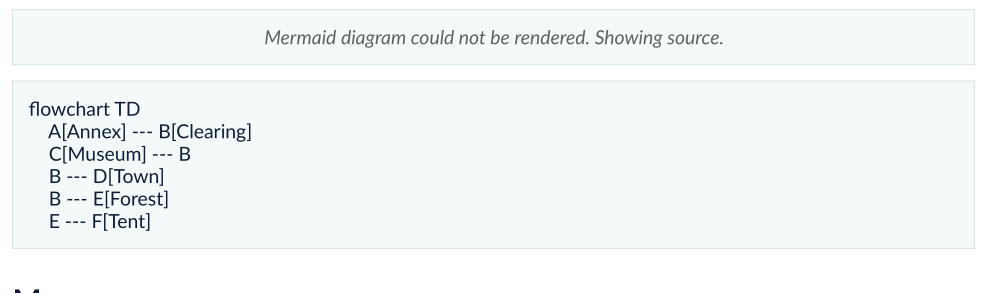
Oh, and it couldn't render one mermaid diagram


Developer

Thanks for letting me know and for taking the time to identify the cause of the PDF export issue. That information is very helpful. I’ll investigate why external images can cause the export to fail.

Regarding the Mermaid diagram, the syntax in your screenshot looks valid, so the rendering failure may be related to the WebKit backend on Garuda Linux. Could you please run GDDKit from the terminal, try rendering the diagram again, and share any output or error messages you see?

It would also be helpful if you could share the output of:

pacman -Q | grep -E 'webkit|wpe|gtk'

This should help me identify the cause of the rendering failure.

This is it:

-------------------------------

[kozelek@kozelek-82k2 arc_image]$ pacman -Q | grep -E 'webkit|wpe|gtk'

appmenu-gtk-module 25.04-3

arc-gtk-theme 20221218-2

epdfview-gtk3 1:0.0.1-1

gtk-doc 1.36.1-1

gtk-engines 2.21.0-7

gtk-layer-shell 0.10.1-1

gtk-update-icon-cache 1:4.22.4-1

gtk-vnc 1.5.0-1

gtk2 2.24.33-5

gtk3 1:3.24.52-1

gtk4 1:4.22.4-1

gtkmm3 3.24.11-1

gtksourceview3 1:3.24.11+r30+gd880929f-1

gtksourceview4 4.8.4-2

gtkspell3 3.0.10-4

kde-gtk-config 6.7.4-1

lib32-gtk2 2.24.33-5

lib32-gtk3 1:3.24.52-1

lib32-libappindicator-gtk2 12.10.0.r298-5

lib32-libdbusmenu-gtk2 16.04.0-7

lib32-libindicator-gtk2 12.10.1-11

libdbusmenu-gtk2 16.04.0.r498-3

libdbusmenu-gtk3 18.10.20180917-2

libgedit-gtksourceview 299.7.1-1

libindicator-gtk2 12.10.1-11

libnma-gtk4 1.10.6-3

libwpe 1.16.3-1

lightdm-gtk-greeter 1:2.0.9-2

perl-gtk3 0.038-5

proton-vpn-gtk-app 4.17.2-1

qemu-ui-gtk 11.1.0-1

spice-gtk 0.42-5

webkit2gtk-4.1 2.52.6-1

webkitgtk-6.0 2.52.6-1

wpebackend-fdo 1.16.1-1

wxwidgets-gtk3 3.2.11-2

xdg-desktop-portal-gtk 1.15.3-1

Oh, and forgot to mention: when rendering the PDF, there is no error log in the terminal

Developer(+1)

Thanks, this is very helpful! WebKitGTK 4.1 and GTK3 are both installed, so a missing dependency doesn’t seem to be the cause.

I haven’t identified the exact cause yet, but I’ll investigate it using the diagram and package versions you provided. The application currently catches Mermaid rendering errors and shows the source as a fallback, which is why nothing appeared in the terminal.

Thanks again for taking the time to provide all this information!

(+1)

If you need it for your tests, I could provide you with a zip file with my GDD. Just tell me if you need it and I'll find the way to send it to you :)

Developer(+1)

Thanks for the offer! I don’t need the GDD file just yet. I’ll first try to reproduce the issue on Garuda Linux and let you know if I need it.

Developer

Hey Kozelek, could you please send me your gddkit file via email: camyesili25@gmail.com

(+1)

I just sent it!