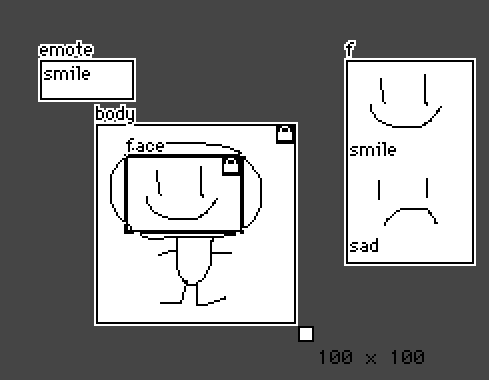
Sorry for the delay, I realized that my existing fancy puppets have a friend's art in them so I made a new one with Phinxel.
Contraption code block is at the bottom of the post.
+ I'll try to explain here about what it's doing, and the different ways it's set up to work for each part.
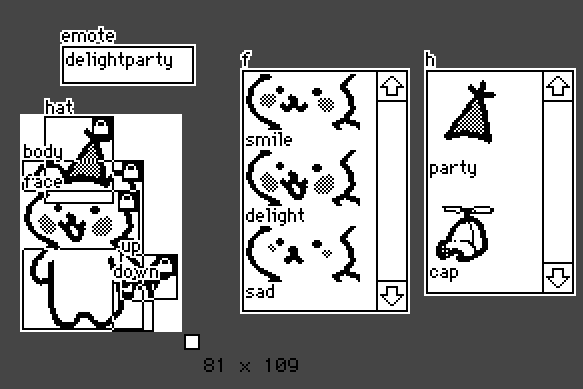
There's a series of canvases in the visible area and some fields for data storage.
The Fields:
emote = holds the name of the current emote (used by puppeteer)
f, h = holds all of the images of a specific part (face, hat) and a label for that part on the line above or below the image.
In this example I put the string of text on the line below the image, but I'm pretty sure it works the other way too... (Just be consistent about it.)
The Canvases, and what they need to do:
body = Always visible, never changes.
face = Always visible, image can change.
hat = Only visible if the emote calls for it, image can change.
up, down = Multiple canvases for one feature (the tail) and the images do not change but only one of these canvases should be visible at a time.
And now let's look at the code. We got some basics:
on set_emote x do emote.text:x end
on get_animate do view end
And then we get into the emotes:
on view do
     faceData:insert
      emote          faceImage     tail       hat
     with
      "smile"        "smile"       up         nil
      "smileparty"   "smile"       up         "party"
      "smilecap"     "smile"       up         "cap"
      "delight"      "delight"     up         nil
      "delightparty" "delight"     up         "party"
      "delightcap"   "delight"     up         "cap"
      "sad"          "sad"         down       nil
      "sadparty"     "sad"         down       "party"
      "sadcap"       "sad"         down       "cap"
     end
The instructions for which combination of canvases + images apply to which named emote all live in a big table.
Quotes around a word mean we're referring to a string of text in one of the fields. When there's no quotes it's either the name of a widget (the canvases: up, down) or specifically nothing (nil).
These next lines let us refer to the images in the hat/face storage fields by their labels (the strings of text) on the neighboring lines:
 faceImages:("" drop "\n" split f.text) dict f.images
 hats:("" drop "\n" split h.text) dict h.images
And this sets up 'e' to only look at the information in the row for the current named emote:
e:(faceData.emote dict rows faceData)[emote.text]
The face is simple, because there's only one canvas and it's always visible:
face.paste[faceImages[e.faceImage]]
For the hat we also need to check to see if there's supposed to be a hat in the current emote (whether there's a label in the hat column or just nil). So we toggle the visibility based on the contents of the hat column, then paste the relevant image.
 hat.toggle["transparent" e.hat]
 hat.paste[hats[e.hat]]
And finally the tail. For this one we hide the tails in the column and then only show the one that's named for the current emote:
 (distinct faceData.tail)..show:"none"
 e.tail.show:"transparent"
end                   # ending the "on view do" from earlier
Hopefully one of these examples of ways to handle a modular part in a fancy puppet is helpful to you, or to some future forum reader.
(And I'm honored that Phinxel's book has been useful to you! I'm not bothered at all by the association. Keep making your art, Goons.)
%%WGT0{"w":[{"name":"fancyphinxel1","type":"contraption","size":[81,109],"pos":[235,103],"def":"fancyphinxel","widgets":{"down":{},"up":{},"body":{},"face":{},"f":{"value":{"text":["smile\n","i","\ndelight\n","i","\nsad\n","i","\n"],"font":["","","","","","",""],"arg":["","%%IMG3ADkAHAZAgHAICBiNxKRyyWwWkczj0UmtJqdRacDKpWKX0q64+VWWx2jhmbhOi8NgKHnrztLNcvu92h7Cr3lxgXN9amuFfntef3Z4ew2QkVGLio2Jj5GZjpVpf2WZmoCIAKANlk+YpYKcQ6WQgpdErqZql3eVs7CxraCxWoaKuY5sg5K2Wr+yrqeoVsnJSarMo7vATaG6xKx1XYzV3GPe2tvgzKvk5cCDm+vpyOKi1G9aIO+U8s5HIPv70ITtnYzwG1gPnb10qAjyCxAE","","%%IMG3ADkAHAZAgHAICBiNxKRyyWwWkczj0UmtJqdRacDKpWKX0q64+VWWx2jhmbhOi8NgKHnrztLNcvu92h7Cr3lxgXN9amuFfntef3Z4ilaPgJGObIMADQ2Ek2N/Z5ifeptJoIKJe5+kgqJCqJilhqetmX6md5Gys5KVd7izU1qwo7ivwUO9T1rJscPEyMbMwMh5va7NZczStbzUzcWsrbu208eOkdeppulE2OGafFhr4N3lq8po0U7J+fiQypbh/7JxSQbC3j5GdaSBWLiQX6iEkhhKLFhPH0RTExkGCAI=","","%%IMG3ADkAHAZAgHAICBiNxKRyyWwWkczj0UmtJqdRacDKpWKX0q64+VWWx2jhmbhOi8NgKHnrztLNcvu92h7Cr3lxgXN9amt9DQ2GXVpeg22JiYKEVmWIkXiFjF+FkpmDS5h2fqB8mkKRnpmke5ulRKmKk6xvWq2hqqu0XLanlXm+hlB/bpaveGy3Y4fHdb+gwc6CysLU0pROjdeOvrbb097Z2t+2IL3c0aZGIOzs44TNtQHt9ObW1enq9e0BQQ==",""]}},"h":{},"hat":{},"emote":{}}}],"d":{"fancyphinxel":{"name":"fancyphinxel","size":[81,109],"margin":[0,0,0,0],"description":"A little demo of a modular fancy puppet.","script":"on set_emote x do emote.text:x end\n\non get_animate do view end\n\non view do\n faceData:insert\n emote faceImage tail hat \n with\n \"smile\" \"smile\" up nil\n \"smileparty\" \"smile\" up \"party\"\n \"smilecap\" \"smile\" up \"cap\"\n \"delight\" \"delight\" up nil\n \"delightparty\" \"delight\" up \"party\"\n \"delightcap\" \"delight\" up \"cap\"\n \"sad\" \"sad\" down nil\n \"sadparty\" \"sad\" down \"party\"\n \"sadcap\" \"sad\" down \"cap\"\nend\n\n faceImages:(\"\" drop \"\\n\" split f.text) dict f.images\n hats:(\"\" drop \"\\n\" split h.text) dict h.images\n \n e:(faceData.emote dict rows faceData)[emote.text]\n\n face.paste[faceImages[e.faceImage]]\n hat.toggle[\"transparent\" e.hat]\n hat.paste[hats[e.hat]]\n (distinct faceData.tail)..show:\"none\"\n e.tail.show:\"transparent\"\nend","widgets":{"down":{"type":"canvas","size":[19,24],"pos":[47,84],"locked":1,"show":"none","border":0,"image":"%%IMG3ABMAGAZAQABALBqPxIASySwqh83mM8p8TqlOqxar3VK7VqzRK04uy1koWnhGX5Fvszodlh/By3oaxAeBx0p9fWRygnxxe4KIgAGKbXBPh49VXWWERUE=","scale":1},"up":{"type":"canvas","size":[27,21],"pos":[51,71],"locked":1,"show":"transparent","border":0,"image":"%%IMG3ABsAFQZAgHBILBIDSKRxuUw6A8wo4AlySo1OkLaavA6zW23XO0WGt2Nv8ixWktfs9BWMdpPLa+v9+7TvhX1/R36CfFCFg4eIeIR7gVGKhk9qfY+UlY1zk4hB","scale":1},"body":{"type":"canvas","size":[59,83],"pos":[2,24],"locked":1,"show":"transparent","border":0,"image":"%%IMG3ADsAUwZAgHBIDBiPAaJyyWw6nwCkNAmtWqHT6XXLFR5B4DDo2C0/v2Ix2VxcW9HpsJudfRvj6Xk3a8Te8Wp9UXx6gwGBgk1wgGCEhEOLcolMkXGOl0iAhZB/mlKMkp+eVJSdmqCjppaTbYeor56om4ausLa3s7S3u6+5tLW8wY2sS1PCwr6/wMe2yZnMwc6q0M3ESpXUvb7Y2bLWnMvdsEhO3OKg5KXh59qk19Ps7cXw8d6s5vWMevj5ePv0/UbNWxfQHzF+BUMNTCjvHUGGw9y1gmjwmyGKiCQOfJgvmZdnBaVcMdbxURWS4ozVOSkqG8iIHn+d45auHEqX9LY94xgtUs2FIXfmQtjNpDqMY0QqInps3U+HPKFhe/rR6cychXwC7Pnwqdaou8zNqcS0Gkc3ZLdyRZcoLdiwANFOK2tWX9u5atcKBJcnLy+a977cTKlKaass9eBoUTe4qNFyfBMv5kIXl2HKfrmyqVpSI+a3mulkDm2msmXPI0f/tcgS9GrUdlzDhd26X8ylsk9vviiZdu14t23ybLyKdequiNn6Pm43efHlx51Omho8drh/pqjuVjb5cPft3i9D1Q4eHHnz0JUEAQ==","scale":1},"face":{"type":"canvas","size":[57,28],"pos":[2,39],"locked":1,"show":"transparent","border":0,"image":"%%IMG3ADkAHAZAgHAICBiNxKRyyWwWkczj0UmtJqdRacDKpWKX0q64+VWWx2jhmbhOi8NgKHnrztLNcvu92h7Cr3lxgXN9amuFfntef3Z4ilaPgJGObIMADQ2Ek2N/Z5ifeptJoIKJe5+kgqJCqJilhqetmX6md5Gys5KVd7izU1qwo7ivwUO9T1rJscPEyMbMwMh5va7NZczStbzUzcWsrbu208eOkdeppulE2OGafFhr4N3lq8po0U7J+fiQypbh/7JxSQbC3j5GdaSBWLiQX6iEkhhKLFhPH0RTExkGCAI=","scale":1},"f":{"type":"field","size":[83,121],"pos":[111,-22],"scrollbar":1,"value":{"text":["","i","\nsmile\n","i","\ndelight\n","i","\nsad"],"font":["","","","","","",""],"arg":["","%%IMG3ADkAHAZAgHAICBiNxKRyyWwWkczj0UmtJqdRacDKpWKX0q64+VWWx2jhmbhOi8NgKHnrztLNcvu92h7Cr3lxgXN9amuFfntef3Z4ew2QkVGLio2Jj5GZjpVpf2WZmoCIAKANlk+YpYKcQ6WQgpdErqZql3eVs7CxraCxWoaKuY5sg5K2Wr+yrqeoVsnJSarMo7vATaG6xKx1XYzV3GPe2tvgzKvk5cCDm+vpyOKi1G9aIO+U8s5HIPv70ITtnYzwG1gPnb10qAjyCxAE","","%%IMG3ADkAHAZAgHAICBiNxKRyyWwWkczj0UmtJqdRacDKpWKX0q64+VWWx2jhmbhOi8NgKHnrztLNcvu92h7Cr3lxgXN9amuFfntef3Z4ilaPgJGObIMADQ2Ek2N/Z5ifeptJoIKJe5+kgqJCqJilhqetmX6md5Gys5KVd7izU1qwo7ivwUO9T1rJscPEyMbMwMh5va7NZczStbzUzcWsrbu208eOkdeppulE2OGafFhr4N3lq8po0U7J+fiQypbh/7JxSQbC3j5GdaSBWLiQX6iEkhhKLFhPH0RTExkGCAI=","","%%IMG3ADkAHAZAgHAICBiNxKRyyWwWkczj0UmtJqdRacDKpWKX0q64+VWWx2jhmbhOi8NgKHnrztLNcvu92h7Cr3lxgXN9amt9DQ2GXVpeg22JiYKEVmWIkXiFjF+FkpmDS5h2fqB8mkKRnpmke5ulRKmKk6xvWq2hqqu0XLanlXm+hlB/bpaveGy3Y4fHdb+gwc6CysLU0pROjdeOvrbb097Z2t+2IL3c0aZGIOzs44TNtQHt9ObW1enq9e0BQQ==",""]}},"h":{"type":"field","size":[74,112],"pos":[203,-22],"scrollbar":1,"value":{"text":["","i","\nparty\n","i","\ncap"],"font":["","","","",""],"arg":["","%%IMG3ACEAKgQQyEmrvTjrzbv/VQB+QTli4lSmJ7WqZuu+KytL9XuHeb4DPd8tqJP1frBAo7hbNZaxZun5ZLacVOsIm42euFSoDQTujj1l83caDms3abeXE5efM/X2+5K3d/p+dGxthGKCSlV1e0lEOWp4jZGGKEEzkRqLljVIPHOcQJ+hoqOkpaalEQ==","","%%IMG3ACEAKgZAgHBILBqPyKRyyWw6n9CodEqtWq/YrHbL7XqHgbB4bByTkwGQeg0yh9nsMNKtpqfh7YBTDnD79VJiXmZaf4BVhnxTZm11goFvcY6Ke5GSk1BieI2YT5qbd3mHS5+ga49MpXihqEqqq6eUaJamsaNFdpNvoaJzY5u2cbJgr6C8rcQBEcvAwrZHYcvSosB3Z7jR0nRwbr7K2tu2w8nfj6qEruh9iZW3hlndTEE=",""]}},"hat":{"type":"canvas","size":[33,42],"pos":[13,2],"locked":1,"show":"transparent","border":0,"image":"%%IMG3ACEAKgQQyEmrvTjrzbv/VQB+QTli4lSmJ7WqZuu+KytL9XuHeb4DPd8tqJP1frBAo7hbNZaxZun5ZLacVOsIm42euFSoDQTujj1l83caDms3abeXE5efM/X2+5K3d/p+dGxthGKCSlV1e0lEOWp4jZGGKEEzkRqLljVIPHOcQJ+hoqOkpaalEQ==","scale":1},"emote":{"type":"field","size":[66,19],"pos":[21,-34],"value":"delightparty"}}}}}