Indie game storeFree gamesFun gamesHorror games
Game developmentAssetsComics
SalesBundles
Jobs
TagsGame Engines

OPTIONAL mouse controls?

A topic by Clearleaf created 6 days ago Views: 192 Replies: 12
Viewing posts 1 to 4
Submitted (3 edits) (-1)

My game is entirely menu based, so it’s nice to just click the buttons rather than using keyboard inputs. The game is primarily designed for keyboard/gamepad input and the mouse is a completely optional alternative, so is that ok or should I disable the mouse inputs when I submit?

Edit: A reply was concerned that it’s too hard to disable mouse clicks in engines. Here’s how I’m doing it in Godot. You can copy this into a global script to send all mouse clicks to a black hole. Functionality to toggle it is there so you can use it while testing if you need/want to, and then you disable it for the submission.

var mouse_input_disabled = true

func disable_mouse_input():
	mouse_input_disabled = true
	Input.mouse_mode = Input.MOUSE_MODE_HIDDEN

func enable_mouse_input():
	mouse_input_disabled = false
	Input.mouse_mode = Input.MOUSE_MODE_VISIBLE

func _input(event):
	if mouse_input_disabled and event is InputEventMouse:
		get_viewport().set_input_as_handled()
Jam Host(+2)(-2)

Please disable the mouse. It's not even allowed to be an option.

(-2)

That seems really bad for accessibility and also many game engines don't let you disable mouse inputs on buttons easily (e.g. Godot). The mouse should be optional to accommodate people with accessibility problems.

Jam Host(+2)

Using a mouse breaks one of the CORE rules of the gameboy. There is no wiggle room here. If the mouse is that important to you, then this may not be the right jam for you I'm afraid.

(-2)

I personally don't have any accessibility issues but I still think it's dumb to make the games harder to play for certain people for the sake of principle. Game jam constraints are meant to foster creativity, like the 4 colour rule, but this seems completely unnecessary. It is your jam though, so run it however you like.

Jam Host (1 edit) (+2)

In the case of GBJAM, the 4 color constraint isn't to foster creativity, it's to make it feel more like a Game Boy game. The second you introduce mouse support all that goes out the window.
I won't be replying on this subject going further because there's no point.

Submitted(-2)

I agree it would be nice to have it be secondary option but oh well. If you’re a godot user please see my edit in the OP if you need help disabling it.

Thanks for the code

Jam Host

i don’t know about Godot, but if you don’t assign mouse input to anything in your game in GameMaker, there simply is no mouse input. you don’t have to disable it with extra code. i would assume this is how all game engines work, but maybe Godot is different?

Submitted(+1)

Yes in Godot you can use a collection of GUI controls like buttons and dropdown menus and stuff. By default they all respond to mouse events, which are handled a bit differently from button inputs in godot. It’s a doozie for new users so this is a way to ensure any mouse input that does reach the game is eaten regardless of however the game is set up.

Jam Host

yeah, so… don’t use those buttons! lol

Jam Host(+2)

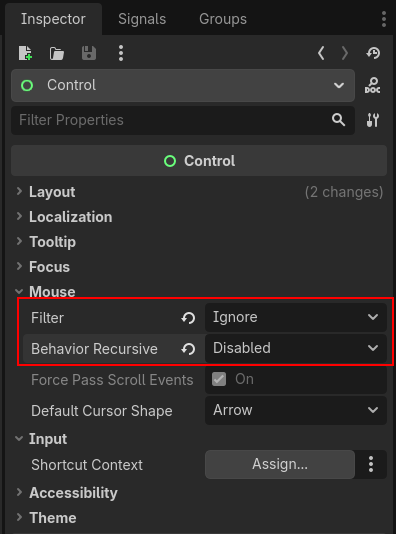
Dusted off Godot to test something out and this seems to disable the mouse completely, without needing to write any code. Setting Filter to Ignore and Behavior Recursive to Disabled in the Control nodes inspector like so.

Submitted

This option will apply to your currently selected Control node and it’s children. If the game switches to a different scene, it may not have this option set and so the mouse would work.

Although you could do this for a fullscreen transparent rectangle, and then set it’s filter to block, so that it will always block all control nodes behind it. If the rectangle was a global then it would block input in all scenes.