

Let's say you have a scene with two characters, Alpha and Beta, which takes place on one card. I'll further assume that you're using both Dialogizer and Puppeteer together.
Alpha's speech should use a sound clip named "alphaVoice" and Beta's speech should randomly choose between sound clips named "betaVoice1" and "betaVoice2". We'll define two commands for use in our prose for dd.say[]: "!alpha" will switch to Alpha's voice, and "!beta" will switch to Beta's voice. To make the difference even more stark, I'll also give Alpha's text boxes a light color scheme and Beta's text boxes a dark color scheme. Voices are chosen with the "tsound" style setting, which also requires us to set a "speed" for animating in text. "fcolor" and "bcolor" are used to change the text box color schemes.
On the card script, we'll include an event handler for command[] events that looks like this:
on command x do
 if x~"alpha"
  o.speed:3
  o.tsound:"alphaVoice"
  o.fcolor:colors.black
  o.bcolor:colors.white
  dd.style[o]
 elseif x~"beta"
  o.speed:3
  o.tsound:("betaVoice1","betaVoice2")
  o.fcolor:colors.white
  o.bcolor:colors.black
  dd.style[o]
 else
  pt.command[deck x]
 end
end
Notice how there are blocks of code when the argument to command[] is "alpha" or "beta", and when it is neither it will fall through to calling pt.command[] to allow puppeteer !-commands to work normally. If you wanted to reuse these style-changing commands across your project, you could "lift" this definition up to the deck-level script.
Your prose for the scene might be stored in a field named "scene" and look something like
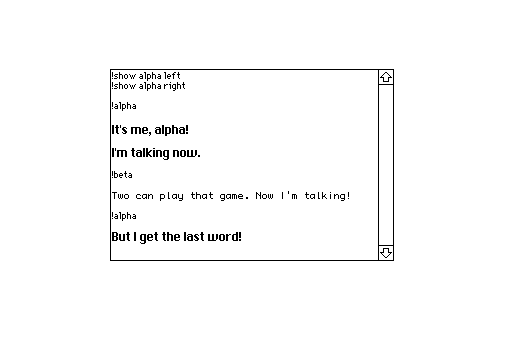
To play the cutscene, you'd then have a script triggered by, for example, a button:
on click do
 dd.open[deck]
 dd.say[scene.value]
 dd.close[]
 pt.clear[]
end
Is that more clear?