
Indie game storeFree gamesFun gamesHorror games
Game developmentAssetsComics
SalesBundles
Jobs
TagsGame Engines

Godot WebXR builds that support more platforms! Sticky

A topic by David Snopek created 3 days ago Views: 135 Replies: 6
Viewing posts 1 to 3
(1 edit) (+2)

Hello!

I'm the Godot maintainer responsible for Godot's WebXR support.

WebXR (and web builds in general) are great for game jams because folks don't need to download anything to play your game, and a single WebXR build can support more platforms than an OpenXR build.

Unfortunately, if you use the official Godot 4.7.2 web builds, WebXR will work on Meta headsets and desktop Chrome or Firefox browsers on Windows, but there's a number of platforms it currently won't work on, like:

  • Pico 4
  • Google Cardboard
  • Android XR
  • Apple Vision Pro

I've made two PRs to fix this (which you can find here and here), but they aren't merged yet, so I've made some builds of Godot 4.7.2 that include those changes which you can find here:

https://drive.google.com/drive/folders/10AfembGLk4XAi7tVU8IIOPaYZSdDoVun?usp=dri...

To use them:

  1. Download both ZIP files from the Google Drive above (but don't extract them!)
  2. In Project -> Export... add a "Web" export preset, if you haven't already
  3. Turn on Advanced Options and put the paths to both templates in the Custom Template section
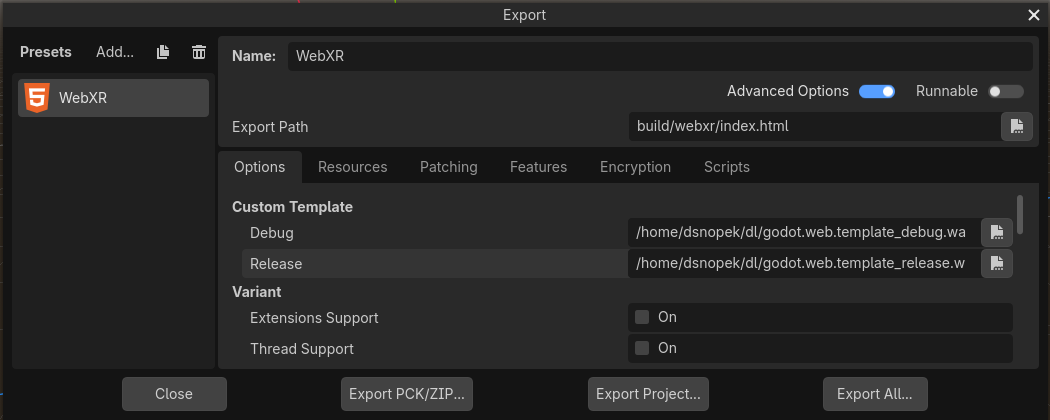

And then just export as normal!

If you're interested in more information about how to use WebXR with Godot, see this tutorial.

If you have any issues, feel free to comment here :-)

Just want to say that tutorial is very well written and I will be following it for the jam

(+1)

Thanks :-)

>WebXR will work on [...] desktop Chrome or Firefox browsers

Have you found this practically true these days? Any specific tips? I've had a lot of trouble historically getting webXR on desktop browsers to work. Where something in the browser settings, or the particular browser distribution/build, or the openxr/openvr lookup or runtime results in 'No XR device detected' and debugging it was hard even for me as a motivated developer (and thus basically impossible for my nontechnical friends who I just wanted them to be able to play my webxr demo). Regular godot standalone builds seem to work better even if they require unzipping/clicking through the 'unknown software' warning.

I don't test on desktop browsers very often, because this means being on Windows, and I'm not on Windows very often :-) but I've always had pretty good luck with it! It may depend on specific hardware/software? I'm usually testing with Quest 2 or 3 via Quest Link or Steam Link. I know a number of people have reported issues, but I've never been super successful in reproducing them - unfortunately, it seems to usually just work for me

What hardware/software are you testing with?

I was testing on Windows 11 with wired steamvr headsets (Index/Bigscreen Beyond). Which I know by steam's hardware surveys are relatively rare, but I think overrepresented in my VR social circles (uh, vrchat addicts). I've since gone full VR on Linux for desktop (monado is surprisingly good these days), but unfortunately I think WebXR support on linux browsers is even more fragmented, with some distros turning off openxr support in their browser builds even if upstream supports it. So at least for desktop VR, the promise of easy no-install XR apps through webXR never felt practically worth it (on top of the other tradeoffs like being limited to the compatibility/webgl renderer).  

Last I tried though was around 2023, so I might have to give it a new shake. It does seem a fair tradeoff vs sideloading APKs for quest at least, given there's (AFAIK) only one browser on there you need to test for

(1 edit)

Yeah, I'm not aware of any web browser that has upstream support for WebXR on Linux, only this set of patches for Chromium (which I've never personally tested): https://github.com/utzcoz/chromium-webxr-linux

(UPDATE: Or actually, was it this one I was thinking of? https://github.com/mrxz/webxr-linux - some patches, in any case)

I guess I should update my post to say "desktop browsers on Windows" or something

Unfortunately, I don't have an Index or Bigscreen Beyond to test myself, but I would have expected them to work through Steam VR, given that Steam Link (which goes through Steam VR on the desktop side) to the Quest works.