

Graphics acceleration was already enabled.
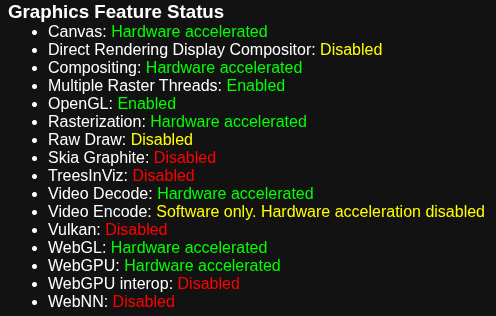
Graphics Feature Status:
Viewing post in Comrade, Secrets Escape! comments
Similiar issue, as well. Seeing “Legacy Shaders/Particles/Multiply (Double) shader is not supported on this GPU (none of subshaders/fallbacks are suitable)”
For my chrome://gpu settings, I do see this nugget:
Problems Detected
=================
*   WebGPU has been disabled via blocklist or the command line.
    Disabled Features: webgpu

*   Accelerated video encode has been disabled, either via blocklist, about:flags or the command line.
    Disabled Features: video_encode

*   Program link fails in NVIDIA Linux if gl_Position is not set:
    (http://crbug.com/286468)
    Applied Workarounds: init_gl_position_in_vertex_shader

*   NVIDIA fails glReadPixels from incomplete cube map texture:
    (http://crbug.com/518889)
    Applied Workarounds: force_cube_complete

*   Framebuffer discarding can hurt performance on non-tilers:
    (http://crbug.com/570897)
    Applied Workarounds: disable_discard_framebuffer

*   Unpacking overlapping rows from unpack buffers is unstable on NVIDIA GL driver:
    (http://crbug.com/596774)
    Applied Workarounds: unpack_overlapping_rows_separately_unpack_buffer

*   Disable KHR_blend_equation_advanced until cc shaders are updated:
    (http://crbug.com/661715)
    Applied Workarounds: disable(GL_KHR_blend_equation_advanced),
        disable(GL_KHR_blend_equation_advanced_coherent)

*   Expose WebGL's disjoint_timer_query extensions on platforms with site isolation:
    (http://crbug.com/808744), (http://crbug.com/870491)
    Applied Workarounds: enable_webgl_timer_query_extensions

*   Some drivers can't recover after OUT_OF_MEM and context lost:
    (http://crbug.com/893177)
    Applied Workarounds: exit_on_context_lost

*   Disable GL_MESA_framebuffer_flip_y for desktop GL:
    (http://crbug.com/964010)
    Applied Workarounds: disable(GL_MESA_framebuffer_flip_y)
I have an AMD RTX 6600, btw. Vulkan disabled. Chrome and Firefox, won’t run.
Looks like there's some sort of 'block list' on WebGPU which is needed, is there a firewall or antivirus or something blocking it? you should be able to see the triangle here https://webgpu.github.io/webgpu-samples/?sample=helloTriangle