Indie game storeFree gamesFun gamesHorror games
Game developmentAssetsComics
SalesBundles
Jobs
TagsGame Engines

Lil Programming Questions Sticky

A topic by Internet Janitor created Oct 28, 2022 Views: 30,476 Replies: 481
Viewing posts 141 to 143 of 143 · Previous page · First page
(+2)

Trying to decode images using app.params, but IMG3 images will not render correctly:


It seems random where the image will cut off, sometimes the display is nearly perfect except for a pixel or two. Could it be a limitation of URL parameters or a bug of some kind? Here's the script I'm using:

on view do
p:app.params
c.paste[image[p["img"]]] end
Developer(+2)

Base64 encoding as used in %%IMG datablocks in Decker uses digits, upper- and lower-case letters, and the symbols +, /, and =.

URL encoding leaves digits and letters unchanged, but reads + as a space and / is technically reserved. If I open web-decker with a URL like:

http://beyondloom.com/decker/tour.html?i=a1+/b2

app.params comes out as

{"i":"a1 /b2"}

If I instead encode that + and / with the appropriate percent-codes:

http://beyondloom.com/decker/tour.html?i=a1%2b%2fb2

I get the intended payload:

{"i":"a1+/b2"}

I think this explains the behavior you're seeing; your image-string is getting scrambled before you try to decode it.

Here's one way to encode those special characters- and other reserved chars, too- if you're using a Lil script to assemble the URL:

on url_escape x do
 a:"" split " !#$&'()*+,/:;=?@[]"
 b:3 window "%20%21%23%24%26%27%28%29%2A%2B%2C%2F%3A%3B%3D%3F%40%5B%5D"
 rtext.string[rtext.replace[x a b]]
end

If you're exclusively pasting Decker image strings into URL parameters I guess it might also work to translate spaces back into + before decoding?

How's that?

(+2)

Exactly what I needed - thank you!

(5 edits) (+2)

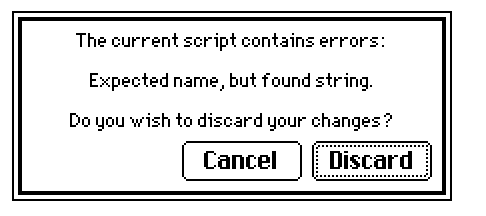
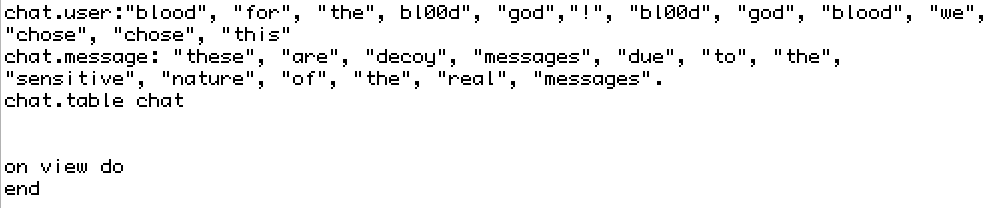
Hello, I apologize that I am brand new to decker and lil! My goal has been to create a small AIM-style text chain for a bite-sized narrative thingy in Decker, and I figured using a table would be the best way to store all the usernames, however, trying to return to the card or another script asks me to discard the code with this error message (IGNORE THE PERIOD AT THE END OF THE chat.message DECLARATION as this was a decoy list for demonstration purposes)

my hello world

I am unsure what name parameter is needed, whether it is by the on view do function, whether me calling for the creation of a table is not necessary, or not defining what 'chat' is. I also am unsure what a name parameter is and how it's different from a string value.  I also am unsure if I need to put this table in a different script. It is currently in the home card script, but I don't know if it would instead go into the contraption instances? 

Goals for the text message game: display corresponding messages with usernames via stylized fields, have them drip feed out over different intervals of time depending on which message is next, have a small field players can type in and send something, which functionally causes an ending screen if done.

in general, I find the way the lil and decker documentation is written makes it hard to immediately intuit where I can use something written in the lil documentation in decker, such as a list, dictionary, or table. I think the fact I know what I want to do in terms of knowing how programming languages work but not getting used to the syntax nor the scripting interface of decker is just me making it harder on myself. I chalk it up to my brain and not a critique on the way these tutorials are written though.

Perhaps pre-existing guides on making IM or text message contraptions would also be helpful.

(+2)

Hello, welcome! I've seen several different text message situations in Decker games, with different behaviors and narrative purposes so it's hard to answer without knowing more about what you want for your own project. I'll start with clarifications and then go into some questions if that's okay?

I'm not seeing what in your script screenshot could be causing that error message specifically, so I suspect there's something else in the non-decoy version which is causing that.

It should just be a syntax error. Somewhere in your script Lil expected to find the name of something like a card, a widget, a variable or a function and what it found instead was a string (text enclosed in a pair of double-quotes). Again, I can't see the cause of this error in the decoy script as written.

The other thing you mentioned which I need to ask about is Contraptions, which the name for a reusable prototype made of bundled widgets and Lil script.  The pre-built ones made by members of the community (such as in this forum's Contraption Bazaar) are usually easy to use and modify. On the other hand, making Contraptions from scratch is difficult without familiarity with Decker and Lil.

Did you mean widgets (the basic forms of interactive objects in Decker)? Or if you are using Contraptions it would be helpful to know more about them since they might have their own scripted behavior already.

Okay! Now let's talk about what behavior you're aiming for.

I know this involves your actual planned series of screen names and messages and some stylized fields that they'll be displayed in.

But in terms of drip feed, do you mean:

  • messages appearing word-by-word or letter-by-letter?
  • sometimes adding a new message to a log of previous messages? 
  • updating a specific field to display only the most recent message? 
  • and do messages even vanish?
  • should the new message be displayed on a timer, or is there some other trigger you have in mind?

Knowing any of these specifics (or something else!) would make it possible to write guidance to build the specific version of text message interface that you want for your project.

Sorry to not have a one-size-fits all suggestion for you yet, but it seems like you have a specific vision in mind and I'd like to help you get there!

Viewing posts 141 to 143 of 143 · Previous page · First page