Thank you ahmwma! Your kind words are a gift in itself. ^^
A member registered Sep 05, 2025 · View creator page →
Creator of
Multi-layered drawing application utilizing Decker's in-built tools.
Run in browser
Open-source sprite stacking framework to create 2.5D models in Decker.
Run in browser
Recent community posts
Trying to decode images using app.params, but IMG3 images will not render correctly:
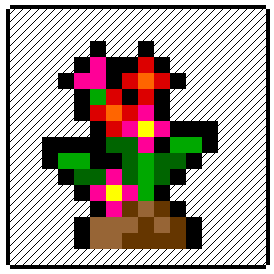
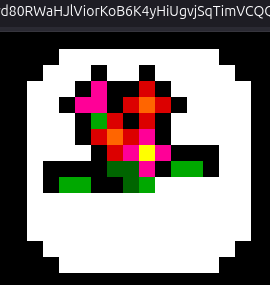
It seems random where the image will cut off, sometimes the display is nearly perfect except for a pixel or two. Could it be a limitation of URL parameters or a bug of some kind? Here's the script I'm using:
on view do
 p:app.params
 c.paste[image[p["img"]]]
end
Intro
I've noticed a substantial amount of people wondering how variables are managed in Decker, so I thought it might be helpful to start a write-up about some of the patterns I've been using to create, store, and edit variables in both a global and local environment.
For those just starting out - don't be too intimidated by the length of these scripts; Most have been made longer with intentional spacing / comments. It's always been a difficult task to write things that are both concise and informative, but I'll do my best!
Creating Global Variables
If you're already familiar with Lil operations, you'll know that It's possible to store a string within a field, and access it locally via 'fieldname.text' or globally with the exact path: 'cardname.widgets.fieldname.text'. In Decker, it's standard practice to store data within widgets using their .attributes. However, if you're working on a larger project with a lot of variables, it might be helpful to keep everything within a single widget and make sure it can be accessed from anywhere using a name of your choice. Now, how can we set that up?
First, create a grid widget on any card. I'll be using 'grid1' on the 'home' card, populated with a few dummy variables:
{"fruits":[{0:"apple",1:"orange"}],"cats":[{0:"siamese",1:"tabby",2:"calico"}],"flag":[1]}
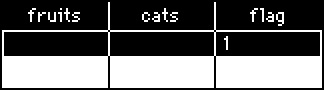
Next, we'll visit the deck script to add this line:
_G:home.widgets.grid1.value
In this context, '_G' is the name of the variable we're assigning our grid value to - any space-less string will work here.
Now from anywhere in our deck, we can type '_G.fruits' into the Listener and get '({0:"apple",1:"orange"})'. However, this arrangement isn't ideal, because these variables are returning as a (list), indicated by the surrounding parenthesis. Since this affects scope, we'd need to type '_G.fruits[0][0]' instead of '_G.fruits[0]' to return "apple", and there's currently no way to change these values unless we edit the grid directly.
Luckily, we aren't done yet; In the following section I'll show you how to create get[] and set[] functions, to serve as wrappers for viewing and adding new data.
'get' and 'set' Functions
Let's return to the deck script and redefine '_G' so that it refers to the grid itself, instead of the value it stores:
_G:home.widgets.grid1
In the same area, we'll start adding a few lines of code. The get[] function will return the value of the variable we look up, using the _G namespace to refer to the grid widget we populated earlier, and set[] will assign a value to a variable within a given table.
Here's a small setup for both functions, with a few comments (starting with #) for clarity:
# usage: get[_G "varname"]
on get x y do
    x.value[y][0]
    # return the variable y from table x
end
# get[_G "flag"] will return 1
# usage: set[_G "varname" value]
on set x y z do
    r: cols x.value
    # create a variable called r, comprised of the column data from x
    x.value: table r[y]:z
    # set the value of x to a new table where the variable y is changed to reference z, and return it.
end
Assuming we don't want to bloat up our global table with unused values, we can add another function to the end of set[] to cull nil values:
on set x y z do  r:cols x.value  x.value:table r[y]:z  cullnil[x] end
# the set[] function from above, condensed into a single line, with 'cullnil[x]' added
on cullnil x do
    r:() dict ()
    # create a new empty dictionary called r
    each v k in cols x.value
    # cycle through entries in table x, by column

        # copy all existing variables from x to r
        if v[0]
            r[k]:v
        end

    end
    # return r as a table
    table r
end
If you've followed along this far, try setting a variable using the Listener, and retrieve it using get[]! If you aren't sure how you can interact with something, the 'typeof' operator will tell you what type of data it is. Given the context of our dummy variables, 'get[_G "cats"][1]' will return "tabby", because it's a numbered dictionary. If you want to add an entry to that dictionary, we'd need to retrieve and edit the variable, like so:
d:get[_G "cats"]
d[count d]:"tuxedo"
set[_G "cats" d]
We've now created a place to store our global variables, and the functions needed to access them, but a few cases still might find 'global' variables unsuitable. What if you have identically named variables that need to be unique across cards? In that case, it might be wise to limit the scope of your data by...
Going Local!
Grids can also store data on a per-card basis, if they share a name. The deck script will run every time a card is visited, so the following line will assign '_v' to the grid widget named 'vars', if it exists.
_v:deck.card.widgets["vars"]
The get[] and set[] functions work as they would with the global variable table, except by using '_v' instead of '_G'. If the grid doesn't exist, isn't named "vars" or the variable hasn't been defined, get[] will return nil.
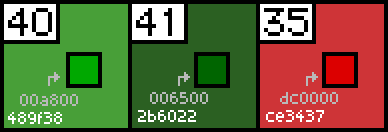
While I was importing pictures today, I noticed that the colors from the 'Patterns Interface' section don't -exactly- match the ones Decker comes with by default (at least the most recent version), here's the comparison between the patterns image on the documentation with the output from "%06H" format deck.patterns[...]
This even leads to some colors from the palette being imported as dark grey, seen here:
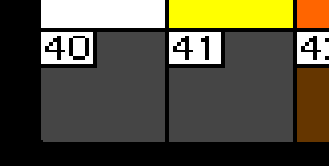
This is something I'm experiencing in both native and web environments, and I've tried a couple of different methods to save and load the image with the same result, but there's still a chance it's an issue on my end. In any case, I figured posting it here might be helpful.
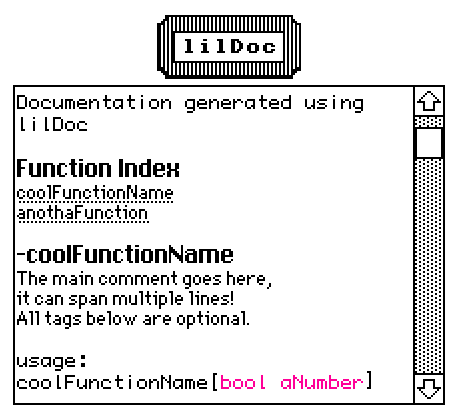
lilDoc
A mini, Decker-fied documentation utility inspired by YUI/JSDoc. Add comments to your scripts, and this contraption will be able to generate documentation for their functions automatically. You can create multiple widgets and/or download the formatting guide by clicking on the 'lilDoc' button.
%%WGT0{"w":[{"name":"lilDocFactory","type":"contraption","size":[72,32],"pos":[211,52],"script":"###\n# Displays the 'alert' modal with information about lilDoc and a list of options.\n#\n# @function menuz\n# @return {Dictionary} menu_option A dictionary containing functions.\n##\n\n###\n# Find every formatted comment within a script, then generate documentation.\n#\n# @function gendocz\n# @param {String} x The script to search.\n# @param {String} y The name of the interface that contains the script.\n##\n\n###\n# Create, format and populate a field widget with generated documentation.\n#\n# @function genwidgetz\n# @param {Dictionary} x A dictionary generated with gendocz[]\n# @param {String} y The name provided to gendocz[], used as the title for the documentation.\n##","show":"transparent","def":"lilDocFactory","widgets":{"main1":{},"main2":{},"main_alert":{},"format_guide":{},"fieldscript_template":{}}}],"d":{"lilDocFactory":{"name":"lilDocFactory","size":[72,32],"margin":[5,5,5,6],"description":"Generates documentation for any script available within a deck, using specially formatted comments. ","version":2,"script":"on view do card.show:\"transparent\" end\n\n# Assigning all the different menu options to a dictionary...\nmenu.ds:on x do gendocz[deck.script deck.name] end\nmenu.cs:on x do gendocz[deck.card.script deck.card.name] end\nmenu.sw:on x do\n w:alert[\"Select Widget\" \"choose\" deck.card.widgets]\n gendocz[w.script w.name]\nend\nmenu.sm:on x do\n w:alert[\"Select Module\" \"choose\" deck.modules]\n gendocz[w.script w.name]\nend\nmenu.fg:on x do write[format_guide.text] end\n\non menuz do\n d:(\"Use Deck Script\",\"Use Card Script\",\"Select Widget\",\"Select Module\",\"Download Formatting Guide\",\"Exit\") dict (\"ds\",\"cs\",\"sw\",\"sm\",\"fg\",\"ex\")\n r:alert[main_alert.value \"choose\" d]\n menu[r][]\nend\n\non gendocz x y do\n s:\"\\n\" split x\n i:0\n w:0\n r:() dict ()\n each v k in s\n if v[2]=\"#\" w:1\n elseif v[1]=\"#\"\n r[i].comments:1 drop r[i].comments\n i:i+1\n w:0\n elseif (v[0]=\"#\")&(w)\n e:\" \" split v\n if (e[1] like \"@*\")\n r[i].tags[\" \" fuse (e[1],e[2],e[3])]:\" \" fuse 3 drop e\n elseif e[2]\n r[i].comments:r[i].comments,\" \" fuse 1 drop e\n end\n end\n end\n genwidgetz[r y]\nend\n\n# Outputs a field widget containing generated documentation.\non genwidgetz x y do\nshow[x]\n r:deck.card.add[\"field\" \"\" fuse y,\"_doc\"]\n r.size:(card.size[0]*3),(card.size[1]*5)\n r.pos:(card.pos[0]-(r.size[0]/2)-(card.size[0]/2)),((card.pos[1]+card.size[1])+3)\n on rtm x y do rtext.make[x y] end\n r.value:rtext.cat[rtm[y \"menu\"],rtm[\"\\nDocumentation generated using lilDoc\\n\\n\" \"mono\"],rtm[\"Function Index\\n\" \"menu\"]]\n r.locked:1\n r.scrollbar:1\n r.script:fieldscript_template.text\n \n on appendr x do r.value:rtext.cat[r.value x] end\n on nline do appendr[\"\\n\"] end\n \n indx:()\n each entry in x\n each v k in entry.tags\n if k like \"@function*\"\n n:\" \" split k\n indx:indx,n[1]\n r.value:rtext.cat[r.value rtext.make[n[1] \"body\" n[1]] \"\\n\"]\n end\n end\n end\n nline[]\n \n each entry i in x\n r.value:rtext.cat[r.value \"-\" rtext.make[indx[i] \"menu\"] \"\\n\"]\n each v k in entry.comments\n r.value:rtext.cat[r.value v \"\\n\"]\n end\n nline[]\n r.value:rtext.cat[r.value rtext.make[\"\" fuse \"usage:\\n\",indx[i],\"[\" \"mono\"]]\n pinx:()\n each v k in entry.tags\n if k like \"@param*\"\n pn:\" \" split v\n pinx:pinx,pn[0]\n end\n end\n appendr[rtext.make[(\" \" fuse pinx) \"mono\" \"\" colors.magenta]]\n appendr[\"]\\n\\n\"]\n each v k in entry.tags\n pn:(\" \" split k),(\" \" split v)\n if !(pn[0]=\"@function\")\n fc:(\"@param\",\"@return\") dict (colors.magenta,colors.orange)\n if pn[0]=\"@return\" appendr[rtext.make[\"returns:\\n\" \"mono\"]] end\n r.value:rtext.cat[r.value rtext.make[pn[2] \"mono\" \"\" fc[pn[0]]] \" - \" 1 drop -1 drop pn[1] \"\\n\"]\n appendr[\" \" fuse 4 drop pn]\n appendr[\"\\n\\n\"]\n end\n end\n end\nend","template":"###\n# Displays the 'alert' modal with information about lilDoc and a list of options.\n#\n# @function menuz\n# @return {Dictionary} menu_option A dictionary containing functions.\n##\n\n###\n# Find every formatted comment within a script, then generate documentation.\n#\n# @function gendocz\n# @param {String} x The script to search.\n# @param {String} y The name of the interface that contains the script.\n##\n\n###\n# Create, format and populate a field widget with generated documentation.\n#\n# @function genwidgetz\n# @param {Dictionary} x A dictionary generated with gendocz[]\n# @param {String} y The name provided to gendocz[], used as the title for the documentation.\n##","image":"%%IMG3AEgAIAUgIAJBaZ5oqq5sy44wOc10bd94ru94EIslnnBIFJZiwaJyWTySksyotGeaWq81KHbL1HK/Qy94nBOTzzQz+qxej9vuLzy+ndOv9vs0r4/y+0t/gE0Bg2+FhnKIiXWLjHiOj3uRkn6UlYFVmJkom4ROmp47JkiXolk+Py6rrK2tP0CusrOuMCE=","attributes":{"name":[],"label":[],"type":[]},"widgets":{"main1":{"type":"canvas","size":[56,16],"pos":[8,8],"locked":1,"script":"on click pos do\n \nend\n\non drag pos do\n \nend\n\non release pos do\n \nend","border":1,"image":"%%IMG3ADgAEAKEj6nL7Q+jnLTai3HYiqMdfGDWeJAJcCh5rGOCeiYYtu+zprXI64ZcA552tg5R6EvmHLnmMTQLSn/EBU0Uu12xzyXrCw6Lx+Sy+YwoAA==","scale":1},"main2":{"type":"button","size":[56,16],"pos":[8,8],"script":"on click do menuz[] end","style":"invisible"},"main_alert":{"type":"field","size":[56,16],"pos":[0,-16],"locked":1,"script":"on change val do\n \nend","show":"none","value":{"text":["","lilDoc\n","Generates documentation for any script available within a deck, using specially formatted comments. "],"font":["","menu","mono"],"arg":["","",""]}},"format_guide":{"type":"field","size":[16,16],"pos":[56,-16],"locked":1,"show":"none","style":"plain","value":"Formatting Guide for lilDoc\n~\nSince lilDoc is based on YUIDoc, it follows similar formatting conventions. \n\nEach comment block starts with a triple octothorp (###) and ends with a double (##)\n\nThe description that will appear when the documentation is generated should be written underneath the (###) header, followed by a single (#) to close it off.\n\nAfter the description, you can add @ tags, which will appear in the documentation with special formatting. As of now, lilDoc recognizes three tags, which should be included in this order:\n@function\nusage: # @function functionName\n\n@param\nusage: @param {paramtype} paramName Description of param variable\nCan include multiple @param tags.\n\n@return\nusage: @return {paramtype} returnName Description of return variable\n\nComment example:\n###\n# The main comment goes here,\n# it can span multiple lines!\n# All tags other than @function are optional.\n#\n# @function coolFunctionName\n# @param {Boolean} bool 0 or 1\n# @param {Number} aNumber Any integer\n# @return {Boolean} isTrue Returns 1 on success\n##\n\nExample params:\n# @param {Boolean} \n# @param {Number} \n# @param {String} \n# @param {List} \n# @param {Dictionary} \n# @param {Table} "},"fieldscript_template":{"type":"field","size":[72,24],"pos":[0,32],"locked":1,"show":"none","value":"on link x do\n me.scrollto[first (rtext.find[me.value (\"\" fuse \"-\",x) 1])]\nend"}}}}}
Some alternative input options! Both are resizable, and you can configure a sound to play when they are interacted with. :3
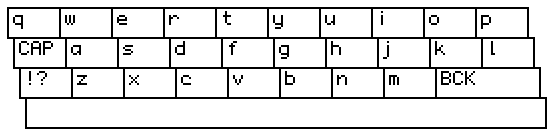
All keys are configurable, but there's currently no way to type text anywhere but the very end of the field.
On-screen Keyboard
%%WGT0{"w":[{"name":"Screen Keyboard","type":"contraption","size":[272,64],"pos":[143,47],"script":"# define the text field widget that events should be sent to:\ntf:outz\n\non click x do\n if ((me.alt)&(x=\"B\"))|((!me.alt)&(x=\"<\")) \n tf.value:rtext.span[tf.value 0,rtext.len[tf.value]-1]\n elseif ((me.alt)&(x=\"S\"))|((!me.alt)&(x=\"?\")) me.alt:!me.alt\n elseif (!me.alt)&(x=\"^\") me.caps:!me.caps\n else tf.value:rtext.cat[tf.value x] end\nend","def":"Screen Keyboard","widgets":{"c":{"size":[272,64],"image":"%%IMG3ARAAQAKMj6nL7Q+jnLTai7NmoPsPBOBIkmKJmun6nezqvmgsq/V847m9g/T46wV3w1zxFjumlDLmK9kLRX3TFqzqcbK0V6w0G+UuvV+sWGfuhg7EjujddhuE7jVdPjfW90j+uQzYh3eHcKfj8ncCl+gXl8cIRhgpiBjHp1cGWYl5OFmjKKVZiPln5Ul5+tTIGfi5inrZ1LWJCkdaBToFJRmr+pUn2Cub6Zi6pTYabMuZ7NoaLGfZPGwHKey7VqrIZlnyY41LVgokTs6qW+6VG6Zm3I6unp422A0/Pz9+7X7OHu9/H+5fQID2vMkbiLCgwn4EGSZ0yOOhIYn1IFqcuBDjRVMNNXqs+JFfSGgZQbbYgDKlypUsW7p8ieHdRpEmadokORPnSGdouGXDEyQfx4fg7Nx0JnRXsYLjlKxbBtVcx4rgmqZLehWh1TGBKtGaNA1b2GNApQFT5hNpWp7PfK2DtrXTSTZjny7t95VaW7J53e5Ds3dWYK76ZFLpCuaIXWZnkf41+FjuYBt9yRbmupZtXMheE2OOxk9TZKmTOY8+XLnd1reac2Z65LnnMrWNqY1VzfD258sRV58eWhsb5KlH9ZYMXROua+Ouhf4mTLG42OCWA1IXflzn0OxsuTPf+T159+XYSXsvDx69+PDSq593b548/PTz16tvb9h+/eeA3+fHD51/Acr3n3ZZwIRgggouyGCDFhQ4Hn0QsmdghRHqR8Z+lyRx3XYEDijhbh/2h5dP3KQmUG9gaXghgCTyMuJw1sUWCm/cKeWhOQncZU1mftmImo98GUWKkILVQcNsGeYIXHwRlSaVksOgKJloQJoC2y1S8nWiD86xiCOUYbYGoyFbDnllJFSadqaISrZ50JO52QOnZGZCiRp/v+gJSp2U0WjLly82yaSOulVpVocyrmakm8X4aSgwXaZpoaCWxhmjnCEO6uKSmhZqIYUthnofqSyK6imYmG4qo4CcmjphqamqmmKmTmIIIq6vjjorhJfWyuqnnQoLa6690kpcsbuiKiuzpzZ7LLHZOEhttdZei60Ey0bLbbfefguut0UIGm655p6Lbq/jpstuu+6+q+628M5Lb73trmtvvvruey6+/P4LcMCrUipwwQb/6+/BCi9scMIMPwyxvQ5HTHHF6E5sccYaR4vxxh5/TBy5II+8ccckn4yysNmuzHLLLrOUcswyz0xzzTbfjLMXBQA="},"caps":{"value":0},"alt":{},"storage":{"size":[9,8]},"altkeys":{"size":[113,8]},"cnoise":{"size":[89,8],"pos":[18,-16]},"clickhold":{"size":[114,9],"pos":[158,-16]},"current":{"size":[9,8],"pos":[141,-15]}}}],"d":{"Screen Keyboard":{"name":"Screen Keyboard","size":[241,64],"resizable":1,"margin":[0,0,0,0],"description":"Resizable on-screen keyboard that can be used as an alternative to the default.\n\nMust be populated with script for full functionality.","version":1,"script":"on view do renderz[] end\n\non get_caps do caps.value end\non set_caps x do caps.value:x renderz[] end\non get_alt do alt.value end\non set_alt x do alt.value:x renderz[] end\non get_cnoise do cnoise.text end\non set_cnoise x do cnoise.text:x end\n\non renderz do\n c.clear[]\n c.size:card.size\n if get_alt[]\n keyb:\"W\" split altkeys.text\n elseif get_caps[]\n keyb:\"QWERTYUIOP\",\"^ASDFGHJKL\",\"?ZXCVBNM<\",\" \"\n else\n keyb:\"qwertyuiop\",\"^asdfghjkl\",\"?zxcvbnm<\",\" \"\n end\n kwh:10,4\n cellsize:floor ((c.size[0]/kwh[0])-1),(c.size[1]/kwh[1])-1\n input:()\n each r ri in keyb\n each ch chi in \"\" split r\n if !get_alt[]\n if ch=\"?\" ch:\"!?\"\n elseif ch=\"^\" ch:\"CAP\"\n elseif ch=\"<\" ch:\"BCK\" end\n else\n if ch=\"S\" ch:\"ABC\"\n elseif ch=\"B\" ch:\"BCK\" end\n end\n xy:((chi*cellsize[0])+3*ri),(ri*cellsize[1])\n if (ch=\"BCK\")&!get_alt[] cellsize[0]:cellsize[0]*2 end\n if (ch=\" \") cellsize[0]:c.size[0]-10 end\n c.box[xy cellsize+1]\n xy[0]:xy[0]+3\n input[r[chi]].pos:(xy)\n input[r[chi]].size:(cellsize)\n c.text[ch xy]\n end\n end\n storage.value:table input\nend\n\non inside p r cellsize do\n min(p>r)&(p<r+cellsize)\nend\n\non clickz pos do\n input:cols storage.value \n each v k in input\n vpos:v[0].pos\n vsize:v[0].size\n if inside[pos vpos vsize]\n vpos[0]:vpos[0]-2\n vpos[1]:vpos[1]+1\n c.invert[vpos vsize-1]\n play[get_cnoise[]]\n current.text:k\n card.event[\"click\" k]\n end \n end\nend\n\non startholdz do clickhold.animated:1 end\n\non endholdz do\n clickhold.animated:0\n clickhold.value:0\nend","template":"# define the text field widget that events should be sent to:\ntf:placeholder\n\non click x do\n if ((me.alt)&(x=\"B\"))|((!me.alt)&(x=\"<\")) \n tf.value:rtext.span[tf.value 0,rtext.len[tf.value]-1]\n elseif ((me.alt)&(x=\"S\"))|((!me.alt)&(x=\"?\")) me.alt:!me.alt\n elseif (!me.alt)&(x=\"^\") me.caps:!me.caps\n else tf.value:rtext.cat[tf.value x] end\nend","attributes":{"name":["caps","alt","cnote","cnoise"],"label":["caps lock enabled","alt characters enabled","(optional) noise to play[] when clicked",""],"type":["bool","bool","note","string"]},"widgets":{"c":{"type":"canvas","size":[241,64],"pos":[0,2],"locked":1,"script":"on click pos do startholdz[] clickz[pos] end\n\non release do endholdz[] renderz[] end","font":"mono","border":0,"image":"%%IMG3APEAQAKMj6nL7Q+jnLTaizPYvIcOhuInliFppgCqlmx7wuYrc3S94rHupeiBI/1qQgRxYzyukjChTTmUsW4+myGIBCpdyKe0C26GsbmxaqpzmqvldgtNjorb1BFb/g7Xd/uZfus2h3f29+UFdZhHB8iXSLhoyCSoZbj2mNMHohbIZnnneEc5xwUpiInIs5mZuNoD+jjYyQn7Stqq+elpt8QbyVMW61crrGs7vFO8G2yc2imquKwsSZvsWo17vLt068ZNd4WaJntNTvo7yyh+jl756419vvdu7b7OPlq/Pp99mR8/ru6fPnv7ymnzh7DZQGIJAzYkIzDiw3QQJxpEZhGfQokbMyri6BBjx5EhS1YkedIkxZVZMrh8CTOmzJk0ay4AmDInS40q26Hc+THjD3DbWsIpuuUZLKWhmJpzyuwePH5eojX6CWaI1kOqwt3q6kuhVWxj6ZVTw22TzqzwPsgBa0osVbZy60o1e7dqXlfz5JlJsA0O4EpQlc0FVvgqUWjTAH7NYnctsLaz4AY9WyiuurJ6MZeCtrdzz8ldtl4NbZka6ot0V39W/Zh02NFDu95I7WwxY92qISYme7h2nOBGY5vz2A8rT8mXRzdnnnyq8udAo0PHWR27T9oEuy8EeZ3hdOvZxUt3Tn57+OPjtS8vz/78+oPtzc8Xid49dfWH6ee3D59/98kXIH6S2YRgggouyGCDhRUUmoAFEshfhe9ZaM+F3XjAG1+NCcOZHh2CSFxgw3kWImJEaZFiehtmhp9xbp3oWoq4gajWUr1oNmNprAE4xm3ipYVXb14d6UuPpigJmo89QGggK1EG6ZA3ORIWYREjMrPlabEl8UKXQpnVR4tU0uhbljDChiSPgTCZ4T0QXjkKnGy2Y+WaudRYommnROjiUcloKSZfJSKF52a/GYpin5Sw2J97c3oH3oRFWhophXHuB6imnH7qIqj6hUrqpvFdimGpQGoo6qqtnmoqp5N+h9yotrqqKqyxSkpprbjeqiuruUq466qzVpoqsMQKq+yUxS7rYLTSTkvttL8+i2222m7Lba+edgtuuOKOW2wdUJKLbrrqgmvuuu6+C6+67cZLb732xjrvvfruy6925/YLcMDZ5itwwQbLe+3BCi8cJ8EMPwzxpg5HTHHFLP1rccYCT6xxxx1z7HHIFJtbbckmn4zyAyKvzHLLLr8Mc8wVFwA=","scale":1},"caps":{"type":"button","size":[8,8],"pos":[-15,56],"locked":1,"show":"none","style":"check","value":1},"alt":{"type":"button","size":[8,8],"pos":[-15,41],"locked":1,"show":"none","style":"check","value":0},"storage":{"type":"grid","size":[8,8],"pos":[0,-16],"locked":1,"volatile":1,"show":"none"},"altkeys":{"type":"field","size":[100,8],"pos":[-1,69],"locked":1,"show":"none","value":"+=/_<>[]`~W-@#$%^&*()WS'\":;!?,.BW "},"cnoise":{"type":"field","size":[79,8],"pos":[16,-16],"locked":1,"show":"none"},"clickhold":{"type":"slider","size":[101,9],"pos":[140,-16],"locked":1,"volatile":1,"script":"on view do\n me.value:me.value+1 \n if me.value=me.interval[1] card.event[\"click\" current.text] end\nend","show":"none","interval":[0,30]},"current":{"type":"field","size":[8,8],"pos":[125,-15],"locked":1,"volatile":1,"show":"none"}}}}}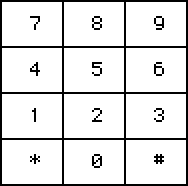
Has .noetc attribute to enable/disable drawing the pound sign and asterisk.
On-screen Numpad
%%WGT0{"w":[{"name":"Screen Numpad","type":"contraption","size":[94,93],"pos":[336,143],"script":"# define the text field widget that events should be sent to:\ntf:outz\n\non click x do tf.value:rtext.cat[tf.value x] end","def":"Screen Numpad","widgets":{"c":{"size":[94,93],"image":"%%IMG3AF4AXQKMj6nL7Q8jArTaizMNuvvKfSJmjCZ4nmEqlmz7wrHnztpqk/mN76h/6QFrwE3RIvQRi8ldM7fsJD5PUlRnOrSqN2r2J/0aadwMtzwGnMVqKhopG2m9cjAvhX6v1tm59J1Gw8aH51YYt1UG6Pd3ZMfkuAGoEtkWeeVUOdmn2Xm5WXepCYoI+enpSGooypoq8QobK/uKeqRKVmvqmjs0yqvk22obnPrrdBsmzLSp2MdopoKJNCn9mBxaivvVLPcM3V0tKcZ9eE1n2QgeDkp4fsac3RX4HffOQp4Yz6OILF98qqwXwH8EbfWjN2xgwoLLjEEhtjBiw4DAPs26iDEjBIc2DlrhOMNjEJFwKB4DGYMkCJXzBO4y+VChLolDqGHLdw6ntm43BbUMMmgVG5/l/FHa2dNoUiychC5l+hToPaf6pEa16o5qTnNkvGF1ww/lC5ZqyJqFODNtTbFTZbqkqeQszI5yGa6dG3KUxr18M7ItOtFuxZeCM7kdDPck3pRo36qN+/co4avW/uDzErYOh3ZEOVtetygcOjrrKGWGsXlrmNREwYIGrDSd59Vb2O5RDXnxyst3C8ec/NgwcMfEc/vu2BhxcCh1EzOPPDSwc+QW+1q//qAA"},"storage":{"size":[10,8]},"noetc":{"size":[10,8],"pos":[19,-16],"value":1},"cnoise":{"size":[94,8],"pos":[1,99]},"clickhold":{"size":[113,9],"pos":[18,-32]},"current":{"size":[10,8]},"chenable":{"pos":[137,-31]}}}],"d":{"Screen Numpad":{"name":"Screen Numpad","size":[79,80],"resizable":1,"margin":[0,0,0,0],"description":"Resizable on-screen numpad with optional asterisk and pound signs.\n\nMust be populated with script for full functionality.","version":1,"script":"on view do renderz[] end\n\non get_noetc do noetc.value end\non set_noetc x do noetc.value:x renderz[] end\non get_cnoise do cnoise.text end\non set_cnoise x do cnoise.text:x end\non set_chenable x do chenable.value:x end\non get_chenable do chenable.value end\n\ncellsize:floor (c.size[0]/3),(c.size[1]/4)\non renderz do\n c.clear[]\n c.size:card.size\n cellsize:floor (c.size[0]/3),(c.size[1]/4)\n nump:\"789\",\"456\",\"123\",\"*0#\"\n if !noetc.value nump[3]:\" 0 \" end\n input:()\n each r ri in nump\n each ch chi in \"\" split r\n xy:((chi*cellsize[0])),(ri*cellsize[1])\n c.box[xy cellsize+1]\n xy[0]:xy[0]+3\n input[r[chi]].pos:(xy)\n input[r[chi]].size:(cellsize)\n c.text[r[chi] xy+(cellsize/2)-(c.textsize[r[chi]]/2)]\n end\n end\n storage.value:table input\nend\n\non inside p r cellsize do\n min(p>r)&(p<r+cellsize)\nend\n\non clickz pos do\n input:cols storage.value \n each v k in input\n vpos:v[0].pos\n vsize:v[0].size\n if (inside[pos vpos vsize])&!k=\" \"\n vpos[0]:vpos[0]-2\n vpos[1]:vpos[1]+1\n c.invert[vpos vsize-1]\n play[get_cnoise[]]\n current.text:k\n card.event[\"click\" k]\n end \n end\nend\n\non startholdz do clickhold.animated:1 end\n\non endholdz do\n clickhold.animated:0\n clickhold.value:0\nend","template":"# define the text field widget that events should be sent to:\ntf:placeholder\n\non click x do tf.value:rtext.cat[tf.value x] end","attributes":{"name":["noetc","cnote","cnoise","chenable"],"label":["draw asterisk and pound sign?","(optional) noise to play[] when clicked","","enable click hold function."],"type":["bool","note","string","bool"]},"widgets":{"c":{"type":"canvas","size":[79,80],"pos":[0,0],"locked":1,"script":"on click pos do startholdz[] clickz[pos] end\n\non release do endholdz[] renderz[] end","font":"mono","border":0,"image":"%%IMG3AE8AUAKMj6nL7Q8NmLTaWwPeHOgOUlIYfmRnntuori2XvlksT3R9y2wt8lb+2q0QrpIwQzrAgJgc09ZrlqKXI6p4hUpBJucTiUVZtVnP8MT8dsPL8bhahlF/LS863pYbge+6D/zn8ZUUSPbXpzI4VYh4x1goCKnIJTmJx2O5JLnJGOH5CRqawBmYefaIWmq6VVpJeuiaCtuZqCemxHqrmcS3eAnHNajRG/ymhtukZkhXm4tlV+zm58wKTchWjQ1sltxMnUxcvNsq69N4Ta76ah6bPqtejtn+Tm++ul2PKbrP33/umw/HPWbu7K2TRysejnnsFOpQlIZXOF2ngv0i6MSXNUq20BH0OMORtpHcjIzjSPIjPoAhQapMWdLWxovLwEnbc7JhQX0HFybc6RMeUB0MEQ4NMhBQwIc9iXbyBzWqg6ZBigZdipTqNKFYtx5KOkfnV60ijFl1Wibjz65abnIV62IYTDRga1b5oPatUZlzeZG1YXYt3L0GHVYVTDixwL8uFxv2WvgoZJ6PvR0qAA==","scale":1},"storage":{"type":"grid","size":[8,8],"pos":[0,-16],"locked":1,"volatile":1,"show":"none"},"noetc":{"type":"button","size":[8,8],"pos":[16,-16],"locked":1,"show":"none","style":"check"},"cnoise":{"type":"field","size":[79,8],"pos":[1,86],"locked":1,"show":"none"},"clickhold":{"type":"slider","size":[101,9],"pos":[15,-32],"locked":1,"volatile":1,"script":"on view do\n me.value:me.value+1 \n if (me.value=me.interval[1])&(get_chenable[]) card.event[\"click\" current.text]\n end\nend","show":"none","interval":[0,30]},"current":{"type":"field","size":[8,8],"pos":[0,-31],"locked":1,"volatile":1,"show":"none"},"chenable":{"type":"button","size":[8,8],"pos":[122,-31],"locked":1,"show":"none","style":"check"}}}}}Since I’ve been posting a lot of lengthy code to the bazaar, I’ve felt like I should try to find a way to tidy up so people have an easier time finding things they need. So I’ll be using this post as an index to all of my other contraptions from now on! If you like the new banner, you can create your own using the ‘bannerFactory’ contraption below. ^^
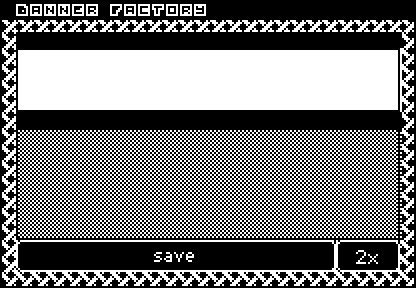
bannerFactory
%%WGT0{"w":[{"name":"bannerFactory","type":"contraption","size":[208,144],"pos":[160,112],"pattern":33,"show":"invert","def":"bannerFactory","widgets":{"inz":{},"outz":{},"savez":{},"rez":{}}}],"d":{"bannerFactory":{"name":"bannerFactory","size":[208,144],"margin":[0,0,0,0],"description":"Tiny, shaded banner generator. Uses widget.show and widget.pattern to render.\n\nIf widget.show is \"inverted\", the outline is white, and \"transparent\" will draw the outline using the pattern instead.","version":1,"script":"on view do\n bannerz[]\nend\n\non bannerz do\n outz.clear[].text[inz.value (0,0),outz.size \"center\"]\n txt:outz.copy[]\n c:-1,0,1\n each v in c\n each k in c\n outz.paste[txt v,k 1]\n end\n end\n oc:47\n if card.show=\"invert\" oc:32 elseif card.show=\"transparent\" oc:card.pattern end\n md:() dict ()\n each i in ((range 47)+1)\n md[i]:oc\n end\n outz.paste[outz.copy[].map[md]].paste[txt 0,0 1]\n outz.paste[outz.copy[] 0,-1 1]\nend\n\non savez do\n sz:-1 drop rez.text\n b:outz.copy[].bounds\n write[outz.copy[b.pos b.size].scale[\"%i\" parse sz]]\nend","image":"%%IMG3ANAAkAbAgHBILBqPyKRyyWw6n9CodEqtWq/YrHbLlYK+XyEYHBiHzaCyWT02otnkt3w9b3fveGtanN6Ly2qAfX2AQ4SGbkSHf36CioWMj4OQeZWWS42EZ4WakX6bm0Wfmp1tZ6ClnYiXrK2PjpmOsJ5xho1/gZSkYbKCqoGmrsKssZOksL/IlLifwLqRuLS9y8PVW3VxdNqma6JkfNx233Cn4ePW6Onq6+zt7u/w8UIG9PX29/j5+vv8/f7/AAMKHEiwoMB5BhMqXMiwocOHAxFCnEixosWLCSVi3Mixo8eFGj+KHElSZMiSKFOqBBkgn7yXMPHgO2kgps2bVma21Imzp88lOl3+HEp0SFCeRZPiPHpPqdObTO09nfoyaj2qWN9ZpUegq9evYMOKHUu2rNmzaNOqXcu2rVuvWw28nUu3rt27ePOCjau3r9+/gAOX5Su4sOHDiM8STsy4seO+ix9LnkxZcdOd9ypr3rw5MufPoA17Dk26NN7RplOrXot6tevXYVvDnu1aNu3bpW3j3s1ZN+/fk30DH85YOPHjhY0jX+5XOfPnd51Dn/5WOvXraq1j3z74cj7u4O1qD0+ewPjy4M+j365+/fX27qfDj/98Pv3l9u8fz69/eNysAK7zX4AEVjNggQiycmCCDMrkHVINRqjFghJWmNODl1moIRUUbuhhEx1+KCIScTVg4okopqjiiiy26OKLMMYo44w01mjjjSeWiOOOPPbo449ABomijkIWaeSRSCbJIpFKNunkk1C6yGSUVFZpZZBTXqnlllxKiaE9XYYppphZjmnmmUqWieaabPqoZptwxinjm3LWaeeQX9Zz55584ikVZmD2KaiddA5qaJiFHqrolYku6iiUjT4qaZKRTmqpkJVeqmmPmW7qqY2dfipqjKGOauqSedJz6qo8lsoqq66+emqsso5Ka62f3orrprruemmvvk4KbLCPDkvsosYee2iyyg7KbLN9PgvtntJOS2iqBli7a7Xaxsltt21+C+6a4o57Zrnmjoluuohiy+6s7r5ra7zy5kpvvbzei++v+u4rbL/+FgtwwMgOTPCyBh/sbMIKR8tww9Riu9LEFFcsscUYZ0wSTRp37DFGHH8s8sgMhUzyySgDZHLKLLf8p8swx3yxzDSLvHLNOGN8c848r7Rzz0BvDGjQRPs8dNFIC5300iX9zPTTDTkN9dQGSU311QFZjfXW/GjN9dczgy32Pl6P/XXZZm894tpaBAE=","attributes":{"name":[],"label":[],"type":[]},"widgets":{"inz":{"type":"field","size":[192,32],"pos":[8,24],"volatile":1,"script":"on change val do\n bannerz[]\nend","align":"center"},"outz":{"type":"canvas","size":[192,56],"pos":[8,64],"locked":1,"volatile":1,"pattern":47,"show":"transparent","scale":1},"savez":{"type":"button","size":[160,16],"pos":[8,120],"script":"on click do\n savez[]\nend","font":"body","show":"invert","text":"save"},"rez":{"type":"button","size":[32,16],"pos":[168,120],"script":"on click do\n if (me.text=\"1x\")\n me.text:\"2x\"\n elseif (me.text=\"2x\")\n me.text:\"4x\"\n else\n me.text:\"1x\"\n end\nend","font":"mono","show":"invert","text":"2x"}}}}}

RGB/Hex Adjuster
RGB/Hex color adjusting contraption I made for a small project. :3
%%WGT0{"w":[{"name":"RGB/Hex Adjuster","type":"contraption","size":[162,79],"pos":[140,180],"def":"RGB/HEX Adjuster","widgets":{"rs":{},"gs":{},"p":{},"bs":{},"rgb":{},"c":{},"hex":{},"temp":{}}}],"d":{"RGB/HEX Adjuster":{"name":"RGB/HEX Adjuster","size":[162,79],"margin":[0,0,0,0],"description":"Adjust color patterns by using their rgb and hex values.","version":2,"script":"on get_s do p.pattern end\non set_s x do setz[x] end\non get_rgb do rgb.text end\non set_rgb x do \n if !temp.text\n patterns[p.pattern]:\"%h\" parse convertRgbz[x]\n setz[p.pattern]\n end\nend\non get_hex do hex.text end\non set_hex x do \n if !temp.text\n patterns[p.pattern]:\"%h\" parse x\n setz[p.pattern]\n end\nend\n\non setz x do\n previewz[x]\n h:hexz[x]\n v:rgbz[h]\n hex.text:h\n rgb.text:v\n v:\",\" split v\n rs.value:v[0]\n gs.value:v[1]\n bs.value:v[2]\nend\n\non sliderz x y do\n c:(\"r\",\"g\",\"b\") dict (rs.value,gs.value,bs.value)\n c[y]:x\n c:\",\" fuse c\n rgb.text:c\n hex.text:convertRgbz[c]\n patterns[p.pattern]:\"%h\" parse hex.text\nend\n\non previewz x do\n p.clear\n p.pattern:x\n p.fill[]\nend\n\non hexz x do\n r:patterns[x]\n r:\"%h\" format r\n r:\"\" split r\n if !r[2] r:\"00\",r end\n if !r[4] r:\"00\",r end\n r:\"\" fuse r\nend\n\non convertRgbz x do\n d:(10,11,12,13,14,15) dict (\"a\",\"b\",\"c\",\"d\",\"e\",\"f\")\n x:\",\" split x\n r:()\n each v i in x\n i1:floor v/16\n i2:((v/16)-i1)*16\n if i1>9 i1:d[i1] end\n if i2>9 i2:d[i2] end\n r:r,i1,i2\n end\n \"\" fuse r\nend\n\non rgbz x do\n d:\"abcdef\" dict 10,11,12,13,14,15\n r:()\n each v i in 2 window \"\" split x\n each v2 i2 in v\n if d[v2]\n v[i2]:d[v2]\n end\n v[i2]+0\n r[i]:(v[0]*16)+v[1]\n end\n end\n r:\",\" fuse r\nend","image":"%%IMG3AKIATwbAgHBILBqPyKRyyWw6n9CoEkCtWq/YrHbL7Xq/4LB4nBWSz+i0es3+mtvwuHzOftPv+Dzeru/7/2F8gIOEg4KFiIlzh4qNjmeMj5KTW5GUl5eWmJuOmpyfhZ6go36ipKd3UqqrrK2ur1EgsrO0tba3uLm6u7y9vr/AwbdCwsXGx8jJyr3EtbDP0NGy0VDTAbYBqIrXINmh1tjaidzehOTctOXihtOI593N6ut/5O7gxNfy83313/D/+fax62YPYDyBgPqZu5ePIMJS7fw1S/cQosOF/5xV5BcR48RZ+jbKUTjwY0eRdEgmBOeMmsuXT06uzLisps2b4SSiAwmzp08jMumxpIgyVVCLJi8WHXmUI02QS1M21fNOY1SmSmfiG5L16hqVQg1C9QoHLNJ8DUOShTQ1zzsiXdeyjet0Kz65ddruGToWbxqzdXfq9dsFMFW+gwlXSrwIMbyfkHsyxpoUp+XLwtQefmotsmdqk+NUJaqYjGG3jjWX5nJ6L2e6q1mHLps69pjWRg3itm1ld2OxAXmD8U0ZLXHex2kDhy38SvI2bw829/I872vV06lU/1o7u2zmrpNiz75dzWien9PD6qzeMeb38OMbqyy/vv376NXr36/+05Hp8cymlYBLcWWNf90kOJ5cAYK3jVXCIeGfEQCm5eA4CRJYFD4KIihdhIItWFBfyP3HiYkgQogJhxeuBdcQHj5WoYqZ0BibhCdS2Bx/PPYYTRA=","attributes":{"name":["s","rgb","hex"],"label":["selected","rgb","hex"],"type":["number","string","string"]},"widgets":{"rs":{"type":"slider","size":[106,14],"pos":[7,18],"volatile":1,"script":"on change val do\n sliderz[val \"r\"]\nend","font":"mono","interval":[0,255],"style":"bar"},"gs":{"type":"slider","size":[106,14],"pos":[7,33],"volatile":1,"script":"on change val do\n sliderz[val \"g\"]\nend","font":"mono","interval":[0,255],"style":"bar"},"p":{"type":"canvas","size":[44,44],"pos":[115,18],"locked":1,"volatile":1,"pattern":47,"scale":1},"bs":{"type":"slider","size":[106,14],"pos":[7,48],"volatile":1,"script":"on change val do\n sliderz[val \"b\"]\nend","font":"mono","interval":[0,255],"style":"bar"},"rgb":{"type":"field","size":[94,15],"pos":[68,64],"volatile":1,"script":"on change val do\n set_rgb[val]\nend","font":"mono","border":1,"style":"plain","align":"center"},"c":{"type":"canvas","size":[160,14],"pos":[1,1],"locked":1,"script":"on sendz x do\n temp.text:x[1]\n c:me[x]\n if c=0 c:32\n elseif c=1 c:47\n end\n setz[c]\nend\n\non click pos do\n sendz[pos]\nend\n\non drag pos do\n sendz[pos]\nend\n\non release pos do\n temp.text:nil\nend","border":0,"image":"%%IMG2AKAADgEUIRQkFCUUKBQpFCwULRQBFCEUJBQlFCgUKRQsFC0UARQhFCQUJRQoFCkULBQtFAEUIRQkFCUUKBQpFCwULRQBFCEUJBQlFCgUKRQsFC0UARQhFCQUJRQoFCkULBQtFAEUIRQkFCUUKBQpFCwULRQAFCIUIxQmFCcUKhQrFC4UABQiFCMUJhQnFCoUKxQuFAAUIhQjFCYUJxQqFCsULhQAFCIUIxQmFCcUKhQrFC4UABQiFCMUJhQnFCoUKxQuFAAUIhQjFCYUJxQqFCsULhQAFCIUIxQmFCcUKhQrFC4U","scale":1},"hex":{"type":"field","size":[57,15],"pos":[6,64],"volatile":1,"script":"on change val do\n set_hex[val]\nend","font":"mono","border":1,"scrollbar":1,"style":"plain","align":"center"},"temp":{"type":"field","size":[8,8],"pos":[165,1],"locked":1,"volatile":1,"script":"on change val do\n \nend","show":"none"}}}}}
Re-posting the two widgets currently available from the main post, so that this thread can be better organized overall. The steps for creating ‘spoiler text’ can be found here. ^^
Export Deck Palette as .HEX

This is just a regular button with two lines of code attached, utilizing line 194 from pdf.deck. It can be used to export patterns 32-47 as a 16-color HEX file. Change ‘range 16’ to ‘range 14’ and ‘deck.patterns[32+i]’ to ‘deck.patterns[33+i]’ if you’d like to exclude black and white.
As a reminder, you can click and drag .HEX files directly into an active deck to change the patterns used. If you want an easy way to save and swap between pattern sets, you can use the Palette Storage contraption I uploaded to the Contraption Bazaar.
%%WGT0{"w":[{"name":"emexhex","type":"button","size":[185,19],"pos":[133,186],"script":"on click do\n colors:each i in range 16 \"%06H\" format deck.patterns[32+i] end\n write[array[0 \"u8\"].cat[\"\\n\" fuse colors] \".hex\"]\nend","text":"Export Deck Palette as .HEX"}],"d":{}}
emDeck Exporter
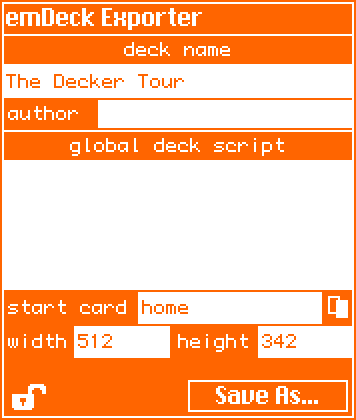
A toolbox contraption to make it easier to export decks at a non-standard size, with an added field to view the global script as a convenience.
%%WGT0{"w":[{"name":"emDeck","type":"contraption","size":[178,210],"pos":[193,68],"def":"emDeck","widgets":{"t":{},"h1":{},"h":{},"w1":{},"w":{},"s1":{},"scr":{},"crd":{},"nm":{},"a1":{},"auth":{},"t2":{},"crd1":{},"export":{},"e1":{},"lock":{},"limg":{},"crd2":{},"init":{}}}],"d":{"emDeck":{"name":"emDeck","size":[178,210],"margin":[0,0,0,0],"description":"Configuration and deck export, all in one place!","version":1,"script":"on view do\n if !init.value\n i:app.render[deck.card]\n w.value:i.size[0]\n h.value:i.size[1]\n crd.value:deck.card.name\n nm.value:deck.name\n auth.value:deck.author\n scr.value:deck.script\n lock.brush:deck.locked\n lock.paste[limg.images[lock.brush]]\n init.value:1\n end\nend\n\non export do\n file:\"\\n\\n\" split deck.encoded\n d:\"\\n\" split file[0]\n lc:\"\" fuse \"locked:\",lock.brush\n each v k in d\n if v like \"size*\" d[k]:\"\" fuse \"size:[\",(\",\" fuse w.text,h.text),\"]\" end\n if v like \"card*\" d[k]:\"\" fuse \"card:\",deck.cards[crd.text].index end\n if v like \"locked*\" d[k]:lc show[v] l:1 end\n end \n if !l d[count d]:lc end\n file[0]:\"\\n\" fuse d\n file:\"\\n\\n\" fuse file\n write[newdeck[file]]\nend\n\non pickcrd do\n r:alert[\"start deck from card ____\" \"choose\" deck.cards]\n crd.text:r.name\nend","image":"%%IMG3ALIA0gZAkXBILBqPyKRyyWw6n9CodEqtWq/YrHbL7Xq/4LB4TC6bz+i0es1uu9/wuHxOr9vv+Lx+z+/7/4CBgoOEhYaHiImKi4yNjo+QkZKTlJWWl5iZmpucnZ6foKGio6SlpqeoqaqrrK2ur7CxsrO0tba3uLm6u7y9vr/AwcLDxMXGx8jJysvMzc7P0NHS09TV1tfY2drb3N3e3+Dh4uPk5ebn6Onq6+zt7u/w8fLz9PX29/j5+vv8/f7/AAMKHEiwoMGDCBMqXMiwocOHECNKnEixosWLGDNq3Mixo8ePIEOKHEmypMmTKFOqXMmypcuXMGPKnEmzps2bOHPq3Mmzp8+fQIMKHUq0qNGjSJMqXcq0qdOnUHkGAQ==","widgets":{"t":{"type":"field","size":[176,208],"pos":[1,1],"locked":1,"font":"menu","pattern":34,"show":"invert","border":1,"value":"emDeck Exporter"},"h1":{"type":"field","size":[90,16],"pos":[87,163],"locked":1,"font":"mono","pattern":34,"show":"invert","border":0,"value":"height"},"h":{"type":"field","size":[48,16],"pos":[129,163],"volatile":1,"pattern":34,"border":0,"style":"code"},"w1":{"type":"field","size":[84,16],"pos":[2,163],"locked":1,"font":"mono","pattern":34,"show":"invert","border":0,"value":"width"},"w":{"type":"field","size":[48,16],"pos":[37,163],"volatile":1,"pattern":34,"border":0,"style":"code"},"s1":{"type":"field","size":[176,16],"pos":[1,65],"locked":1,"font":"mono","pattern":34,"show":"invert","border":1,"align":"center","value":"global deck script"},"scr":{"type":"field","size":[176,64],"pos":[1,81],"volatile":1,"script":"on change val do\n deck.script:me.text\nend","pattern":34,"border":0,"scrollbar":0,"style":"code"},"crd":{"type":"field","size":[92,16],"pos":[69,146],"volatile":1,"pattern":34,"border":0,"style":"code"},"nm":{"type":"field","size":[176,16],"pos":[1,33],"volatile":1,"script":"on change val do\n deck.name:me.text\nend","pattern":34,"border":0,"style":"code"},"a1":{"type":"field","size":[47,16],"pos":[2,49],"locked":1,"font":"mono","pattern":34,"show":"invert","border":0,"value":"author"},"auth":{"type":"field","size":[128,14],"pos":[49,50],"volatile":1,"script":"on change val do\n deck.author:me.text\nend","pattern":34,"border":0,"style":"code"},"t2":{"type":"field","size":[176,16],"pos":[1,17],"locked":1,"font":"mono","pattern":34,"show":"invert","border":1,"align":"center","value":"deck name"},"crd1":{"type":"field","size":[66,16],"pos":[2,146],"locked":1,"font":"mono","pattern":34,"show":"invert","border":0,"value":"start card"},"export":{"type":"field","size":[80,16],"pos":[94,190],"locked":1,"font":"menu","pattern":34,"show":"invert","border":1,"align":"center","value":"Save As..."},"e1":{"type":"button","size":[80,16],"pos":[94,190],"script":"on click do\n export[]\nend","style":"invisible"},"lock":{"type":"canvas","size":[23,17],"pos":[3,190],"locked":1,"volatile":1,"script":"on click pos do\n me.brush:!me.brush\n me.paste[limg.images[me.brush]]\nend\n\non drag pos do\n \nend\n\non release pos do\n \nend","show":"transparent","border":0,"brush":1,"scale":1},"limg":{"type":"field","size":[8,8],"pos":[1,213],"locked":1,"show":"none","value":{"text":["","i","i"],"font":["","",""],"arg":["","%%IMG3ABcAEQZAkXBILBqPyKRyCGo6QUvicxoVOpnNqigrhVa5WON0HB1Tl08sOJm2XtHps5IqZ5vfcLN2z18GAQ==","%%IMG3ABcAEQZAkXBILBqPyKQRxGyClEWnFDpsVplUIZa4pXa1T690Ch2Tlc7rF5kGr4/TczLeRputYnN2z98HAQ=="]}},"crd2":{"type":"canvas","size":[14,15],"pos":[162,146],"locked":1,"script":"on click pos do\n pickcrd[]\nend\n\non drag pos do\n \nend\n\non release pos do\n \nend","border":0,"image":"%%IMG3AA4ADwZAkXBILBqPQoByiQQQnUeoaMkcSqnKpxWrTXKtW2p3+vViq8Zzs4xsu4M=","scale":1},"init":{"type":"button","size":[8,8],"pos":[2,-14],"locked":1,"volatile":1,"show":"none","style":"check"}}}}}
For reference, I’m using my mouse to detect inputs in Native Decker on Linux Mint.
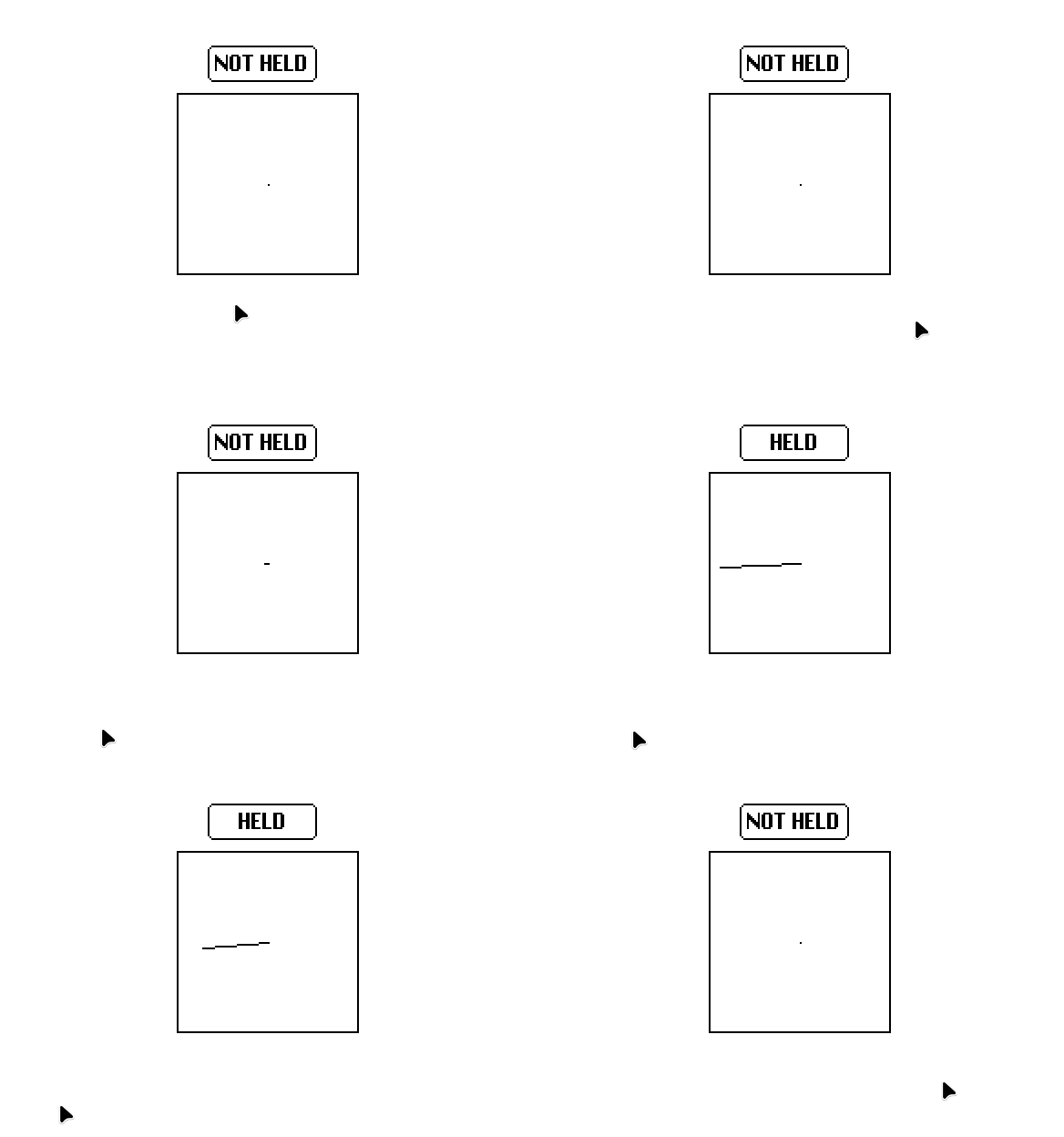
(I added an animated button on top of the canvas to show when my mouse is being held.)
On my end, it’s a pretty substantial difference. Previously, I was using this slider widget to specifically detect changes in Y pos:
%%WGT0{"w":[{"name":"slider","type":"slider","size":[38,151],"pos":[163,94],"locked":1,"animated":1,"script":"on view do\n diff:(pointer.pos[1]-pointer.prev[1])\n me.value:(diff/1)\nend","interval":[-50,50],"style":"vert"}],"d":{}}
I love this!! Even though I do have an art tablet, sometimes I would rather do the work with my mouse instead. Have a Bézier kitty for your hard work:
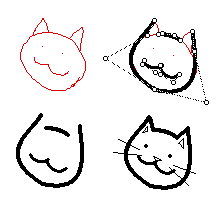
For anyone else doing this, you can do a sweeping-select of every widget and lock them all or assign show:none/show:transparent all at once. From the listener, you can run the script 'deck.card.image:app.render[deck.card]' to flatten all visible widgets to the card background.
I immediately saw a future where this can be used to 'tether' other widgets or create wiring:
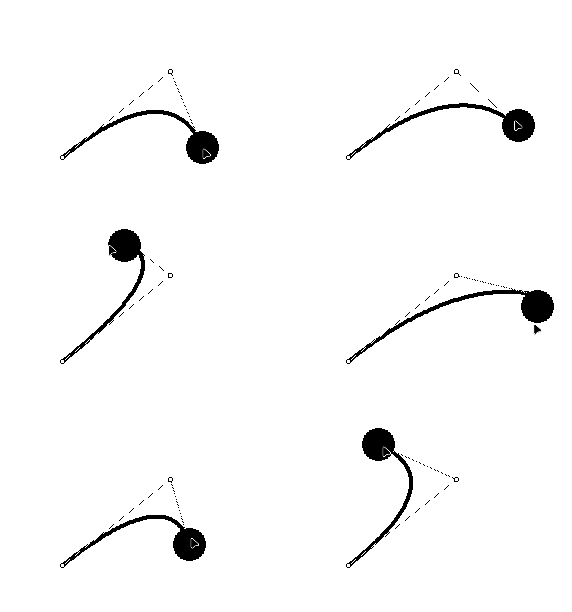
# this is a script attached to the black sphere, which is an animated, draggable canvas widget.
on view do
 p:"\n" split bezier.coords
 newpos:me.pos-bezier.pos-(floor me.size/2)
 p[2]:"," fuse newpos
 bezier.coords:"\n" fuse p
end
(As a note: When using a larger contraption size / more handles on the Bézier curve, the script profiler shoots up anywhere between 20%-70%, I didn't have any performance issues while using this on Decker native, but after adding 3 handles to a single curve, usage went up to 200%, and I wasn't able to edit it anymore. )
Standalone toolboxes for more Decker developments..!
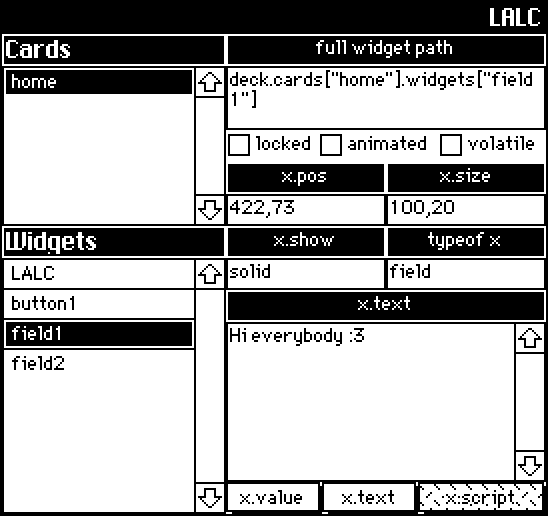
LALC ( Look A Little Closer!
A read-only viewer that displays a list of every card in a deck, along with some general information about the widget interfaces that exist on any selected card. Eventually I plan on having better support for canvases/grids.
%%WGT0{"w":[{"name":"LALC1","type":"contraption","size":[272,256],"pos":[114,44],"def":"LALC","widgets":{"tab4":{},"widgetz":{},"cardz":{},"c1":{},"w1":{},"t":{},"val":{},"path":{},"t2":{},"locked":{},"animated":{},"volatile":{},"p1":{},"s1":{},"pos":{},"size":{},"show":{},"sh1":{},"tab1":{},"tab2":{},"tab3":{},"to1":{},"to":{},"handler":{},"optype":{},"v1":{}}}],"d":{"LALC":{"name":"LALC","size":[272,256],"margin":[5,20,5,6],"description":"'Look A Little Closer!'\nA live, read-only viewer used to examine common attributes shared across all widgets.","version":1,"script":"on get_selected do path.text end\n\non view do\n card.show:\"transparent\"\n cardz.value:deck.cards\nend\n\non getwidgets x do\n widgetz.value:deck.cards[x].widgets\nend\n\non loadwidget do\n w:deck.cards[cardz.rowvalue.key].widgets[widgetz.rowvalue.key]\n if w.name \n path.text:\"deck.cards[\\\"\",w.parent.name,\"\\\"]\",\".widgets\",\"[\\\"\",w.name,\"\\\"]\"\n to.text:typeof w\n end\n if w.pos[0] pos.text:w.pos[0],\",\",w.pos[1] end\n if w.size[0] size.text:w.size[0],\",\",w.size[1] end\n show.text:w.show\n font.text:w.font\n locked.value:w.locked\n volatile.value:w.volatile\n animated.value:w.animated\n otxt:optype.text\n if to.text=\"canvas\" tab1.show:\"none\" tab2.show:\"none\" tab4.show:\"solid\" else\n tab1.show:\"solid\" tab2.show:\"solid\" tab4.show:\"none\" end\n if otxt=\"value\" val.value:w.value\n elseif otxt=\"text\" val.text:w.text\n elseif otxt=\"script\" val.text:w.script\n elseif otxt=\"encoded\" val.text:w.copy[].encoded end\nend\n","attributes":{"name":["selected"],"label":["selected"],"type":["string"]},"widgets":{"tab4":{"type":"button","size":[96,16],"pos":[112,240],"script":"on click do\n v1.text:me.text\n optype.text:\"encoded\"\nend","font":"body","pattern":0,"show":"none","text":"x.copy[].encoded","style":"rect"},"widgetz":{"type":"grid","size":[112,128],"pos":[0,128],"locked":1,"volatile":1,"script":"on click row do\n loadwidget[me.rowvalue.key]\nend","headers":0,"widths":[80,0]},"cardz":{"type":"grid","size":[112,80],"pos":[0,32],"locked":1,"volatile":1,"script":"on click row do\n\nend","headers":0,"bycell":0,"widths":[80,0]},"c1":{"type":"field","size":[112,16],"pos":[0,16],"locked":1,"font":"menu","show":"invert","border":1,"value":"Cards"},"w1":{"type":"field","size":[112,16],"pos":[0,112],"locked":1,"font":"menu","show":"invert","border":1,"value":"Widgets"},"t":{"type":"field","size":[272,16],"pos":[0,0],"locked":1,"script":"on change val do\n \nend","font":"menu","pattern":47,"show":"invert","border":0,"align":"right","value":"LALC"},"val":{"type":"field","size":[160,80],"pos":[112,160],"volatile":1,"script":"on change val do\n \nend","scrollbar":1},"path":{"type":"field","size":[160,32],"pos":[112,32],"volatile":1,"script":"on change val do\n \nend"},"t2":{"type":"field","size":[160,16],"pos":[112,16],"locked":1,"show":"invert","align":"center","value":"full widget path"},"locked":{"type":"button","size":[48,16],"pos":[112,64],"volatile":1,"font":"body","text":"locked","style":"check"},"animated":{"type":"button","size":[66,16],"pos":[158,64],"volatile":1,"font":"body","text":"animated","style":"check"},"volatile":{"type":"button","size":[54,16],"pos":[218,64],"volatile":1,"font":"body","text":"volatile","style":"check"},"p1":{"type":"field","size":[80,16],"pos":[112,80],"locked":1,"show":"invert","border":1,"align":"center","value":"x.pos"},"s1":{"type":"field","size":[80,16],"pos":[192,80],"locked":1,"show":"invert","border":1,"align":"center","value":"x.size"},"pos":{"type":"field","size":[80,16],"pos":[112,96],"volatile":1},"size":{"type":"field","size":[80,16],"pos":[192,96],"volatile":1},"show":{"type":"field","size":[80,16],"pos":[112,128],"volatile":1},"sh1":{"type":"field","size":[80,16],"pos":[112,112],"locked":1,"show":"invert","align":"center","value":"x.show"},"tab1":{"type":"button","size":[48,16],"pos":[112,240],"script":"on click do\n v1.text:me.text\n optype.text:\"value\"\nend","font":"body","pattern":0,"text":"x.value","style":"rect"},"tab2":{"type":"button","size":[48,16],"pos":[160,240],"script":"on click do\n v1.text:me.text\n optype.text:\"text\"\nend","font":"body","text":"x.text","style":"rect"},"tab3":{"type":"button","size":[64,16],"pos":[208,240],"script":"on click do\n v1.text:me.text\n optype.text:\"script\"\nend","font":"body","pattern":10,"text":"x.script","style":"rect"},"to1":{"type":"field","size":[80,16],"pos":[192,112],"locked":1,"show":"invert","align":"center","value":"typeof x"},"to":{"type":"field","size":[80,16],"pos":[192,128],"volatile":1},"handler":{"type":"field","size":[16,15],"pos":[-21,240],"locked":1,"animated":1,"volatile":1,"script":"on change val do\n \nend\n\non view do\n getwidgets[cardz.rowvalue.key]\n loadwidget[]\nend","show":"none"},"optype":{"type":"field","size":[32,32],"pos":[278,223],"locked":1,"volatile":1,"script":"on change val do\n \nend","show":"none"},"v1":{"type":"field","size":[160,16],"pos":[112,144],"locked":1,"show":"invert","align":"center","value":"x.value"}}}}}
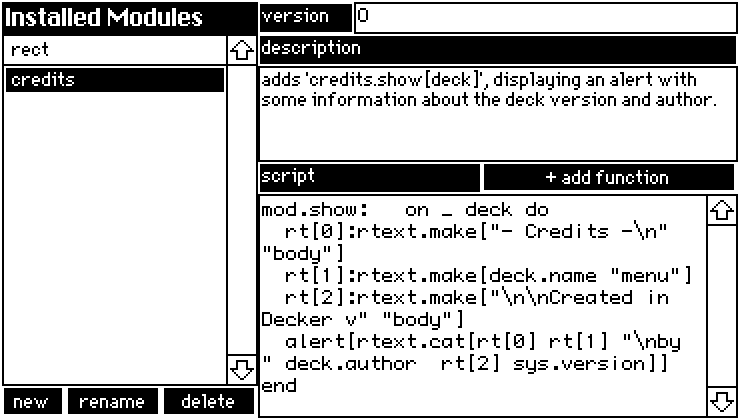
QuickMod
A GUI for creating simple modules and edit existing modules from within Decker - I've even provided a placeholder script for adding functions!
%%WGT0{"w":[{"name":"QuickMod","type":"contraption","size":[368,208],"pos":[69,71],"def":"QuickMod","widgets":{"mods":{},"m1":{},"v1":{},"new":{},"delete":{},"rename":{},"d1":{},"s1":{},"script":{},"description":{},"version":{},"name":{},"s2":{}}}],"d":{"QuickMod":{"name":"QuickMod","size":[368,208],"margin":[0,0,0,0],"description":"A combination viewer/editor for simple modules. \nEditing the 'data' interface must still be done externally.","version":2,"script":"on view do\n mods.value:deck.modules\n if !(count deck.modules) loadmod[] delete.locked:1 rename.locked:1\n else loadmod[mods.rowvalue.key] delete.locked:0 rename.locked:0 end\nend\n\non namecheck x do\n n:alert[\"name module\" \"string\" x]\n while deck.modules[n]\n n:alert[\"name already in use\" \"string\"]\n end\n if !n n:\"module\" else n end\nend\n\non newmod do\n deck.add[\"module\" namecheck[]]\n loadmod[n]\nend\n\non loadmod x do\n mod:deck.modules[x]\n version.text:mod.version\n description.text:mod.description\n script.text:mod.script\n name.text:mod.name\nend\n\nmod:deck.modules[name.text]\n\non updatemod x y do\n mod[x]:y\nend\n\non renamemod do\n mod.name:namecheck[mod.name]\nend\n\non deletemod do\n if name.text\n if alert[\"permanently delete '\",name.text,\"' module?\" \"bool\"]\n deck.remove[mod]\n end\n end\nend\n\non addfunction do\n r:alert[\"name function\" \"string\"]\n mod.script:mod.script,\"\\nmod.\",r,\": on _ do \\n# script\\nend\"\nend","widgets":{"mods":{"type":"grid","size":[128,176],"pos":[0,16],"volatile":1,"script":"on click row do\n loadmod[me.rowvalue.key]\nend","headers":0,"widths":[100,0]},"m1":{"type":"field","size":[128,16],"pos":[0,0],"locked":1,"font":"menu","show":"invert","border":0,"value":"Installed Modules"},"v1":{"type":"field","size":[48,16],"pos":[128,0],"locked":1,"show":"invert","style":"plain","value":"version"},"new":{"type":"button","size":[32,16],"pos":[0,192],"script":"on click do\n newmod[]\nend","font":"body","show":"invert","text":"new","style":"rect"},"delete":{"type":"button","size":[48,16],"pos":[80,192],"script":"on click do\n deletemod[]\nend","font":"body","show":"invert","text":"delete","style":"rect"},"rename":{"type":"button","size":[48,16],"pos":[32,192],"script":"on click do\n renamemod[]\nend","font":"body","show":"invert","text":"rename","style":"rect"},"d1":{"type":"field","size":[240,16],"pos":[128,16],"locked":1,"show":"invert","style":"plain","value":"description"},"s1":{"type":"field","size":[112,16],"pos":[128,80],"locked":1,"show":"invert","style":"plain","value":"script"},"script":{"type":"field","size":[240,112],"pos":[128,96],"volatile":1,"script":"on change val do\n updatemod[me.name val]\nend","scrollbar":1,"style":"code"},"description":{"type":"field","size":[240,48],"pos":[128,32],"volatile":1,"script":"on change val do\n updatemod[me.name val]\nend","scrollbar":0},"version":{"type":"field","size":[192,16],"pos":[176,0],"volatile":1,"script":"on change val do\n updatemod[me.name val]\nend"},"name":{"type":"field","size":[16,8],"pos":[0,224],"locked":1,"show":"none","value":"credits"},"s2":{"type":"button","size":[128,16],"pos":[240,80],"script":"on click do\n addfunction[]\nend","font":"body","show":"invert","text":"+ add function","style":"rect"}}}}}
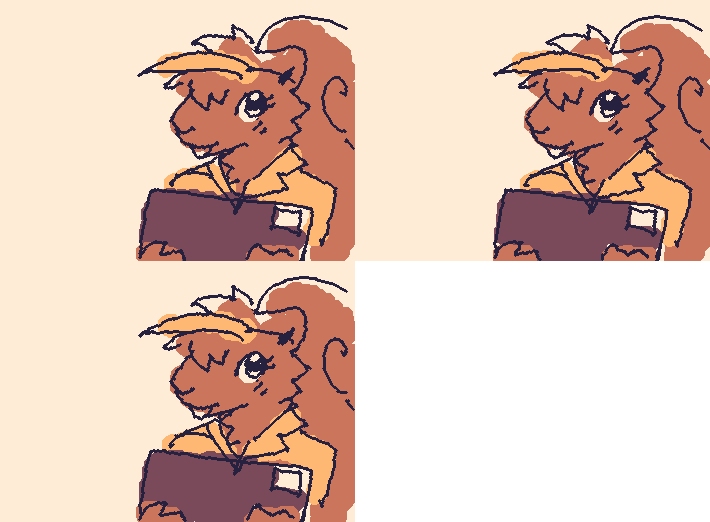
Howdy! I'm Emma, a squiggly squirrel living a GIF based world.
It's my dream to one day become a .PNG file, but it's going to be
a lot of hard work... Do you want to see some other projects I've
been working on in the meantime?
Available tools:
Export Deck Palette as .HEX
emDeck Exporter
As I continue experimenting and (hopefully) improve my understanding of file structures, I'll update this post with more tools. Enjoy! - Missooni ♥
Here's some contraptions I had lying around, plus some new ones to celebrate the existence of the 1.66 Decker Gamepad interface. :3
1. Sticker
I noticed that ahmwma's deck, "Phinxel's Field Notes" had these amazingly cute stickers I wanted to use in one of my own decks, so I turned them into contraptions with attributes to change their sprites and constrain the dragging region within another widget.
%%WGT0{"w":[{"name":"Sticker","type":"contraption","size":[23,29],"pos":[240,128],"script":"on drag do\n if me.constrain\n b:me.parent.widgets[me.constrain]\n # 'constrain' script written Internet Janitor, from the 'rect' module.\n me.pos:(b.pos+b.size-me.size)&b.pos|me.pos\n end\nend","show":"transparent","def":"Sticker","widgets":{"c":{"show":"transparent"},"is":{},"wc":{}}}],"d":{"Sticker":{"name":"Sticker","size":[23,29],"resizable":1,"margin":[1,1,1,1],"description":"Draggable, self-resizing contraption that toggles between two images when pressed.\n\nCan be constrained if a widget name is provided under the 'constrain' attribute.\n\nInspired by stickers seen in 'Phinxel's Field Notes' created by ahmwma","version":2,"script":"# Code for making stickers draggable was repurposed from the 'follower' contraption found in path.deck.\n\non get_sprites do is.value end\non set_sprites x do is.value:x end\non get_constrain do wc.text end\non set_constrain x do wc.text:x end\n\non click pos do\n update_view[1]\nend\n\non drag pos do\n if !card.locked\n card.pos:pointer.pos-c.size/2\n c.pos:0,0\n card.event[\"drag\"]\n end\nend\n\non release pos do\n update_view[]\n card.pos:card.pos+(0,1)\nend\n\non update_view x do\n if x then\n i:last is.images\n else\n i:first is.images\n end\n c.clear[]\n c.size:i.size\n c.paste[i]\n c.show:card.show\n card.size:c.size\nend\n\non view do\n update_view[]\nend","template":"on drag do\n if me.constrain\n b:me.parent.widgets[me.constrain]\n # 'constrain' script written Internet Janitor, from the 'rect' module.\n me.pos:(b.pos+b.size-me.size)&b.pos|me.pos\n end\nend","attributes":{"name":["sprites","constrain"],"label":["sprites","constrain"],"type":["rich","string"]},"widgets":{"c":{"type":"canvas","size":[23,29],"pos":[0,0],"locked":1,"volatile":1,"border":0,"draggable":1,"scale":1},"is":{"type":"field","size":[18,18],"pos":[-2,-25],"locked":1,"show":"none","value":{"text":["","i","i"],"font":["","",""],"arg":["","%%IMG3ABcAHQZAgFAIKg6PyCSgyFQ6iSCX1PhEFl2prMtIfV5TKFRqywRVv2Hxdmp2stDhsUpF9kbBcdWK3k2+72Apenx9VlFSWXtSbEpXc497j4SGLiojlyOPIpsik1CVmJiPl5uTjqQhIqGhpWSnI5yrrISvm7KzrlGWt7KduaC8q75lwMGkhCx/xcHDba/MyELKu7zNR8+90UPT1KLaR8qVknRkLG5Mi4tM5k9/ZWXsVcnvIMlVSMn58UlB","%%IMG3ABcAGwZAgFAIKg6PyCSgyFQ6iSCX1PhEFl2prMtIfV5TKFRqywRVv2Hxdmp2stDhsUpF9kbBcdWK3k2+72Apenx9VlFSWXtSbEpXc497j4SGLiojlyOPIpsik1CVmJiPl5uTjqQhIqGhpWSnI5yrrISvm7KzrlGWt7KduaC8q75lwMGkhCx/xcHDba/MyEJ/ZUW9nlDUTJjNLEcsLeDg2XNk3U7h4kzlVUjpRebsSMnJSUE="]}},"wc":{"type":"field","size":[12,12],"pos":[21,-25],"locked":1,"show":"none","border":0,"style":"plain","align":"right"}}}}}
Note: I referenced the "follower" script from the path.deck module to make this contraption draggable, but I could not reproduce the dragging behavior of the follower script without copy-pasting the exact canvas used. If you want to reproduce the steps to 'break' the follower contraption in a way that renders it undraggable, go to path.deck, specifically #followeranim, edit the follower contraption, then attempt to change the canvas script. At a glance, it doesn't look like the canvas has any scripts attached to it, so it will auto-fill with the default 'click' 'drag' 'release' functions, however, if you then save the canvas the contraption will not be draggable anymore. If you then go back and delete the entire script, it will still be permanently broken. I have found no way to fix this, other than copy-pasting the exact canvas used from path.deck.
2. Palette Storage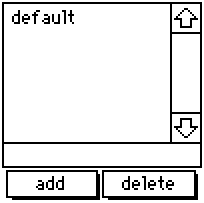
A resizable list to store and update color palettes, containing the default Decker palette when created. If you happen to change the colors in your deck manually or by importing a .hex file, you can give the new palette a name, add it to the list, then return to it any time using this contraption. If you click 'add' after specifying a name already listed, it will update that entry instead of making an entirely new one. By editing the contraption itself, you can specify more default palettes.
%%WGT0{"w":[{"name":"Palette Storage","type":"contraption","size":[100,100],"pos":[194,125],"def":"Palette Storage","widgets":{"s":{},"d":{},"t":{},"add":{},"delete":{}}}],"d":{"Palette Storage":{"name":"Palette Storage","size":[100,100],"resizable":1,"margin":[4,70,6,5],"description":"Adapted grid for storing and accessing color patterns sets.","version":1,"script":"on get_s do t.text end\non set_s x do \n t.text:x\n palz[x] \nend\n\np:32,33,34,35,36,37,38,39,40,41,42,43,44,45,46,47\n\non view do\n d.value:keys cols s.value\n w:add,delete,t,d\n w..show:card.show\nend\n\non palz x do\n if s.value[x]\n each v k i in s.value[x]\n patterns[p[i]]:v\n end\n end\n card.event[\"change\"]\nend\n\non addz x do\n a:cols s.value\n a[x]:()\n each v in p\n a[x]:a[x],patterns[v]\n end\n s.value:table a\n view[]\nend\n\non delz x do\n s.value:x drop s.value\n view[]\nend","attributes":{"name":["s"],"label":["selected"],"type":["string"]},"widgets":{"s":{"type":"grid","size":[100,22],"pos":[0,-31],"locked":1,"show":"none","value":{"default":[16777215,16776960,16737536,14417920,16711831,3539095,202,38911,43008,25856,6632960,9921846,12171705,8816262,4539717,0]}},"d":{"type":"grid","size":[100,71],"pos":[0,0],"locked":1,"volatile":1,"script":"on click row do\n v:me.rowvalue.value\n palz[v]\n t.text:v\nend","headers":0,"lines":1,"bycell":0},"t":{"type":"field","size":[100,13],"pos":[0,70],"volatile":1,"style":"plain"},"add":{"type":"button","size":[47,15],"pos":[2,84],"script":"on click do\n addz[t.text]\nend","font":"body","text":"add","style":"rect"},"delete":{"type":"button","size":[48,15],"pos":[50,84],"script":"on click do\n delz[t.text]\nend","font":"body","text":"delete","style":"rect"}}}}}
3. Gamepad Buttons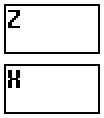
Scalable, vertical buttons that display the state of the action and cancel buttons introduced with the Decker 1.66 gamepad interface. They provide a visual interface for people without a keyboard or controller, and transmit the state of the buttons through boolean attributes 'action' and 'cancel'. By observing the attributes of this widget instead of the global gamepad interface, mobile users or people on touch-screen exclusive devices are able to interact with elements in a deck as if they were using a keyboard.
%%WGT0{"w":[{"name":"Gamepad Buttons","type":"contraption","size":[48,55],"pos":[96,128],"def":"Gamepad Buttons","widgets":{"b1":{"size":[48,25]},"b2":{"size":[48,25],"pos":[0,30]},"handler":{},"action":{"size":[48,25]},"cancel":{"size":[48,25],"pos":[0,30]},"t1":{"size":[48,25]},"t2":{"size":[48,25],"pos":[0,30]},"locka":{"pos":[0,58]},"lockc":{"pos":[14,58]}}}],"d":{"Gamepad Buttons":{"name":"Gamepad Buttons","size":[48,104],"resizable":1,"margin":[2,2,2,2],"description":"Minimalistic, resizable buttons to add gamepad button functionality.","version":1,"script":"on get_action do action.brush end\non get_cancel do cancel.brush end","attributes":{"name":["action","cancel"],"label":["action","cancel"],"type":["bool","bool"]},"widgets":{"b1":{"type":"field","size":[48,48],"pos":[0,0],"locked":1,"pattern":12,"show":"invert"},"b2":{"type":"field","size":[48,48],"pos":[0,56],"locked":1,"pattern":9,"show":"invert"},"handler":{"type":"canvas","size":[8,8],"pos":[0,-8],"locked":1,"animated":1,"script":"t:(\"solid\",\"transparent\")\non view do\n if !locka.value\n g1:gamepad.held[\"action\"]\n action.brush:g1\n end\n if !lockc.value\n g2:gamepad.held[\"cancel\"]\n cancel.brush:g2\n end\n action.show:t[action.brush]\n cancel.show:t[cancel.brush]\nend","show":"none","scale":1},"action":{"type":"canvas","size":[48,48],"pos":[0,0],"locked":1,"script":"on click pos do\n locka.value:1\n me.brush:pointer.held\nend\n\non release pos do\n me.brush:pointer.held\n locka.value:0\nend","scale":1},"cancel":{"type":"canvas","size":[48,48],"pos":[0,56],"locked":1,"script":"on click pos do\n lockc.value:1\n me.brush:pointer.held\nend\n\non release pos do\n me.brush:pointer.held\n lockc.value:0\nend","scale":1},"t1":{"type":"field","size":[48,48],"pos":[0,0],"locked":1,"script":"on change val do\n \nend","font":"menu","show":"transparent","border":0,"style":"plain","value":"Z"},"t2":{"type":"field","size":[48,48],"pos":[0,56],"locked":1,"font":"menu","show":"transparent","border":0,"style":"plain","value":"X"},"locka":{"type":"slider","size":[8,8],"pos":[0,107],"locked":1,"show":"none","interval":[0,1]},"lockc":{"type":"slider","size":[8,8],"pos":[14,107],"locked":1,"show":"none","interval":[0,1]}}}}}
4. Gamepad Joystick
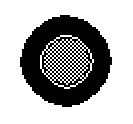
Similar to the previous contraption - except this one is meant to simulate a physical joystick. Exposes the attributes 'x' and 'y' for external scripts, observing both gamepad.dir and mouse inputs simultaneously.
%%WGT0{"w":[{"name":"Gamepad Joystick","type":"contraption","size":[100,100],"pos":[206,121],"def":"Gamepad Joystick","widgets":{"handler":{},"cir":{},"stick":{},"x":{},"y":{},"lock":{}}}],"d":{"Gamepad Joystick":{"name":"Gamepad Joystick","size":[100,100],"resizable":1,"margin":[0,0,0,0],"description":"Minimalistic, resizable joystick to add gamepad joystick functionality.","version":2,"script":"on get_x do x.value end\non get_y do y.value end\n\n# Circle drawing script provided on the Lil Playground\non view do\n card.show:\"transparent\"\n cir.clear[]\n cir.pattern:1\n c:cir.size/2 # center of canvas\n r:.7*c # radius of the pattern\n a:(pi/0.5*16)*range 16 # angle per wedge\n p:flip c+r*flip unit a # points around a circle\n each x i in p\n cir.line[x p[(count p)%1+i]]\n end\n cir.pattern:34\n cir.paste[cir.fill[0,0].copy[].map[(34,0) dict (0,1)]]\n stick.size:cir.size/2\n stick.paste[cir.copy[].scale[.5].outline[(35,32)].map[(1,35) dict (13,47)]]\n center[]\nend\n\non center do stick.pos:cir.pos+(stick.size/2) end\non stickz input do\n cntr:cir.pos+(stick.size/2)\n diff:(cir.size/2)-(stick.size/2)\n if input=\"gp\"\n x.value:gamepad.dir[0]\n y.value:gamepad.dir[1]\n stick.pos:(cntr[0]+(diff[0]*x.value)),(cntr[1]+(diff[1]*y.value))\n else\n x.value:(stick.pos[0]/diff[0])-1\n y.value:(stick.pos[1]/diff[1])-1\n end\nend","attributes":{"name":["x","y"],"label":["x","y"],"type":["number","number"]},"widgets":{"handler":{"type":"canvas","size":[8,8],"pos":[0,-16],"locked":1,"animated":1,"script":"on view do\n if !lock.value\n stickz[\"gp\"]\n end\nend","show":"none","scale":1},"cir":{"type":"canvas","size":[100,100],"pos":[0,0],"locked":1,"pattern":34,"show":"transparent","border":0,"image":"%%IMG3AGQAZAKEj6nL7Q+jnLTai7PevPsPhuJIluaJpurKtu4Lx/JM1/aN5/quBP4f4I2AxCJReDEql0AkhAmFOhnR6nKasGqNWMD2y0WCx0ce+fzToddpG/sdpMHh8jl7ZqfD8vMX3+7y18ciCKhSmJeCyIeymGjiyFgS+UhCaWh5OSiiiRnSufkJ+pY5esdpeiqaijbE2rr6SoYqexZbC3aLu6W7a9XrGwUcfEVLLGx8zOSqLJXcXFQKHfY83cZs3SSdHbedDcl97Q3dGK74fTjdQr7e7HccQ4y3W4dbY+/2qjYqBOqk2cVRlwOIBiIQZLBHqIQKZzGkUOUhhzISK1q8iDGjxo0cO3r8CDKkyJEkS0osAA==","scale":1},"stick":{"type":"canvas","size":[50,50],"pos":[25,25],"script":"on click pos do\n lock.value:1\nend\n\non drag pos do\n mx:(cir.size+cir.pos)-me.size\n if me.pos[0]<mn[0] me.pos:mn[0],me.pos[1]="" end\n="" if="" me.pos[1]<mn[1]="" me.pos:me.pos[0],mn[1]="" me.pos[0]="">mx[0] me.pos:mx[0],me.pos[1] end\n if me.pos[1]>mx[1] me.pos:me.pos[0],mx[1] end\n stickz[]\nend\n\non release pos do\n center[]\n lock.value:0\nend","show":"transparent","border":0,"image":"%%IMG3ADIAMgZAgHBILBqPyKRyyWw6n9CodEqtWq9YKmjL7WaZ3Jd4TOZ+j6BxY81uj0FnYrpNrzde2/P2Ze+zxXBYaXx+hXeBVXOGi3iJhIuMiFGKkJFSlJWWT5iZho1OnJ2ekkqhooWfS6anfalJq6x2rkiwsXSzaI+2o6q6u364RbW/a8FyvsR1xkPDxMtCzb/PANG709Wx09DIycWktNzd2tThzt+v5dbn6N1/6+zt40bYvFrpmfLg1vnwp3jvk8SI4tdkTyVAcY6pUQYIoKAwZBo6TNjFTMKLGDNq3Mixo5Ig","draggable":1,"scale":1},"x":{"type":"slider","size":[8,8],"pos":[25,-16],"locked":1,"show":"none","interval":[-1,1],"step":0.01},"y":{"type":"slider","size":[8,8],"pos":[39,-16],"locked":1,"show":"none","interval":[-1,1],"step":0.01},"lock":{"type":"slider","size":[8,8],"pos":[0,112],"locked":1,"script":"on change val do\n \nend","show":"none","interval":[0,1]}}}}}</mn[0]>
Editing images can be done in a single line of code, if you append the operations like so:
# This script:
i:me.copy[]
i.map[(39,35) dict (35,39)]
i.transform["horiz"]
me.paste[i]
# Can be condensed into one line:
me.paste[me.copy[].map[(39,35) dict (35,39)].transform["horiz"]]
If you use this particular script in tandem with a click event, you can make a canvas that swaps red with blue and flips when clicked.