This is such a cute game!!! Out of curiosity, and if you’re comfortable sharing, how did you do this in GBStudio? I’m trying to do my own dress up games in the engine, but it’s really hard to find any documentation on it.
I figured out how to make one through experimentation, since like you, I couldn't really find any documentation on it. I've written down anything you could need to know below, but let me know if you need any more information :)
Each clothing "type" (hair, shirt, skirt, shoe) is one actor each, so four (visible) sprites overall for the character. each actor is set to the "fixed direction" animation type and has no sprite at all in it's "idle" animation. the accessory options are made as new states, for e.g. the hairs are called hair1, hair2 and hair3. you can hypothetically do more than three each, but you'll have to figure out how to put all of them onscreen at once (unless you make multiple identical scenes with different wardrobe contents using global variables).
You have a maximum of 40 sprite tiles, which seems like a lot but you run out of them quick.
Each hair is 12 tiles (4x3), each shirt is 10 tiles (4x3, with the bottom-middle sprites on the stomach being empty (hence why the character has underclothes to disguise the gap)), each skirt is 8 tiles (4x2) and each pair of shoes is also 8 tiles (but spread over a 4x3 area in order to have more diverse lengths of cut). The player cursor is 1 tile (1x1), because that's half of what's left over. if you go over 40, things will start to disappear.
Everything else onscreen is a background asset. Each onscreen item has a trigger including the swap button.
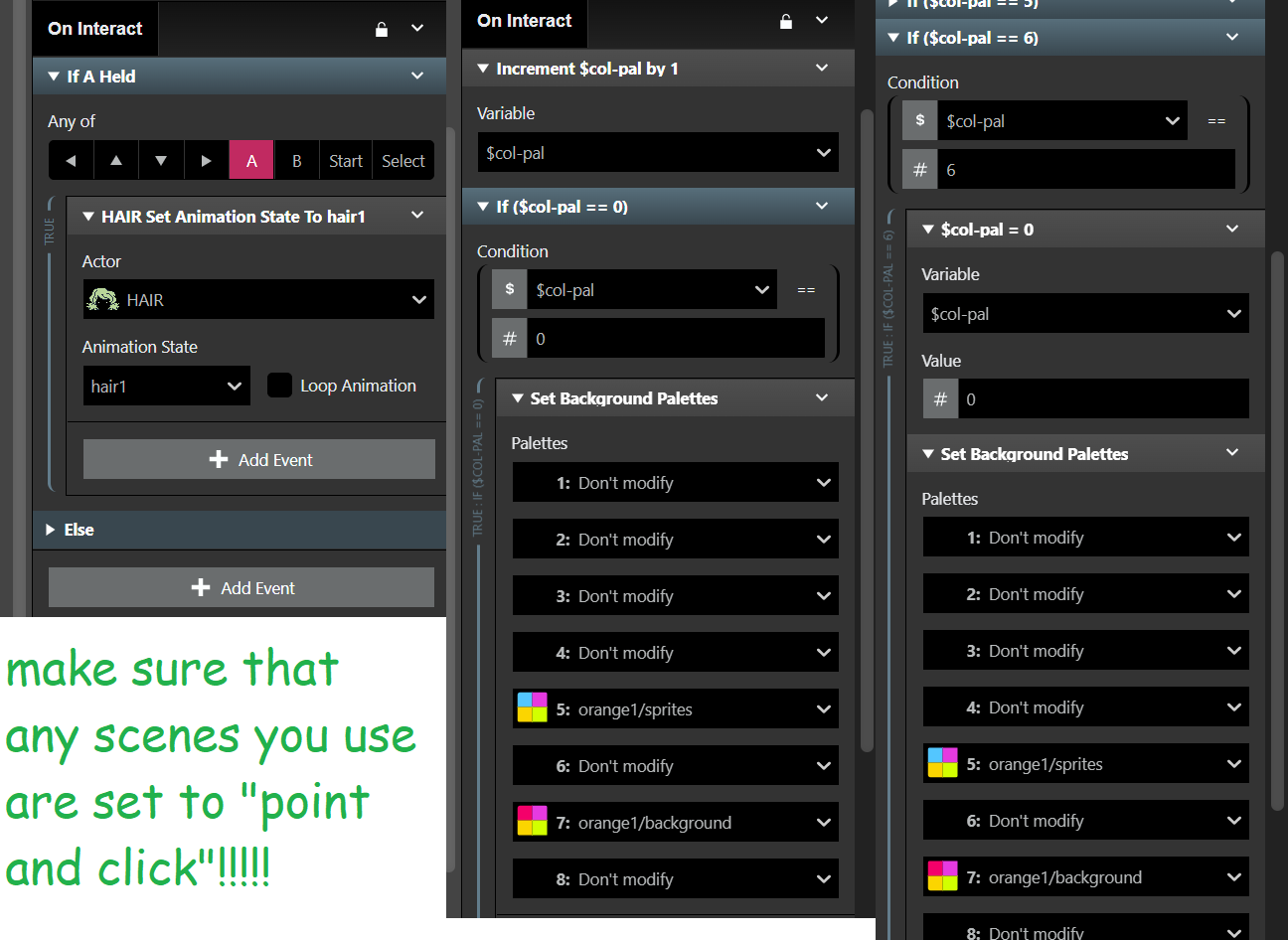
For the accessories, all the trigger does is "if A pressed: Set SPRITE-NAME Animation state to STATE-NAME". That is how simple it is.
For the colour-swapping button, pressing A increments a unique value (for e.g. $swapcolour), and then does "if ($swapcolour) == X" for as many options as you want for alternative palettes. if you want three palettes, you will have to do four checks. the first three are for the colours (0 = red palette, 1 = blue palette, 2 = green palette), with the last check being "3 = set $swapcolour value to 0" and then attaching the first palette to it again.
Finally, make sure that any scenes you use are set to "Point and Click!!!" it lets you move the player in 8 directions instead of 4 (and I'm pretty sure using any other mode makes the code get fucky).
Hope this helps :)